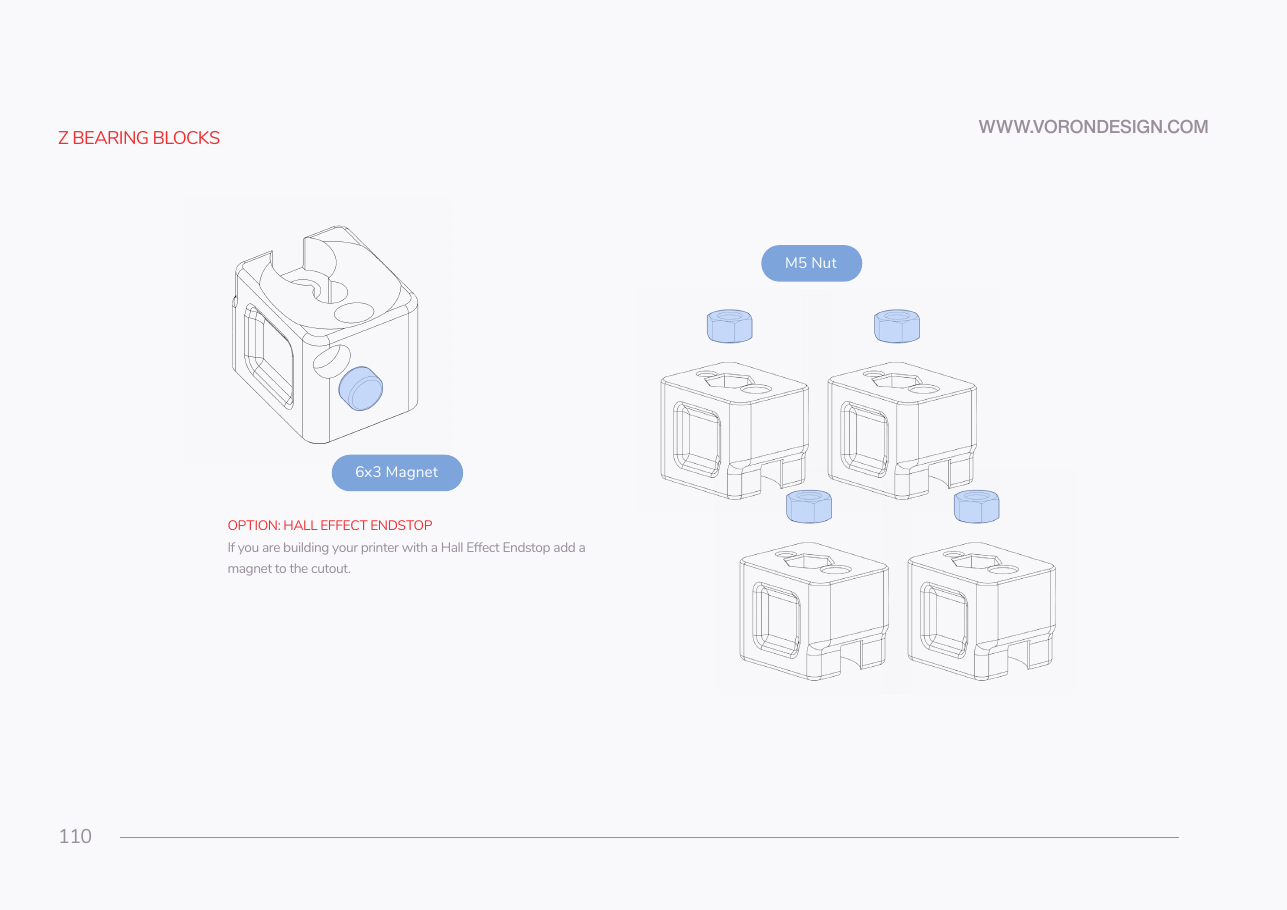
Step 06.3 — Seat an M5 nut in each Z bearing block¶
Step 3 of 42 · Chapter 06 — Z axis (and Chapter 06b — Gantry squaring)
Tap to enlarge
Parts:
-
z_joint_upper_x4×4 · bin 06-Z-joints - M5 hex nut ×4 · Fasteners, Tools & Misc box
Do: Press one M5 hex nut fully into the pocket of each of the four z_joint_upper blocks, square and flush. Push it home with the flat of a screwdriver, never by threading a bolt through and cranking.
 Check
Check
The nut is flat, hex faces aligned with the pocket walls, and clear thread shows through the bore from the far side.
What you're looking at
The look-alike pair. The z_joint_upper, the Z bearing block, clamps the first belt end and takes the M5 nut. The z_joint_lower bolts to the Z carriage; one M5×40 joins the two into a Z joint. The lower is chunkier, with four M3 holes.
Caution
Rev D+ / LDO: Do not fit the 6×3 mm magnet shown on this page. It belongs to the hall-effect endstop build. LDO note p.145: "SKIP The kit does not use hall effect endstops." All four blocks are the plain z_joint_upper_x4. src
Source: Voron manual p.110 · LDO Build Notes § Voron 2.4 build FAQ