Step 08.18 — Verify drive-gear alignment with real filament
Step 18 of 65 with a helper · Chapter 08 — Toolhead: Stealthburner, Clockwork 2, Revo HF, Nitehawk-SB V2
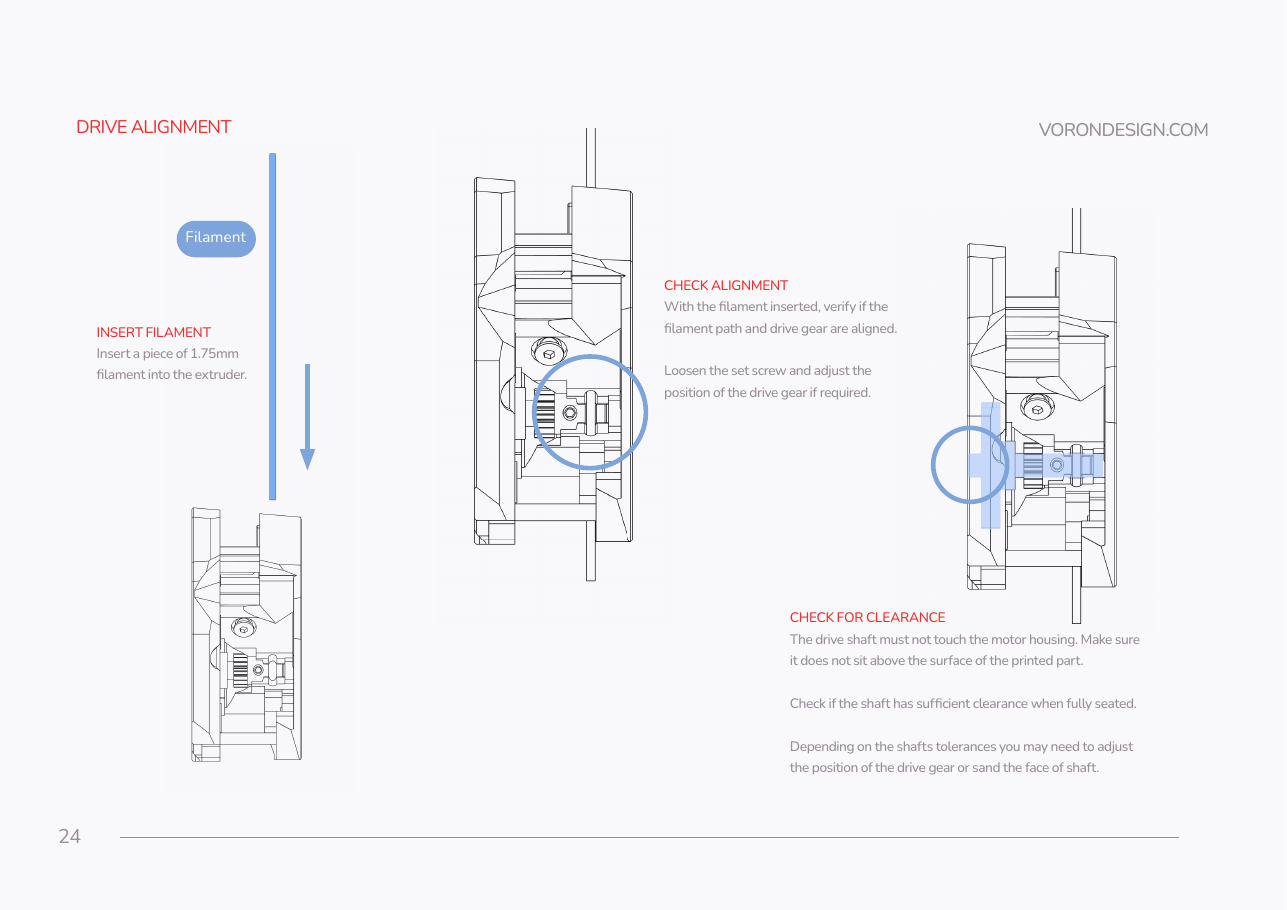
Tap to enlarge
Parts:
- 1.75 mm filament, a 100 mm offcut · consumable
Do:
- Push filament down the path: it must land on the gear's toothed section, not the shoulder.
- If off, loosen the set screw, nudge the gear, re-check, re-tighten.
- Sand the shaft end face if it stands proud.
 Check
Check
Filament centres on the gear teeth; the shaft end sits at or below the plastic surface when fully seated.
 Helper Shines a torch down the filament path and says whether the filament meets the teeth.
What you're looking at
A live check with real filament, because the 15.6 mm figure is only a starting point. The filament must land on the drive gear's toothed band, not on the smooth shoulder either side; a gear a millimetre out grips only intermittently.
 Good stopping point · ~30 min since the last one
the drive train is closed between the main body and the motor plate, and threadlocker is curing on the drive-gear set screw and on the M3×6 FHCS. Do not re-open the set screw or work the drive gear against a tight spot while the threadlocker sets; the motor is not on yet, so nothing is under load.
Source: SB manual p.24