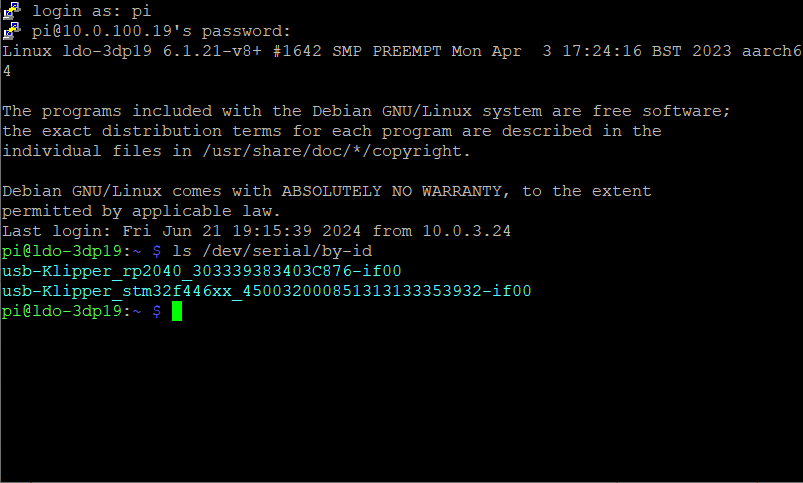
Step 12.12 — Read the two serial IDs and work out which is which¶
Step 12 of 37 with a helper · Chapter 12 — Software: Pi OS image, Klipper/Moonraker/Mainsail, firmware, printer.cfg
Parts: none.
Do:
ls -l /dev/serial/by-id/
 Check
Check
Exactly two Klipper devices, one toolboard stm32g0b1xx and one mainboard stm32f446xx or stm32h743xx, and you know which physical board each belongs to.
 Helper Reads each serial ID off the screen and names its board from the table.
What you're looking at
The screenshot is ls /dev/serial/by-id/, Linux's stable naming for USB serial devices. Each entry carries the MCU family and that chip's unique id, so a board keeps the same path across reboots. These two strings go into printer.cfg and tell Klipper which board is which.
Copy both lines into a scratch file. Identify them by MCU family, not by order:
| Board | Expected ID substring |
|---|---|
| Leviathan V1.1 / V1.2 mainboard | usb-Klipper_stm32f446xx_…-if00 |
| Leviathan V1.3 mainboard | usb-Klipper_stm32h743xx_…-if00 |
| Nitehawk-SB V2 toolboard | usb-Klipper_stm32g0b1xx_…-if00 |
If you are unsure, unplug one board's USB, re-run the command, and see which line disappears. Mainsail's Machine → open a config file → DEVICES → SERIAL → REFRESH shows the same list under Path by ID.
Caution
Rev D+ / LDO: the wiring guide states the toolboard ID will look like usb-Klipper_rp2040_…. It will not. Rev D+ ships the STM32G0B1 Nitehawk-SB V2. Matching rp2040 assigns the mainboard's ID to [mcu nhk] or finds nothing (survey §4.1 ②). The guide also writes stmf446xx; the real string is stm32f446xx. src · src · src
Source: LDO Rev D photo, ls /dev/serial/by-id output · LDO wiring guide § Determining the USB ID of your mainboard and toolboards · LDO Klipper-ID guide · Video: Extras! @0:24:38 (differs: BTT Octopus + separate Raspberry Pi; this kit is a Leviathan with the Pi mounted on it)