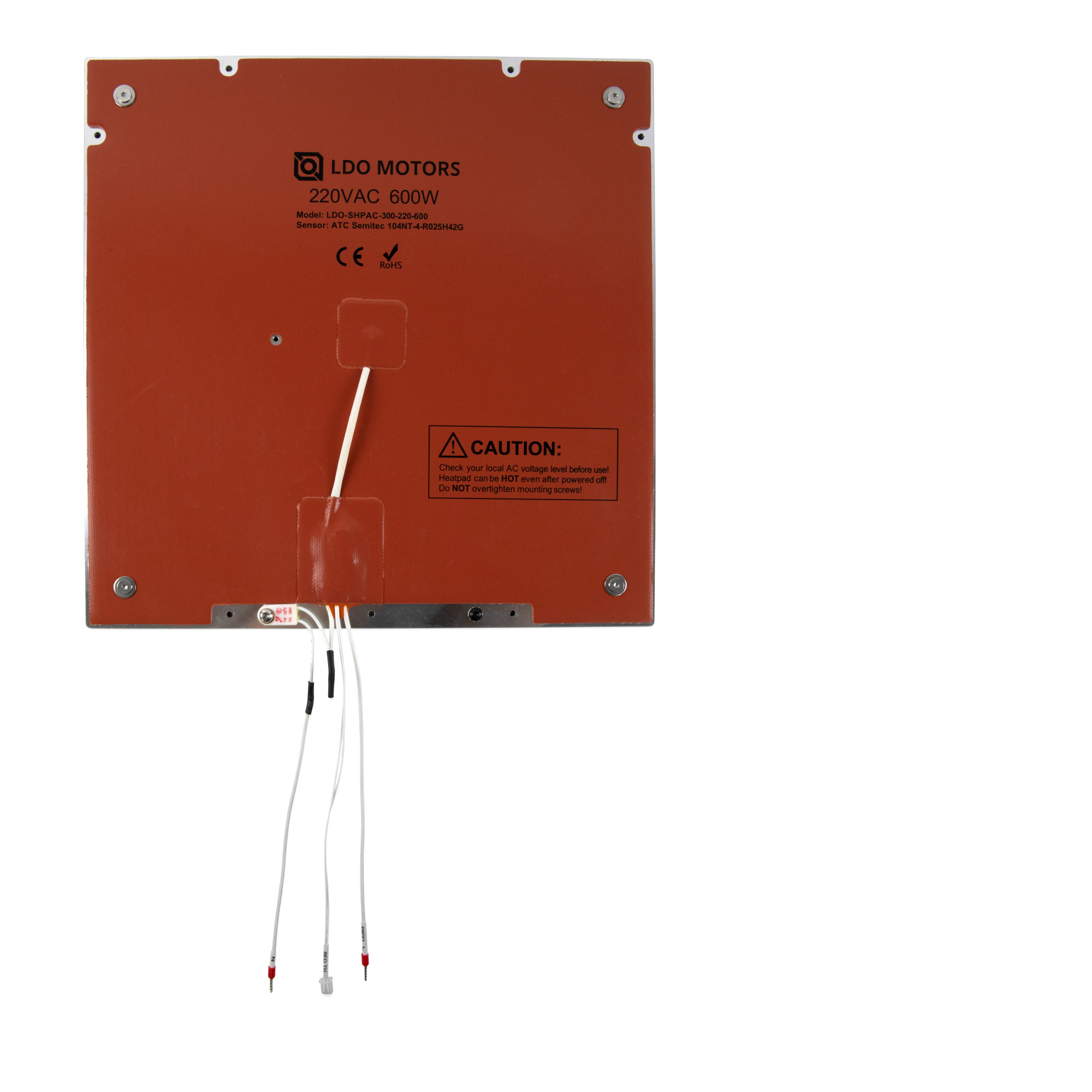
Step 03.4 — Verify the heater pad (do not apply one)¶
Step 4 of 20 with a helper · Chapter 03 — Build plate
Tap to enlarge
Parts: none.
Do:
- Turn the plate bottom-up.
- Confirm the AC heatpad is flat and centred: no lifted corner, wrinkle or trapped air.
- Confirm every pad screw is present. Do not tighten them, add adhesive or re-press a lifted edge.
 Check
Check
Pad flat and centred; every pad screw present and untouched, head type (verify on bench); nothing peeling at the cable exit.
 Helper Counts the pad screws aloud and points out any lifted corner.
What you're looking at
Manual p.55 shows the official manual applying a heater pad, a page you skip. The LDO photo beside it is your plate from below: the silicone AC pad bonded and screwed down, the thermal-fuse patch, the cable exit. Compare layout, not ratings.
Caution
Rev D+ / LDO: SKIP manual p.55 entirely — the heater pad is pre-applied on Rev C and later kits. This step is inspection only. If the pad is genuinely lifting, stop and raise it in #ldo_motors before you bolt the plate in. src · wiring guide § Wiring the Bed Heater
Source: Voron manual p.55 · LDO Build Notes (Rev D) · LDO wiring guide § Wiring the Bed Heater · image: LDO build_plate_bottom_view.jpg