Ch 0917 / 36
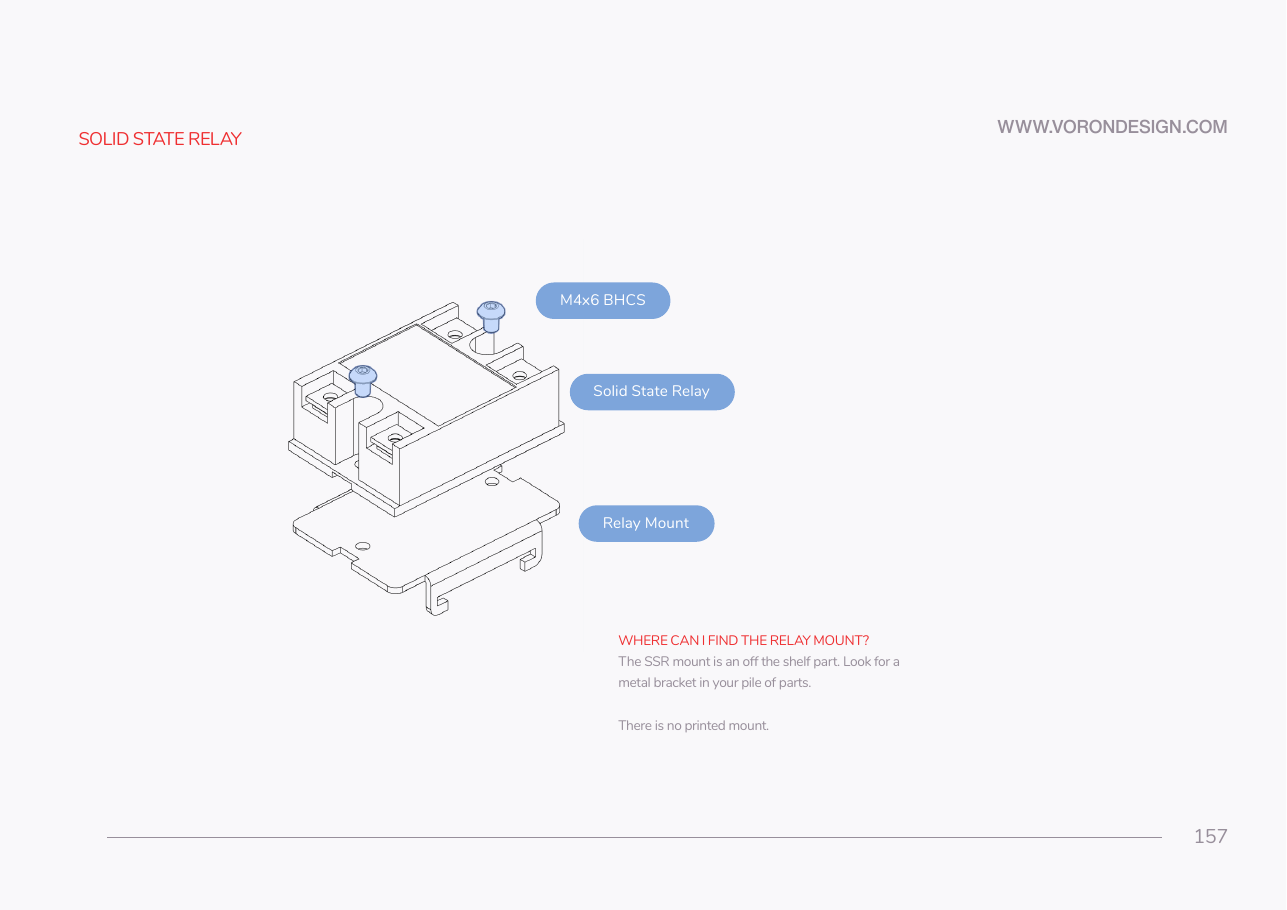
Step 09.17 — Fit the SSR to its metal DIN bracket¶
Step 17 of 36 · Chapter 09 — Electronics bay
Tap to enlarge
Parts:
- Omron G3NB-210B-1 SSR ×1 · Electronics 1 box
- metal DIN rail mount bracket ×1 · Electronics 1 box
- M4×6 BHCS ×2 · Fasteners, Tools & Misc box
Do:
- Find the stamped metal bracket in the hardware bags.
- Lay the SSR on it, two M4×6 BHCS through its mounting ears.
- Read the label before tightening: which pair is LOAD, which is INPUT, LED beside terminal 3.
Check
SSR square on the bracket, both screws tight, the bracket's spring latch free to move, and you can say which pair is load.
What you're looking at
The SSR, a solid-state relay, is a contactless electronic switch: DC on its input terminals switches the mains through its load terminals. Terminals 1 / 2 are LOAD, 3 + / 4 − are INPUT, and swapping them is the error LDO calls catastrophic.
Source: Voron manual p.157 · LDO wiring guide § General Placement · Video: Part 8 @0:36:59