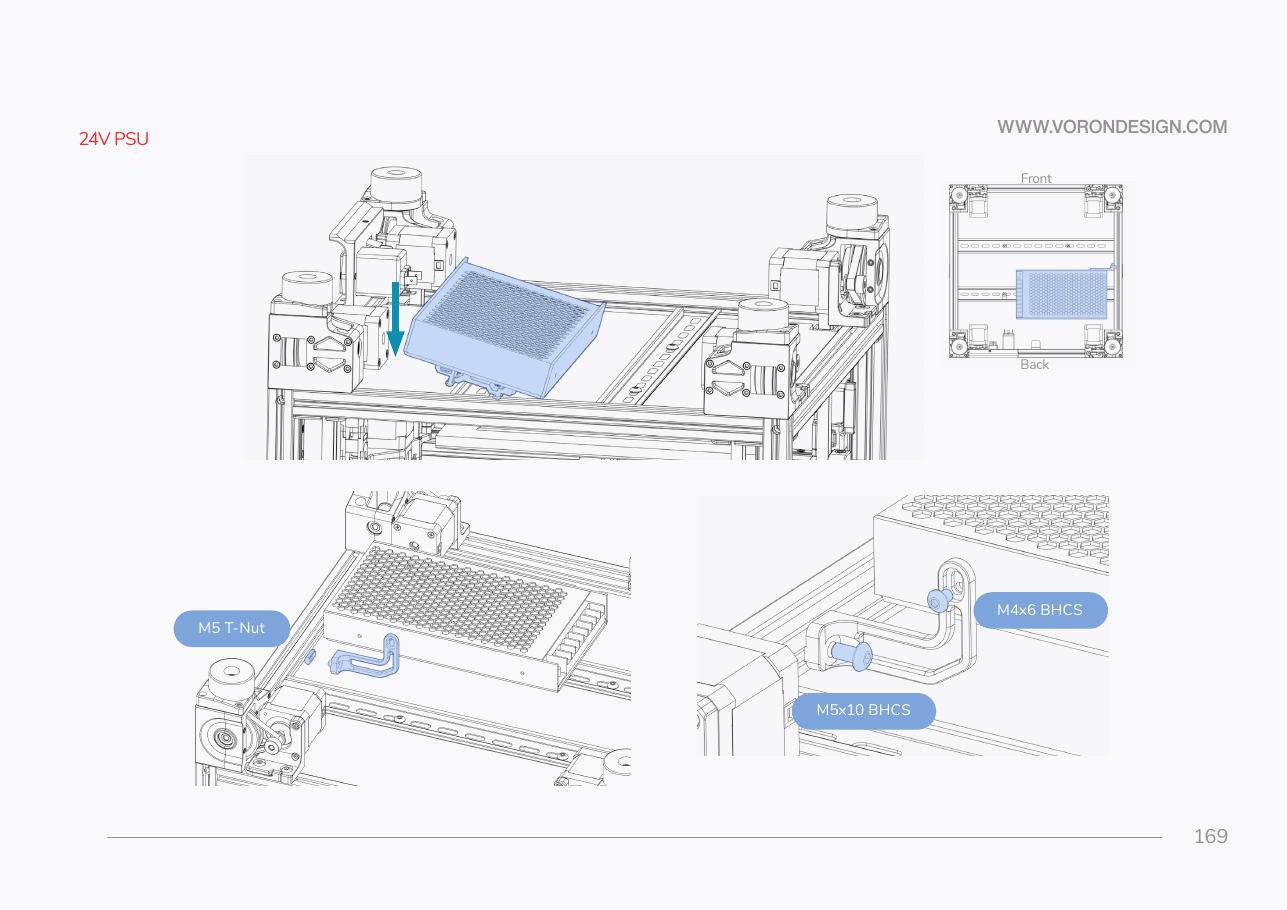
Step 09.16 — Clip the PSU onto the rear rail¶
Step 16 of 36 · Chapter 09 — Electronics bay
Tap to enlarge
Parts:
- the PSU on its brackets · already on the bench
Do: Hook, rotate and snap the PSU onto the rear DIN rail at the bay's right, terminal block facing left. Slide it left until its front-right corner clears the dry-laid right T's rear fillet by 2 mm, then stop.
Check
Both brackets latched, no rocking, front-right corner 2 mm or more from the right T's rear fillet, every terminal screw reachable with a PH2 driver.
What you're looking at
Hook, rotate, snap: the motion from Step 09.7, now with the heaviest component in the bay. Position is set by the dry-laid DC loop's right T and by access: a PH2 driver must reach every terminal screw later, with the bay full.
Layout v3
stop at 2 mm. The PSU's left end must stay 3 mm or more from the SSR run's open end, which 09.36 checks (verify on bench). If the psu row at B11.10 failed, that run is one 10 mm piece shorter and the PSU has more room.
Caution
Rev D+ / LDO: SKIP the bottom half of p.169 — the L-shaped support bracket with its M5 T-nut, M5×10 BHCS and M4×6 BHCS. LDO: "PAGE 169 SKIP. The kit does not use a support bracket." The two printed DIN brackets carry the PSU on their own. src
Caution
Rev D+ / LDO: the print plan prints PSU_stabilizer_50mm anyway as a 4 g insurance part. Fit it only if the PSU visibly sags or rocks on the rail; otherwise it stays in the spares bin. src §6
LDO layout
no shift. Slide the PSU clear of the right-hand PVC duct, where LDO's placement photo shows it, so a PH2 driver reaches every terminal screw. LDO § General Placement
Source: Voron manual p.169 · LDO wiring guide § General Placement · LDO Build Notes § Voron 2.4 build FAQ · print plan §B08 · review/2026-09-23-bay-mods/layout-v3/layout-v3.md § What changed, bench checks 5 and 6