Step 11.10 — Populate the keystone panel
Step 11 of 67 · Chapter 11 — Skirts, panels, Clicky-Clack door, filtration
Tap to enlarge
Parts:
-
keystone_panel×1 · bin 11-skirts - the CAT6 keystone insert · already on the bench
-
[a]_keystone_blank_insert×1 · bin 11-skirts
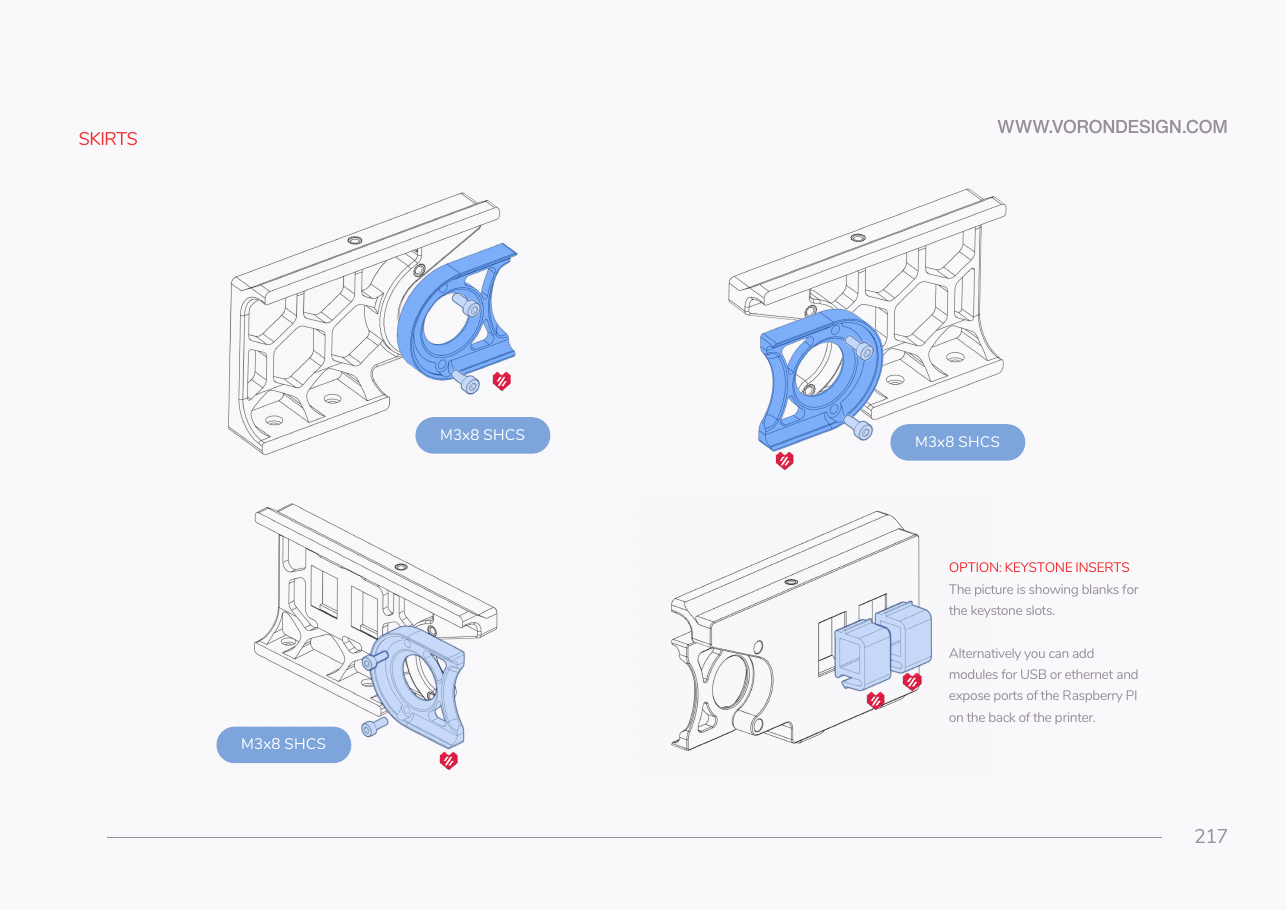
Do: Snap the CAT6 keystone into whichever of the two slots suits your cable run to the Pi's Ethernet port, and the blue blank into the other. Both clip in from the inside face, no fasteners.
 Check
Check
Both slots filled, both inserts flush with the outside face, neither rattling. The RJ45 opening faces out.
What you're looking at
The keystone panel is the rear skirt segment with two rectangular cut-outs for snap-in network modules. The CAT6 keystone is the RJ45 socket that Ch 10's Ethernet run plugs into from the inside; the blue blank fills the second slot.
 Tip
Tip
if you want more of the LDO logo on the machine, ldo_bestagon_insert snaps into any of the skirt hexagons — print extras. src
Source: Voron manual p.217 · LDOVoron2 STLs/