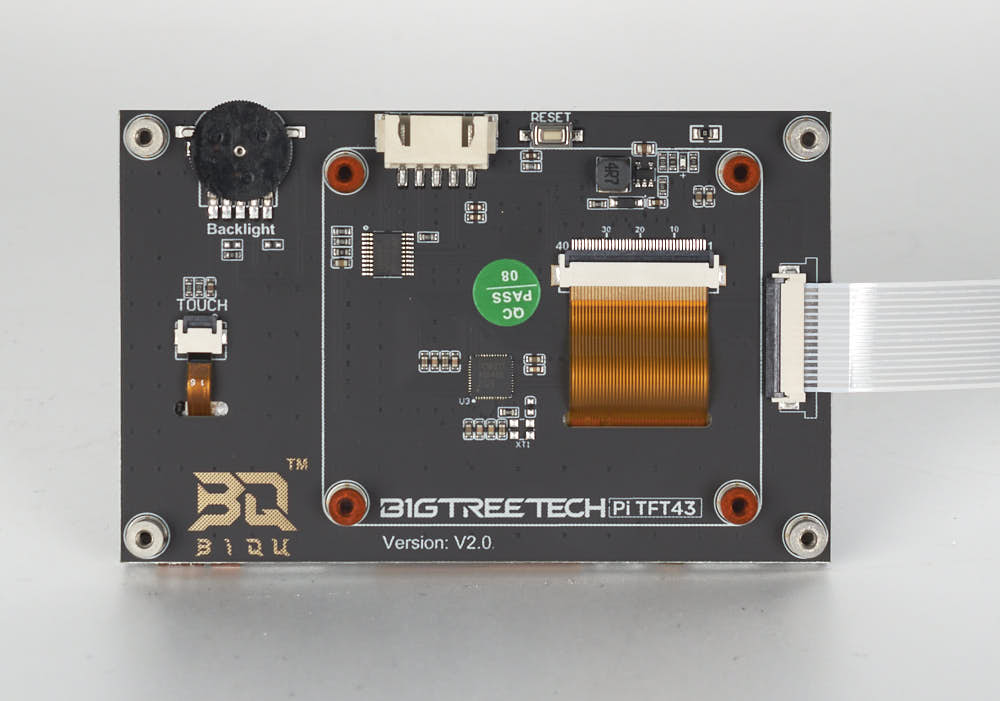
Step 11.6 — Fit the BTT Pi TFT4.3 screen into the mount
Step 7 of 67 with a helper · Chapter 11 — Skirts, panels, Clicky-Clack door, filtration
Parts:
- 4.3" capacitive DSI display ×1 · Electronics 1 box
- FFC ribbon ×1 · BTT screen packaging
- M2.5×6 screw ×4 · BTT screen packaging
- the faceplated
mount· already on the bench
Do:
- Peel the back film. Slide the ribbon in, metal contacts up and blue tab rearward, then close the latch once.
- Fit the screen, FFC connector at the bottom edge, and drive the four M2.5×6 screws finger-tight.
 Check
Check
Screen-end latch closed evenly, ribbon square in the socket, screen square in the faceplate aperture, FFC leaving the slot with no kink.
 Helper Holds the mount steady, face down, while you seat the screen and drive its four screws.
What you're looking at
The BTT Pi TFT43 is a 4.3" capacitive display that reaches the Raspberry Pi over one flat ribbon carrying power and video. On the back, the white edge socket takes the ribbon and the four corner holes the M2.5×6 screws.
 Tip
Tip
leave the front film on until the build is finished; tape over the free end's bare contacts until Ch 10 Step 10.50 latches the Pi end.
Caution
Rev D+ / LDO: "Incorrect orientation of the FFC cables can result in damage to your Raspberry Pi and/or touchscreen." An FFC has no polarity key — the metal contacts are the only clue, and each end is latched exactly once in this build. src
Source: LDO BTT 4.3" screen guide · LDO wiring photo PITFT43_FFC.jpg