Step 12.19 — Fallback: flash the Nitehawk through Katapult¶
Step 19 of 37 · Chapter 12 — Software: Pi OS image, Klipper/Moonraker/Mainsail, firmware, printer.cfg
Parts: none.
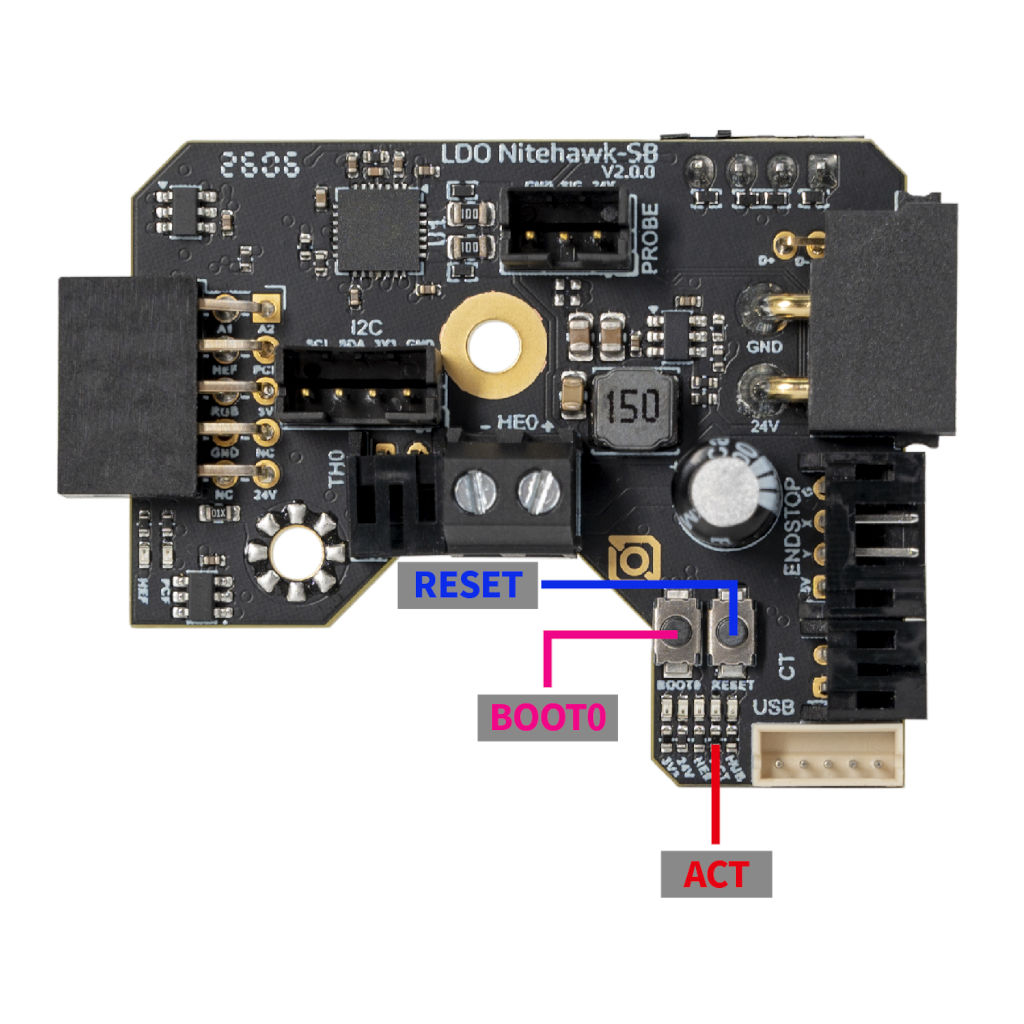
Do: Only if make flash failed. Move the toolhead to the front and open the cover so you can reach RESET and BOOT0 and see the five LEDs: 3V3, 24V, HE0, ACT, HUB. Double-click RESET quickly; the ACT LED blinks slowly. Then:
ls /dev/serial/by-id/
# expect: usb-katapult_stm32g0b1xx_<id>-if00

~/katapult-env/bin/python3 ~/katapult/scripts/flashtool.py \
  -d /dev/serial/by-id/usb-katapult_stm32g0b1xx_<id>-if00
 Check
Check
ACT blinks slowly in Katapult, and usb-Klipper_stm32g0b1xx_<id>-if00 is back after flashing.
What you're looking at
The photo shows the toolboard's two buttons and five status LEDs. RESET restarts the chip; BOOT0 held across a reset forces the factory DFU bootloader instead. ACT, the fourth LED from the left, blinks slowly when Katapult is waiting for a flash.
If there is no usb-katapult_… line, Katapult itself is missing: hold RESET and BOOT0 together, release RESET first then BOOT0, confirm lsusb shows ID 0483:df11 … STM Device in DFU mode, then build Katapult:
sudo apt install dfu-util
cd ~/katapult
make menuconfig
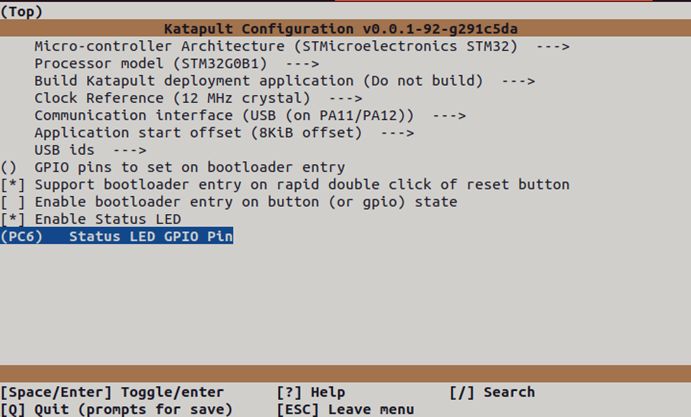
with Micro-controller Architecture STMicroelectronics STM32 / Processor model STM32G0B1 / Clock Reference 12 MHz crystal (tick "Enable extra low-level configuration options" first if the line is absent) / Communication interface USB (on PA11/PA12) / Application start offset 8KiB offset / Support bootloader entry on rapid double click of reset button / Enable Status LED / Status LED GPIO Pin (PC6) — the second screenshot above — then Q, Y and:
make clean && make
sudo dfu-util -a 0 -s 0x08000000:leave -D ~/katapult/out/katapult.bin
Then repeat Steps 12.17–12.18.
Caution
Installing Katapult this way erases the Klipper firmware. You must re-flash Klipper afterwards. src · button/LED photo · Katapult menuconfig screenshot
Source: Nitehawk-SB V2 doc § Installing the Katapult bootloader · Nitehawk-SB V2 doc § Uploading Klipper via Katapult · Nitehawk-SB-V2 reset_boot_buttons.jpg
