Ch 129 / 37
Step 12.9 — Install KlipperScreen
Step 9 of 37 · Chapter 12 — Software: Pi OS image, Klipper/Moonraker/Mainsail, firmware, printer.cfg
Parts: none.
Do:
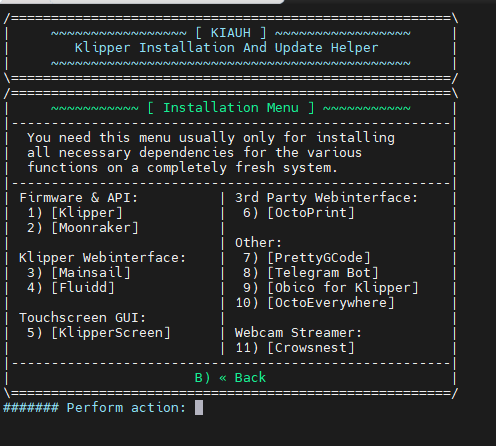
- From KIAUH's main menu choose Install → KlipperScreen and let it run.
- Confirm Moonraker gained an
[update_manager KlipperScreen]block in~/printer_data/config/moonraker.conf. - If not, add it by hand from the KlipperScreen install docs and restart Moonraker.
 Check
Check
systemctl status KlipperScreen shows the unit loaded. It will not display anything useful yet: there is no printer.cfg.
What you're looking at
KlipperScreen is the touchscreen front end: the same printer, driven from the 4.3" panel instead of a browser. It installs into its own Python environment and runs as a service alongside Mainsail. The screenshot is KIAUH's Installation menu, where it is option 5.
Source: KlipperScreen installation · LDO BTT 4.3" screen guide · LDO wiring photo KIAUH_install_opt.png