Step 13.13 — STEPPER_BUZZ the four Z motors¶
Step 13 of 54 with a helper · Chapter 13 — Initial startup
Parts: none.
Do: Run the four Z commands one at a time, watching the machine, not the console. STEPPER_BUZZ prints nothing; it moves the named stepper 1 mm positive, pauses, returns, and repeats ten times.
Send: STEPPER_BUZZ STEPPER=stepper_z
Send: STEPPER_BUZZ STEPPER=stepper_z1
Send: STEPPER_BUZZ STEPPER=stepper_z2
Send: STEPPER_BUZZ STEPPER=stepper_z3
 Check
Check
Exactly one motor responds per command, it moves cleanly forward, pause, back, pause, and it lifts the corner named below first.
 Helper Watches each Z corner and calls out which one just moved.
What you're looking at
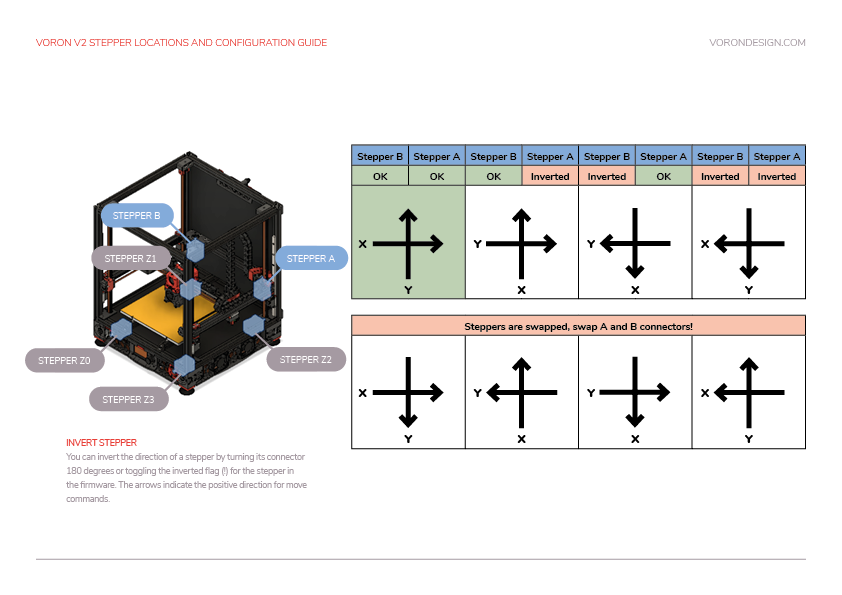
Voron's own map of which motor sits at which corner and which config name it answers to. The diagram below names all four Z corners with the command that moves each, its port, and what rises: the gantry corner, not the bed.
| Command | Motor | Corner that must rise first |
|---|---|---|
STEPPER_BUZZ STEPPER=stepper_z |
Z0, STEPPER-0 |
front left |
STEPPER_BUZZ STEPPER=stepper_z1 |
Z1, STEPPER-1 |
rear left |
STEPPER_BUZZ STEPPER=stepper_z2 |
Z2, STEPPER-2 |
rear right |
STEPPER_BUZZ STEPPER=stepper_z3 |
Z3, STEPPER-3 |
front right |
Note: on a 2.4 the bed is bolted to the frame and does not move — what rises 1 mm is the corresponding corner of the gantry. The wizard's V2 table said "bed" until Voron corrected it to "gantry" on 2026-09-16. Sight along the top of the X extrusion against the frame to see it.
Source: Voron docs image V2-motor-configuration-guide.png · Voron startup wizard § Stepper motor check · Klipper docs § STEPPER_BUZZ · Video: Part 9 @1:42:04