Step 13.21 — QUERY_PROBE on the inductive probe¶
Step 21 of 54 with a helper · Chapter 13 — Initial startup
(no image of your own printer yet — simulated printer: your numbers differ)
Parts: none.
Do: With the gantry still high and well clear of the bed, send QUERY_PROBE. Then hold a steel offcut or the flex plate up under the probe face and send it again.
Send: QUERY_PROBE
Recv: // probe: open

  (metal close to the probe)

Send: QUERY_PROBE
Recv: // probe: TRIGGERED
 Check
Check
open when far, TRIGGERED when metal is close.
 Helper Reads the probe state off the screen after each QUERY_PROBE and calls it back.
What you're looking at
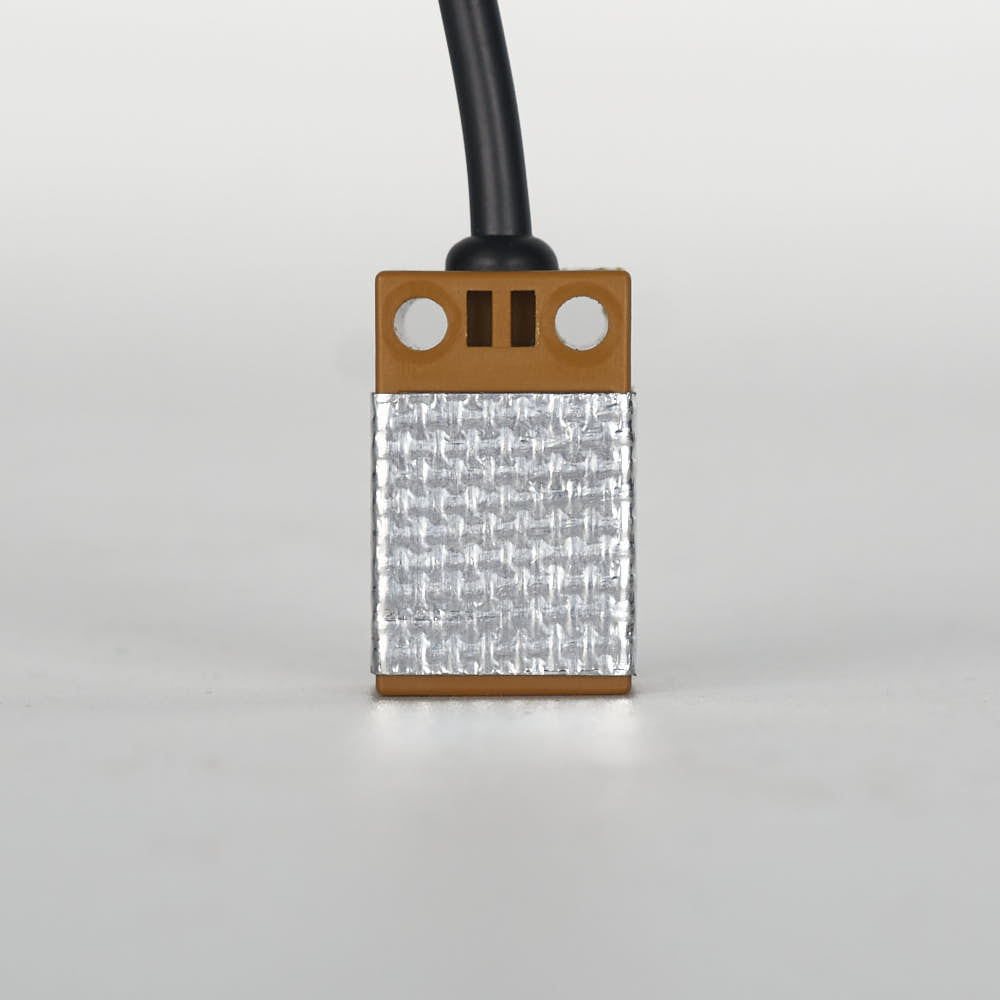
The Omron inductive probe senses metal without touching it, and on this build it is used only to level the gantry and shape the mesh. The photo shows the fibreglass heat shield it must wear: front and sides only, sensing face bare.
 Tip
Tip
if it is stuck one way, check ground, signal and 24 V at the probe, and that [probe] pin: nhk:PC15 matches where it is plugged. If the sense is inverted, use pin: !nhk:PC15.
Caution
Rev D+ / LDO: the PROBE port is JST-PH2.0 on Rev D+ and is 24 V only. Also confirm the probe body still carries the supplied fibreglass tape on the front and sides only — not the back and not the bottom; tape on the sensing face changes the trigger height. (survey §4.1 ③, §4.2 p.143)
 Good stopping point · ~20 min since the last one
all three endstops and the inductive probe respond correctly to QUERY_ENDSTOPS / QUERY_PROBE, tested by hand with nothing homed. Do not stop halfway through the endstop set: the value of this pass is seeing all four in one sitting.
Source: LDO wiring photo Probe_Insulation.jpg · Voron startup wizard § Probe check · Klipper docs § QUERY_PROBE · leviathan-printer-rev-d-sbv2.cfg