Step 13.6 — Verify the three temperature readings at room temperature¶
Step 6 of 54 with a helper · Chapter 13 — Initial startup
(no image of your own printer yet — simulated printer: your numbers differ)
Parts: none.
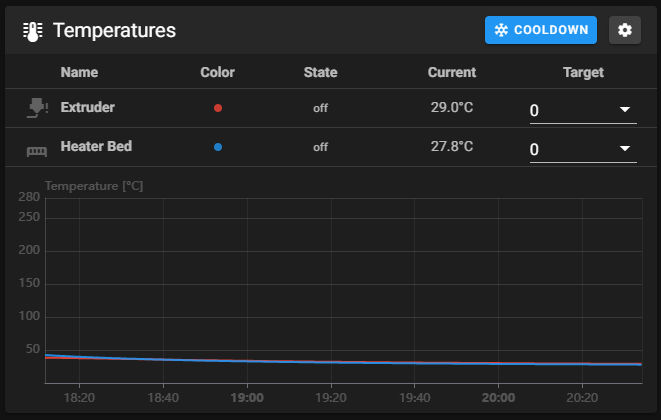
Do: Look at the temperature panel. You should have exactly three sensors: extruder, heater_bed and chamber_temp. Read them and do nothing else for thirty seconds.
 Check
Check
Extruder, bed and chamber all read within a couple of degrees of room temperature, and none of them is climbing.
 Helper Reads the three temperatures off the Mainsail screen and calls them out.
What you're looking at
The screenshot is the temperature panel, one trace per sensor. Three are expected: the hotend, the bed, and the chamber sensor on the toolboard. A sensor reading room temperature and staying there is a sensor that is wired and configured correctly.
Caution
A temperature rising with nothing commanded means a heater is energised through a wiring fault: cut power at the switch.
Caution
Rev D+ / LDO: the hotend and chamber thermistors land on the Nitehawk V2 through JST-PH2.0 connectors, not the XH2.5 the Rev D wiring guide names. A spare pigtail crimped to XH2.5 will not fit, and a PH2.0 housing can be forced into the wrong header. (survey §4.1 ③)
 Tip
Tip
extruder and bed are ATC Semitec 104NT-4-R025H42G with pullup_resistor: 2200; the chamber sensor is on the toolboard CT port, whose 4.7 kΩ pull-up is Klipper's default, so it carries no pullup_resistor line.
Source: Voron docs image mainsail_temp_graph.png · Voron startup wizard § Verify temperature · Klipper docs § Common thermistors · Klipper thermistor.py (the 4700 Ω default)