Step 14.22 — Bed mesh variance, and a backup¶
Step 22 of 36 · Chapter 14 — Calibration and tuning
Parts: none.
Do:
- Fully heat-soaked and QGL'd, run
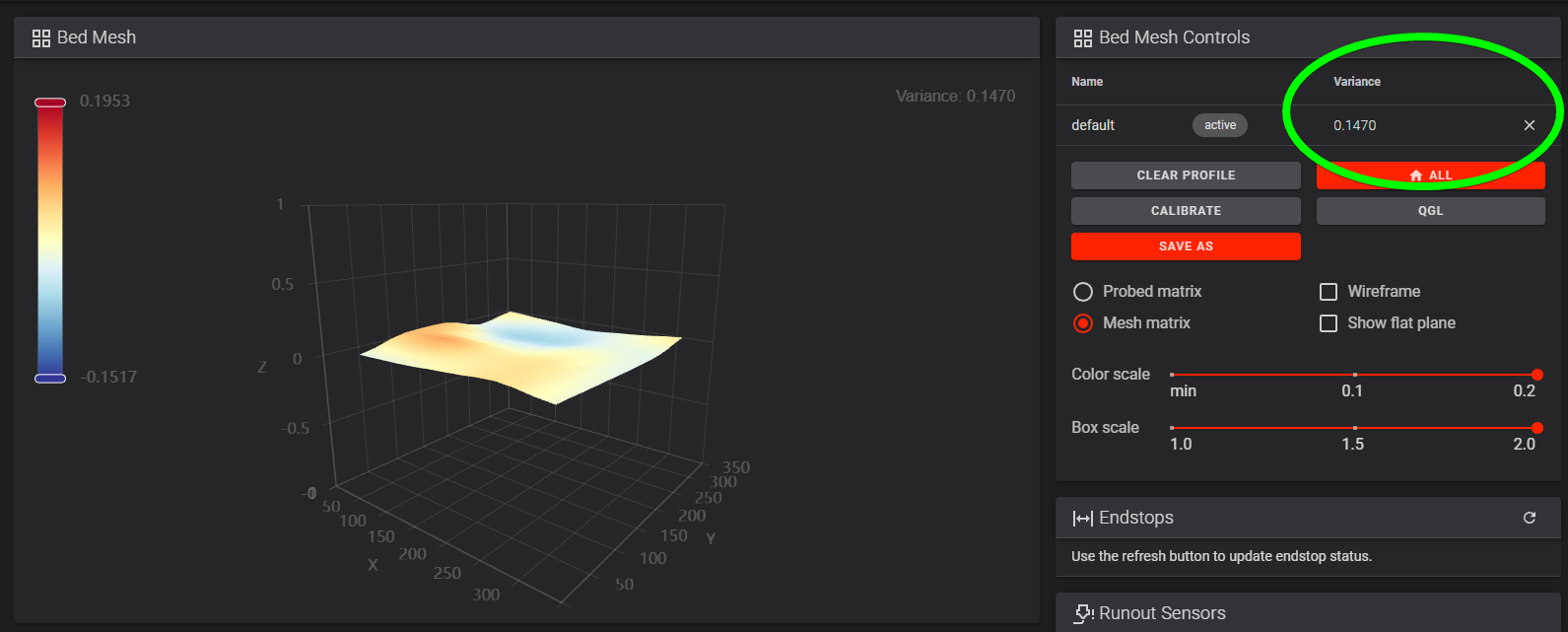
BED_MESH_CALIBRATEand open Mainsail's Heightmap page. - Read the Variance number, not the colours, and confirm
zero_reference_position: 175,175is set. - Back up:
cd ~/printer_data/config && git add -A && git commit -m "Ch 14 done: belts, shaper, max_accel, Z offset", and copy the directory off the Pi.
Check
The heightmap sits centred around Z0, the variance is in the tuning log, and the config directory is copied off the Pi.
What you're looking at
The heightmap is the bed mesh drawn as a surface. The Variance figure is the real reading; the colours are stretched to fill the scale and make a 0.03 mm bed look alarming. zero_reference_position is what centres the mesh on Z0.
Bed mesh variance, and the backup — the calculator needs JavaScript; the limits are in the table on this page.
Caution
A V2 on the stock Z endstop must have zero_reference_position: 175,175, or the mesh floats away from Z0. Under ~0.05 mm total variance a mesh is optional, but keep generating one per print: the variance changes with chamber temperature as the gantry extrusions bend.
Tip
copy printer.cfg with its auto-save block, moonraker.conf, config.leviathan and config.nitehawk. git log should show one commit per SAVE_CONFIG since the Ch 12 baseline.
Source: Voron docs image heightmap_variance.png · Voron docs — Secondary printer tuning § Bed mesh · Klipper docs § Bed Mesh