Step 00.29 — How to read an exploded view, and the page-number contract (p.11)
Step 29 of 32 pre-kit · Chapter 00 — Before you start
Tap to enlarge
Parts: none.
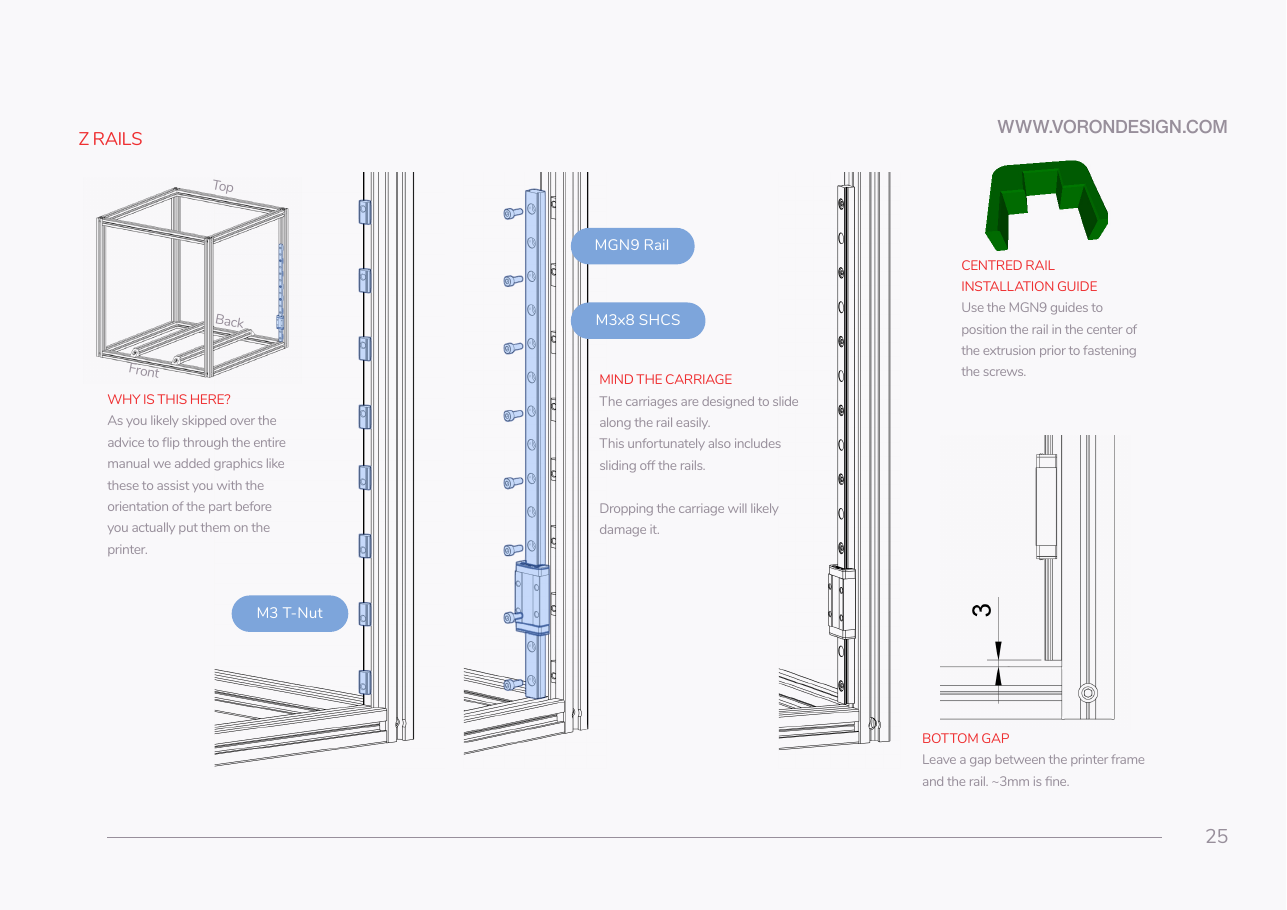
Do: Learn the manual's visual conventions, all visible on p.25.
 Check
Check
Open any page in Ch 02 and identify, without reading the text, which part is new and which way the machine is facing.
What you're looking at
Manual p.25, where every drawing convention shows at once. p.11 itself is a divider page. Blue is what you add, grey what you already built, green a printed jig; the cube says which way round the machine is drawn.
| In the drawing | Meaning |
|---|---|
| blue part | what you are adding at this page |
| grey/white | structure you have already built |
| blue rounded pill | names a part or fastener, with a leader line to it |
| wireframe cube, top-left, labelled Top / Back / Front | which way round the machine you are looking |
| green | a printed jig or tool, not a machine part |
| plain dimension arrow with a bare number | a millimetre gap you must leave |
| red heading | section title or warning |
Then note the contract that makes this manual possible: the official PDF has not changed since 2023-07-18, and LDO's Build Notes are a page-indexed diff pinned to that exact commit. Every p.XX reference in these chapters points at a page number that will not move. Pages like p.11 are dividers with no assembly content — they still get a page number, so do not assume a missing step when a page looks empty.
 Good stopping point · ~25 min since the last one
since the last pause (pre-kit) — you have read the manual's front matter (p.4–11) and can read a filename, a fastener name and an exploded view. Nothing physical is in progress.
Source: Voron manual p.11 · Voron manual p.25