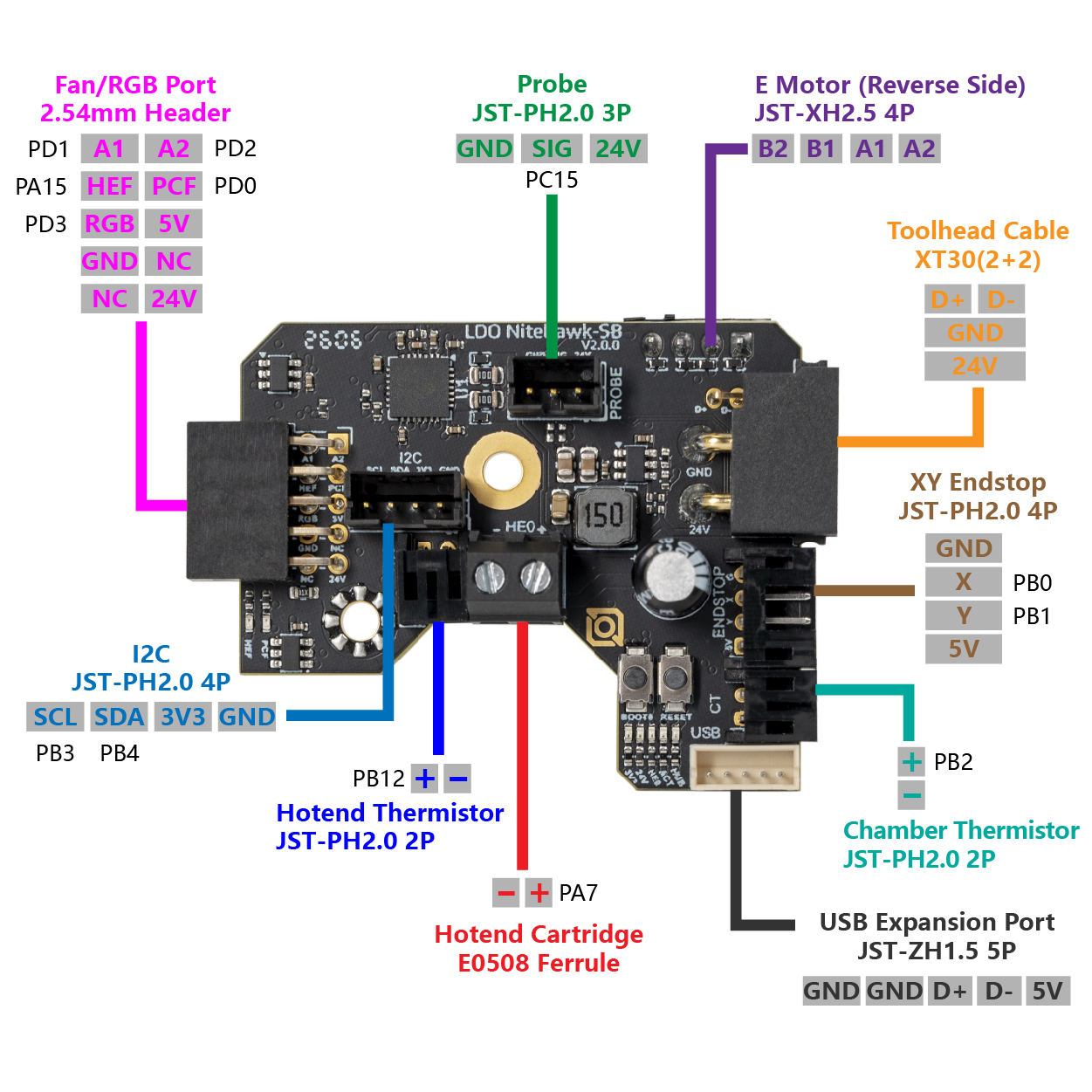
Step 00.5 — Verify you actually received a Rev D+ (Nitehawk-SB V2)¶
Step 5 of 32 with a helper · Chapter 00 — Before you start
Parts:
- Nitehawk SB toolhead PCB ×1 · Electronics 2 box
- Stealthburner fan adapter ×1 · Electronics 2 box
- USB adapter PCB ×1 · Electronics 2 box
Do:
- Touch bare metal first, then handle the board by its edges on its antistatic bag.
- Check all four markers below against the V2 board doc.
 Check
Check
All four markers present means Rev D+; any one absent means a V1 board, so stop and ask Fabreeko before going further. src
 Helper Reads the four markers from the table aloud while you check each one on the board.
What you're looking at
The Nitehawk-SB V2 toolboard: the small PCB on the toolhead that drives the hotend, fans, LEDs, probe and accelerometer over one cable. The + in Rev D+ is this board. The silkscreen in the drawing reads LDO NiteHawk-SB V2.0.0; read yours.
| # | Marker |
|---|---|
| 1 | PROBE, TH0, CT and Endstop are JST-PH 2.0 mm pitch, visibly finer than the JST-XH 2.5 mm E Motor connector on the back of the board |
| 2 | a secondary USB port is present: JST-ZH 1.5 mm, 5-pin, labelled as the USB expansion port |
| 3 | the board-to-board header that mates with the fan adapter is keyed |
| 4 | the MCU is marked STM32G0B1, not RP2040 |
Caution
Rev D+ / LDO: the USB serial ID settles it, and Ch 12 reads it once the Pi is up: it must contain stm32g0b1xx. LDO's Rev D wiring guide expects usb-Klipper_rp2040_…, which is wrong for this kit. On rp2040, load leviathan-printer-rev-d.cfg instead of leviathan-printer-rev-d-sbv2.cfg; the wrong one mis-drives heater, thermistor, probe, fans and accelerometer. src · survey §4.1 ①②
Source: LDO Nitehawk-SB V2 board doc · image: Nitehawk-SB-V2 Images/nhsbv2_pcb_pinout.jpg · LDO Klipper config leviathan-printer-rev-d-sbv2.cfg