Step 07.6 — Fit the heat-set inserts and M3 nuts¶
Step 6 of 39 · Chapter 07 — A/B belts and tensioning
Tap to enlarge
Gather for this segment — steps 07.6–07.8 (~30 min)
Fasteners, Tools & Misc box
- M3 heat-set insert ×4
- M3 nut ×2
- M3×12 SHCS ×2
Printed parts
x_frame_V2TR_MGN12_left×1 · bin 07-Xx_frame_V2TR_MGN12_right×1 · bin 07-Xprobe_retainer_bracket×1 · bin 07-X
Tools and consumables
- Gates 2GT open belt, 6 mm wide, two equal lengths
Parts:
-
x_frame_V2TR_MGN12_left×1 · bin 07-X -
x_frame_V2TR_MGN12_right×1 · bin 07-X -
probe_retainer_bracket×1 · bin 07-X - M3 heat-set insert ×4 · Fasteners, Tools & Misc box
- M3 nut ×2 · Fasteners, Tools & Misc box
Do:
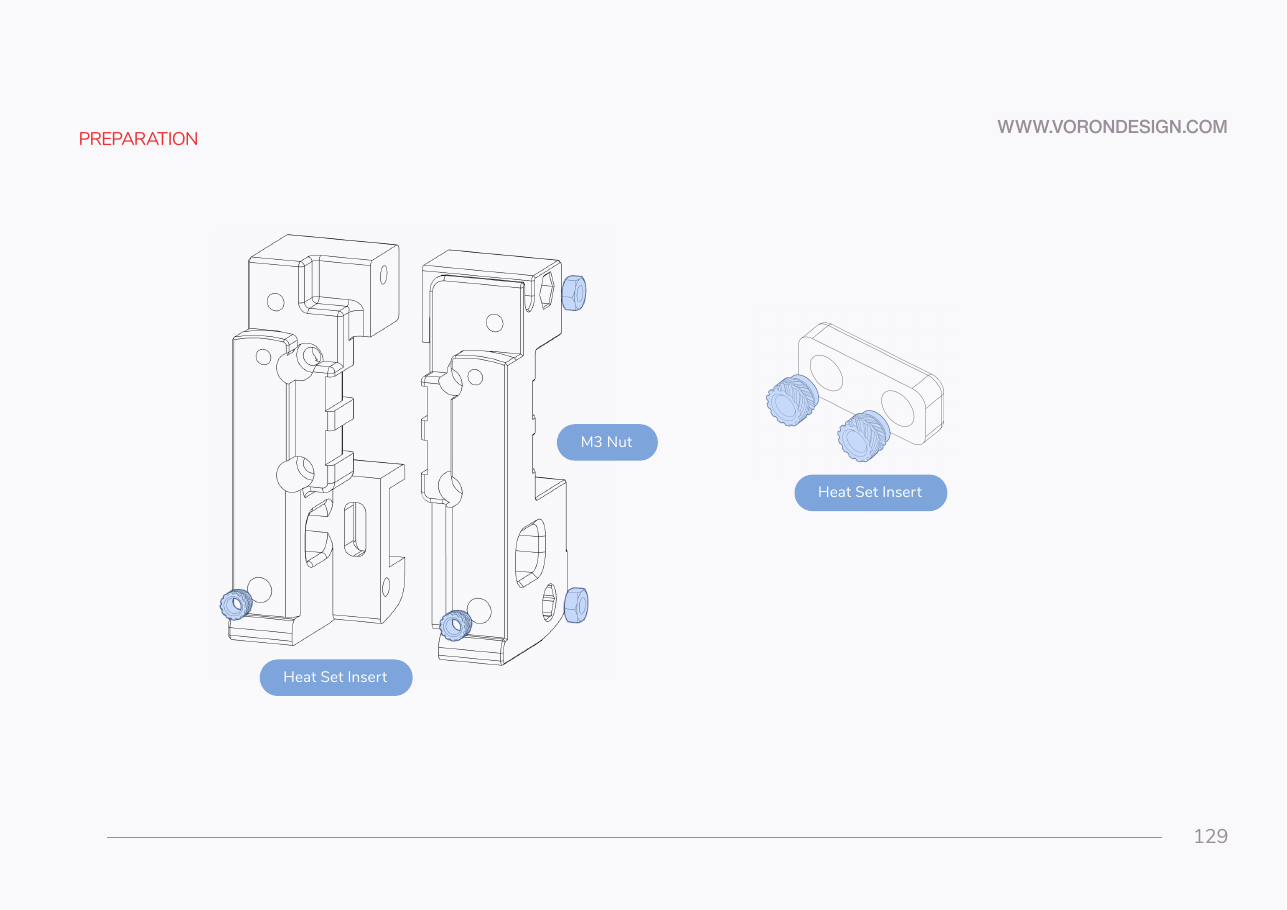
- If the inserts went in during the Ch 00 pass, verify them. Otherwise set all four flush with the plastic, square to the face.
- Press the two M3 nuts into their pockets in the right carriage half.
Check
Inserts flush and square; nuts fully seated with no gap behind them; an M3 screw starts by hand in every insert.
What you're looking at
A heat-set insert is a knurled brass sleeve melted into the plastic so a steel screw has metal threads to bite into. Four go in here: one per X carriage half, two in the probe retainer bracket. The halves are a handed pair.
Caution
Rev D+ / LDO: "If you are building Clockwork 2 double-check that you have the correct X-Carriage and follow the instructions in the Stealthburner manual." For this kit that is the pair x_frame_V2TR_MGN12_left / x_frame_V2TR_MGN12_right — the R2 / Clockwork-2 halves, not the Afterburner ones. Confirm the filenames against what you actually printed before the belts go in. src (p.129–130)
Source: Voron manual p.129 · LDO Build Notes § Voron 2.4 build FAQ