Step 09.10 — Heat-set the power inlet panel¶
Step 10 of 36 · Chapter 09 — Electronics bay
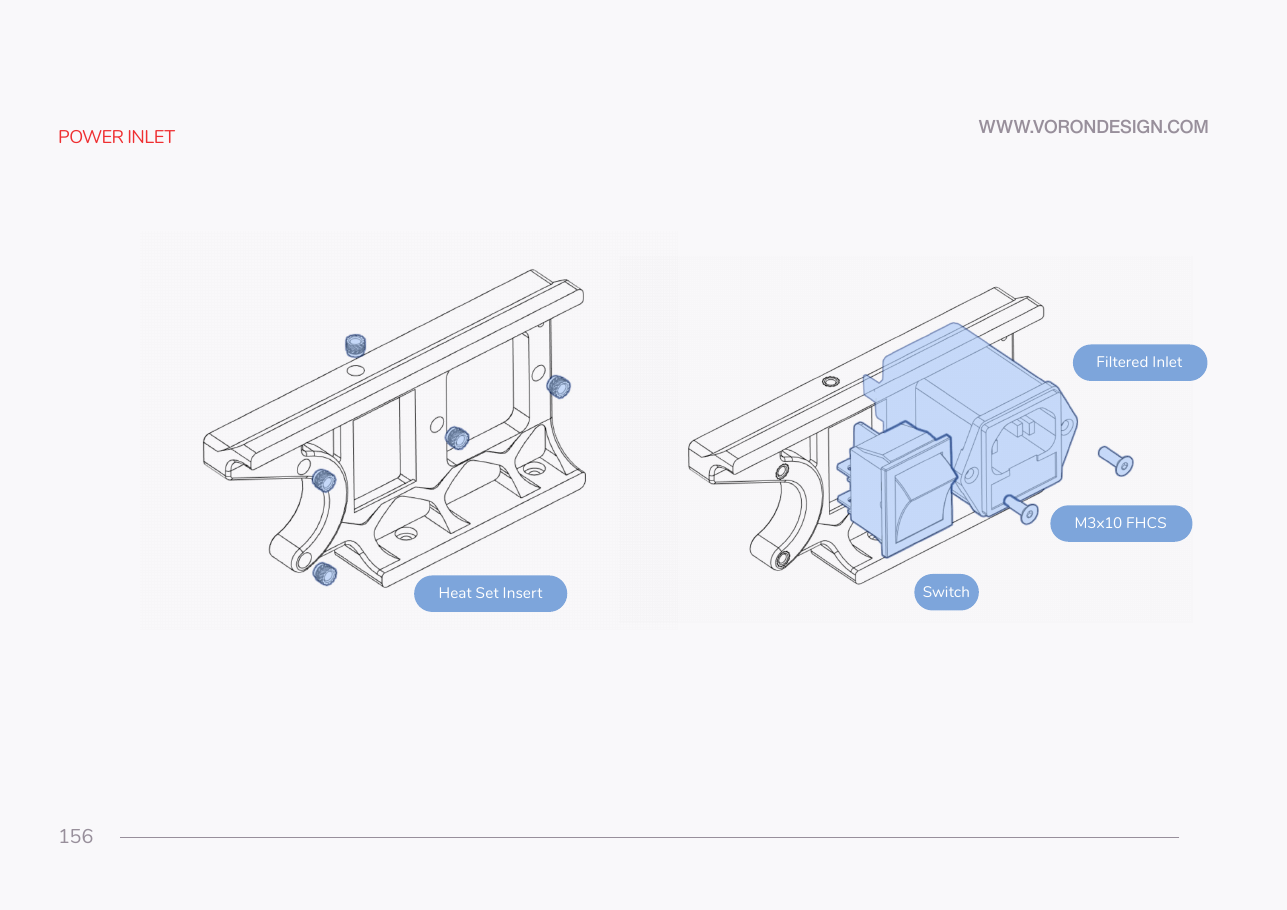
Tap to enlarge
Parts:
-
power_inlet_IECGS_1mm×1 · bin 09-bay - M3×5×4 heat-set insert ×3 · Fasteners, Tools & Misc box
Do: If Ch 08's insert pass did this panel, confirm and move on. Otherwise, at your ASA insert temperature, press one insert into each of the three bores, square and flush: one in the rail, two in the curved cut-out.
Check
Every insert flush or a hair below, none tilted, no bulged plastic around a boss.
What you're looking at
The inlet panel is the printed plate that fills a cut-out in the rear skirt and carries the mains socket. Heat-set inserts give the plastic metal threads: one for the bottom-panel hinge and two for the belt guard, both fitted in Ch 11.
Caution
Rev D+ / LDO: the manual's part is power_inlet_filtered. Yours is power_inlet_IECGS_1mm — LDO ships the 1.0 mm AC inlet with an integrated switch, so the printed panel is a different file with a different cut-out. src · Rev D printed parts guide
Source: Voron manual p.156 · LDO wiring guide § Preparing the inlet · LDO printed-parts guide (Rev D) · LDO Build Notes § Voron 2.4 build FAQ