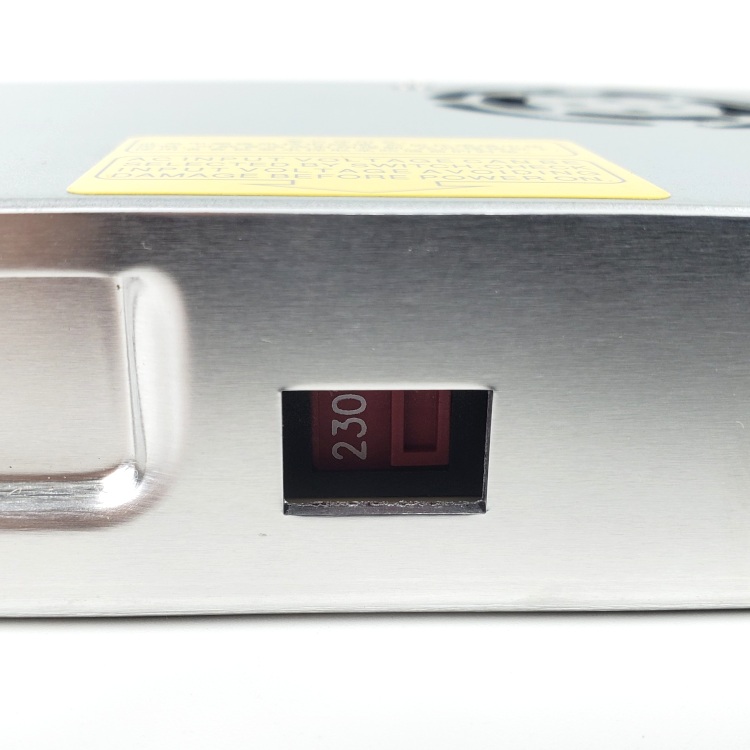
Step 09.14 — Set the PSU voltage selector to 115 V¶
Step 14 of 36 · Chapter 09 — Electronics bay
Gather for this segment — steps 09.14–09.18 (~30 min)
Electronics 1 box
- Omron G3NB-210B-1 SSR ×1
- metal DIN rail mount bracket ×1
Fasteners, Tools & Misc box
- M4×6 BHCS (verify on bench) ×6
Other box
- Meanwell LRS-200-24 PSU ×1
Printed parts
lrs_200_psu_bracket_x2×2 · bin 09-bay
Already on the bench
- the PSU on its brackets
- the SSR on its bracket
Parts:
- Meanwell LRS-200-24 PSU ×1 · set out now, fitted later
Do: Find the recessed slide switch on the side of the PSU, next to the yellow warning label. Push it to 115 V for US mains with the 2.5 mm flat screwdriver, while it is still easy to reach.
Check
Selector reads 115 V, or 120 V on units marked that way: either is the low-voltage position.
What you're looking at
The PSU is the Meanwell LRS-200-24, which makes the 24 V that runs the motors, fans, boards and toolhead. It is not auto-ranging: a recessed slide switch selects 115 V or 230 V, and 115 V on 230 V mains destroys it.
Caution
Rev D+ / LDO: LDO calls this out twice, in Preparing the Power Supply Unit and again in Checkpoint #1: "Flick the switch to the correct value before powering it on! Failing to do so can destroy the power supply!" Ch 10 re-checks it before the first power-on. src
Tip
EU builds may get a Meanwell RSP-200-24 instead: PFC, universal input, no switch. If yours has no selector, that is the unit and nothing needs setting. src
Source: LDO wiring guide § Preparing the power supply unit · image psu_switch.jpg · Video: Part 8 @0:40:16