Step 09.4 — Verify the deck panel before you drill anything into the layout¶
Step 4 of 36 with a helper · Chapter 09 — Electronics bay
Tap to enlarge
Parts:
- the deck panel · already on the bench
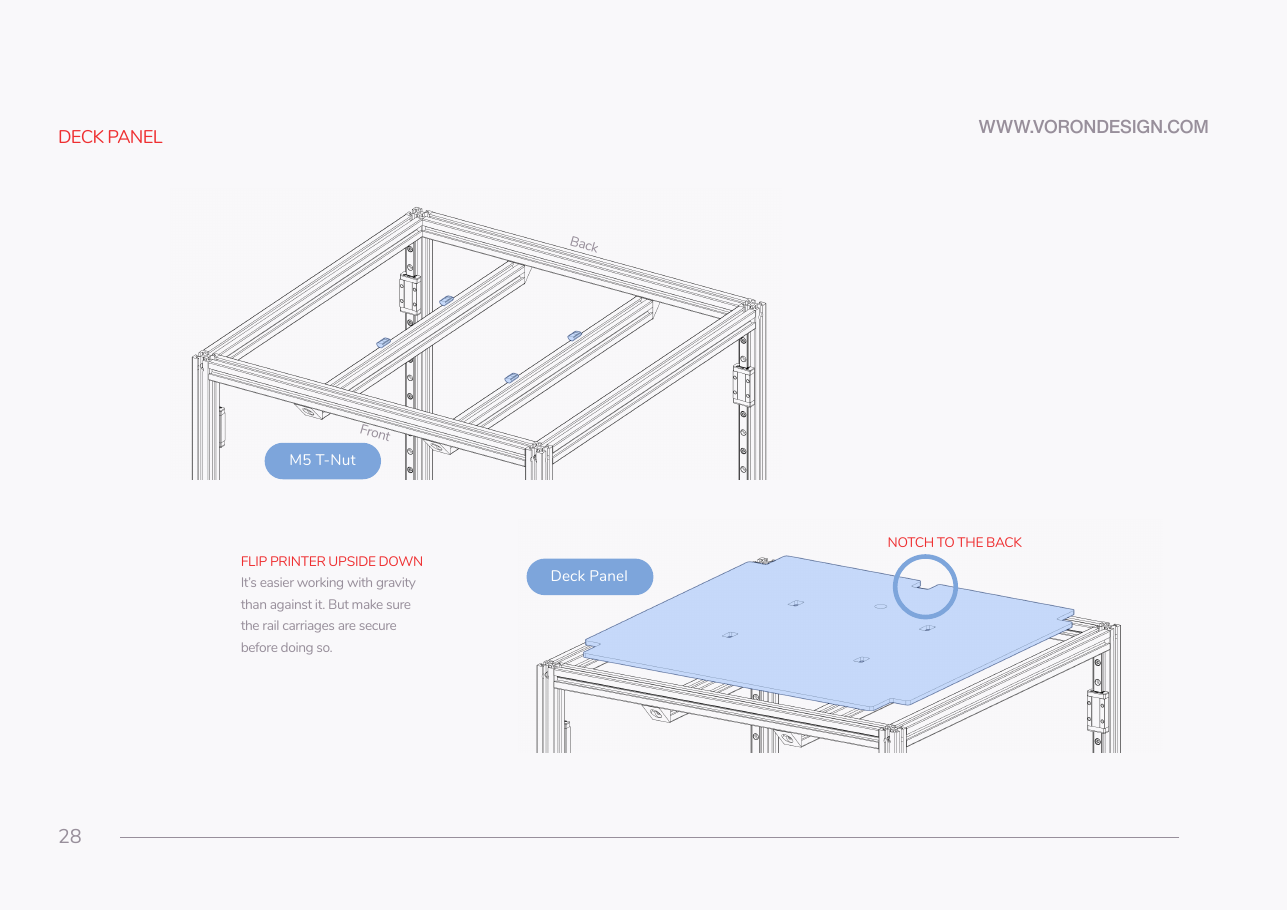
Do: Confirm the notch faces the back and the rear wire opening is clear. Caliper the edge: the BOM lists 469 × 469 × 3 mm, LDO's guide assumes 4 mm, and the deck supports must match what you measure.
 Check
Check
Notch to the back. Wire opening unobstructed. Deck thickness recorded, and the deck supports fitted in Ch 02 are the matching variant.
 Helper Reads the caliper at the deck edge aloud and writes the thickness down.
What you're looking at
The deck panel separates the print chamber above from the bay below; the DIN rails bolt through it into the bed extrusions. Measure its thickness: the deck supports come in 3 mm and 4 mm versions, and the wrong pair leaves the panel flexing.
Caution
Rev D+ / LDO: if Ch 02 fitted deck_support_4mm_x8 and your panel calipers at 3 mm, swap them for deck_support_3mm_x8 now — the deck is about to carry the DIN rails and everything on them. src
Source: Voron manual p.28 · LDO wiring guide § Installing the DIN rails and wire ducts · LDO 350 Rev D BOM