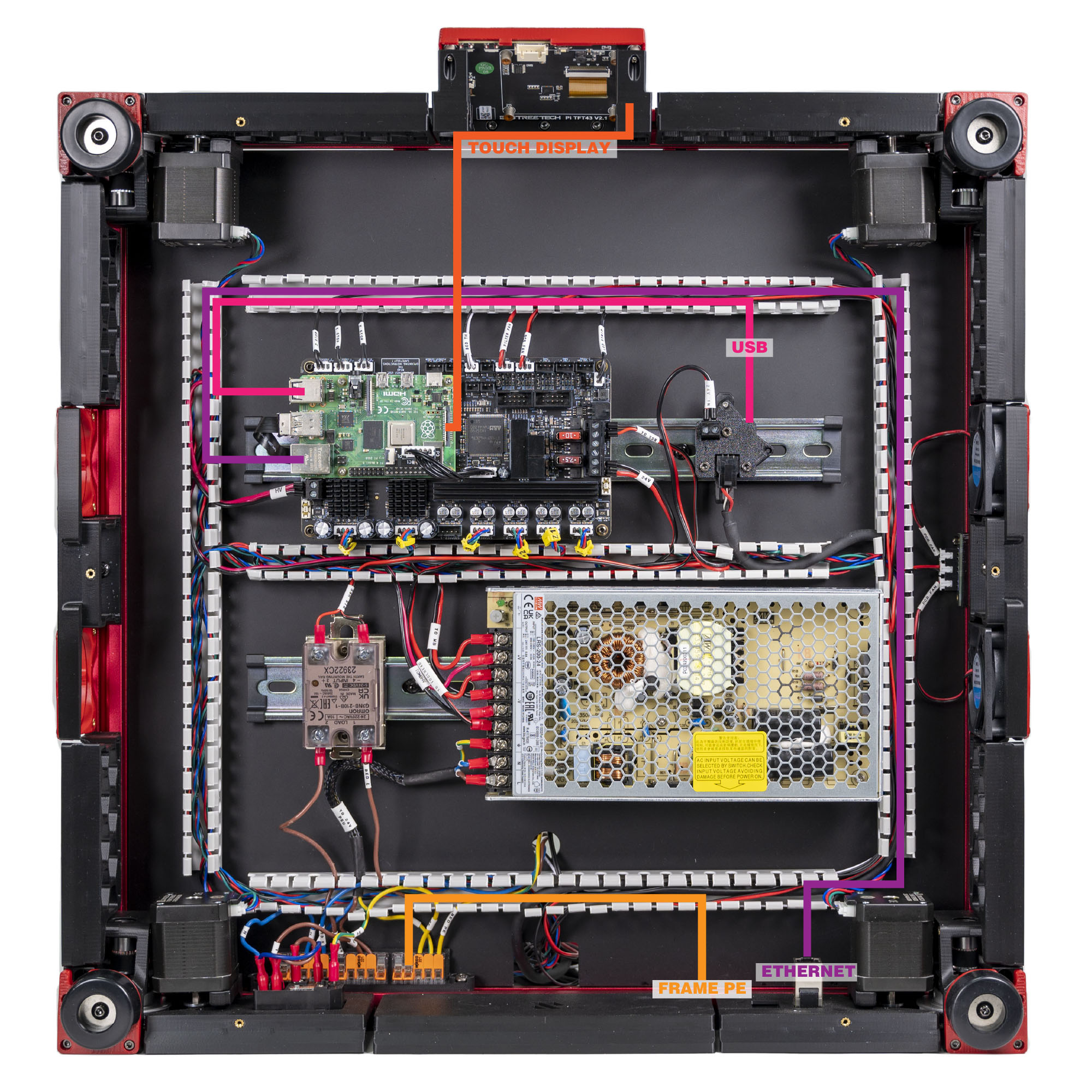
Step 10.16 — Frame PE¶
Step 16 of 80 · Chapter 10 — Wiring and Checkpoint #1
Parts:
- FRAME PE cable ×1 · the Cable Kit box
- M5 locking washer ×2 · Fasteners, Tools & Misc box
- M5×10 BHCS ×1 (verify on bench) · Fasteners, Tools & Misc box
- M5 roll-in T-nut ×1 (verify on bench) · Fasteners, Tools & Misc box
Do:
- Scrape the rear extrusion to bare metal ~20 mm to the printer's left of the Z-chain notch
(verify on bench). Screw the ring terminal there, between both locking washers. - Lead it via the box's rear tines to the PE WAGO.
Check
From the C14 earth pin: the lug's screw head under 1 Ω, a far frame corner under 2–3 Ω. Probe bare metal, never anodising.
What you're looking at
FRAME PE is the single green/yellow lead that bonds the whole aluminium frame to earth. Anodising, the hard oxide layer on the extrusions, is an insulator, so the ring terminal must bite through to bare metal. The two locking washers do the biting.
Layout v3
the lug sits between the WAGO-mount screw and the notch, the drawing's magenta ring, clear of the notch's DC bundle. "Left" is the printer's left, whichever way it lies. LDO layout: the rear extrusion right of the deck notch, as the photo shows. Same washers, same bare metal, same check. LDO § Frame PE
Good stopping point · ~30 min since the last one
every mains connection made and pull-tested: SSR LOAD 1/2, bed L/N/PE, frame PE. Cord still out of the room and the DC side untouched. Next segment is LDO's Checkpoint #1 — start it only when you have an uninterrupted 25 minutes.
Source: LDO Rev D photo VS8 mapping · LDO wiring guide § Connecting the FFC cable, Ethernet cable, USB cable and frame PE · review/2026-09-23-bay-mods/layout-v2/layout-v2.md bench check 12 · layout-v3/layout-v3.json components_moved · drawings: layout-v3/work/leads_v3.py