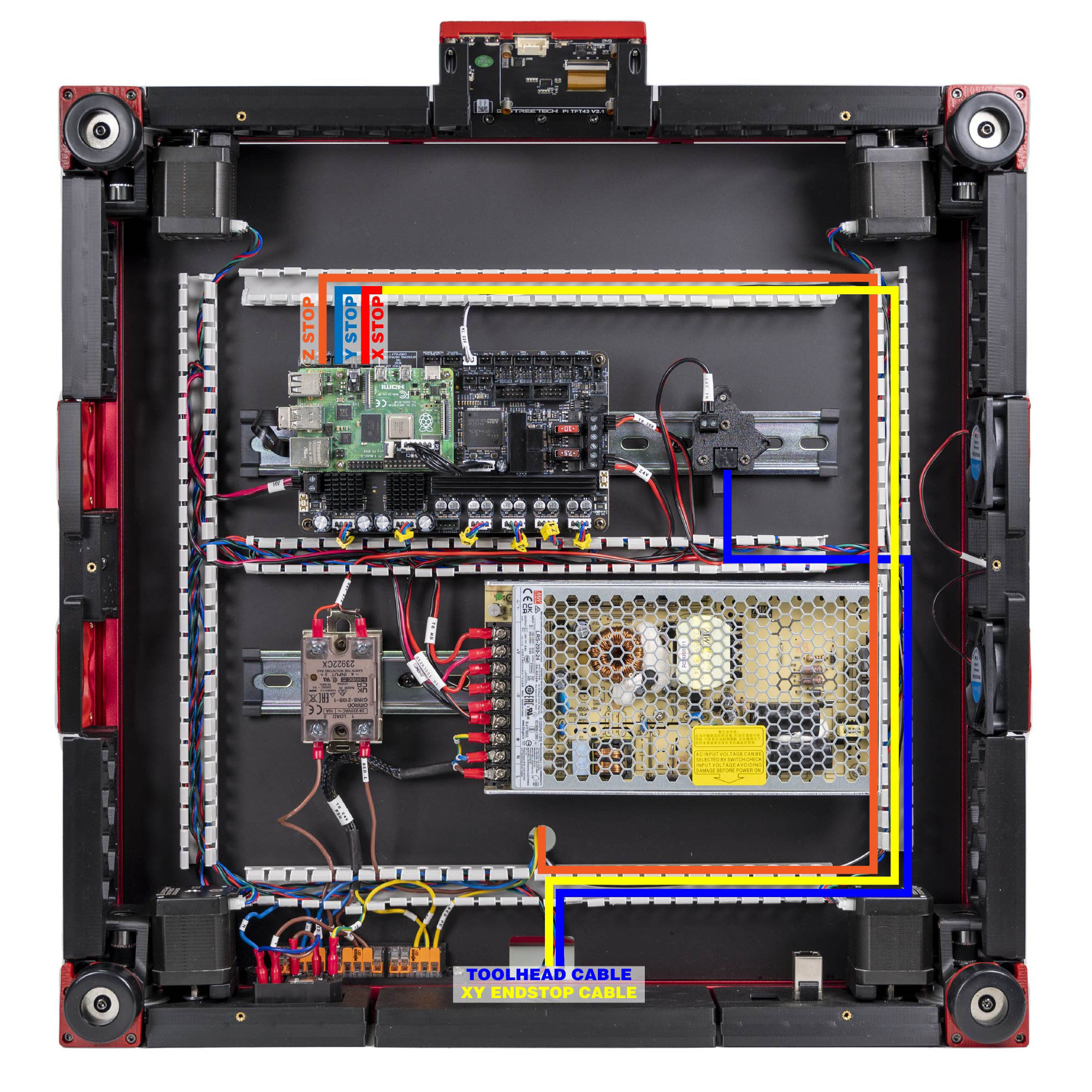
Step 10.45 — XY endstops → X-ENDSTOP and Y-ENDSTOP¶
Step 45 of 80 with a helper · Chapter 10 — Wiring and Checkpoint #1
Parts:
- the two 3-pin ends of the XY endstop cable · already on the bench
Do: XES / X Stop into the port labelled X-ENDSTOP; YES / Y Stop into Y-ENDSTOP. LDO's mapping photo labels the three endstop headers Z STOP / Y STOP / X STOP in that order along the board.
 Check
Check
Both fully seated. Press each microswitch on the gantry PCB with a fingertip and feel a distinct click.
 Helper Presses each microswitch on the gantry PCB and says when it clicks.
What you're looking at
The two 3-pin ends of the cable from step 10.31 finally reach the board. Each endstop port watches one switch open or close a circuit to ground, and that transition is what tells Klipper the axis has reached its limit.
Source: LDO Rev D photo S6 gantry-cable mapping · LDO wiring guide § Connecting the gantry cables