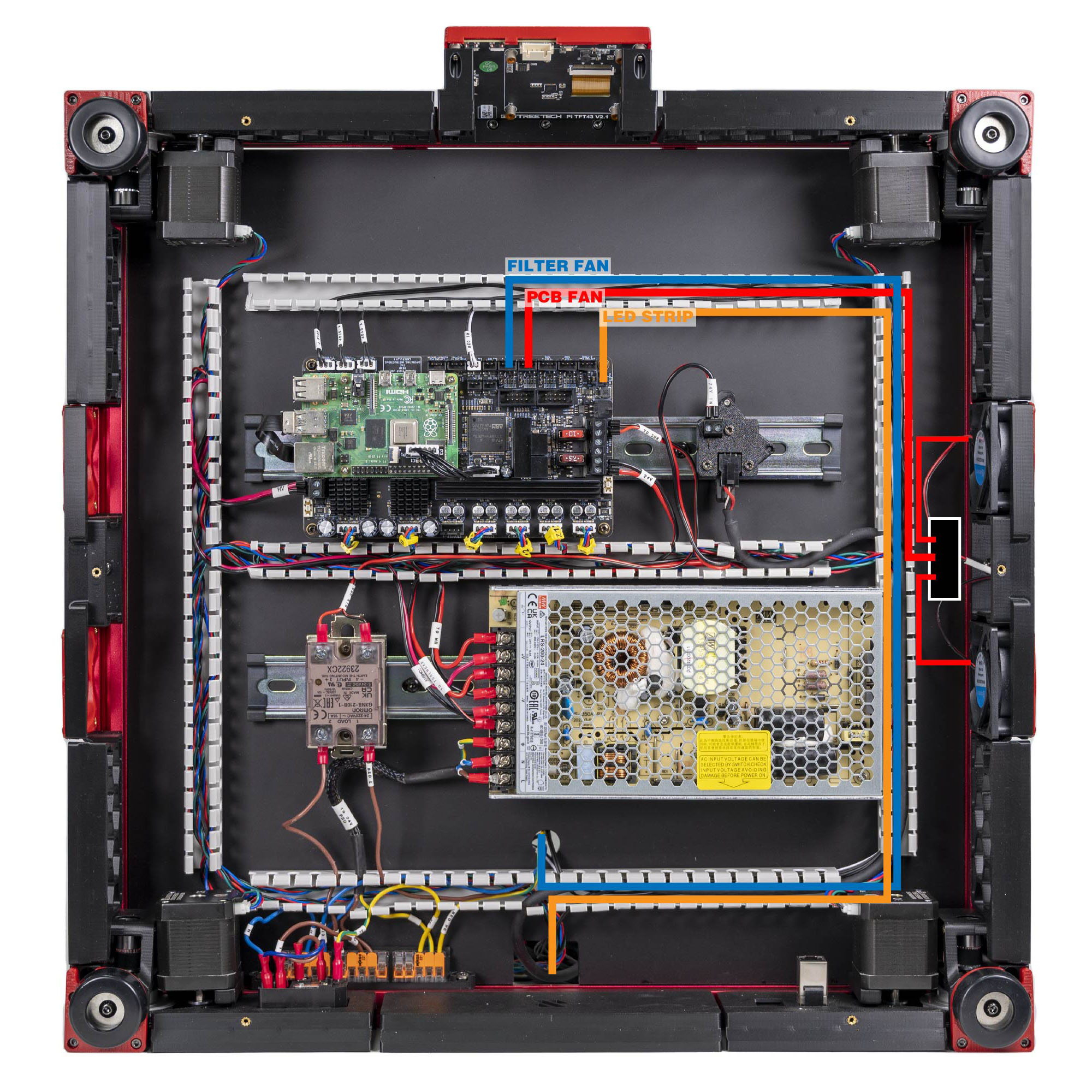
Step 10.47 — Electronics-bay fan pair → FAN2¶
Step 47 of 80 · Chapter 10 — Wiring and Checkpoint #1
 Gather for this segment — steps 10.47–10.53 (~40 min)
Electronics 1 box
- Keystone CAT6 insert ×1
Electronics 2 box
- 3×2 XH splicer PCB ×1
2x3 Splitter Spacer×1
Fasteners, Tools & Misc box
- M3×8 SHCS ×2
- M3 hammerhead T-nut ×2
Belts, Chains & Fans box
- 60×60×20 fan ×2
The Cable Kit box
- PCB FAN cable ×1
- FILTER FAN cable ×1
- Ethernet patch cable ×1
- USB-A to USB-C cable, short (verify on bench) ×1
- USB cable ×1
The display box
- FFC ribbon cable (verify on bench) ×1
Set out for later steps
- 4.3" capacitive DSI display ×1
mount.stl×1 · bin 10-tft[a]_faceplate×1 · bin 10-tft- M3×5×4 heat-set insert ×2
- M3×8 SHCS ×2
- M2.5×6 screw ×4
Already on the bench
- the LED STRIP cable from the junction PCB
Parts:
- 60×60×20 fan ×2 · Belts, Chains & Fans box
- 3×2 XH splicer PCB ×1 · Electronics 2 box
2x3 Splitter Spacer×1 · Electronics 2 box- M3×8 SHCS ×2 · Fasteners, Tools & Misc box
- M3 hammerhead T-nut ×2 · Fasteners, Tools & Misc box
- PCB FAN cable ×1 · the Cable Kit box
Do: Bolt the splicer PCB to its printed spacer and mount the sandwich to a frame extrusion in the bay. Plug both 6020 fans into it and run the PCB FAN cable to the Leviathan port FAN2, pin PF7.
 Check
Check
The spacer is fitted, same short-circuit rule as the LED junction.
What you're looking at
The two 6020 fans are 60 × 60 × 20 mm axial fans that cool the electronics bay. The 3×2 splicer PCB joins them into one lead so a single Leviathan fan port drives both; its printed spacer keeps the bare board off the extrusion.
 Tip
Tip
if the fans are not mounted yet, coil their leads and zip-tie them clear of the gantry; they go on with the skirts in Ch 11.
| Item | Cable label | Controller position |
|---|---|---|
| PCB fan | PCB FAN |
FAN2 / PF7 |
| LED strip | LED STRIP |
LED-Strip / PE6 |
| Filter fan | FILTER FAN |
FAN3 / PF9 |
Source: LDO Rev D photo S7 fan/LED mapping · LDO wiring guide § Connecting the fans and the LED strip