Step 10.52 — USB: Raspberry Pi ↔ Leviathan¶
Step 52 of 80 · Chapter 10 — Wiring and Checkpoint #1
Parts:
- USB-A to USB-C cable, short ×1 (verify on bench) · the Cable Kit box
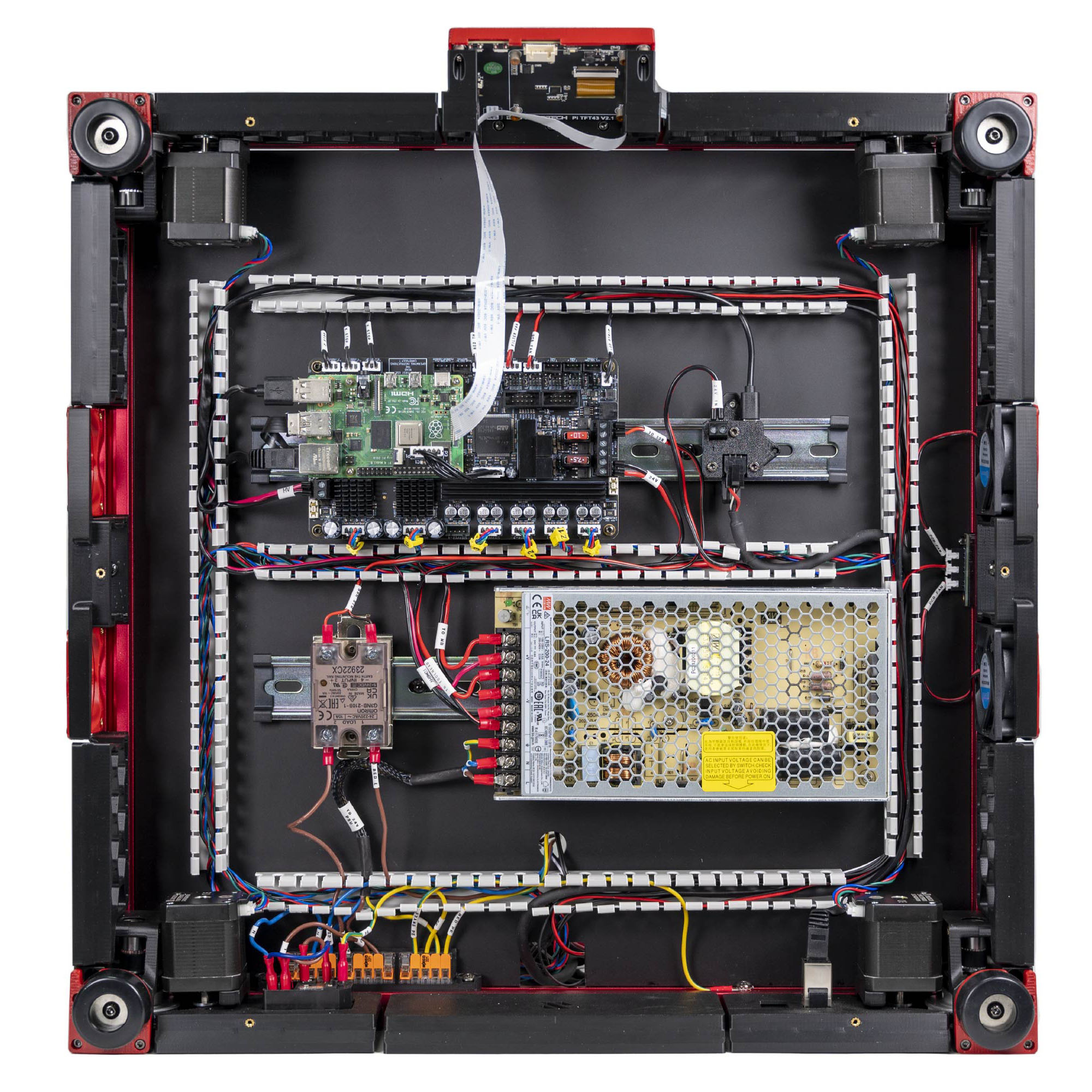
Do: Plug USB-A into a Pi port and USB-C into the Leviathan's USB port. Keep it short and dress it flat; this loop is only 60 mm and a long cable will foul the DIN clips.
 Check
Check
Both ends seated. The Leviathan has exactly one USB-C socket, so there is nothing to get wrong.
What you're looking at
This short cable is the whole link between the Raspberry Pi, the host that plans the motion, and the Leviathan, the MCU that executes it. The photo shows the finished set of Pi connections in LDO's bay.
Note: the Leviathan can alternatively talk over UART on its dedicated 5-pin Raspberry Pi power/UART port. Ch 12 decides. Wire USB now — the Rev D+ config addresses the mainboard as /dev/serial/by-id/..., which is USB. src · Leviathan V1.3 manual p.5
Source: LDO Rev D photo VS8 Ethernet/USB wired · LDO wiring guide § Connecting the FFC cable, Ethernet cable, USB cable and frame PE · LDO Leviathan V1.3 guide (manual p.5)