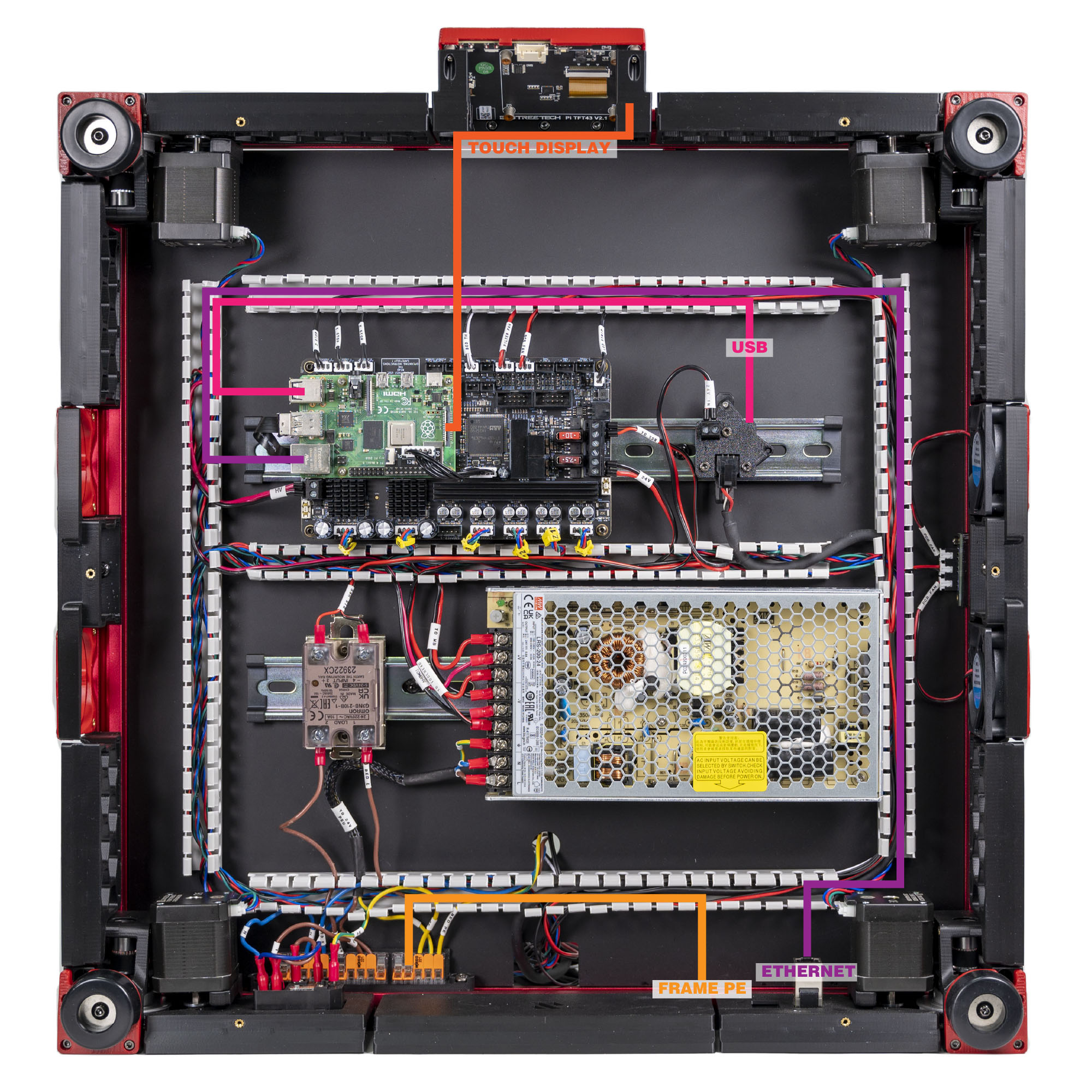
Step 10.53 — USB: Raspberry Pi ↔ USB adapter PCB¶
Step 53 of 80 · Chapter 10 — Wiring and Checkpoint #1
Parts:
- USB cable ×1 · the Cable Kit box
Do: Plug one end into a second Pi USB port and the other into the USB adapter PCB on its DIN clip. This carries the toolboard's USB data; the 24 V it also needs arrived in step 10.26.
 Check
Check
Both ends seated. The USB adapter PCB now has 24 V in, USB in, and the umbilical socket, still empty.
What you're looking at
The second Pi USB lead is the data half of the toolhead link; the 24 V half went on in step 10.26. The adapter PCB merges the two into the single umbilical socket.
 Good stopping point · ~40 min since the last one
bay fans, filter fan and LED strip on their Leviathan ports, the touchscreen module built (Ch 11 Steps 11.5–11.6, done from 10.50) with its DSI ribbon latched at both ends and taped to the front extrusion, Ethernet and both USB links made. The umbilical is still unconnected at both ends.
Source: LDO Rev D photo VS8 mapping · LDO wiring guide § Connecting the FFC cable, Ethernet cable, USB cable and frame PE