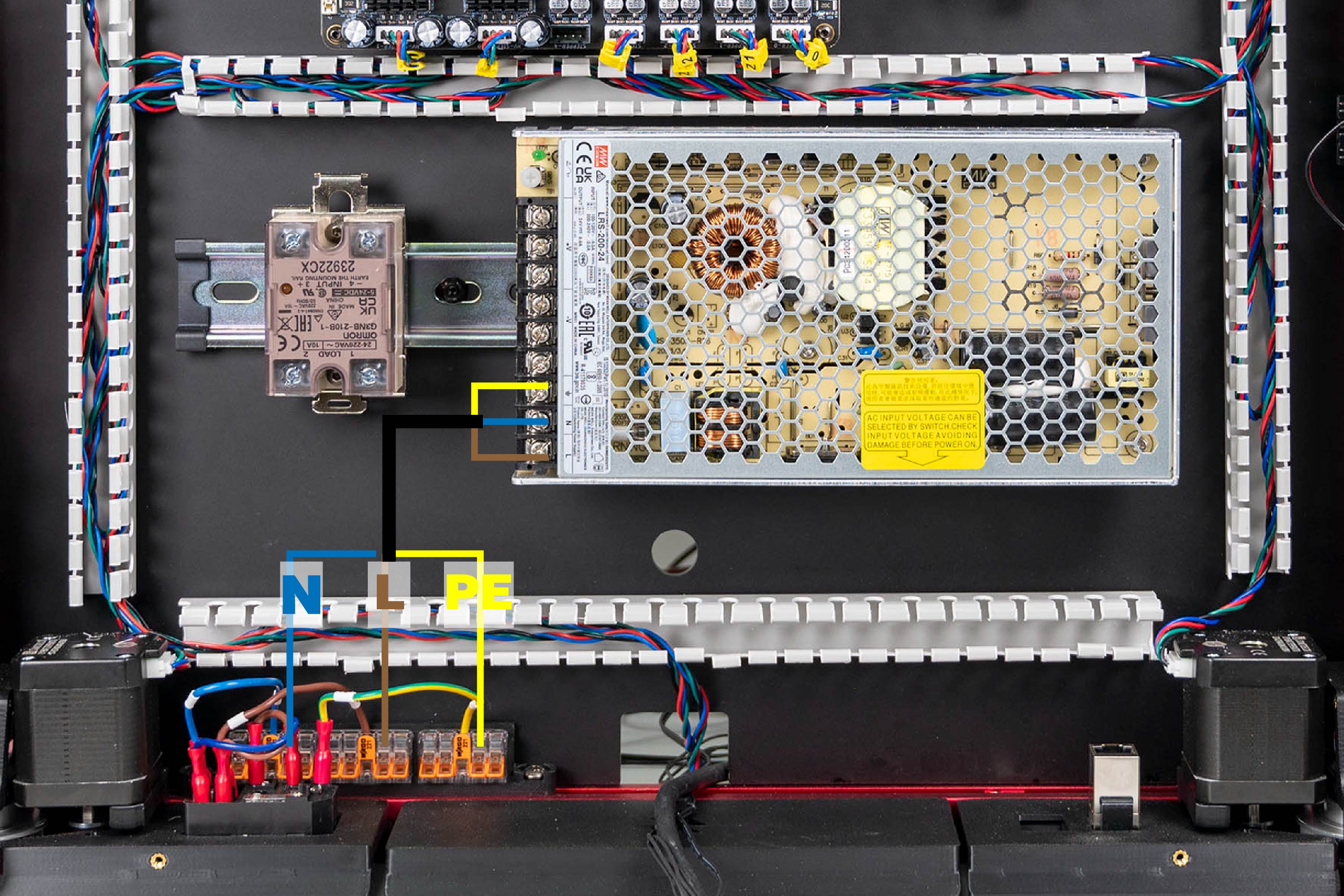
Step 10.9 — WAGO bus → PSU¶
Step 9 of 80 · Chapter 10 — Wiring and Checkpoint #1
Parts:
- PSU AC cable set, 3 cores ×1 · the Cable Kit box
- PH2 screwdriver · tool
Do:
- Feed the ferrules down the port stub and SSR run.
- Brown on 1 L, blue on 2 N, green/yellow on 3 FG, PH2 tight.
- Strip 11 mm; other ends into WAGO blue N, brown L, green/yellow PE.
Check
1 L outermost, 2 N, 3 FG innermost beside −V; brown, blue, green/yellow. Pull-test all six ends; the DC side is still empty.
What you're looking at
The PSU's AC input is the three screws at one end of its terminal block: 1 AC/L, 2 AC/N, 3 FG, FG being frame ground, marked ⏚. The rest of the block is the 24 V DC output, empty until step 10.24.
LDO layout
the cable runs from the WAGO bus along LDO's rear PVC duct to the PSU screws, as the mapping photo shows. LDO § Connecting WAGO and PSU
Good stopping point · ~30 min since the last one
inlet verified, plug panel confirmed on the frame, WAGO bus labelled N/L/PE, and the inlet→WAGO→PSU run fully terminated at both ends. Nothing plugged in, cord out of the room. Do not walk away with a stripped mains core outside a WAGO lever.
Source: LDO Rev D photo S3 WAGO/PSU mapping · LDO wiring guide § Connecting WAGO and PSU · Mean Well LRS-200 datasheet — terminal pin assignment · review/2026-09-23-bay-mods/layout-v3/layout-v3.md § AC conduit, SSR run