Step 11.8 — Route and connect the FFC ribbon to the Pi¶
Step 9 of 67 · Chapter 11 — Skirts, panels, Clicky-Clack door, filtration
Tap to enlarge
Parts:
- the FFC ribbon, Pi end contacts forward and blue tab rearward · already on the bench
Do:
- Ignore p.221; it wires EXP1/EXP2 ribbons.
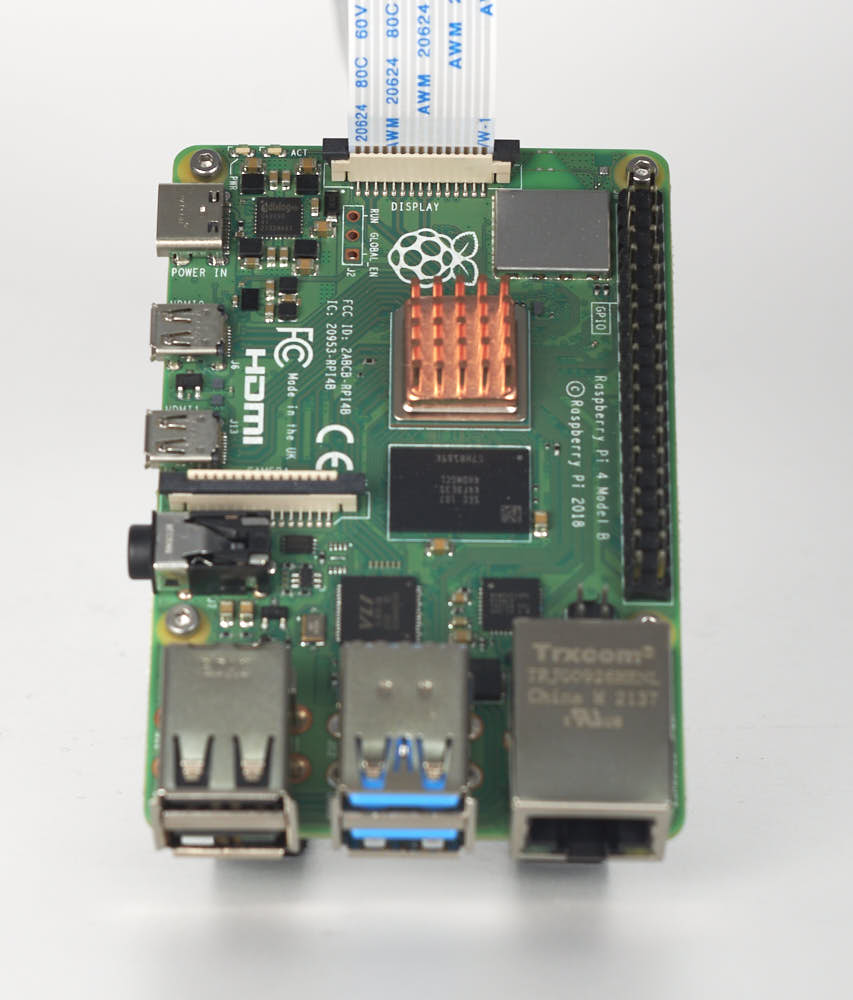
- Follow the ribbon from the module to the Pi: latches closed, a service loop at each end, no tight radius, clear of the front skirts.
- Never open a latch.
 Check
Check
Both latches closed, ribbon square and fully seated, no contacts exposed outside either connector, nothing pinched by the skirt or an extrusion edge.
What you're looking at
The FFC is the one cable between screen and Pi, and it is not keyed: the bare contacts are the only orientation clue, and getting it wrong destroys either end. p.221 wires two ribbons to an EXP1/EXP2 header this machine lacks.
Caution
Rev D+ / LDO: this is the wiring guide's "Connecting the FFC Cable, Ethernet Cable, USB Cable and Frame PE" step, done at 10.50. Screen rotation is a Ch 12 software step, not a wiring one: 12.10 writes it into /boot/firmware/cmdline.txt as video=DSI-1:…rotate= and 12.11 proves it. Do not use display_lcd_rotate, the legacy fake-KMS path, dead on MainsailOS 3.x. src · src
 Tip
Tip
if Ch 10 Step 10.50 had to leave the Pi end taped because the mount was not printed, connect it now exactly as 10.50 describes.
 Good stopping point · ~10 min since the last one
the touchscreen module (built at 10.50) is bolted into the front of the ring, snug, and its FFC run checked end to end, latched at both ends. Do not leave an FFC half-latched — the latch is what holds the contacts.
Source: Voron manual p.221 · LDO wiring guide § Setting up the touch screen · LDO BTT 4.3" screen guide · LDO wiring photo RPI_DSI_FFC.jpg