Step 12.17 — Build Klipper firmware for the Nitehawk-SB V2¶
Step 17 of 37 · Chapter 12 — Software: Pi OS image, Klipper/Moonraker/Mainsail, firmware, printer.cfg
Parts: none.
Do: Same pattern as 12.14, with the toolboard's own settings file:
sudo systemctl stop klipper
cd ~/klipper
make KCONFIG_CONFIG=config.nitehawk menuconfig
 Check
Check
~/klipper/out/klipper.bin exists and is newer than the Leviathan build you just flashed, and the screen showed Clock Reference (12 MHz crystal) before you saved.
What you're looking at
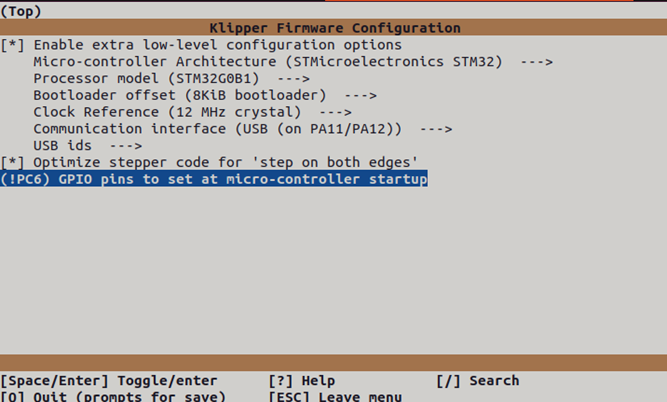
The screenshot is LDO's own make menuconfig screen for the toolboard: the same tool as step 12.14, but a different chip, offset and clock. The !PC6 entry drives the ACT LED pin low at MCU start-up, which LDO documents as the LED coming on (verify on bench).
Set exactly:
[*] Enable extra low-level configuration options
    Micro-controller Architecture: STMicroelectronics STM32
    Processor model:               STM32G0B1
    Bootloader offset:             8KiB bootloader
    Clock Reference:               12 MHz crystal
    Communication interface:       USB (on PA11/PA12)
[*] Optimize stepper code for 'step on both edges'
    (!PC6) GPIO pins to set at micro-controller startup
Q, Y, then:
make KCONFIG_CONFIG=config.nitehawk clean
make KCONFIG_CONFIG=config.nitehawk
cp config.nitehawk ~/printer_data/config/
Caution
Rev D+ / LDO: this is the deviation that defines Rev D+. The Nitehawk-SB V1 is an RP2040 and takes a different menuconfig; the V2 is an STM32G0B1, and choosing RP2040 produces a binary the board cannot run. The 8 KiB bootloader offset is mandatory: build with no offset and the Katapult flash erases the bootloader. src · menuconfig screenshot
Caution
Rev D+ / LDO: the ACT LED: !PC6 turns it on at MCU start-up, but the kit config's [output_pin pcb_led] pin: !nhk:PC6 with default value: 0 may drive the pin the other way once Klipper connects, so the LED could go dark at Ready (verify on bench). LDO's own nitehawk-sbv2.cfg uses pin: nhk:PC6; drop the ! if you want it lit. src
Source: Nitehawk-SB V2 doc § Compiling Klipper firmware · Nitehawk-SB-V2 make_menuconfig.png
