Step 13.2 — Re-confirm the Checkpoint #1 result and the PSU voltage selector¶
Step 2 of 54 · Chapter 13 — Initial startup
Parts: none.
Do:
- Switch off at the inlet rocker and pull the cord out of the inlet.
- Confirm the PSU's 115/230 V selector matches your mains.
- Confirm the SSR terminals and the Leviathan jumpers against the table.
Check
Selector correct. No bare copper anywhere. Every DC duct still open so you can watch the bay; the AC lids stay on. src
What you're looking at
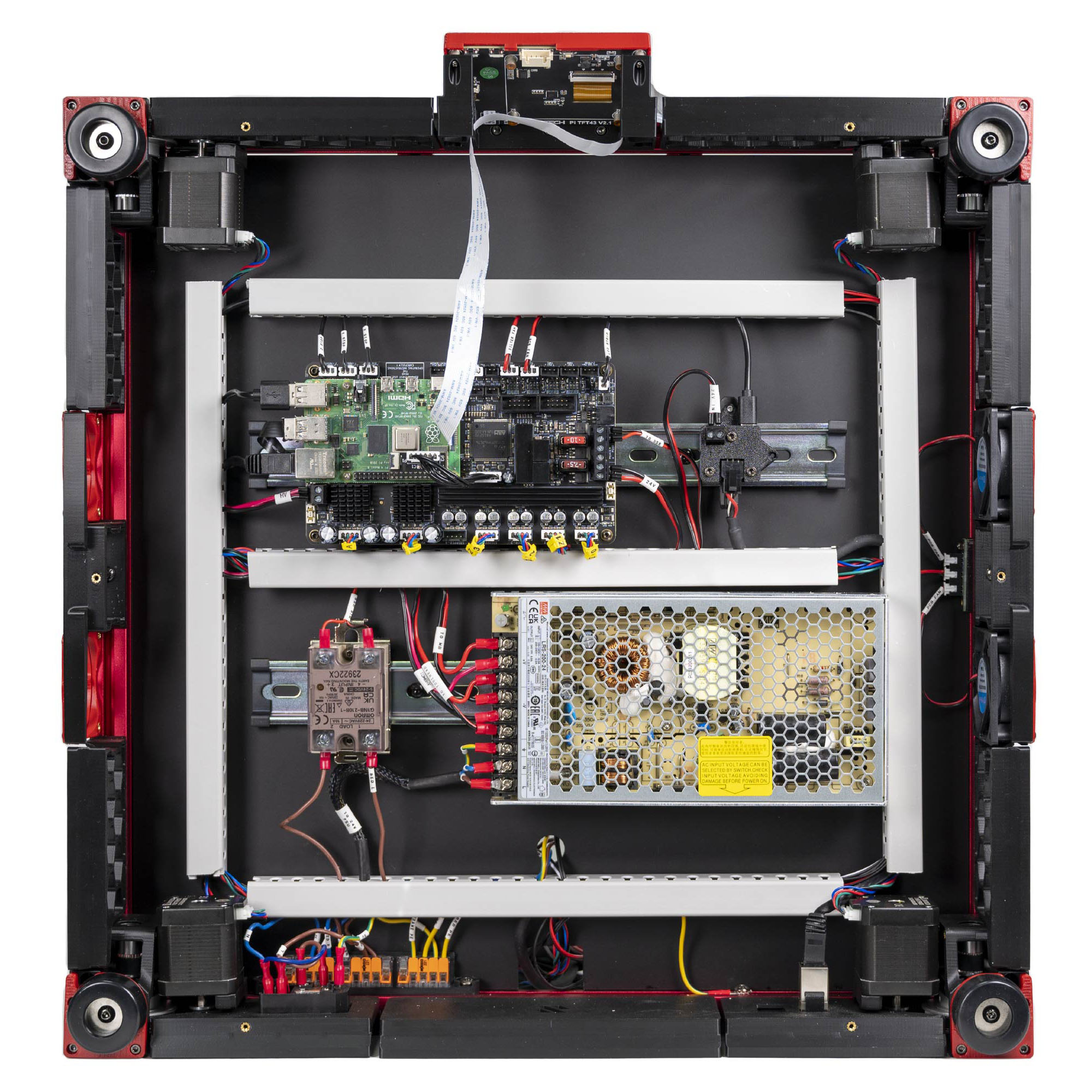
LDO's finished Rev D bay, photographed from below: the view you have with the machine on its side. Three things are re-read in it: the PSU's red voltage slider, the SSR's four numbered terminals, and the Leviathan's five-position voltage-selection jumper block.
| Item | Must be |
|---|---|
| SSR INPUT 3 / INPUT 4 | control red + / control black − |
| SSR LOAD 1 / LOAD 2 | bed live / mains brown |
| Leviathan jumpers | exactly two: Fan2 and Fan3, both on the 24 V pins |
| Probe, Fan0, Fan1 | bare, no jumper |
LDO
"Mixing voltage will permanantly damage the controller and attached components."
Caution
Rev D+ / LDO: there is no 5 V PSU in this kit — the Leviathan supplies the Pi's 5 V through the Pi HAT adapter. If you are looking for a second supply, you have the wrong manual pages (manual p.152, p.172, p.190 are all SKIP). (survey §4.2)
Good stopping point · ~15 min since the last one
bench cleared, tools and meter staged, Checkpoint #1 re-read and the PSU voltage selector confirmed for the third time. The cord is out of the inlet. The next segment is the power-on and runs straight through to the fan and light checks — do not start it with less than 45 minutes free.
Source: LDO wiring photo VS9 finished bay · LDO wiring guide § Checkpoint 1 · LDO wiring guide § Preparing the power supply unit