Step 13.23 — Home Y, then read the chart¶
Step 23 of 54 · Chapter 13 — Initial startup
Parts: none.
Do: M112 ready. Send G28 Y, which lifts another 10 mm first because Z is still unhomed. Compare what X and Y actually did against the chart, then send M114.
 Check
Check
The toolhead travels to the back until it hits the Y endstop, and M114 reads X:350.000 Y:350.000.
What you're looking at
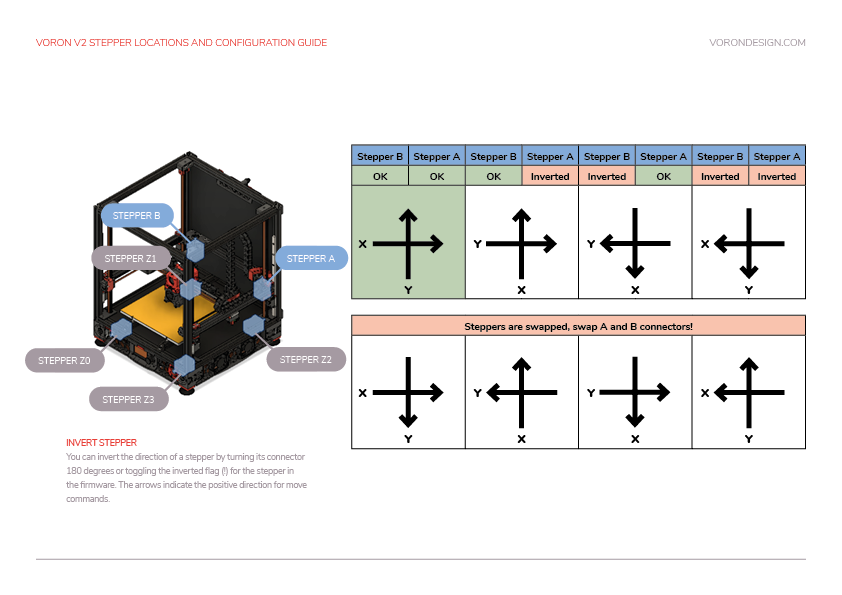
The chart maps each combination of observed X and Y homing directions onto a cause. The upper block is a direction problem, fixed with one character in the config; the lower orange block means the two motors are swapped, fixed with the power off.
| Observation | Fix |
|---|---|
| Matches a column in the upper block of the chart | Invert dir_pin on the stepper that column marks Inverted. [stepper_x] is motor B, [stepper_y] is motor A |
| Matches the lower (orange) block | The motors themselves are swapped: power down, exchange the A and B connectors at the board, power up, re-test |
| Gantry moves downward first instead of sideways | Z stepper directions are reversed. Go back to Step 13.16 |
Source: Voron docs image V2-motor-configuration-guide.png · Voron startup wizard § XY homing check