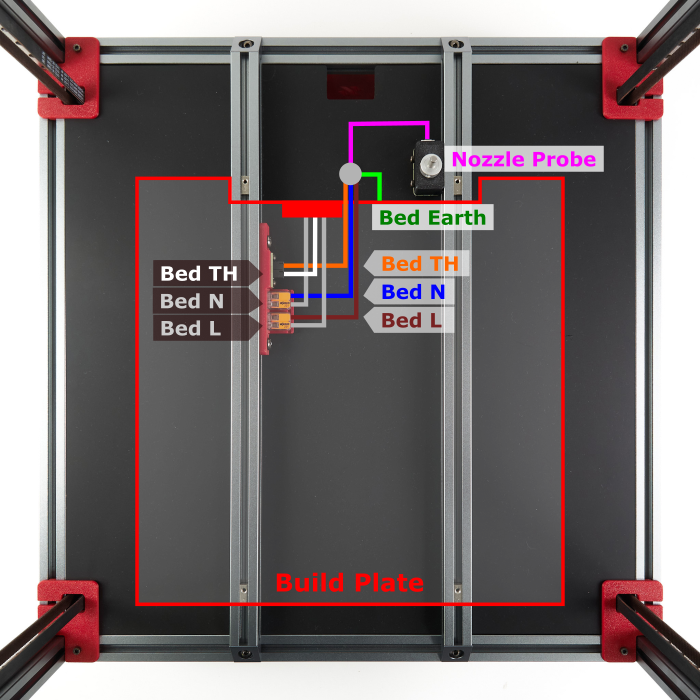
Step 13.44 — Inspect the plate edge and the room behind it
Step 44 of 54 with a helper · Chapter 13 — Initial startup
(no image — see text)
 Gather for this segment — steps 13.44–13.47 (~35 min)
Tools and consumables
- steel rule
- digital caliper
- the laptop with this repo and its
venv-cqPython
Set out for later steps
- Bambu A1 heatbed nozzle wiper ×1
Parts:
- steel rule · tool
- digital caliper · tool
Do:
- Machine off: is the plate's rear edge straight outboard of the left bed extrusion?
- Rule each extrusion top from the plate edge back to the first obstacle.
- Note what stands above either top there, probe collar included.
 Check
Check
Edge straight, at least 39 mm of bare top on the left, and the right side's length and collar noted. All written down.
 Helper Holds the rule on each extrusion top and reads the clear length aloud.
What you're looking at
This part is optional. It fits jinetix's silicone nozzle scrubber on the rear of the bed extrusions: a brush bracket and its magnetic purge bucket on the left, a narrow stop bracket on the right. Nothing is printed until this part has measured the machine and decided which parts fit, or that none do. PRINT_START then wipes the nozzle before the Z home that counts.
Behind the plate, each bed extrusion needs a bare top for a 38 mm bracket that butts the plate's rear edge. The brush sits on that edge outboard of the left extrusion, so the edge must be straight there.
Caution
A notched edge at the brush, or under 39 mm of bare top on the left, ends the add-on here. The right side only decides whether the narrow stop bracket is fitted.
 Tip
Tip
Nothing is printed before the decision step, so these looks cost nothing. Bed leads, the WAGO mount and the Nevermore all belong inboard and below the tops.
Source: Printables 796563 — jinetix, nozzle scrubber w/ sheet stops · Voron manual p.161 · LDO wiki build-plate mapping