Chapter 10 — Wiring and Checkpoint #1¶
One page per step
Read this chapter one step per page — big pictures, prev/next, and the same tick marks. This page is the whole chapter in one scroll.
Builds every harness — mains, 24 V, motion, sensors, lighting, toolhead umbilical — and ends at the gate that must pass before the machine is ever plugged in.
What you're building in this chapter. Four systems, in this order. The mains side — the C14 inlet with its integrated switch and fuse, a three-block WAGO bus for Live, Neutral and earth, the 24 V PSU, and the solid-state relay that lets firmware switch a mains bed heater — goes in first and is then proved with a meter before anything is plugged in. The 24 V side fans out from the PSU to the Leviathan mainboard, to its separate high-voltage stepper supply, and to the USB adapter PCB that feeds the toolhead. The signal side is everything the machine senses and lights with: six motor cables on their mapped driver sockets, the XY endstop pod on the gantry, the mechanical nozzle probe that sets Z=0, the bed thermistor, two COB light strips and their junction PCB, the bay and filter fans, and the Pi's screen, network and USB links. Finally the three drag chains — X, Y and Z — are mounted and filled, so every cable can follow the moving gantry for years without fatiguing. The chapter ends unplugged, open and metered, with LDO's Checkpoint #1 behind you.
Time: 5.0–7.0 h hands-on, first build (survey §5.1, §7.2).
Sessions: 14 × ~30 min (Pause segments below; every minute figure in this chapter is a first-build estimate derived from the Time range and the step count).
Prerequisites:
- Ch 03 — Build plate. Plate bolted down; its heater and thermistor leads loose above the deck, none through it.
- Ch 06 — Z axis. Gantry in, Z belts on. The gantry must move by hand over its full Z travel — that is what sets the chain slack.
- Ch 07 — A/B belts. Probe wires already dressed along the X extrusion (manual p.143).
- Ch 08 — Toolhead. Stealthburner + CW2 + Nitehawk-SB V2 assembled, all toolhead-side connectors seated, USB-adapter PCB stack built.
- Ch 09 — Electronics bay. DIN rails, the B11 conduits (DC loop at 09.6, AC conduit at 09.36, every lid off; layout v3), Leviathan on its brackets, Raspberry Pi mounted on its standoffs with the HAT power adapter, nozzle-probe PCB assembled and mounted, bed WAGO mount fitted above the deck on the left bed extrusion, SSR on its DIN bracket, USB-adapter PCB on its DIN clip — and the inlet panel with its IEC module fitted and mounted on the rear extrusion (Steps 09.10–09.12), plus the mains WAGO block built and mounted (Step 09.13). Nothing in this chapter builds those; 10.4–10.7 only confirm and label them.
- Print batches: B05 (Z joints + Z chain), B07 (electronics bay + lighting — the eight COB mounts and the 3×5 WAGO mount), which also carries
power_inlet_IECGS_1mmon plate B07-P1 (moved out of B08 — index correction #11). One B08 part is needed early:mount.stl(plate B08-P3) plus the B02[a]_faceplate, at Step 10.50 — the touchscreen module has to exist before its ribbon is latched, so Ch 11 Steps 11.5–11.6 are done from there. Both are pre-kit prints. Nothing else from B08 is needed before Ch 11. - Print batch B11:
V2L_STRIP_FINand the AC conduit lids, both in bin 10-lids-AC, at Step 10.80.
Tools
- Multimeter — mandatory. Continuity/beeper, a 2 MΩ or 20 MΩ resistance range you can select by hand, and a DC volts range. The L↔N pass at 10.19 and 10.78 is a number on that range, not
OL: the PSU input bridges L and N. No multimeter, no power-on. - 2.5 mm flat-blade screwdriver (supplied) — WAGO levers, plug-type terminals, drag-chain latches
- PH2 Phillips — PSU terminal block and SSR terminals
- Hex 2 / 2.5 / 3 / 4 mm
- Flush cutters, small long-nose pliers, tweezers (endstop repin)
- Soldering iron + brass M3 insert tip — all twenty inserts in one pass at step 10.35 (COB mounts ×16, Z chain guide ×2, Z chain retainer bracket ×2), so the iron is out once and never during an electrical segment
- Label maker, or the cable tags supplied in the kit
Consumables: zip ties (of the 100 supplied, this chapter eats 30–40), VE0508 ferrules ×5 (spares), a VHB pad for the strip fin, IPA and a lint-free cloth for the extrusion slots before the covers go on.
Printed parts
Parts arrive in the bins named below (see the bin map in print/README.md#bins); check the bin label's list before you start.
| Looks like | STL | Bin | Qty | Colour |
|---|---|---|---|---|
power_inlet_IECGS_1mm.stl (Voron-2 STLs/Skirts/) |
09-bay | 1 | Black — heat-set, fitted with its IEC module and mounted in Ch 09 (09.10–09.12); nothing to build here | |
cob_light_strip_mount_100mm.stl (LDOVoron2 STLs/COB Light Strip/) |
10-lights | 6 | Black | |
cob_light_strip_mount_50mm.stl (LDOVoron2 STLs/COB Light Strip/) |
10-lights | 2 | Black | |
wago_221-415_mount_3by5.stl (Voron-2 STLs/Electronics_Bay/) |
09-bay | 1 | Black — fitted in Ch 09, populated here | |
z_chain_guide / z_chain_bottom_anchor (batch B05) |
10-chains | 1 / 1 | Black | |
[a]_z_chain_retainer_bracket_x2 (batch B02, plate B02-P3) |
10-chains | 2 printed, 1 fitted, 1 spare (verify on bench) | Blue | |
2x3 Splitter Spacer |
— | 2 | LDO-supplied printed — do not print | |
usb_adapter_mount_partial_cover.stl (Nitehawk-SB-V2 repo) |
08-CW2 | 1 | Black — fitted in Ch 08/09, used here | |
V2L_STRIP_FIN.stl (batch B11, plate B11-P3), step 10.80 |
10-lids-AC | 1 | Black | |
AC conduit lids, step 10.80: CMD_V2_6B_WIRE_BOX_COVER.stl, V3L_90DEG_R15_COVER.stl ×2, V3L_34mm_DUCT_COVER.stl, CMD_V2_6B_T_SHORT_COVER.stl, V3L_10mm_DUCT_COVER.stl ×2 (batch B11) |
10-lids-AC | 7 | Black |
Hardware (chapter totals)
| Fastener / part | Qty | Note |
|---|---|---|
| 3×2 XH splicer PCB | 2 | one for the 6020 fan pair, one as the LED junction |
| 2×3 Splitter Spacer | 2 | LDO-supplied printed, one under each 3×2 splicer |
| 60×60×20 fan | 2 | bay fan pair, first plugged in at 10.47, mounted in Ch 11 |
| Keystone CAT6 insert | 1 | plugged at 10.51, snapped into its panel in Ch 11 |
| C13 power cord | 1 | first plugged in at 10.23, then out of the room |
| Drag chain 10×10 R18 | 2 | X chain and Y chain |
| Drag chain 10×15 R28 | 1 | Z chain |
| M3×5×4 brass heat-set insert | 20 | 16 for the COB mounts, 2 for the Z chain guide, 2 for the Z chain retainer bracket (p.204 carries the heat-set icon but no count — count the bosses on your part, verify on bench) |
| M3×6 FHCS | 16 | COB mount halves |
| M3×8 SHCS | 21: 16 COB mounts + 4 splicer PCBs + 1 ESD frame end | 16 COB mounts to extrusion, 2 per splicer PCB ×2, 1 for the ESD cable's frame end at 10.58 (verify on bench) |
| M3 hammerhead T-nut, 2020 | 20 | pairs with the M3×8 SHCS above |
| M3×6 FHCS (chain ends, X and Y) | 6: 3 X chain + 3 Y chain | manual p.197, p.199: one into the T-nut at each fixed end, two into each 2-hole moving end (verify on bench) |
| M3 roll-in T-nut, 2020 | 3: 2 chain ends + 1 ESD frame end | X and Y chain ends; the ESD cable's frame end at 10.58 (verify on bench) |
| M3×10 FHCS | 4 | Z chain top and bottom ends (p.202) |
| M3×12 SHCS | 2 | Z chain retainer bracket to the A drive (p.204) |
| M5×10 BHCS | 3 | Z chain guide (p.201), Z chain bottom anchor (p.203), frame PE lug |
| M5 roll-in T-nut, 2020 | 3 | the same three |
| M5 locking washer | 2 | frame PE stack |
| Extrusion slot cover, 6 mm | up to 9 | closes the slots the LED leads run in |
| Zip ties 3×150 mm | ~35 | from the 100 supplied |
Read first
- Mains is the one step in this build that can kill you. Nothing gets plugged in until Checkpoint #1 passes with a meter. If your local regulations forbid you from wiring the mains side, stop at step 10.8 — the first mains run — and get Section 1 done by someone certified. src
- Set the PSU's 115/230 V selector before anything else and check it again at Checkpoint #1. Getting it wrong destroys the PSU on the first switch-on. src
- Keep every wire loose inside every drag chain. Taut wires fatigue and break — the single most-repeated LDO warning, and the umbilical is the cable it kills. src
- Close nothing until Checkpoint #1 passes. No duct covers, no skirts, no bottom panel. Re-opening a closed bay costs an hour and tempts you to skip the meter (survey §5.2 W8).
- Never plug or unplug a stepper, or the Micro-Fit umbilical connector, with power on. Back-EMF kills drivers; hot-plugging the umbilical can take out the Nitehawk or the Pi. src
- Your Rev D+ toolboard is a Nitehawk-SB V2. The Klipper config and the USB serial-ID pattern both differ from the Rev D wiring guide — that is Ch 12's problem, but do not let anyone talk you into loading
leviathan-printer-rev-d.cfgon this board (survey §4.1 ①②).
Sources for this chapter:
- Voron 2.4r2 Assembly Manual, pinned commit
de7e89d— p.143, p.156, p.181, p.194–195, p.197–204 - LDO wiring guide, Rev D — every connector step below cites its own section anchor
- LDO Build Notes (build FAQ) — the per-page SKIP notes for p.152, p.162–163, p.169, p.172, p.190, p.194–198
- LDO Rev D printed-parts guide and Rev D 350 BOM
- LDO Leviathan V1.3 guide — board silkscreen, jumper block, port map
- Nitehawk-SB V2 board doc and the Nitehawk-SB-V2 repo at commit
42ae497(pinout, grounding and cable-chain images) - LDO XY endstop reconnecting guide and BTT 4.3" screen rotate guide
leviathan-printer-rev-d-sbv2.cfgat commit667521d— the pin assignments this chapter wires to- Klipper
temperature_sensors.cfgat commitf0892d8— the thermistor curve in step 10.76 - Step images mirrored into
assets/remote/10-wiring/— LDOVoron2 at8270e8c, the Nitehawk-SB-V2 images at42ae497, and six diagrams from the LDO wiki. All are LDO Motors' work, mirrored with attribution for this non-commercial manual; owner, source URL, date and sha256 for each are in that folder'sSOURCES.txt
Video coverage (Steve Builds, pre-release LDO kit — differs from Rev D+): Part 4 @1:43:50 (+13m), Part 6 @0:24:08 (+2m), Part 6 @0:25:44 (+22m), Part 6 @1:04:10 (+27m), Part 7 @0:08:36 (+16m), Part 7 @1:29:40 (+12m), Part 8 @0:53:06 (+37m), Part 8 @1:25:00 (+10m), Part 8 @1:34:41 (+3m), Part 8 @1:37:22 (+7m), Part 8 @1:43:45 (+11m), Part 9 @0:04:57 (+15m), Part 9 @0:45:19 (+3m), Part 9 @0:47:56 (+8m), More Extras! @0:43:01 (+4m), More Extras! @1:59:20 (+23m), More Extras! @2:18:10 (+53m)
Manual pages this chapter replaces. The official manual's Wiring chapter describes a BTT Octopus machine with a 5 V PSU. Per LDO's build notes, skip p.182–183, 186–193, 196 and 205–209 entirely and follow the LDO wiring guide instead. Only p.181 (PSU voltage check), p.194–195 (cable-chain overview) and p.197–204 (chain mounting) survive, and they appear below as steps. src
Section 1 — Mains: inlet → switch → PSU → SSR → bed heater¶
Step 10.1 — Empty the bay and set the end state¶
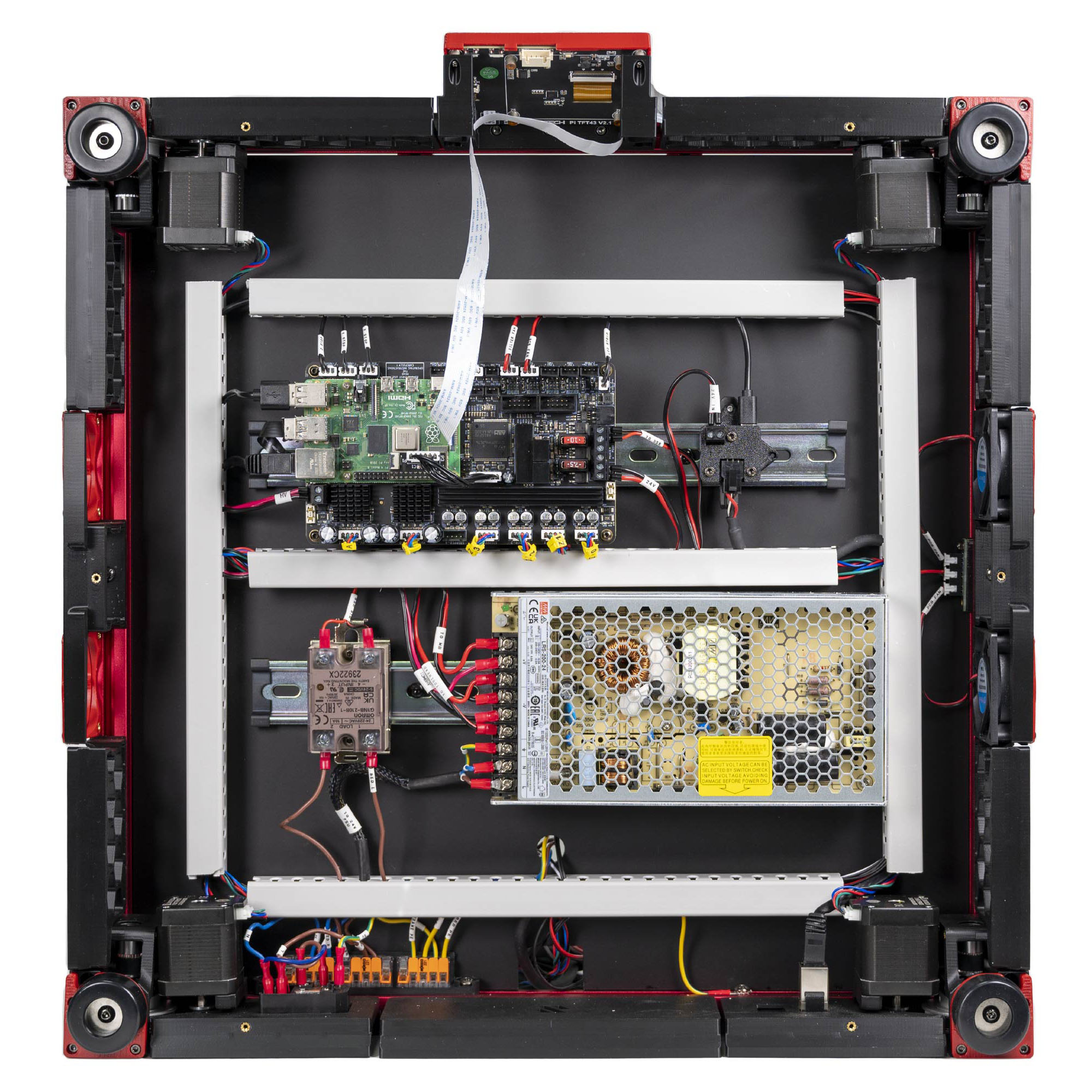
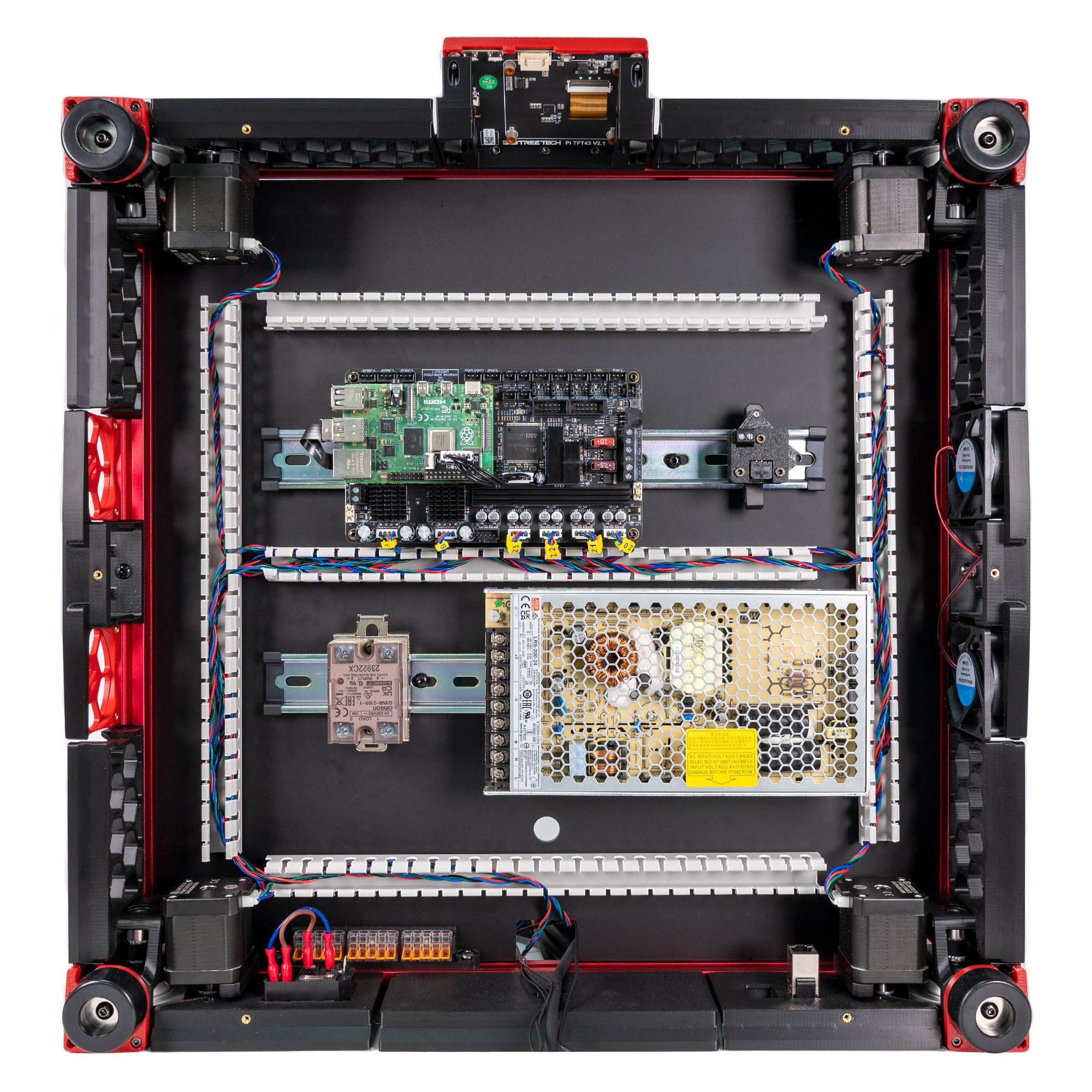
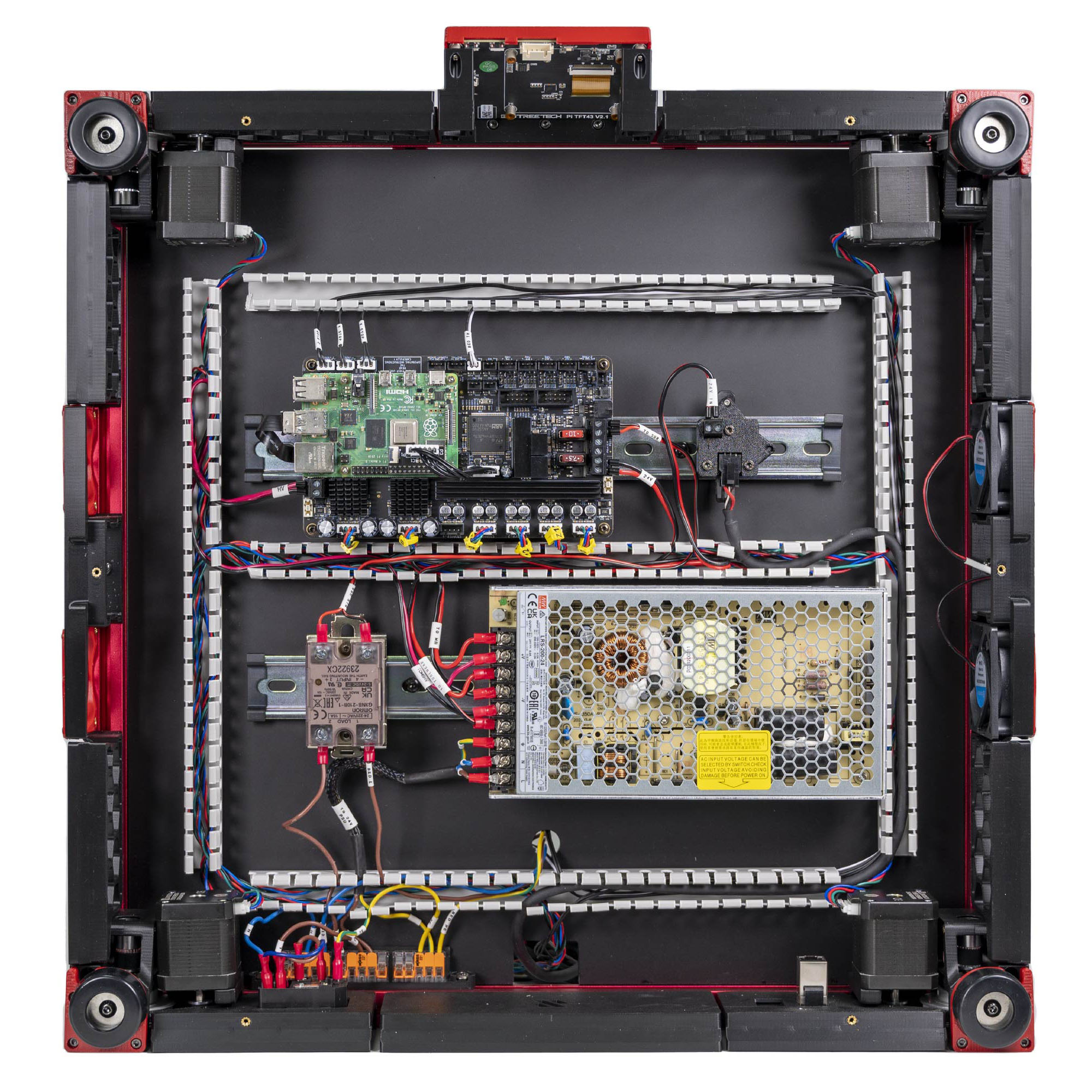
What you're looking at: LDO's finished Rev D bay, seen from below. Ch 09 placed it all: two DIN rails, the wire ducts that hide cable runs, the Leviathan with the Raspberry Pi on top, the PSU, the SSR, the USB-adapter PCB and the 3×5 WAGO mount.
Parts: none.
Do:
- Stand the printer on its side on a blanket, deck underside facing you.
- Confirm the bay holds only Ch 09's work, nothing wired.
- Unplug the C13 cord and put it in another room.
Check
The photo above is the target. Nothing is connected yet and no duct covers are on.
Caution
Who is in the room, 00a.2: one adult at the machine from 10.1 to 10.23. She is out of the room for Sections 1 and 2 and back for 10.24. In Section 8, with the printer unplugged, she records the readings you call out; you hold the probes.
Source: LDO Rev D photo VS9 finished bay · LDO wiring guide § Finish line
Step 10.2 — Set the PSU input-voltage selector¶
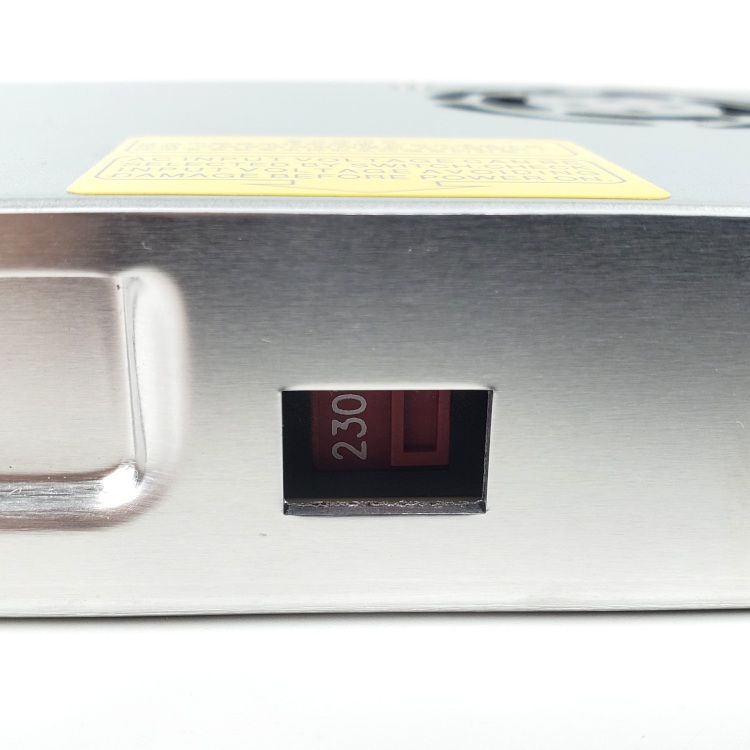
What you're looking at: The grey brick is the Meanwell LRS-200-24, the 24 V supply for everything except the bed heater. The second photo is the small red slide switch in its side, which sets 115 V or 230 V mains.
Parts:
- reused: the Meanwell PSU
Do: Find the red slide switch in the cut-out on the PSU's long side. With the flat screwdriver, slide it so the window shows 115 for a US 110/120 V supply, 230 for a 230 V supply.
Check
Read the number in the window out loud and compare it to your wall socket.
The yellow warning label on the PSU lid says the same thing: "AC INPUT VOLTAGE CAN BE SELECTED BY SWITCH, CHECK INPUT VOLTAGE AVOIDING DAMAGE BEFORE POWER ON."
Caution
Rev D+ / LDO: EU kits may ship the Meanwell RSP-200-24 instead. That unit has power-factor correction and a universal AC input — there is no selector and nothing to set. If your PSU has no red switch, you have the RSP; skip this step. src
Source: Voron manual p.181 · LDO wiring guide § Preparing the power supply unit · LDO wiring photo psu_switch.jpg
Step 10.3 — Confirm the Leviathan voltage-selection jumpers are off¶
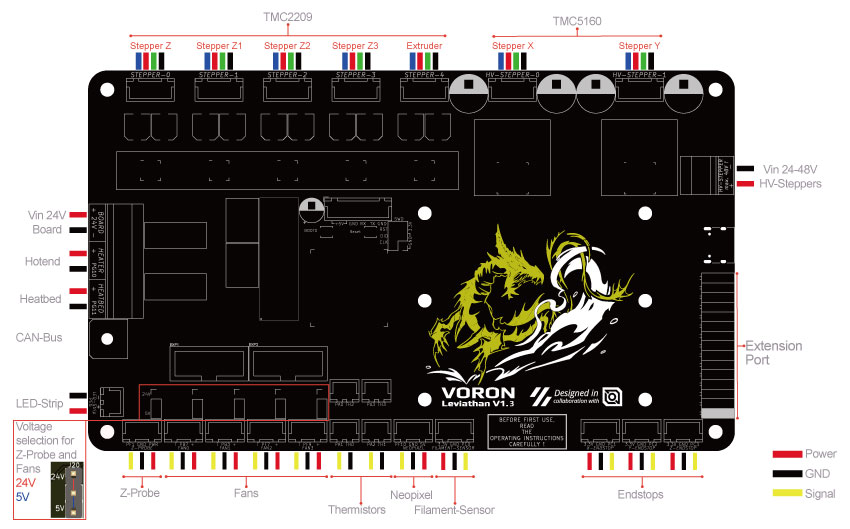
What you're looking at: The Leviathan is LDO's mainboard: it drives six motors, reads the bed thermistor and endstops, and supplies the Raspberry Pi with 5 V. Its jumper block is five pin pairs choosing 24 V or 5 V for the probe port and four fan ports.
Parts:
- reused: the Leviathan mainboard
Do: Find the jumper block silkscreened Voltage selection for Z-Probe and Fans, next to the fan headers. All five positions, Probe, Fan0, Fan1, Fan2, Fan3, must be bare.
Check
Five empty jumper pairs. Count them.
Caution
Rev D+ / LDO: this build uses an active toolboard, so the Leviathan's own probe port and Fan0/Fan1 stay unused and unjumpered for the whole build. A 24 V jumper on a port feeding a 5 V device destroys the device. src · Leviathan V1.3 manual p.7
Source: LDO wiring guide § Preparing the mainboard · LDO Leviathan V1.3 guide (manual p.7) · Leviathan repo wiring_V1.3.jpg
Step 10.4 — Fit the AC inlet into the printed plug panel¶
What you're looking at: power_inlet_IECGS_1mm is the printed panel that carries mains into the machine. The module in it combines three parts: the C14 inlet, the on/off rocker, and the fuse drawer. The manual page is drawn for the stock separate inlet and does not match your frame.
Parts: none.
Do: Nothing to build. On the rear extrusion's panel, confirm the earth pin is at the top with the printer upright, the switch faces out, and the module's tabs are snapped home. If not, go back to Ch 09 Steps 09.10–09.11.
Check
The inlet sits square with no rock, the fuse drawer opens freely, the rocker clicks both ways, and no spade terminal is connected.
Caution
Rev D+ / LDO: LDO note p.156 — the panel is power_inlet_IECGS_1mm (1.0 mm AC inlet with integrated switch), never the manual's stock plug panel. src
Source: Voron manual p.156 · LDO Build Notes p.156 · LDO wiring guide § Preparing the inlet · Video: Part 7 @0:15:11
Good stopping point · ~15 min since the last one
printer on its side, PSU selector set, Leviathan jumpers off, the Ch 09 inlet panel confirmed. No mains wiring started. Do not start the inlet-to-WAGO run until you can finish it: the next segment ends with the whole inlet→WAGO→PSU chain terminated.
Step 10.5 — Verify the pre-wired inlet before you trust it¶
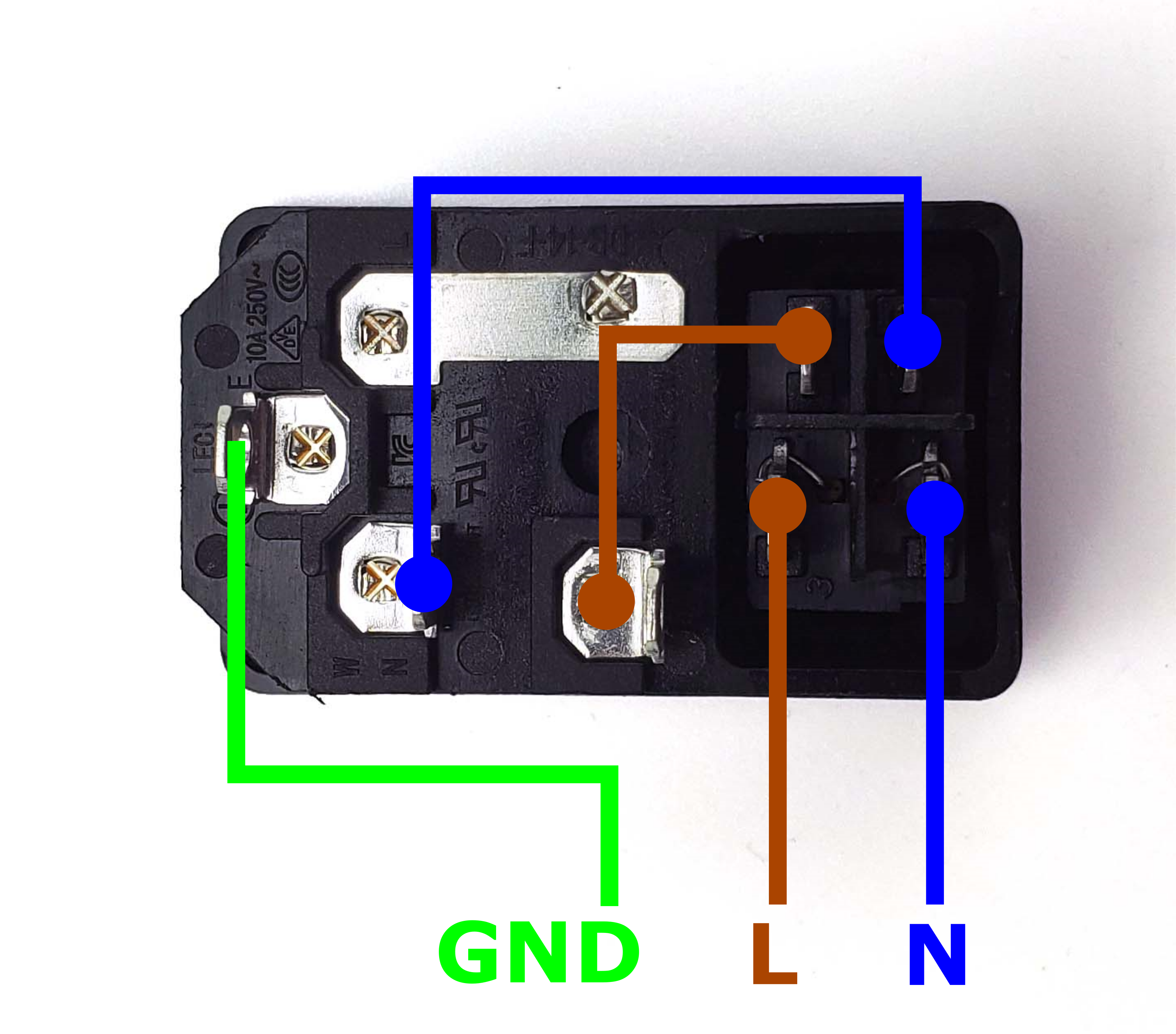
What you're looking at: LDO's internal map of the inlet module: which spade tab feeds which, the fuse in series with Live, the rocker breaking both Live and Neutral. The green/yellow wire is protective earth, the conductor that bonds the metalwork so the machine stays safe to touch.
Parts:
- reused: the AC inlet module
- tool: multimeter
Do: Compare your pre-wired inlet against LDO's diagram: the fuse sits in series with Live; Live and Neutral pass through the rocker; the Earth spade is neither switched nor fused. Three wires leave: brown L, blue N, green/yellow PE.
Check
Meter on continuity, nothing plugged in. Every row of the table matches.
| C14 pin → wire | rocker | expect |
|---|---|---|
| E → green/yellow | either | beeps |
| L → brown | ON only | beeps |
| N → blue | ON only | beeps |
| L → brown, fuse pulled | ON | open; refit the fuse |
Any deviation from that pattern means the inlet is miswired — stop and fix it before anything else. src
Source: LDO wiring guide § Preparing the inlet · LDO wiki inlet layout diagram
Step 10.6 — Mount the plug panel to the rear frame¶
What you're looking at: The panel is already part of the machine's rear wall: Ch 09 hooked it over the rear extrusion and bolted it to two T-nuts, with the WAGO block beside it. It becomes one of the three rear skirt segments in Ch 11.
Parts: none.
Do: Nothing to build. Confirm the panel is flat on the extrusion with no gap at its lip, both M3×8 SHCS snug, and that it does not overhang where the rear skirt lands.
Check
The C14 socket faces out the back, the rocker reachable with the printer upright, the three wires reaching the WAGO block with 50–80 mm spare.
Source: Voron manual p.156 · LDO wiring guide § General placement · LDO Rev D photo S0 general placement
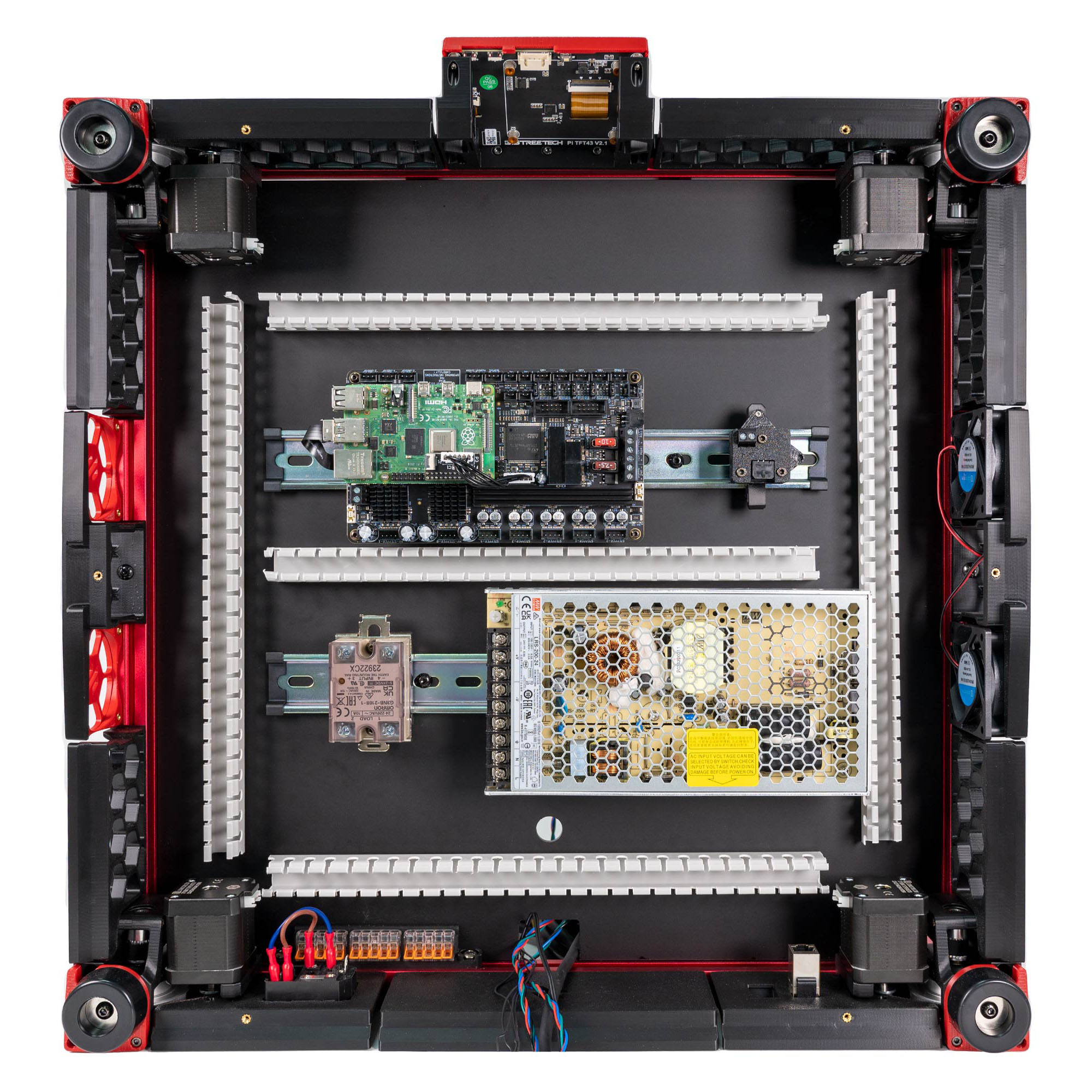
Step 10.7 — Populate and label the WAGO bus¶
What you're looking at: WAGO 221 blocks are lever-clamp connectors. The three 5-way blocks are the machine's mains bus, one each for Neutral, Live and earth. They are physically identical, so "the blue N WAGO" means the block labelled for that wire colour, never the block's own colour.
Parts:
- reused: the three WAGO 221-415 blocks in their mount
- tool: label maker
Do: Label the three blocks left to right N, L, PE, with the label maker.
Check
Three labelled 5-way blocks, all levers up, all fifteen ports empty.
Source: LDO Rev D photo S2 inlet/WAGO mapping · LDO wiring guide § Connecting inlet and WAGO · Video: Part 7 @1:30:02
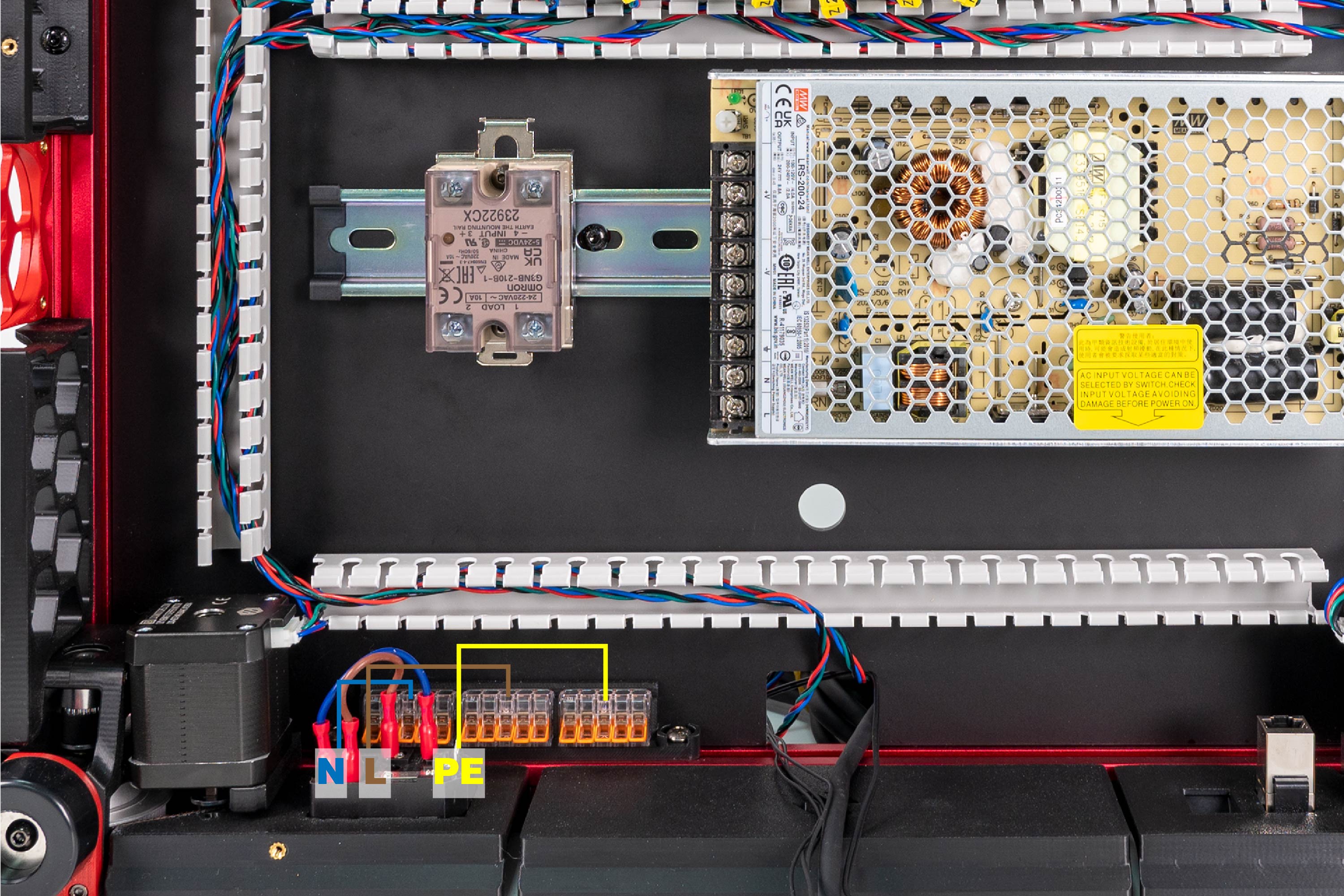
Step 10.8 — Inlet → WAGO bus¶
What you're looking at: The first mains run in the machine: the three wires leaving the inlet module land in their matching WAGO blocks. The drawing shows your route inside the printed wire box; LDO's photo shows its PVC wire duct.
Parts:
- reused: the inlet module's three pre-wired cores
- reused: WAGO N, L and PE
Do:
- Strip each core to 11 mm.
- Lift a lever, push the core to the stop, close it. Blue N, brown L, green/yellow PE.
- Route the run inside the wire box, not across open deck.
Check
Tug each core hard: none comes out, and no copper shows outside any WAGO port.
Tip
The strip-length gauge is moulded on the side of every WAGO 221.
LDO layout
route the run inside LDO's rear PVC duct instead, as the photo shows. LDO § Connecting inlet and WAGO
Source: LDO Rev D photo S2 inlet wired · LDO wiring guide § Connecting inlet and WAGO · review/2026-09-23-bay-mods/layout-v3/layout-v3.md § AC conduit, Enclosure
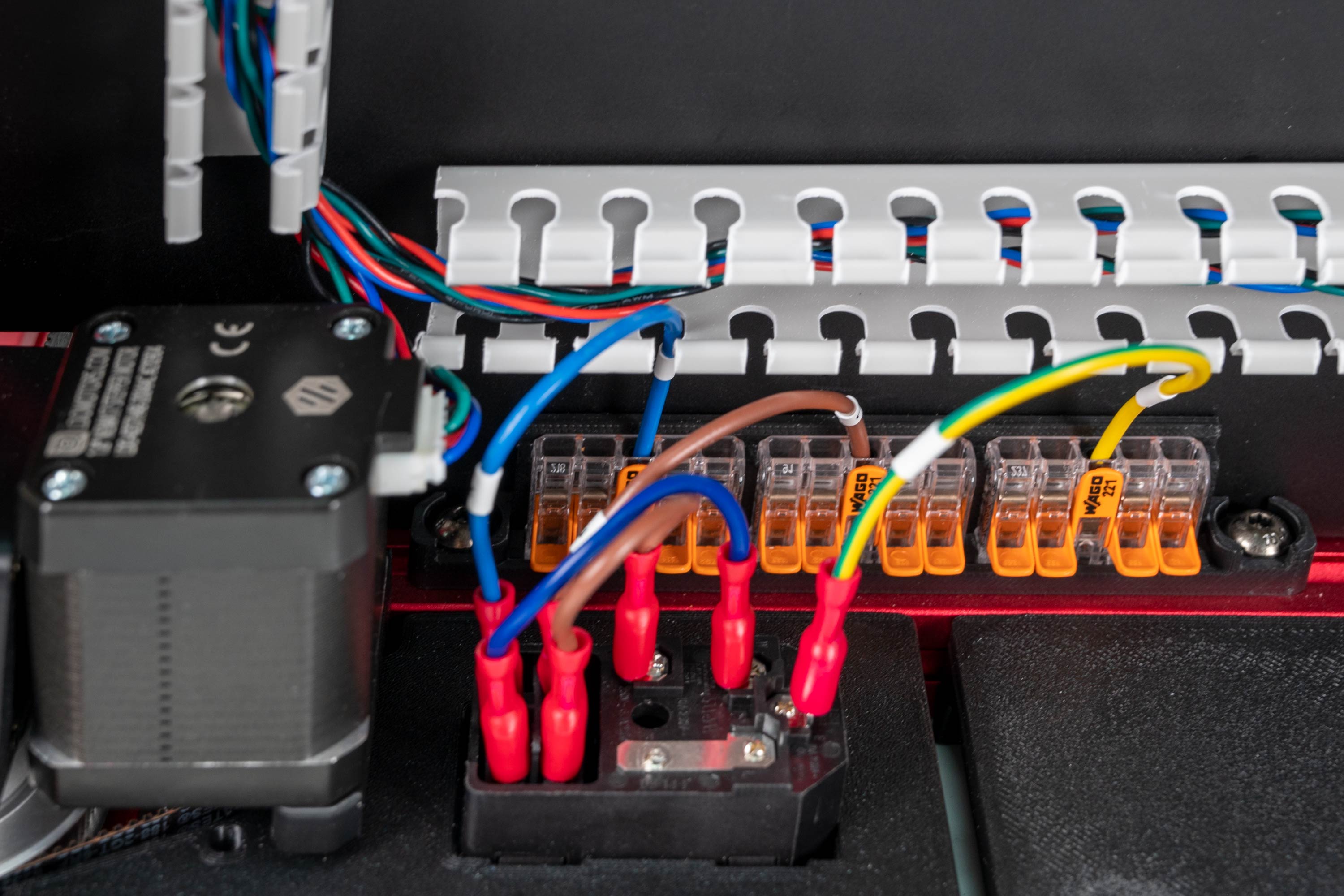
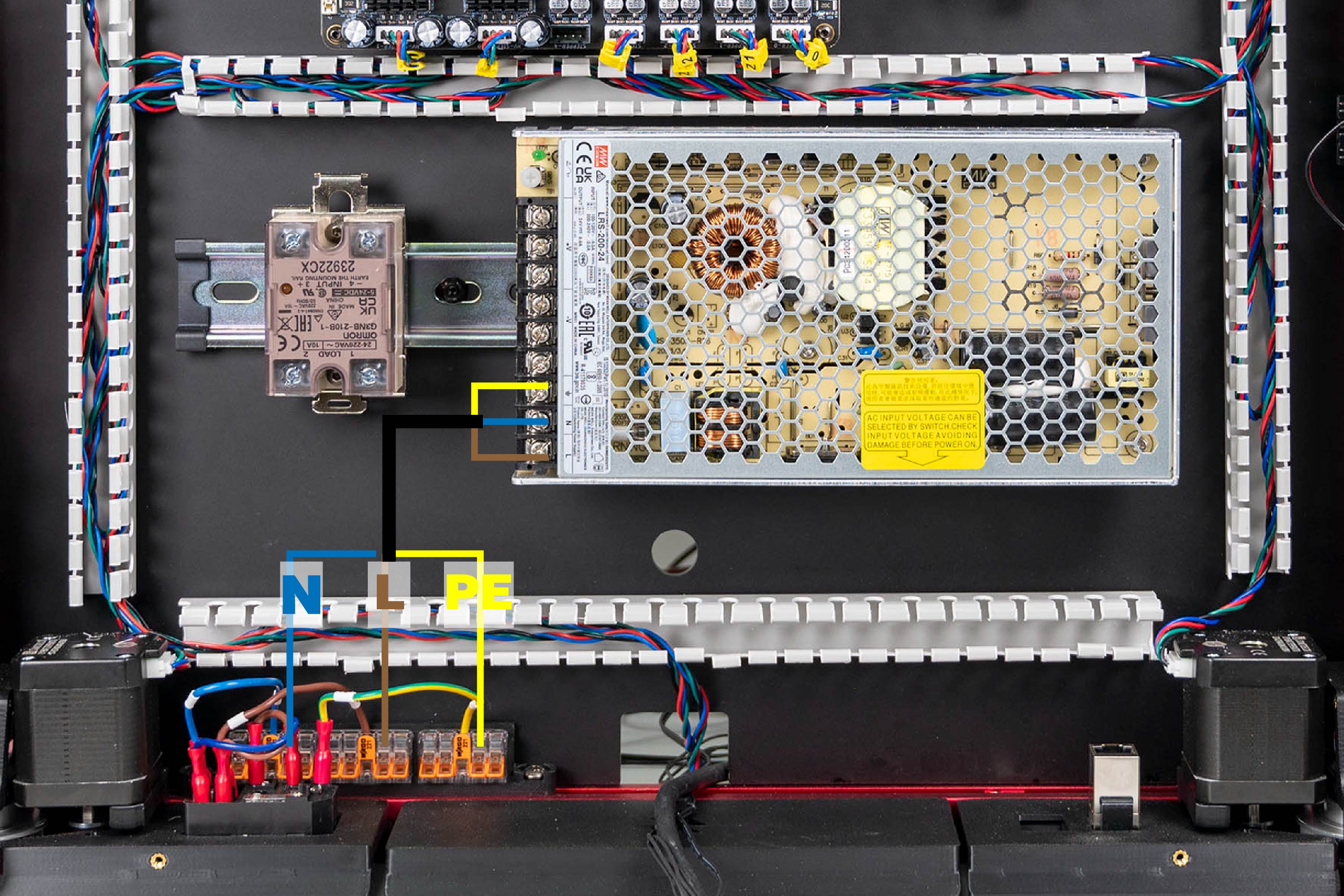
Step 10.9 — WAGO bus → PSU¶
What you're looking at: The PSU's AC input is the three screws at one end of its terminal block: 1 AC/L, 2 AC/N, 3 FG, FG being frame ground, marked ⏚. The rest of the block is the 24 V DC output, empty until step 10.24.
Parts:
- PSU AC cable set, 3 cores ×1 — from the Cable Kit box
- tool: PH2 screwdriver
Do:
- Feed the ferrules down the port stub and SSR run.
- Brown on 1 L, blue on 2 N, green/yellow on 3 FG, PH2 tight.
- Strip 11 mm; other ends into WAGO blue N, brown L, green/yellow PE.
Check
1 L outermost, 2 N, 3 FG innermost beside −V; brown, blue, green/yellow. Pull-test all six ends; the DC side is still empty.
LDO layout
the cable runs from the WAGO bus along LDO's rear PVC duct to the PSU screws, as the mapping photo shows. LDO § Connecting WAGO and PSU
Source: LDO Rev D photo S3 WAGO/PSU mapping · LDO wiring guide § Connecting WAGO and PSU · Mean Well LRS-200 datasheet — terminal pin assignment · review/2026-09-23-bay-mods/layout-v3/layout-v3.md § AC conduit, SSR run
Good stopping point · ~30 min since the last one
inlet verified, plug panel confirmed on the frame, WAGO bus labelled N/L/PE, and the inlet→WAGO→PSU run fully terminated at both ends. Nothing plugged in, cord out of the room. Do not walk away with a stripped mains core outside a WAGO lever.
Step 10.10 — Read the SSR terminal numbers before you wire it¶
What you're looking at: The SSR is the black brick on the DIN rail: a solid-state relay, so the mainboard can switch a mains bed heater with a small DC signal. Its four screws are two separate circuits, 1/2 the mains it switches and 3 +/4 − the control side.
Parts:
- reused: the Omron SSR on its DIN bracket
Do: Read the SSR body: the pair silkscreened 1 LOAD 2 is the AC switching side, 3 + INPUT 4 − the DC control side. Note which end the yellow indicator LED sits at, and match LDO's photo.
Check
You can point at terminal 1, 2, 3 and 4 without hesitating, and the LED is on the same side as in the photo.
Caution
Rev D+ / LDO: "The SSR connection is critical, an incorrect connection can cause catastrophic damage." Nothing else in this chapter carries that warning. src
Note: how LDO tags its cables. Every pre-made lead in the kit is tagged, and the two kinds of tag say different things. A TO … tag names the far end's destination: TO SSR sits at the WAGO end of SSR to Wago; TO MB, TO MB HV and TO TOOLHEAD sit at the PSU ends of the board supply, the HV stepper supply and 24V power. The other end of each of those carries the rail name it lands on — 24V, HV, 24V IN, SSR SIG — not a destination. Read a TO tag as "this cable is going to …", a rail tag as "this is the … rail", then check the connector type and the red/black polarity at both ends. src
Note: the SSR body is also marked EARTH THE MOUNTING RAIL. LDO's build does not run a separate PE to the DIN rail. If your local rules require an earthed rail, that is a mains change — have it specified by whoever signs off your mains work.
Source: LDO Rev D photo S4 24 V/SSR mapping · LDO wiring guide § Connecting 24V · Video: Part 8 @1:29:57
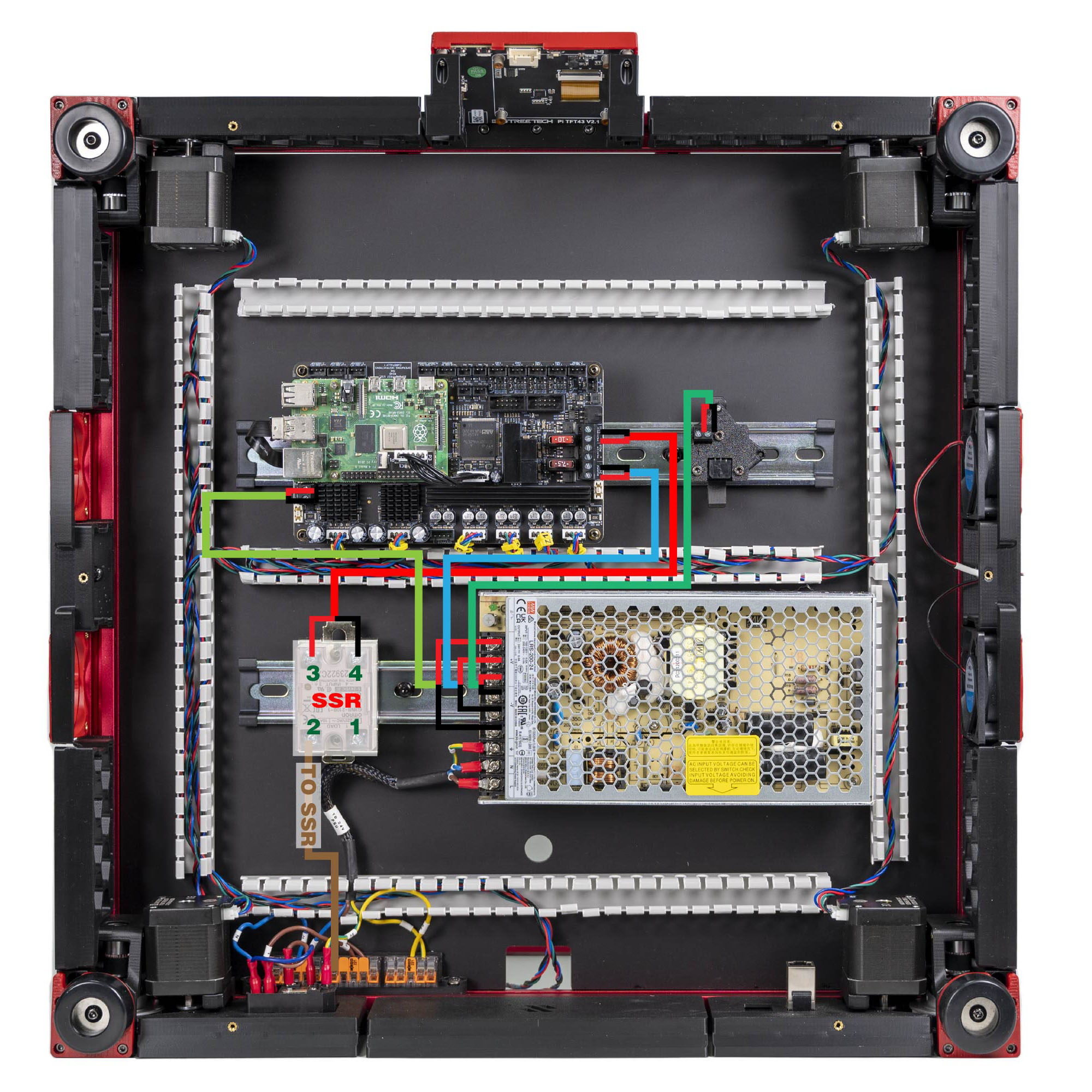
Step 10.11 — Live from the WAGO bus → SSR LOAD 2¶
What you're looking at: The SSR to Wago cable is one of the kit's pre-made mains leads: a bare stripped end for the WAGO lever, and a ferruled end for the relay, its crimped sleeve turning stranded wire into a tube a screw can clamp.
Parts:
- SSR to Wago cable ×1 — from the Cable Kit box
Do:
- Strip the TO SSR end to 11 mm; land it in a spare port of the brown L WAGO.
- Feed it down the port stub and SSR run.
- Ferruled end on SSR terminal LOAD 2, PH2 tight.
Check
Continuity from the C14 L pin, rocker ON, through to SSR terminal 2. Nothing on terminal 1 yet.
LDO layout
the cable runs from the WAGO bus along LDO's rear PVC duct to the SSR, as the mapping photo shows. LDO § Connecting 24V
Source: LDO Rev D photo S4 24 V/SSR mapping · LDO wiring guide § Connecting 24V · Video: Part 8 @1:24:57
Step 10.12 — Bed harness into the bed WAGO breakout¶
What you're looking at: Four things leave the build plate: the heater pad's two mains leads, its earth ring terminal and the bed thermistor. The bed WAGO mount, above the deck on the left bed extrusion, joins the leads to the kit's extensions; the 2×2 splicer does the thermistor.
Parts:
- reused: the plate's Bed L, Bed N and BED TH leads and its PE ring terminal
- Bed L extension lead ×1 — from the Cable Kit box
- Bed N extension lead ×1 — from the Cable Kit box
- reused: the bed WAGO mount with its two WAGO 221-412 and the 2×2 XH splicer
Do:
- Bed L and extension into the first WAGO, N and Bed N into the second, BED TH into the 2×2 splicer.
- Loosen the M4×6 BHCS three turns, slide the PE ring under the serrated washer, retighten.
Check
L, N, PE and TH leave the bed WAGO mount. Ring terminal will not rotate by hand; plate lifts 20 mm with no lead tight.
Never L and N in one block
each 2-way WAGO is one node, so a block is all-Live or all-Neutral. Do not take the M4×6 BHCS out; back it out three turns only. It is the screw Step 03.6 left in place for this moment.
Layout v3
the round deck hole carries mains only, so the splicer's TH cable goes over the deck to the Z-chain notch at 10.44. LDO layout: it drops through the round hole with the bed leads. LDO § Wiring the bed heater
Source: LDO wiring guide § Wiring the bed heater · LDO wiki build-plate mapping · review/2026-09-23-bay-mods/layout-v2/layout-v2.md § Component shifts, bench check 2 · Video: Part 8 @0:54:59
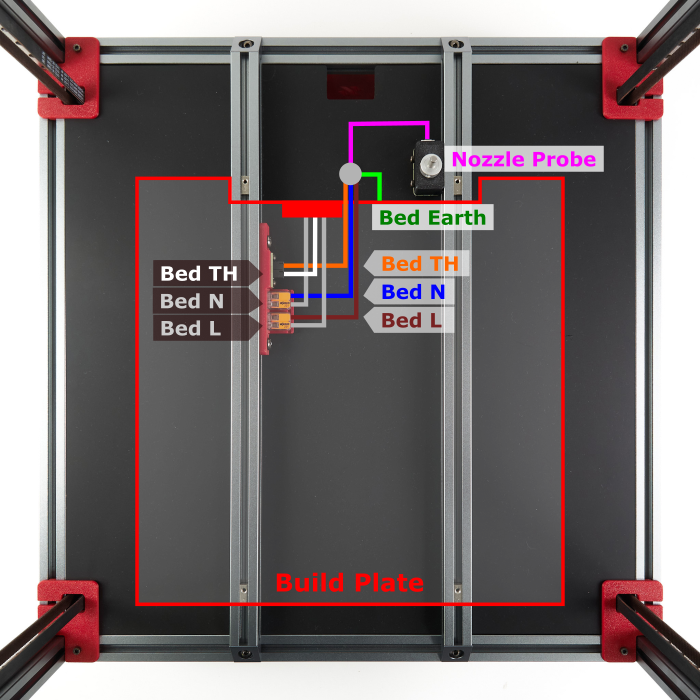
Step 10.13 — Measure the bed heater before you connect it¶
What you're looking at: You are measuring the heater pad before it can ever be energised. Across its own two leads it should read a few tens of ohms; to the aluminium plate it is bonded to, nothing at all. The photo identifies which lead is which.
Parts:
- tool: multimeter
- reused: the Bed L and Bed N extension leads, far ends still free
Do:
- Meter on Ω. Measure Bed L → Bed N at the free ends of the two extensions.
- Measure Bed L → the aluminium plate and Bed N → the aluminium plate, touching the M4×6 PE screw head.
Check
All three readings must land in these bands.
| Measurement | Expected |
|---|---|
| Bed L → Bed N | a stable reading in the tens of ohms. Not 0 Ω. Not OL. |
| Bed L → plate / PE | OL on your meter's highest Ω range |
| Bed N → plate / PE | OL on your meter's highest Ω range |
A dead short means the pad is damaged and must not be connected. OL on L → N means an open pad or 125 °C thermal fuse — but first re-seat both leads in their WAGO levers and measure again, because an unseated core reads the same. Either way, do not go on until the number is right.
Why 'tens of ohms', and how to compute your own target
LDO does not publish the pad's wattage on the Rev D BOM, so derive the number yourself: R = V² ÷ P, using the mains voltage the pad is wound for and the wattage printed on the pad's own label. Worked examples — not your value: 750 W at 120 V → 19.2 Ω; 750 W at 230 V → 70.5 Ω. Read your own label, do the division, and expect the meter to land within a few ohms of it.
Source: LDO wiring guide § Wiring the bed heater · LDO Rev D 350 BOM · LDO wiring guide image bed_heater_wires_revd.jpg
Step 10.14 — Bed Live → SSR LOAD 1¶
What you're looking at: Terminal 1 is the relay's output, live only while the SSR is switched on. Landing the bed's Live lead here is what makes the heater controllable instead of permanently connected to the mains.
Parts:
- reused: the Bed L extension lead
Do: Run the Bed L extension from the bed WAGO breakout down through the round deck hole into the 34 mm run, round both curves, through the wire box, port stub and SSR run to terminal LOAD 1. PH2, tight.
Check
Terminal 1 = bed, terminal 2 = mains Live, LDO's convention from the photo. The lead lies slack in the conduit.
Layout v3
this route is about 47 mm longer than LDO's; check spare against LDO's route during this fit (verify on bench). Never stretch a mains lead — if short, make a longer Bed L lead, same gauge and connector (verify on bench). LDO layout: hole, then LDO's rear PVC duct, to LOAD 1. LDO § Connecting build plate
Source: LDO Rev D photo S5 build-plate mapping · LDO wiring guide § Connecting build plate
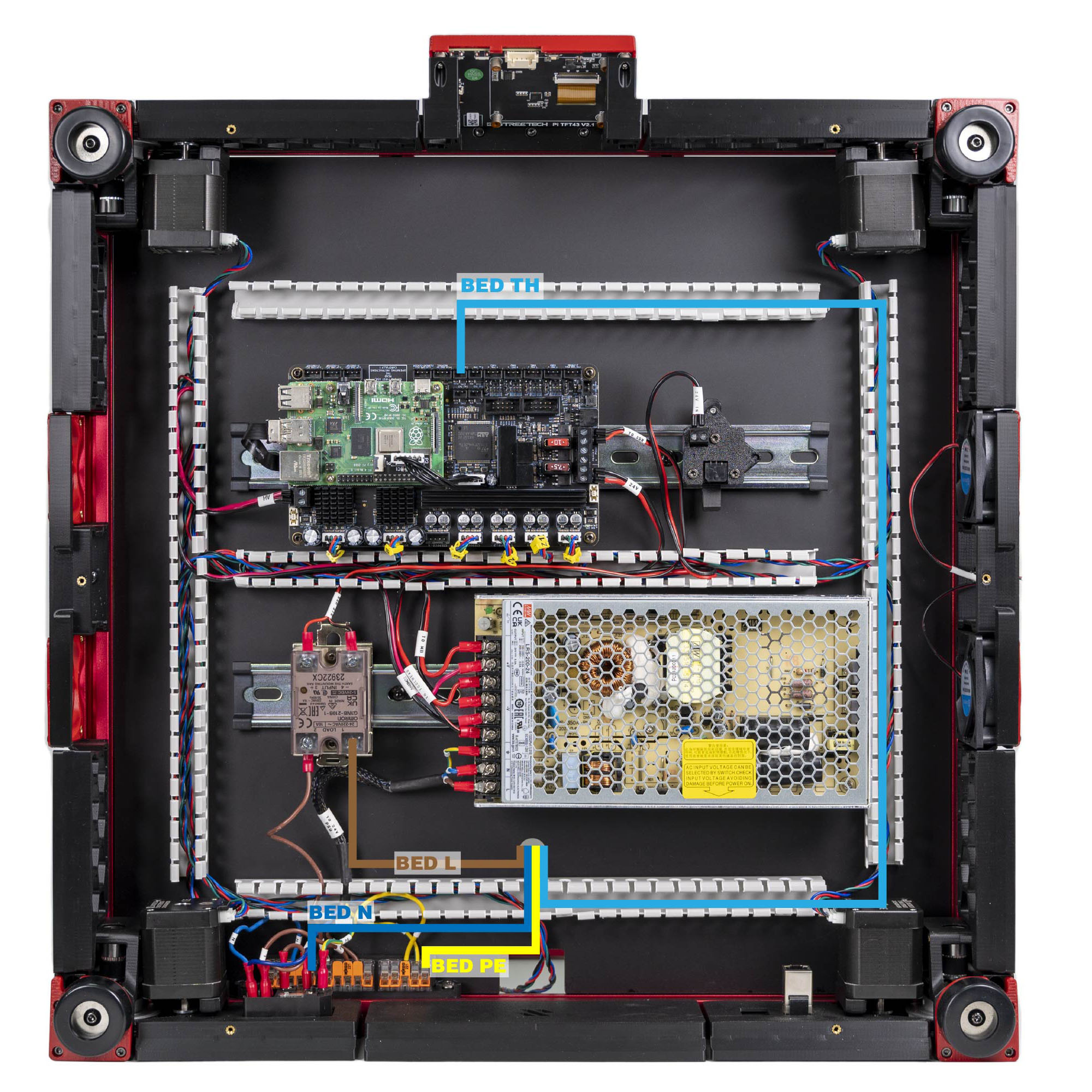
Step 10.15 — Bed Neutral and bed PE → the WAGO bus¶
What you're looking at: The heater's return path, Neutral, and the plate's earth both go straight to the bus, unswitched; only the Live side passes through the relay. That earth connection keeps the aluminium plate safe to touch if the heater pad ever fails onto it.
Parts:
- reused: the Bed N extension lead
- reused: the bed PE lead
Do: Lay both leads from the 34 mm run round the two curves into the wire box. Bed N into a spare port of the blue N WAGO. Bed PE into a spare port of the yellow PE WAGO.
Check
Continuity from the C14 earth pin, through the PE WAGO, to bare aluminium on the build plate.
LDO layout
both leads run from the round hole along LDO's rear PVC duct to the WAGO bus, as the photo shows. LDO § Connecting build plate
Source: LDO Rev D photo S5 bed wired · LDO wiring guide § Connecting build plate · Video: Part 8 @0:59:54
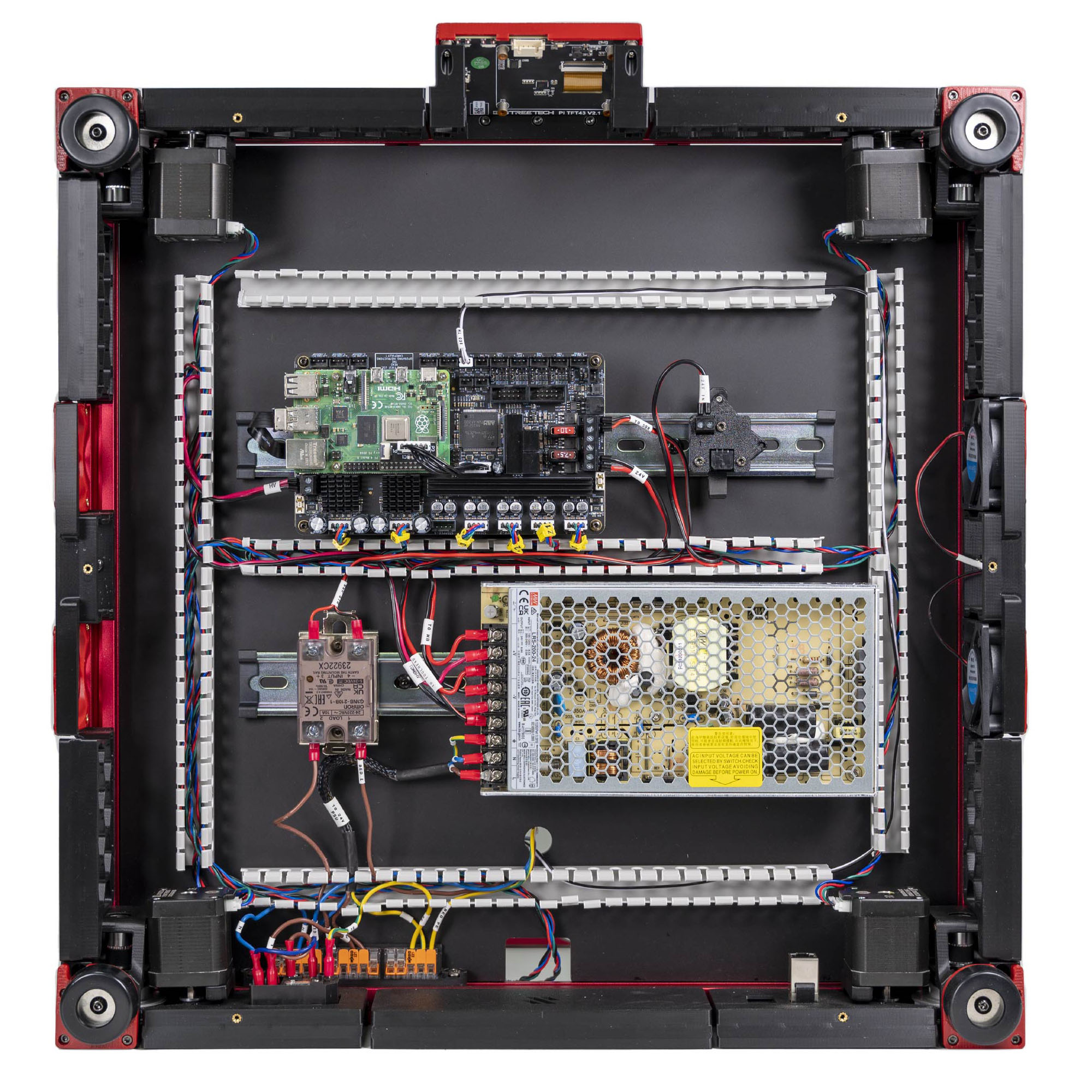
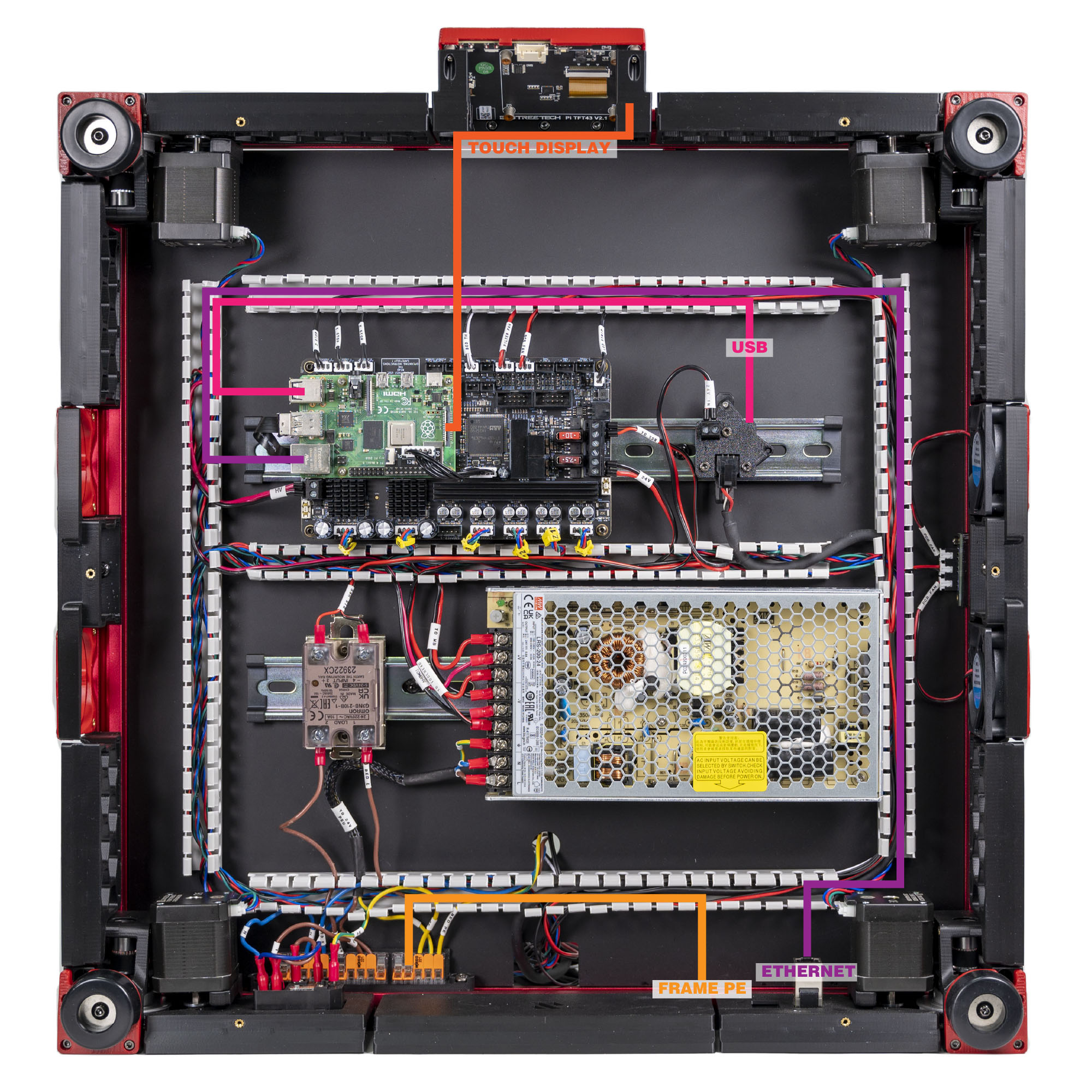
Step 10.16 — Frame PE¶
What you're looking at: FRAME PE is the single green/yellow lead that bonds the whole aluminium frame to earth. Anodising, the hard oxide layer on the extrusions, is an insulator, so the ring terminal must bite through to bare metal. The two locking washers do the biting.
Parts:
- FRAME PE cable ×1 — from the Cable Kit box
- M5 locking washer ×2
- M5×10 BHCS ×1 (verify on bench)
- M5 roll-in T-nut ×1 (verify on bench)
Do:
- Scrape the rear extrusion to bare metal ~20 mm to the printer's left of the Z-chain notch
(verify on bench). Screw the ring terminal there, between both locking washers. - Lead it via the box's rear tines to the PE WAGO.
Check
From the C14 earth pin: the lug's screw head under 1 Ω, a far frame corner under 2–3 Ω. Probe bare metal, never anodising.
Layout v3
the lug sits between the WAGO-mount screw and the notch, the drawing's magenta ring, clear of the notch's DC bundle. "Left" is the printer's left, whichever way it lies. LDO layout: the rear extrusion right of the deck notch, as the photo shows. Same washers, same bare metal, same check. LDO § Frame PE
Source: LDO Rev D photo VS8 mapping · LDO wiring guide § Connecting the FFC cable, Ethernet cable, USB cable and frame PE · review/2026-09-23-bay-mods/layout-v2/layout-v2.md bench check 12 · layout-v3/layout-v3.json components_moved · drawings: layout-v3/work/leads_v3.py
Good stopping point · ~30 min since the last one
every mains connection made and pull-tested: SSR LOAD 1/2, bed L/N/PE, frame PE. Cord still out of the room and the DC side untouched. Next segment is LDO's Checkpoint #1 — start it only when you have an uninterrupted 25 minutes.
Section 2 — Checkpoint #1, exactly as LDO writes it¶
Step 10.17 — De-energise and set up¶
(no image — see text)
What you're looking at: Nothing to look at on the machine; this step is about the meter and the absent cord. Continuity mode makes the meter beep whenever a conductive path joins its two probes, and that beep is the instrument for every measurement in this section.
Parts:
- tool: multimeter
Do: Confirm the C13 power cord is not plugged into the inlet and is not in the room. Set the meter to continuity/beeper and test it by shorting the probes.
Check
The meter beeps on a dead short. No cord anywhere near the machine.
LDO
"Incorrect wiring of AC/mains can be dangerous — therefore, always double check your work, and then triple check it once more." Do all seven steps, 10.17 to 10.23, in order. Do not skip ahead to the 24 V section.
Caution
Who is in the room, 00a.2: one adult at the machine for 10.17 to 10.23. She is out of the room until 10.24; at 10.23 nobody but the person with a hand on the switch is within reach of the machine.
Source: LDO wiring guide § Checkpoint 1
Step 10.18 — Colour groups are shorted¶
(no image — see text)
What you're looking at: You are proving that each conductor colour is one electrical node from the inlet pin to its last destination: out to the PSU screws, the relay, the bed and the frame. A core that never seated in its lever looks perfect from outside.
Parts:
- tool: multimeter
Do:
- One colour at a time, park one probe on the first node in its list and walk the other probe along every node after it.
- Rocker ON for the L and N lists, either position for PE.
Check
Every row beeps. For a row with an Ω figure, short the probes on Ω first and subtract that reading.
PE — green/yellow (rocker on or off — the earth path is never switched)
| From the C14 E pin to … | Expected |
|---|---|
| every occupied port of the PE WAGO | beeps, < 1 Ω |
| PSU screw 3 FG (⏚) | beeps, < 1 Ω |
| bed PE ring — probe the head of the plate's M4×6 screw | beeps, < 1 Ω |
| frame PE ring — probe its screw head | beeps, < 1 Ω |
| frame, far corner — a T-nut or bare cut end | beeps, < 2–3 Ω |
| PSU chassis — a bare case screw | beeps, a few Ω or less (the case is bonded to FG inside the supply) |
N — blue (rocker ON)
| From the C14 N pin to … | Expected |
|---|---|
| every occupied port of the N WAGO | beeps |
| PSU screw 2 N | beeps |
| bed N — the pad's N lead at its bed-WAGO port | beeps |
L — brown (rocker ON, fuse fitted)
| From the C14 L pin to … | Expected |
|---|---|
| the fuse, drawer in — it sits between the L pin and every row below, so those rows prove it in circuit | beeps |
| every occupied port of the L WAGO | beeps |
| PSU screw 1 L | beeps |
| SSR LOAD 2 | beeps |
To read the fuse alone: drawer out, probe cap to cap. It beeps; OL is a blown fuse. Refit the drawer before you walk the L list.
Bed L branch — a node of its own until the SSR conducts
| From SSR LOAD 1 to … | Expected |
|---|---|
| the Bed L extension's bed-WAGO port, and the pad's Bed L lead | beeps |
| SSR LOAD 2 | silent — that is step 10.21 |
A node that does not beep is a core that did not seat in its WAGO lever, or a screw terminal clamped on insulation. Re-strip and re-seat it, then repeat that colour's whole list.
Source: LDO wiring guide § Checkpoint 1
Step 10.19 — L, N and PE are isolated from each other¶
(no image — see text)
What you're looking at: The mirror image of the previous check: the three buses must have no path between them at all. Live touching Neutral is a short across the mains; Live touching earth is what makes the metalwork lethal.
Parts:
- tool: multimeter
Do:
- Probe L→N, L→PE, N→PE at the WAGO blocks, rocker on, then again off.
- Probe the same three pairs at the PSU screws: 3 FG ↔ 1 L, 3 FG ↔ 2 N, 1 L ↔ 2 N.
Check
No beep on any of the nine. L↔N reads 100 kΩ or more, or OL, on the 2 MΩ range; L↔PE and N↔PE read OL.
Why 100 kΩ
the PSU input bridges L and N whatever the rocker does, reading hundreds of kΩ or more, often climbing as its capacitors charge (verify on bench). A stray strand reads near 0 Ω; a shorted SSR reads the bed pad, tens of ohms. Write your L↔N number down for 10.78.
Tip
a momentary tick on 1 L ↔ 2 N as the PSU's input filter charges from the meter is normal; a steady beep is not.
If L↔N beeps or reads under 100 kΩ
something bridges the mains, a stray strand at a WAGO or a shorted SSR. Lift the brown lead off SSR LOAD 2 and re-measure. Silent now: the fault is on the SSR or bed side. Still beeping: a strand at a block. Refit the lead, PH2 tight.
Source: LDO wiring guide § Checkpoint 1
Step 10.20 — The switch actually switches¶
(no image — see text)
What you're looking at: The rocker in the inlet module is the machine's only mains isolator, so it has to genuinely break both poles rather than just one. This check watches the meter change state as you toggle it.
Parts:
- tool: multimeter
Do: With the meter across the C14 L pin and a brown WAGO node, toggle the rocker.
Check
Beeps with the rocker on, silent with it off. Repeat for N. If either stays connected, go back to step 10.5.
Source: LDO wiring guide § Checkpoint 1
Step 10.21 — The SSR is open when unpowered¶
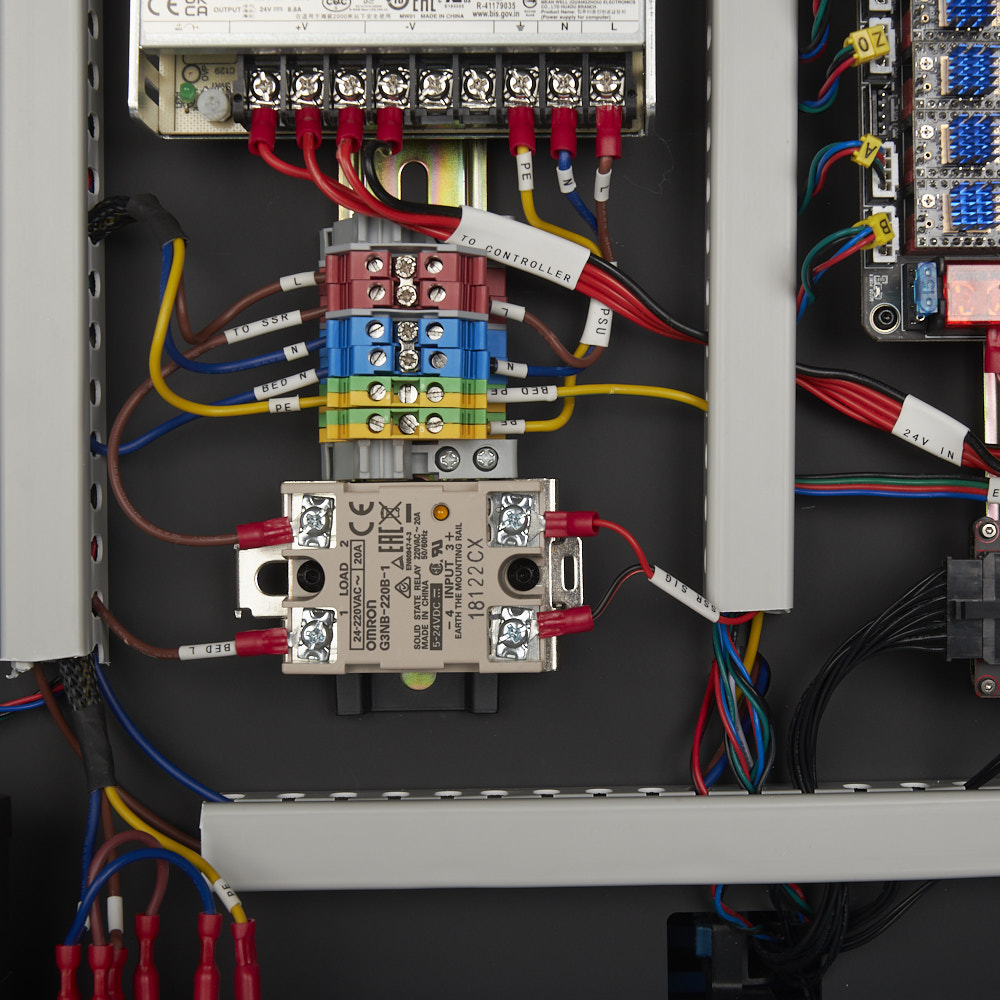
What you're looking at: With nothing on terminals 3 and 4 the relay's semiconductor switch must be off, so its two mains terminals should have no path between them. The close-up shows the terminals you are probing. It is a Rev C bay, so read only the SSR body.
Parts:
- tool: multimeter
Do: Measure SSR LOAD 1 → LOAD 2 with nothing energised.
Check
No beep, and INPUT 3/4 are still empty.
Source: LDO wiring guide § Checkpoint 1 · LDO wiring photo SSR_Close_Up.jpg
Step 10.22 — Re-check the voltage selector¶
What you're looking at: The same red slide switch as step 10.2, read a second time now that the PSU is wired in place and half in shadow. It is the one setting that destroys the supply on first switch-on.
Parts: none.
Do: LDO: "Check again that the power supply voltage input switch is set to the correct value: 115V vs 230V." Look at the window a second time, now that the PSU is wired and the light is worse.
Check
The number in the window matches your mains. If you have the EU RSP-200-24 there is no switch and nothing to check.
Source: LDO wiring guide § Checkpoint 1 · LDO wiring photo psu_switch.jpg
Step 10.23 — First power-on, then off again¶
(no image — see text)
What you're looking at: The only moment in this chapter when mains is present. The rocker lamp and the PSU's indicator LED are the two observations that say the mains half works; ten seconds of looking, listening and smelling is the whole test. Nothing is measured live.
Parts:
- C13 power cord ×1
Do:
- Printer upright. Rocker OFF, meter away; cord into inlet, then wall.
- Everyone back; stand aside, hand on the rocker, switch ON. Look, listen, smell ten seconds.
- Rocker OFF, unplug wall then inlet, cord out of the room.
Check
All three observations during the ten seconds.
| Observe | Expected |
|---|---|
| Inlet rocker | illuminates |
| PSU indicator LED | lights green, seen from beside the machine (verify on bench) |
| Noise / smell | none. Any buzz, click-cycling or smell → rocker OFF, then pull the plug at the wall |
Everything from here to the end of the chapter is done dead.
Caution
Who is in the room, 00a.2: one adult, standing to the side, hand on the switch. Nobody else within reach of the machine; she is out of the room.
Caution
Rev D+ / LDO: this is the only power-on in the chapter. The Leviathan, Pi and toolboard are all still unpowered — the PSU's DC terminals are empty. Never meter a live block: the PSU's +V/−V screws share an uncovered block with live N and L. Keep your free hand behind your back. src
Source: LDO wiring guide § Checkpoint 1
Good stopping point · ~25 min since the last one
Checkpoint #1 passed end to end and the machine was powered once and switched off. Cord unplugged and back out of the room. Everything from here is done dead; lay the printer back on its side, bay towards you, for Section 3.
Section 3 — 24 V distribution¶
Step 10.24 — PSU → Leviathan board supply¶
What you're looking at: 24V PSU to MB is the kit lead that feeds the Leviathan's own electronics, and Vin 24V / Board is the screw-terminal pair on the mainboard that accepts it. The board has a second, separate supply input for the stepper drivers, which is wired next.
Parts:
- 24V PSU to MB cable ×1 — from the Cable Kit box
- tool: multimeter
- consumable: cable tag
Do:
- TO MB end onto the PSU +V/−V, 24V end onto the Leviathan's Vin 24V / Board. Red to +, black to −.
- Tag the cable. Tags and wire colours are the only end markers (verify on bench).
 Check
Check
0 V across PSU +V and −V, still 0 V ten seconds later. Polarity read twice, both ends. Cable tagged at the board end.
Source: LDO Rev D photo S4 24 V/SSR mapping · LDO wiring guide § Connecting 24V · LDO Leviathan V1.3 guide (manual p.8)
Step 10.25 — PSU → Leviathan HV stepper supply¶
What you're looking at: Vin 24-48V / HV-Steppers is that second input, feeding only the two HV stepper drivers, the TMC5160 chips that run the A and B motors. On this build both inputs come from the same 24 V PSU; the port simply also accepts up to 48 V.
Parts:
- HV to MB HV cable ×1 — from the Cable Kit box
Do: TO MB HV end onto the PSU's +V / −V terminals, alongside the board supply. HV end onto the Leviathan terminal silkscreened Vin 24-48V / HV-Steppers.
Check
Polarity. Both PSU-side cables share the same +V/−V pair: each ferrule fully under its screw, no strand crossing between +V and −V.
Source: LDO Rev D photo S4 mainboard/PSU wired · LDO wiring guide § Connecting 24V
Step 10.26 — PSU → USB adapter PCB (toolhead 24 V)¶
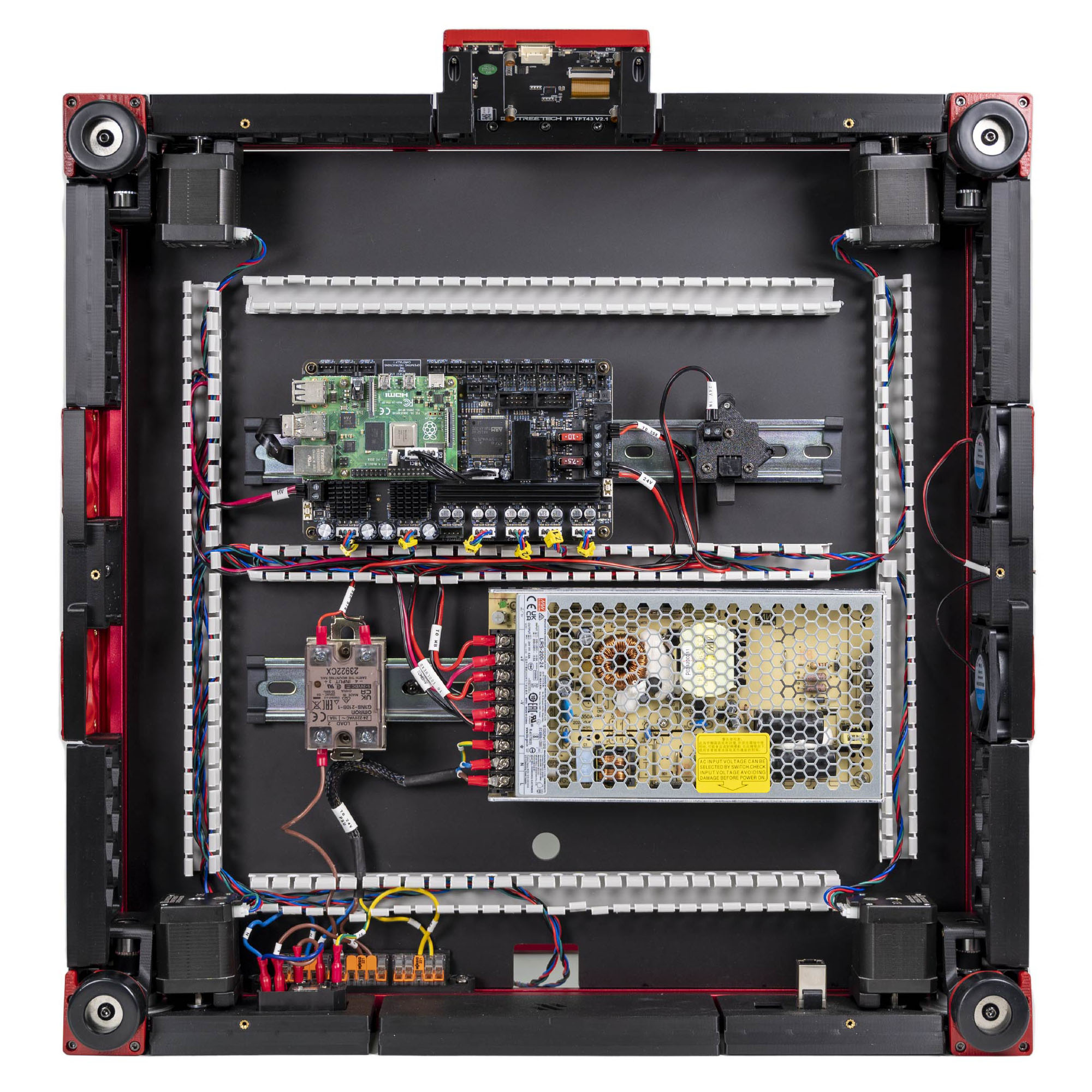
What you're looking at: The USB adapter PCB on its DIN clip is the bay-side end of the toolhead link: 24 V and USB arrive on this side as two separate cables and leave on the other side as one umbilical. This step is the 24 V half.
Parts:
- 24V power cable ×1 — from the Cable Kit box
Do: TO TOOLHEAD end onto the PSU +V/−V. 24V IN end onto the USB adapter PCB on its DIN clip. This is what powers the Nitehawk down the umbilical.
Check
Polarity at the USB adapter end matches the silkscreen. The adapter PCB's cover is the partial cover; see step 10.57.
Source: LDO Rev D photo S6 gantry-cable mapping · LDO wiring guide § Connecting 24V
Step 10.27 — Leviathan HEATBED → SSR INPUT¶
What you're looking at: HEATBED on the Leviathan is a low-current DC output; it never carries bed power, it only tells the relay when to conduct. This polarised red/black pair is the entire control link between the firmware and a mains heater.
Parts:
- SSR to MB cable ×1 — from the Cable Kit box
Do: SSR SIG end onto the SSR's INPUT 3&4: red to INPUT 3, black to INPUT 4. To SSR end onto the Leviathan's HEATBED terminals.
Check
Red on 3, black on 4, and red on the Leviathan HEATBED +. Trace the pair from board to relay with a finger.
Caution
Rev D+ / LDO: reversed INPUT 3/4 means the SSR never fires and the bed stays cold. The dangerous failure is the other one — a shorted relay, which leaves the bed permanently live with no thermal control; that is what 10.21 and 10.78 test for. src
Source: LDO Rev D photo S4 24 V/SSR mapping · LDO wiring guide § Connecting 24V
Step 10.28 — Set the FAN2 and FAN3 jumpers to 24 V¶
What you're looking at: The jumper block from step 10.3, now being set. A jumper across a port's 24 V pins selects that port's output voltage. The diagram shows the end state: five headers, Fan2 and Fan3 fitted at 24 V, three left bare.
Parts:
- reused: two of the jumpers bagged in Ch 09
Do: Fit a jumper on Fan2 and one on Fan3, both in the 24 V position. Leave Fan0, Fan1 and Probe bare.
Check
Exactly two jumpers on the board, both on the 24 V pins, on Fan2 and Fan3. Count them.
Caution
Rev D+ / LDO: on a Nitehawk build the hotend, part fan and probe all live on the toolboard, so the Leviathan's probe and Fan0/Fan1 ports stay unused — that is why they stay unjumpered. src · BOM
Source: LDO Leviathan V1.3 guide (manual p.7) · LDO Rev D 350 BOM · Leviathan repo wiring_V1.3.jpg
Step 10.29 — Meter the 24 V rail for shorts¶
(no image — see text)
What you're looking at: A resistance sanity check across the 24 V rail you have just wired, with no power anywhere. A shorted rail reads like a piece of wire; a healthy one climbs as the boards' input capacitors charge from the meter's own test current.
Parts:
- tool: multimeter
Do:
- With the PSU unplugged, measure +V → −V at the PSU on the Ω range.
- Repeat across the Leviathan's Vin 24V, its Vin 24-48V and the USB adapter's 24 V input.
Check
Finite resistance that rises, hundreds of ohms climbing into the kΩ, the same at all three inputs. Nothing reads 0 Ω or beeps continuously.
Source: LDO wiring guide § Connecting 24V · survey §5.2 W8
 Good stopping point · ~25 min since the last one
24 V distribution complete: board supply, HV stepper supply, USB-adapter feed, HEATBED→SSR control pair, Fan2/Fan3 jumpers at 24 V, and every rail metered with no short. Nothing above deck touched yet.
Section 4 — Above deck: probe, endstops, nozzle probe, lighting¶
Step 10.30 — Confirm the inductive probe's tape¶
What you're looking at: The inductive probe is the small Omron sensor on the X carriage that senses the metal bed for gantry levelling; it never sets Z=0. Its fibreglass tape went on before it was fitted. This step only confirms it.
Parts: none.
Do: Look at the probe on the carriage. Confirm the tape from Step 07.34 is intact on the front and sides. Do not add more tape.
Check
The sensing face and the back are bare, and the tape does not bulge past the probe's lower rim.
Caution
Rev D+ / LDO: the tape shields the probe from hotend heat; it is not a spacer. A second wrap here makes too much, and the probe stops triggering. Torn tape: patch that spot only. src
Source: Voron manual p.143 · LDO wiring guide § Insulating the Z-probe · LDO wiki probe insulation photo
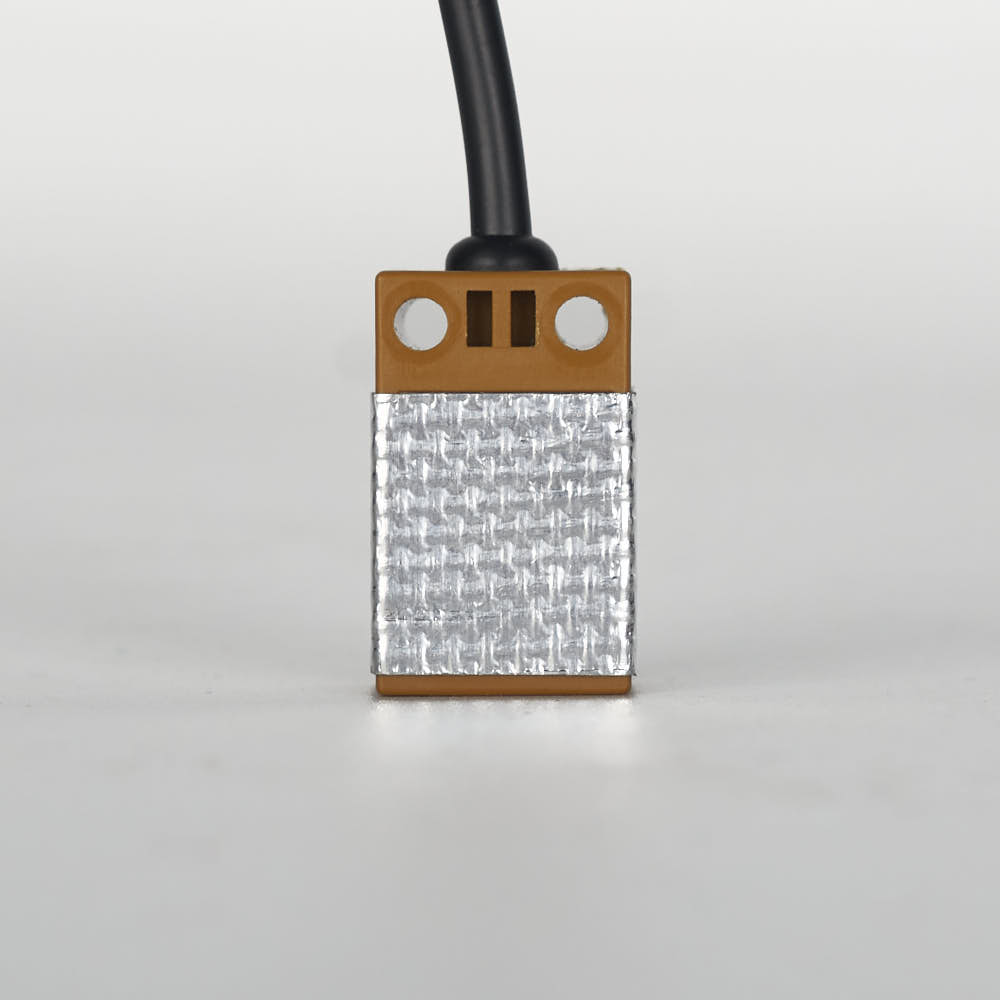
Step 10.31 — Read the XY endstop cable labels¶
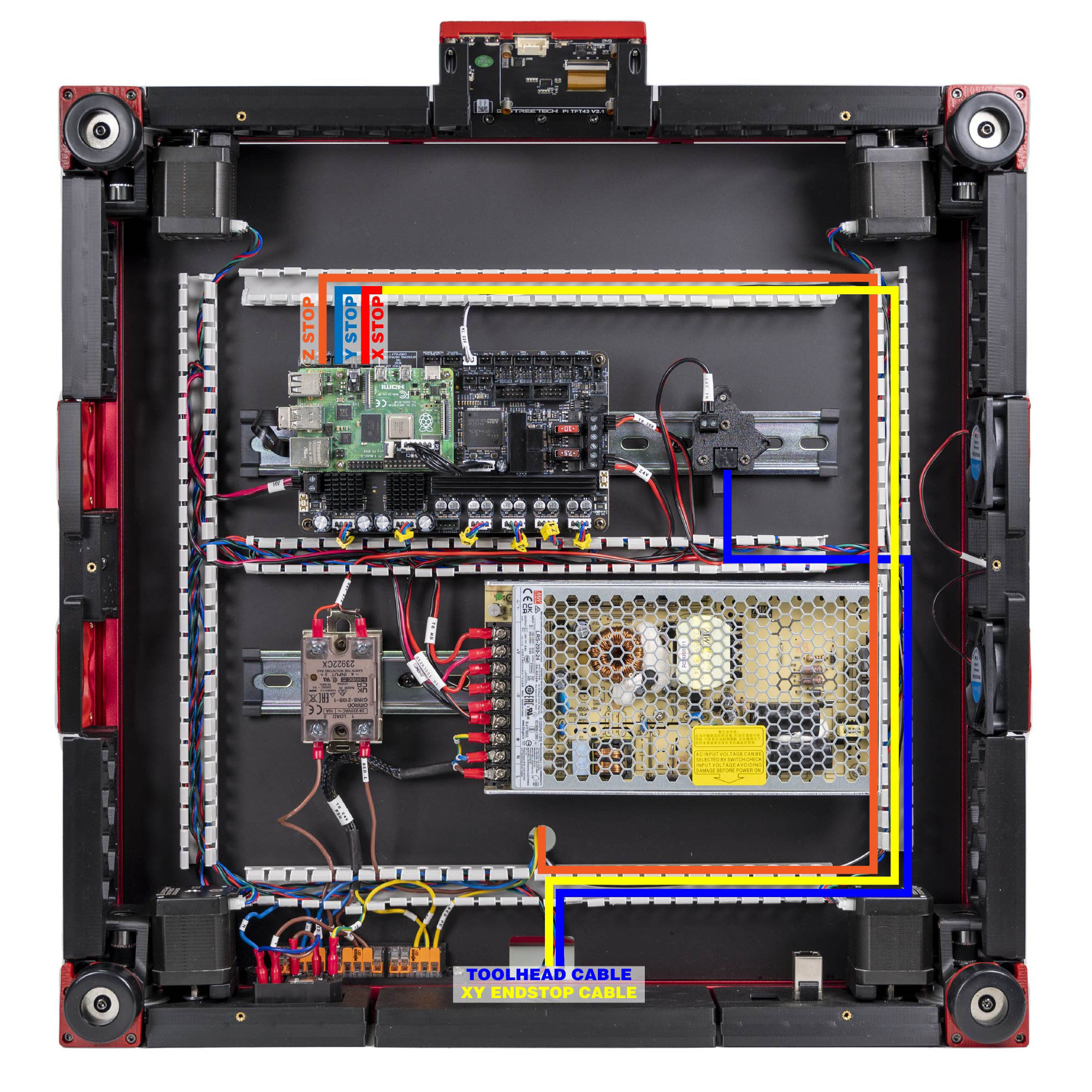
What you're looking at: One cable carries both limit switches: a single 4-pin plug at the gantry end that splits into two 3-pin plugs at the mainboard end. The photo is LDO's side-by-side of a correctly labelled cable and one from the mis-labelled batch.
Parts:
- staged: XY endstop cable ×1
Do: Read the two 3-pin connectors' labels.
Check
Read the two 3-pin connectors and match one row.
Helper: Reads both 3-pin labels aloud and points to the matching row in the table.
| Labels read | Meaning |
|---|---|
| XES and YES | correct cable — go to step 10.33 |
| X Stop and Y Stop | known bad batch — do step 10.32 first |
Caution
Rev D+ / LDO: a mis-pinned cable will not damage the Leviathan, but X and Y homing simply will not work and you will not find out until Ch 13. Check now. src
Source: LDO wiring guide § Wiring the XY endstop · LDO XY endstop reconnecting guide
Step 10.32 — Repin the XY endstop cable (only if labelled X Stop / Y Stop)¶
What you're looking at: Inside a JST housing each crimped wire is held by a small springy retention tab; press the tab flat and the wire slides out, bend it back up and it locks into its new position. The photo shows that tab.
Parts:
- staged: XY endstop cable ×1
- tool: tweezers or the supplied 2.5 mm flat screwdriver
Do:
- On X Stop, press the position 3 retention tab down, pull the wire out, bend the tab up, and insert it at position 2.
- On Y Stop, move the wire from 2 to 3. Light force only.
Check
Meter on continuity, against LDO's map:
| JST-XH 4P pin | goes to |
|---|---|
| 4 | X Stop pin 2 |
| 3 | X Stop pin 1 |
| 2 | Y Stop pin 1 |
| 1 | Y Stop pin 3 |
All four beep, and each repinned wire survives a light tug.
Source: LDO XY endstop reconnecting guide · LDO guide image retention_tab.jpg
Step 10.33 — XY endstop cable → the gantry PCB¶
What you're looking at: The XY endstop pod is the small PCB on the right XY joint carrying both the X and the Y microswitch. X homes to the right and Y to the rear, so the pod sits where both limits are hit.
Parts:
- XY endstop cable ×1 — from the Cable Kit box
- reused: the XY endstop PCB on the right XY joint
Do: Plug the 4-pin end into the XY endstop PCB. Leave the two 3-pin ends free; they reach the Leviathan in step 10.45. Dress the cable along the right Y extrusion toward the rear-right, ready for the Y chain.
Check
The connector is fully home and the cable leaves the PCB without loading the switch bodies.
Caution
Rev D+ / LDO: the kit uses one XY microswitch PCB, not the manual's hall-effect pods. Manual p.162 and p.169 are skipped entirely. src
Source: LDO Rev D photo S6 gantry-cable mapping · LDO wiring guide § Wiring the XY endstop · LDO Build Notes p.162, p.163, p.169
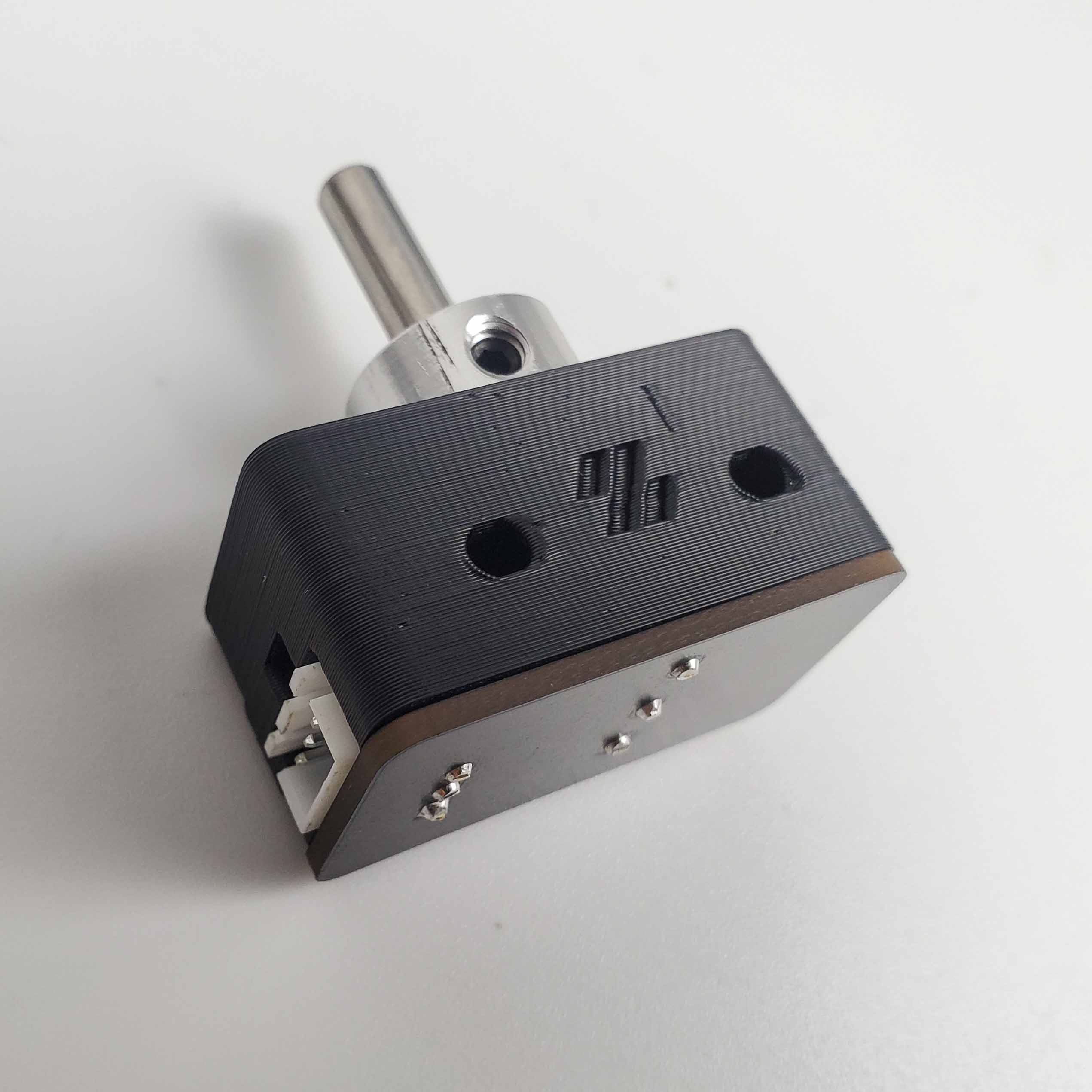
Step 10.34 — Nozzle-probe (Z endstop) cable¶
What you're looking at: The nozzle probe is LDO's mechanical Z endstop: a sprung 5 mm pin below the bed that the nozzle itself presses down onto a D2F microswitch, on the little PCB Ch 09 mounted. This, not the inductive probe, is what sets Z=0.
Parts:
- Z endstop cable ×1 — from the Cable Kit box
- reused: the nozzle-probe PCB
Do: Plug the 3-pin connector onto the nozzle-probe PCB. Route the lead across the deck to the Z-chain notch and drop it through beside the Z-chain bundle, not the round hole.
Check
Press the 5 mm shaft down with a finger: it moves freely, clicks the D2F, and springs back.
Helper: Presses the probe shaft down and says when the switch clicks and the shaft springs back.
Caution
The small GT2 pulley used as the shaft collar, built in Ch 09, has a set screw that stops the shaft falling out. It must not grip the shaft.
Layout v3
the notch route adds about 44 mm; check the lead has spare during this fit (verify on bench). If it's short, make a longer replacement lead, same 3-pin connector; a DC lead never enters the AC conduit. LDO layout: it drops through the round hole alongside the bed cables, per LDO's build-plate mapping. LDO § Wiring the bed heater
Source: LDO wiring guide § Assembling the nozzle probe · LDO wiring photo z_stop_final.jpg · Video: Part 8 @1:49:54 (differs: Euclid probe (Klicky fitted later, Part 11); this kit uses the Omron inductive probe + LDO nozzle probe, Klicky bagged · BTT Octopus + separate Raspberry Pi; this kit is a Leviathan with the Pi mounted on it)
Good stopping point · ~25 min since the last one
probe tape confirmed, XY endstop cable read (and repinned if needed) and plugged into the gantry PCB, nozzle-probe lead run to the Z-chain notch. Both cables are loose on the gantry, not yet in a chain.
Step 10.35 — Assemble the eight COB light-strip mounts¶
(no image — see COB README)
What you're looking at: COB light strips are the chamber lighting: a continuous line of LEDs under one phosphor rather than separate dots. Each printed mount is a two-piece clamshell that grips the strip and bolts to a frame extrusion.
Parts:
cob_light_strip_mount_100mm×6cob_light_strip_mount_50mm×2- M3×5×4 heat-set insert ×20 (verify on bench)
- M3×6 FHCS ×16
- staged:
z_chain_guide×1 - staged:
[a]_z_chain_retainer_bracket×1
Do:
- Melt two inserts into one half of each mount, plus the Z chain guide's two and the retainer bracket's.
- Close the halves with two M3×6 FHCS. Four mounts per strip: three 100 mm plus one 50 mm.
Check
The halves close flush and no mount rocks on glass. Guide and bracket inserts flush, an M3 screw starting by hand in each.
Source: LDOVoron2 STLs/COB Light Strip · LDO wiring guide § Routing the LED strips
Step 10.36 — Mount the COB strips left and right¶
What you're looking at: The strips go on the inner faces of the two top side extrusions, aimed down into the chamber. The diagram is LDO's routing plan for both strips and for the leads that meet at the rear.
Parts:
- COB LED strip ×2 — from the LDO kit, box not in the Rev D BOM
- reused: the eight assembled COB mounts
- M3×8 SHCS ×16
- M3 hammerhead T-nut ×16
Do:
- Slide four mounts into the top-left extrusion's inner face and four into the top-right, evenly spaced.
- Fasten each with two M3×8 SHCS into hammerhead nuts. Press the strips into their channels, leads to the rear.
Check
Both strips are level, fully seated, and their leads meet near the rear centre of the ceiling with slack to spare.
Helper: Holds each COB mount in place on the top extrusion while the adult drives its screws.
Source: LDO wiring guide § Routing the LED strips · LDO wiring photo led_route.png
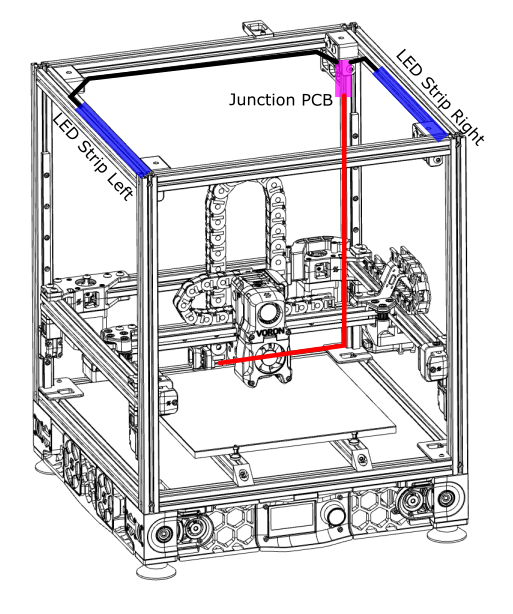
Step 10.37 — Mount the LED junction PCB on its spacer¶
What you're looking at: The 3×2 splicer PCB is a passive junction board: the two strip leads plug into two ports, the third carries one cable down to the mainboard. The printed spacer holds the bare board off the extrusion, which would otherwise short its underside.
Parts:
- 3×2 XH splicer PCB ×1
2x3 Splitter Spacer×1 (LDO-supplied printed)- M3×8 SHCS ×2
- M3 hammerhead T-nut ×2
Do: Stack the PCB on the printed spacer and bolt the sandwich to the inner face of the rear top extrusion. Plug the left and right strip leads into two of the three ports.
Check
The spacer is fitted. LDO calls it out twice: bolting the bare PCB against the extrusion shorts it. Nothing on the PCB's underside touches aluminium.
Source: LDO wiring guide § Routing the LED strips · LDO wiring photo led_splitter_placement.jpg
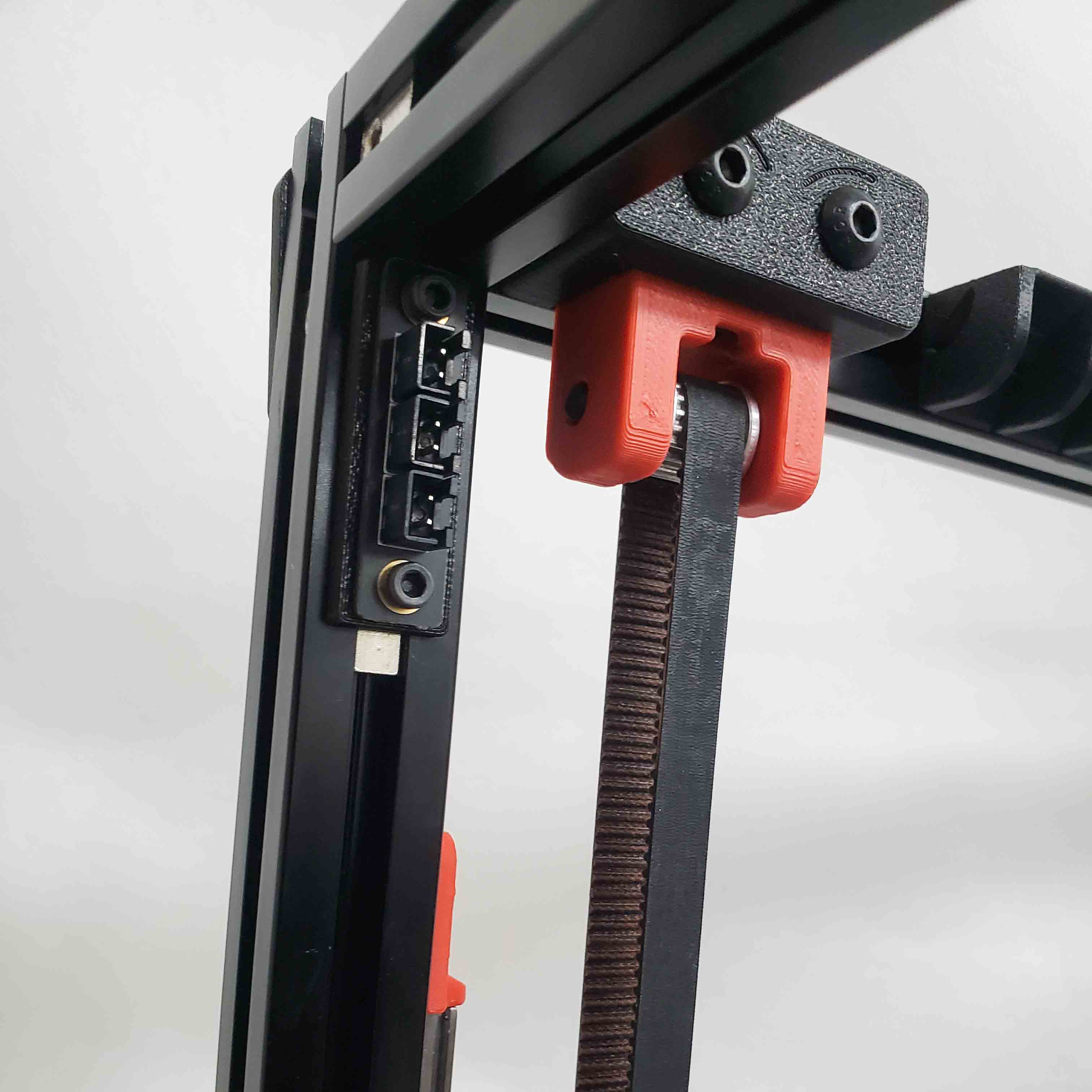
Step 10.38 — Route the LED lead down to the deck and close the slots¶
What you're looking at: Extrusion slot covers are the flexible plastic strips that press into an empty extrusion groove; here they hide and protect the LED cable along its whole route down to the deck. Ch 11's top panel and Z-belt covers close this path for good.
Parts:
- LED STRIP cable ×1 — from the Cable Kit box
- consumable: extrusion slot cover, 6 mm, up to 9
Do:
- Run the junction PCB's third lead along the top rear extrusion slot, down a rear vertical extrusion, and into the deck.
- Press the 6 mm slot covers over every slot the cable occupies. Do this now.
Check
No cable is visible outside a covered slot, and nothing crosses the gantry's Z travel.
Alternative: you may instead route through the Z-motor A opening; if you do, print the alternate Z-belt cover z_belt_cover_a_led.stl for Ch 11. Decide now, not in Ch 11. src
Source: LDO wiring guide § Routing the LED strips · LDO wiring photo led_final.jpg · LDOVoron2 z_belt_cover_a_led.stl · survey §5.2 W5 · Video: Part 9 @0:17:48
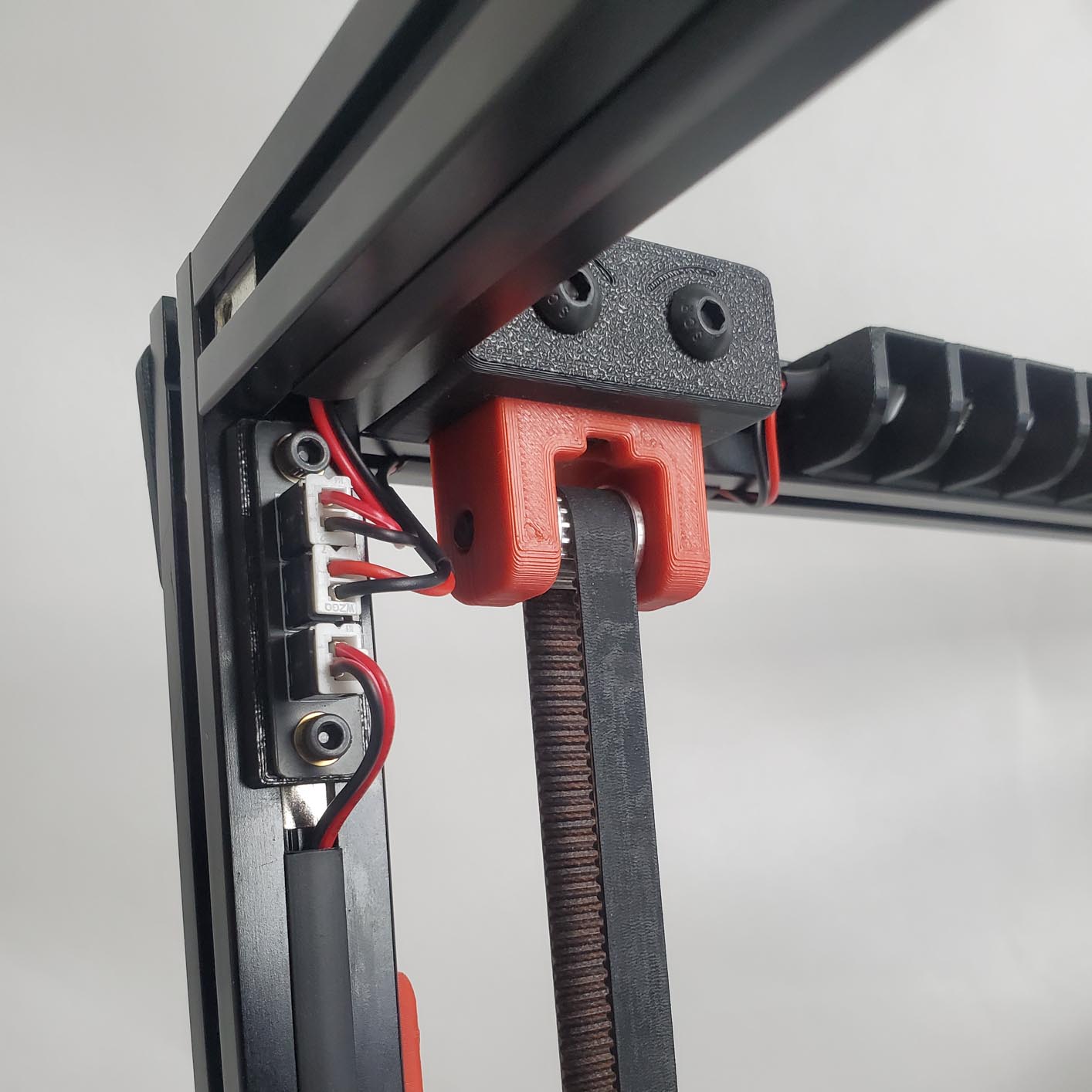
Step 10.39 — Chamber thermistor, if your batch includes one¶
(no image — see text)
What you're looking at: The chamber thermistor is a small temperature sensor left hanging in free air inside the enclosure, reporting how hot the chamber has become. On a Rev D+ machine it belongs on the toolboard's CT port, not on any of the Leviathan's four thermistor inputs.
Parts:
- reused: the chamber thermistor, if your batch has one
Do: Nothing on the Leviathan: the chamber thermistor lands on the toolboard's CT port, a Ch 08 step. If yours is still loose, dress its tip into free chamber air, away from the hotend and out of the toolhead's travel.
Check
Your batch BOM says whether the part is in the kit. The Klipper config's [temperature_sensor chamber_temp] reads nhk:PB2, i.e. the toolboard, not the mainboard.
Caution
Rev D+ / LDO: the Leviathan has four thermistor inputs and it is tempting to put the chamber sensor on one of them. Do not — leviathan-printer-rev-d-sbv2.cfg expects it on the toolboard, anchored by the zip-tie loop on the CW2 cable cover. src
Source: leviathan-printer-rev-d-sbv2.cfg · Nitehawk-SB V2 doc § Port and pin definitions · Video: Part 9 @1:36:20
Good stopping point · ~35 min since the last one
eight COB mounts built, both strips mounted and plugged into the junction PCB on its spacer, LED lead routed and every occupied extrusion slot covered. Do not leave a slot open: Ch 11's top panel and Z-belt covers close this route for good.
Section 5 — Leviathan connections¶
Step 10.40 — Tag every stepper cable before you plug anything in¶
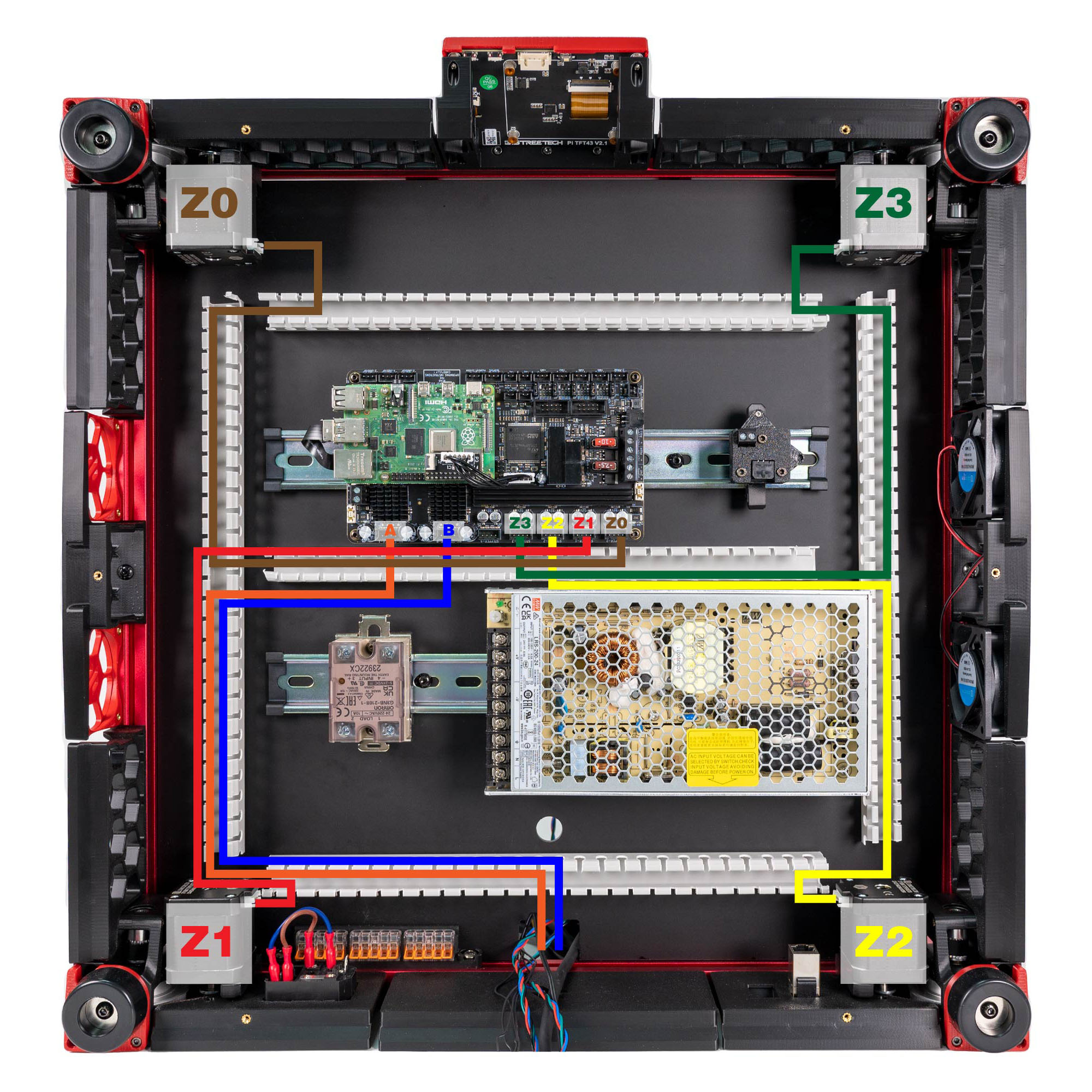
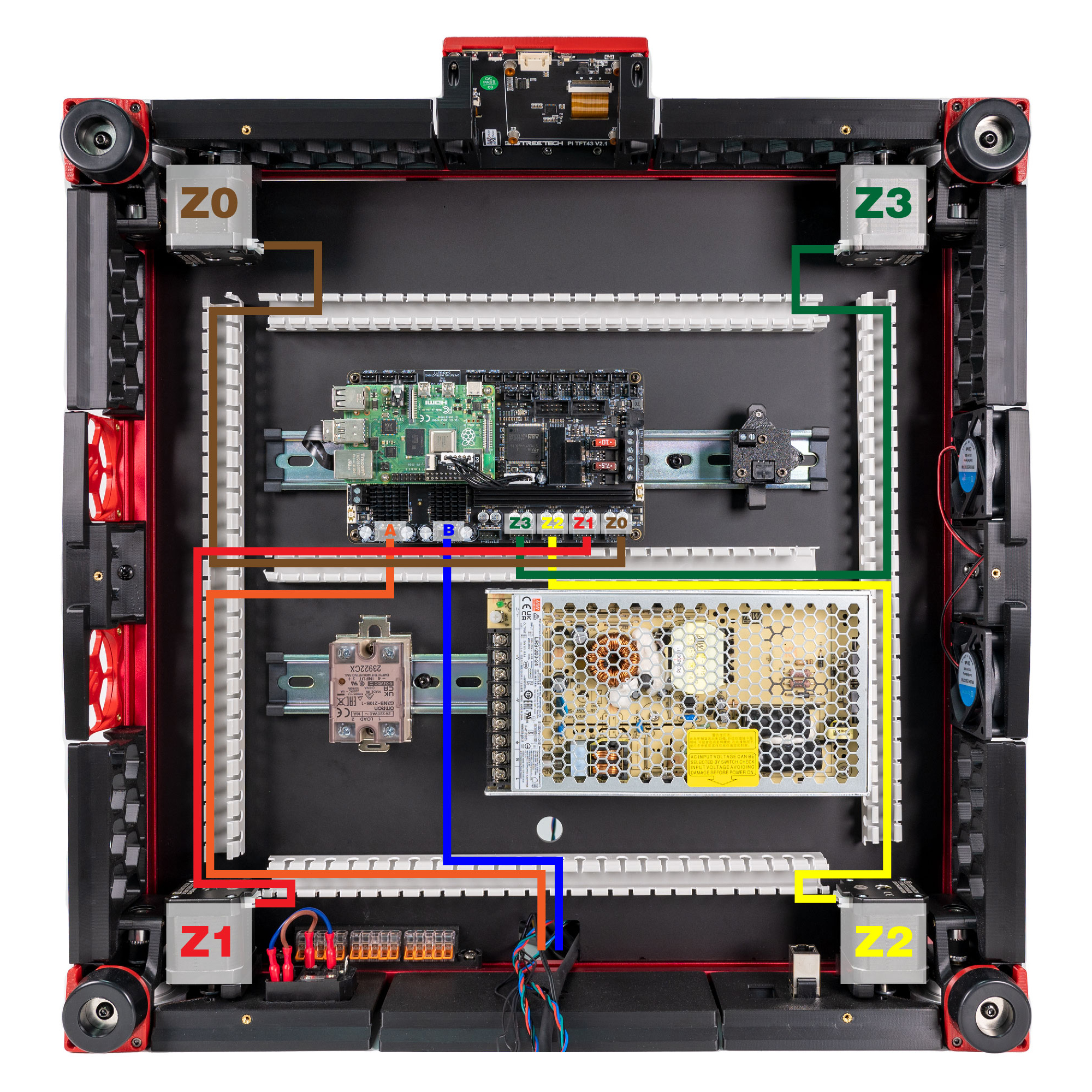
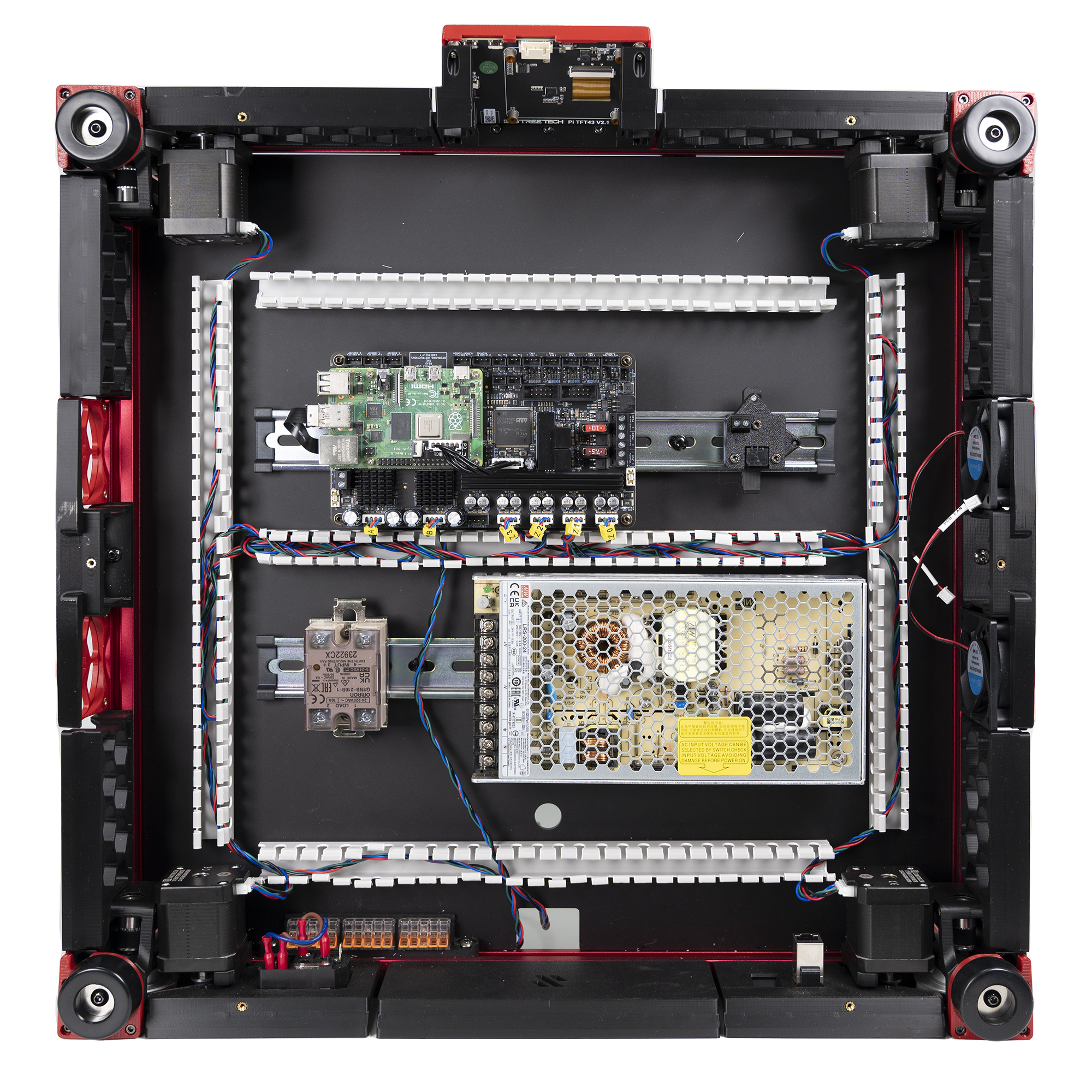
What you're looking at: Six identical 4-pin motor cables arrive at the board and nothing about them says which corner each came from. LDO's mapping photo names every port on the Leviathan; the diagram shows both HV-STEPPER ports and STEPPER-0..3 by corner, and which ports stay empty.
Parts:
- consumable: cable tag ×7
Do: Transcribe the table below onto tags and fit one to each motor cable at the board end. Positions are given "as if standing in front of an upright printer and looking towards it."
| Stepper | Physical position | Controller port |
|---|---|---|
| A | rear right of gantry | HV-STEPPER-1 |
| B | rear left of gantry | HV-STEPPER-0 |
| Z0 | front left | STEPPER-0 |
| Z1 | rear left | STEPPER-1 |
| Z2 | rear right | STEPPER-2 |
| Z3 | front right | STEPPER-3 |
| (not used) | — | STEPPER-4 |
Check
Seven tags written, six cables tagged, and you can trace each cable back to the motor it came from without guessing.
Helper: Writes the seven tags from the table and hands each one over for its cable.
Source: LDO Rev D photo S1 stepper mapping · LDO wiring guide § Connecting steppers · Video: Part 6 @0:25:08
Step 10.41 — A motor → HV-STEPPER-1¶
What you're looking at: HV-STEPPER-1 is one of the two high-voltage driver sockets on the Leviathan: a TMC5160, the strongest driver pair on the board, reserved for the two CoreXY motors. The 4-pin plug carries the motor's two coils, two wires each.
Parts:
- reused: the A motor's lead
Do: Plug the A motor, rear right, into the TMC5160 port LDO's diagram labels HV-STEPPER-1. Match your board against S1_mapping.jpg, not the Stepper X/Y silkscreen. Route the lead from the notch along the DC loop's right run and middle run.
Check
Connector fully home, latch engaged, lead in the DC loop with slack and no tension on the header.
Layout v3
this route adds about 195 mm to A over LDO's route; B11.9 confirmed the lead reaches with spare, or a longer replacement lead was made (verify on bench). LDO layout: route the lead as S1_mapping.jpg shows. LDO § Connecting steppers
Caution
Rev D+ / LDO: never plug or unplug a stepper with power on, and never spin a connected motor fast by hand or shove the gantry — a fast move generates back-EMF the driver has to absorb. The slow hand moves Ch 13 and Ch 06b ask for are fine, with those drivers disabled first. src
Source: LDO Rev D photo S1 steppers wired · LDO wiring guide § Connecting steppers
Step 10.42 — B motor → HV-STEPPER-0¶
What you're looking at: HV-STEPPER-0 is the other TMC5160 socket. A and B are the two rear-corner motors that between them produce every X and Y move, so both belong on the high-current drivers; the five STEPPER-n sockets alongside are weaker TMC2209s.
Parts:
- reused: the B motor's lead
Do: Plug the B motor, rear left, into HV-STEPPER-0, the other 5160 port. Route the lead with A's: notch, right run, middle run.
Check
A and B are in the two 5160 ports and nowhere else. A 2209 would badly under-drive the motor.
Layout v3
this route adds about 129 mm to B over LDO's route; B11.9 confirmed the lead reaches with spare, or a longer replacement lead was made (verify on bench). LDO layout: follow S1_mapping.jpg, and the alternate below if B is short. LDO § Connecting steppers
On LDO's layout, if your B motor cable is too short to follow the mapping photo, LDO publishes an alternate route: alternate B-motor mapping and B-motor cable wiring. Take the alternate route rather than pulling the cable tight. src
Source: LDO Rev D photo S1 stepper mapping · LDO wiring guide § Connecting steppers
Step 10.43 — Z0–Z3 → STEPPER-0 to STEPPER-3¶
What you're looking at: STEPPER-0 to STEPPER-3 are four of those TMC2209 sockets, one per Z motor, Z0–Z3 being the four corners that lift the gantry independently. STEPPER-4 would carry the extruder on a normal build; here the extruder motor is driven by the toolboard instead, so it stays empty.
Parts:
- reused: the four Z motor leads
Do: Working left to right along the 2209 header row as S1_mapping.jpg shows it, STEPPER-3, STEPPER-2, STEPPER-1, STEPPER-0, plug in Z3 front right, Z2 rear right, Z1 rear left, Z0 front left. Leave STEPPER-4 empty; the extruder lives on the toolboard.
Check
Four connectors, four tags, and each tag's physical position matches the corner its cable physically runs to. STEPPER-4 is empty.
Helper: Reads each tag aloud and names the corner its cable runs to before it is plugged in.
Verification deferred: the definitive test is STEPPER_BUZZ per motor in Ch 13. If a corner buzzes that you did not name, swap the two cables — do not edit the config.
Source: LDO Rev D photo S1 steppers wired · LDO wiring guide § Connecting steppers
Step 10.44 — Bed thermistor → TH1¶
What you're looking at: TH1 is a two-pin thermistor input. A thermistor is just a resistor whose value changes with temperature, so the port only measures resistance and there is no polarity to get wrong. The bed's sensor lands here; TH0 beside it is the hotend input, unused on this build.
Parts:
- Bed TH cable ×1 — from the Cable Kit box
Do: Lead it from the splicer over the deck, down the Z-chain notch and round the DC loop. Measure it, about 100 kΩ at 25 °C or 127 kΩ at 20 °C, then plug it into TH1. Polarity does not matter.
Check
TH1, not TH0. TH0 is the hotend port and is unused on a Nitehawk build; the config reads the bed on PA2 = TH1.
Layout v3
the notch route adds about 44 mm; check spare during this fit (verify on bench). If short, make a longer Bed TH lead (2-pin JST-XH); a DC lead never enters the AC conduit. LDO layout: up the round hole, then LDO's rear, right and front PVC ducts to TH1, as the photo shows. LDO § Connecting build plate
Source: LDO Rev D photo S5 build-plate mapping · LDO wiring guide § Connecting build plate · LDO Leviathan V1.3 guide (manual p.9)
Step 10.45 — XY endstops → X-ENDSTOP and Y-ENDSTOP¶
What you're looking at: The two 3-pin ends of the cable from step 10.31 finally reach the board. Each endstop port watches one switch open or close a circuit to ground, and that transition is what tells Klipper the axis has reached its limit.
Parts:
- reused: the two 3-pin ends of the XY endstop cable
Do: XES / X Stop into the port labelled X-ENDSTOP; YES / Y Stop into Y-ENDSTOP. LDO's mapping photo labels the three endstop headers Z STOP / Y STOP / X STOP in that order along the board.
Check
Both fully seated. Press each microswitch on the gantry PCB with a fingertip and feel a distinct click.
Helper: Presses each microswitch on the gantry PCB and says when it clicks.
Source: LDO Rev D photo S6 gantry-cable mapping · LDO wiring guide § Connecting the gantry cables
Step 10.46 — Nozzle probe → Z-ENDSTOP¶
What you're looking at: Z-ENDSTOP and Z-PROBE are two different headers a few millimetres apart on the same board. The mechanical nozzle probe belongs on Z-ENDSTOP; Z-PROBE stays empty for the entire build, because the inductive probe is wired to the toolboard instead.
Parts:
- reused: the Z endstop cable
Do: Plug the nozzle-probe lead into the port labelled Z-ENDSTOP.
Check
Z-ENDSTOP, not Z-PROBE. The Leviathan's Z-PROBE header stays empty for the whole build; the inductive probe is on the toolboard's PROBE port, read as nhk:PC15.
Caution
Rev D+ / LDO: the stock config's comment says "Connected to Z-PROBE" above a nhk: pin. The comment is stale; the pin is authoritative. src
Source: LDO Rev D photo S6 endstops wired · LDO wiring guide § Connecting the gantry cables · leviathan-printer-rev-d-sbv2.cfg
Good stopping point · ~30 min since the last one
six steppers tagged and plugged on their mapped ports, STEPPER-4 empty, bed thermistor on TH1, XY endstops and the nozzle probe on their headers. No chain work started.
Step 10.47 — Electronics-bay fan pair → FAN2¶
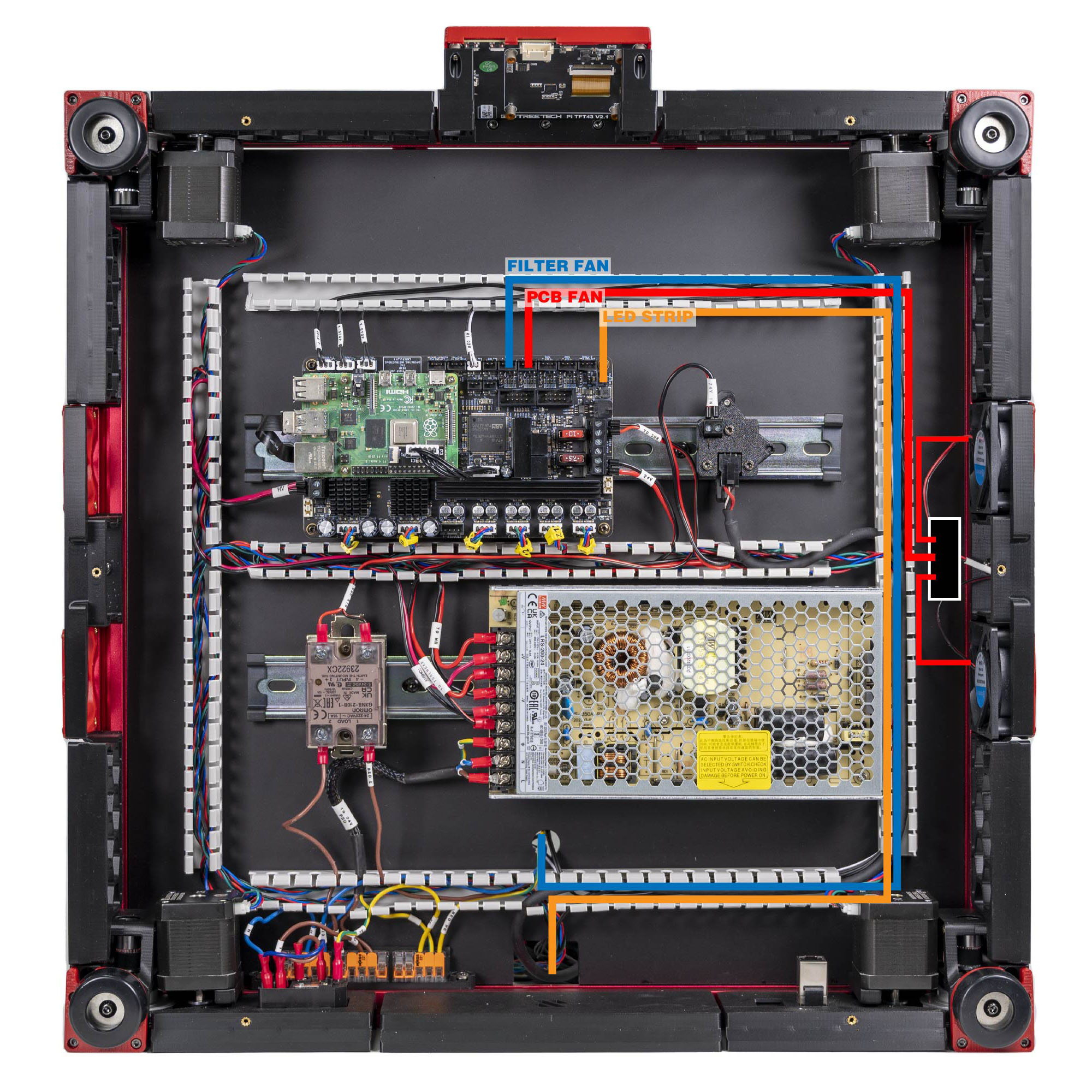
What you're looking at: The two 6020 fans are 60 × 60 × 20 mm axial fans that cool the electronics bay. The 3×2 splicer PCB joins them into one lead so a single Leviathan fan port drives both; its printed spacer keeps the bare board off the extrusion.
Parts:
- 60×60×20 fan ×2
- 3×2 XH splicer PCB ×1
2x3 Splitter Spacer×1- M3×8 SHCS ×2
- M3 hammerhead T-nut ×2
- PCB FAN cable ×1 — from the Cable Kit box
Do: Bolt the splicer PCB to its printed spacer and mount the sandwich to a frame extrusion in the bay. Plug both 6020 fans into it and run the PCB FAN cable to the Leviathan port FAN2, pin PF7.
Check
The spacer is fitted, same short-circuit rule as the LED junction.
 Tip
Tip
if the fans are not mounted yet, coil their leads and zip-tie them clear of the gantry; they go on with the skirts in Ch 11.
| Item | Cable label | Controller position |
|---|---|---|
| PCB fan | PCB FAN |
FAN2 / PF7 |
| LED strip | LED STRIP |
LED-Strip / PE6 |
| Filter fan | FILTER FAN |
FAN3 / PF9 |
Source: LDO Rev D photo S7 fan/LED mapping · LDO wiring guide § Connecting the fans and the LED strip
Step 10.48 — Filter fan → FAN3¶
What you're looking at: FAN3 is the port reserved for the Nevermore: the recirculating activated-carbon filter that scrubs ASA fumes inside the chamber. The filter itself is built in Ch 11, so only its cable is placed and parked now.
Parts:
- FILTER FAN cable ×1 — from the Cable Kit box
Do: Plug the board end into FAN3, pin PF9. Route the free end up through the Z-chain notch, not the round hole, toward the Nevermore position at the rear of the chamber. Coil 150 mm of slack there.
Check
The cable is at the board and the free end is parked where Ch 11 will need it.
Layout v3
the notch route adds about 44 mm; check the lead has spare during this fit (verify on bench). If it's short, make a longer replacement FILTER FAN lead, same connector (verify on bench); the lead never enters the AC conduit. LDO layout: up through the round deck hole, as LDO's fan mapping shows. LDO § Connecting the fans and the LED strip
Source: LDO Rev D photo S7 fans wired · LDO wiring guide § Connecting the fans and the LED strip
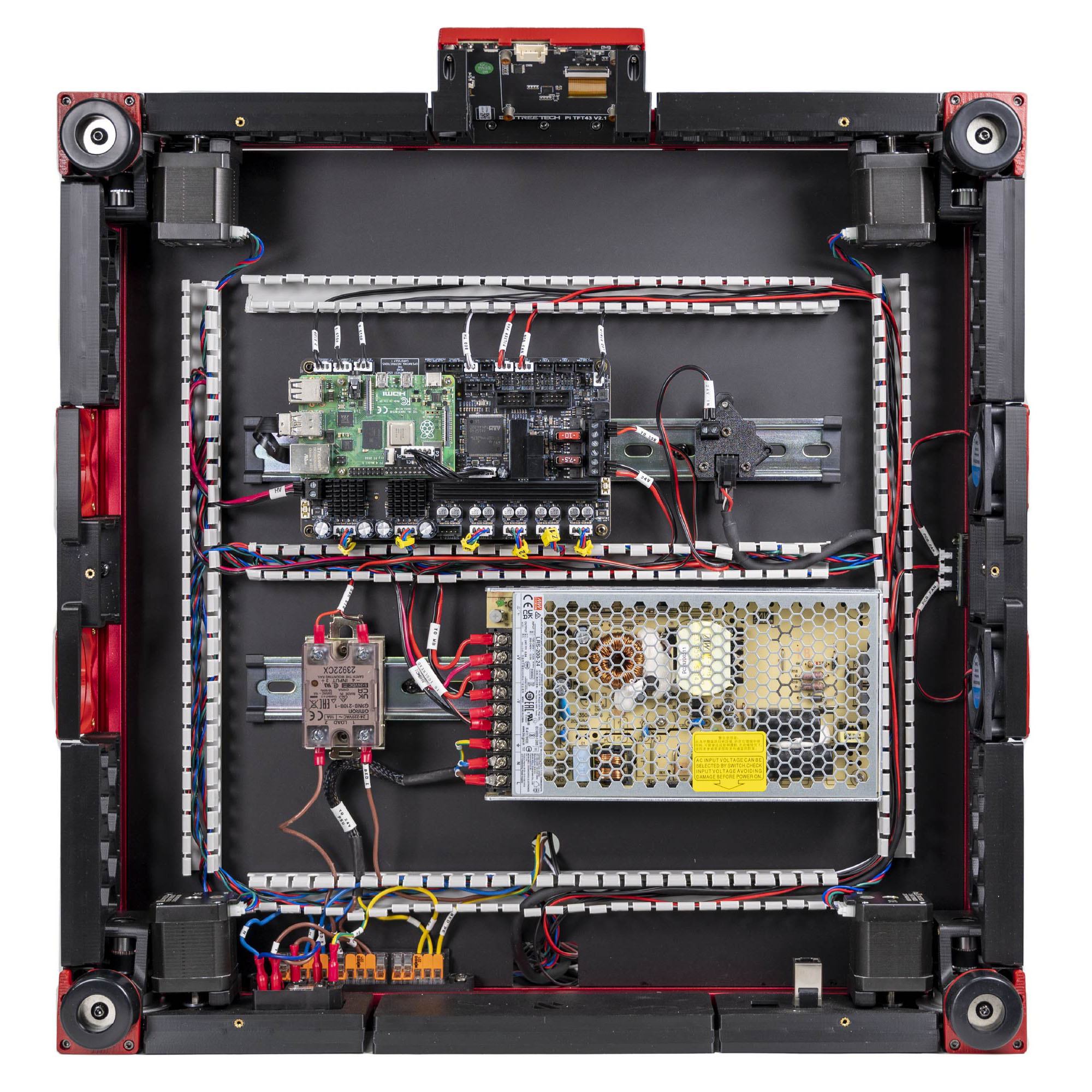
Step 10.49 — LED strip → LED-Strip¶
What you're looking at: LED-Strip is a dimmable constant-current output that powers plain LEDs directly, up to 350 mA. The Neopixel header next to it instead sends a data signal to addressable LEDs; that is what the Stealthburner logo uses, and it runs from the toolboard, not from here.
Parts:
- reused: the LED STRIP cable from the junction PCB
Do: Plug the lead from the ceiling junction PCB into the Leviathan port silkscreened LED-Strip, pin PE6.
Check
LED-Strip, not Neopixel. LED-Strip is a dimmable 350 mA constant-current output; Neopixel is data. The Stealthburner LEDs are addressable and hang off the toolboard, not this port.
Source: LDO Rev D photo S7 fan/LED mapping · LDO wiring guide § Connecting the fans and the LED strip · LDO Leviathan V1.3 guide (manual p.5)
Step 10.50 — DSI ribbon: Raspberry Pi ↔ touchscreen¶
What you're looking at: The FFC is the flat flexible ribbon carrying the display signal, DSI, between the Raspberry Pi and the 4.3" touchscreen. It has no polarity key, so the bare metal contacts on one face are the only clue to which way round it goes.
Parts:
- FFC ribbon cable ×1 (verify on bench) — from the display box
- staged: 4.3" capacitive DSI display ×1
- staged:
mount.stl×1 - staged:
[a]_faceplate×1 - staged: M3×5×4 heat-set insert ×2
- staged: M3×8 SHCS ×2
- staged: M2.5×6 screw ×4 — from BTT screen packaging
Do:
- Build the touchscreen module: Ch 11 Steps 11.5–11.6.
- Down to the Pi's DISPLAY: lift the latch, ribbon in contacts forward, blue tab rear, close the latch once.
- Service loop; tape the module to the front extrusion.
Check
Both latches closed evenly, ribbon square, no fold or crease, no bare contacts outside either connector. Match the photo (verify on bench).
Tip
if the mount is not printed yet, seat the screen end only, tape the Pi end's bare contacts, and connect it at 11.8 instead.
Caution
Rev D+ / LDO: "Incorrect orientation of the FFC cables can result in damage to your Raspberry Pi and/or touchscreen." An FFC has no polarity key — the metal contacts are the only clue. At the Pi, forward is toward the front of the printer. src
Source: LDO Rev D photo VS8 mapping · LDO wiring guide § Setting up the touch screen · LDO BTT 4.3" rotate guide
Step 10.51 — Ethernet: Raspberry Pi ↔ rear keystone¶
What you're looking at: A keystone insert is the snap-in module that turns an opening in a printed panel into a proper RJ45 socket on the machine's outside. This step runs the Pi's network cable to it, so no lead dangles out of the bay.
Parts:
- Ethernet patch cable ×1 — from the Cable Kit box
- Keystone CAT6 insert ×1
Do: Plug one end into the Pi's RJ45. Run the cable round the DC loop to the rear-right corner, out through the rear-lower run's tines, and into the keystone insert. Leave the insert loose for Ch 11.
Check
Both plugs click. The run does not cross the PSU's AC terminals or lie against the SSR.
LDO layout
run it through LDO's PVC ducts to the rear-right of the bay, as the photo shows. LDO § Ethernet
Source: LDO Rev D photo VS8 Ethernet/USB wired · LDO wiring guide § Connecting the FFC cable, Ethernet cable, USB cable and frame PE
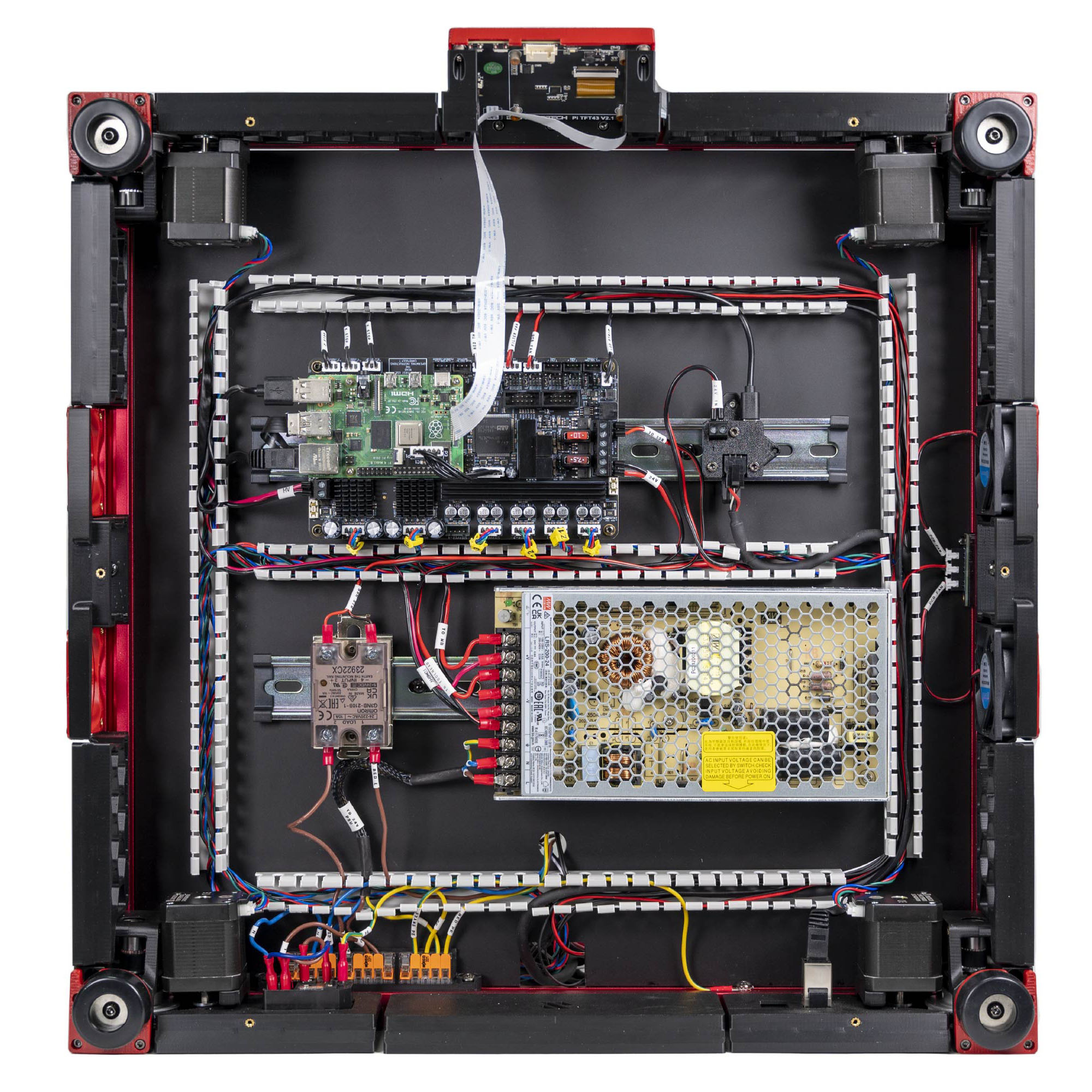
Step 10.52 — USB: Raspberry Pi ↔ Leviathan¶
What you're looking at: This short cable is the whole link between the Raspberry Pi, the host that plans the motion, and the Leviathan, the MCU that executes it. The photo shows the finished set of Pi connections in LDO's bay.
Parts:
- USB-A to USB-C cable, short ×1 (verify on bench) — from the Cable Kit box
Do: Plug USB-A into a Pi port and USB-C into the Leviathan's USB port. Keep it short and dress it flat; this loop is only 60 mm and a long cable will foul the DIN clips.
Check
Both ends seated. The Leviathan has exactly one USB-C socket, so there is nothing to get wrong.
Note: the Leviathan can alternatively talk over UART on its dedicated 5-pin Raspberry Pi power/UART port. Ch 12 decides. Wire USB now — the Rev D+ config addresses the mainboard as /dev/serial/by-id/..., which is USB. src · Leviathan V1.3 manual p.5
Source: LDO Rev D photo VS8 Ethernet/USB wired · LDO wiring guide § Connecting the FFC cable, Ethernet cable, USB cable and frame PE · LDO Leviathan V1.3 guide (manual p.5)
Step 10.53 — USB: Raspberry Pi ↔ USB adapter PCB¶
What you're looking at: The second Pi USB lead is the data half of the toolhead link; the 24 V half went on in step 10.26. The adapter PCB merges the two into the single umbilical socket.
Parts:
- USB cable ×1 — from the Cable Kit box
Do: Plug one end into a second Pi USB port and the other into the USB adapter PCB on its DIN clip. This carries the toolboard's USB data; the 24 V it also needs arrived in step 10.26.
Check
Both ends seated. The USB adapter PCB now has 24 V in, USB in, and the umbilical socket, still empty.
Source: LDO Rev D photo VS8 mapping · LDO wiring guide § Connecting the FFC cable, Ethernet cable, USB cable and frame PE
Good stopping point · ~40 min since the last one
bay fans, filter fan and LED strip on their Leviathan ports, the touchscreen module built (Ch 11 Steps 11.5–11.6, done from 10.50) with its DSI ribbon latched at both ends and taped to the front extrusion, Ethernet and both USB links made. The umbilical is still unconnected at both ends.
Section 6 — Toolhead umbilical and the drag chains¶
Step 10.54 — Identify your umbilical and its two connectors¶
What you're looking at: The umbilical is the thick cable between the bay and the toolhead, carrying 24 V and USB together. The Amass XT30(2+2) at the toolboard end is a four-contact power-plus-signal connector; the Micro-Fit 3.0 at the bay end is the latching rectangular one.
Parts:
- reused: the toolhead umbilical cable
Do: Confirm the toolboard end is an Amass XT30(2+2)-F, the partially overmolded variant, and the bay end a Micro-Fit 3.0. Nominal bend radius 28 mm, max operating temperature 105 °C.
Check
Both connectors are undamaged and the sheath is unnicked over its whole length.
Caution
Rev D+ / LDO: never plug or unplug the Micro-Fit end with the machine powered — it can take out the Nitehawk or the Pi. src
Source: Nitehawk-SB V2 doc § Umbilical cable · Nitehawk-SB V2 doc § Cable pinout — adapter side · LDO board doc image nk36_cable_comparison.jpg · Video: Part 8 @1:35:03 (differs: no toolboard — loom to the mainboard; this kit runs a Nitehawk-SB V2 on one USB+24 V umbilical)
Step 10.55 — Connector types on the V2 toolboard¶
What you're looking at: The Nitehawk-SB V2 is the toolboard: the small PCB on the toolhead driving the hotend, fans, LEDs, probe and accelerometer, so only one cable crosses the moving gantry. V2 uses the finer JST-PH2.0 housings where the Rev D guide still names the coarser XH2.5.
Parts: none.
Do: Before you touch anything on the toolhead, confirm what Ch 08 fitted:
| Port | Rev D wiring guide says | Rev D+ / Nitehawk V2 actually is |
|---|---|---|
PROBE |
not specified | JST-PH2.0 3P, 24 V only |
TH0 (hotend thermistor) |
"JST-XH2.5 two pin" | JST-PH2.0 2P, 2.2 kΩ pull-up |
Endstop (X/Y) |
not specified — only "the endstop port isn't used in a standard Rev D build" | JST-PH2.0 4P — unused in a standard build |
HE0 (hotend heater) |
screw terminal / E0508 ferrule | unchanged |
TH0 is the one real conflict: JST-XH2.5 is the only connector the Rev D guide names for the toolhead, and for the SB fans it names JST-PH2.0.
Check
The probe, hotend-thermistor and endstop plugs are the small PH2.0 housings. The extruder motor stays XH2.5 and the umbilical stays XT30.
Caution
Rev D+ / LDO: the Rev D wiring guide has not been updated for this. Trust the V2 board doc. src — survey §4.1 ③
Source: Nitehawk-SB-V2 repo nhsbv2_pcb_pinout.jpg · Nitehawk-SB V2 doc § Connector variants — toolboard side · Nitehawk-SB V2 README § Change list from Nitehawk-SB V1 · Video: More Extras! @2:00:45 (differs: no toolboard — loom to the mainboard; this kit runs a Nitehawk-SB V2 on one USB+24 V umbilical)

Step 10.56 — The fan-adapter header is keyed and reversed¶
What you're looking at: The fan-adapter PCB is the small board inside the Stealthburner front carrying the part-cooling and hotend fans; it mates to the toolboard through a pin header, not a cable. The photo is the V2 header: 2×5 pins, keyed, reversed in gender from V1.
Parts: none.
Do: The board-to-board interface between the Stealthburner fan adapter and the toolboard is a 2×5, 10-pin header on V2, with reversed gender and keying. V1 used 2×4, and every Rev D photo online shows that old arrangement.
Check
The Stealthburner front drops on and the header seats with no gap. If it does not, it is backwards; do not press harder.
Caution
Rev D+ / LDO: a V1 fan adapter PCB physically cannot be reused on a V2 toolboard. src — survey §4.1 ④
Source: Nitehawk-SB-V2 repo sbv2_fan_adapter_pcb_pinout.jpg · Nitehawk-SB V2 doc § Pinout — fan adapter PCB

Step 10.57 — The USB adapter cover is the partial cover¶
What you're looking at: The printed cover clips over the USB adapter PCB in the bay. The V2 version deliberately leaves one mounting hole open so a grounding wire can be bolted to it; the V1 cover encloses that hole.
Parts:
- reused: the fitted
usb_adapter_mount_partial_cover
Do: Confirm the cover on the USB adapter PCB is the V2 partial cover, which deliberately leaves one mounting point exposed. The printed-parts guide still points at the V1 usb_adapter_mount.stl / cw2_captive_pcb_cover.stl; that cover encloses the point you need.
Check
One mounting hole on the USB adapter PCB is uncovered. A fully enclosed cover is the V1 part; reprint from the V2 repo.
Caution
Rev D+ / LDO: "A newly designed cover exposes one of the mounting points to connect a grounding point." src — survey §4.1 ⑤
Source: Nitehawk-SB-V2 repo usb_adapter_gnd.jpg · Nitehawk-SB V2 doc § Printed parts

Step 10.58 — Fit the ESD grounding path¶
Detail photos: toolboard ground routing · USB-adapter ground point
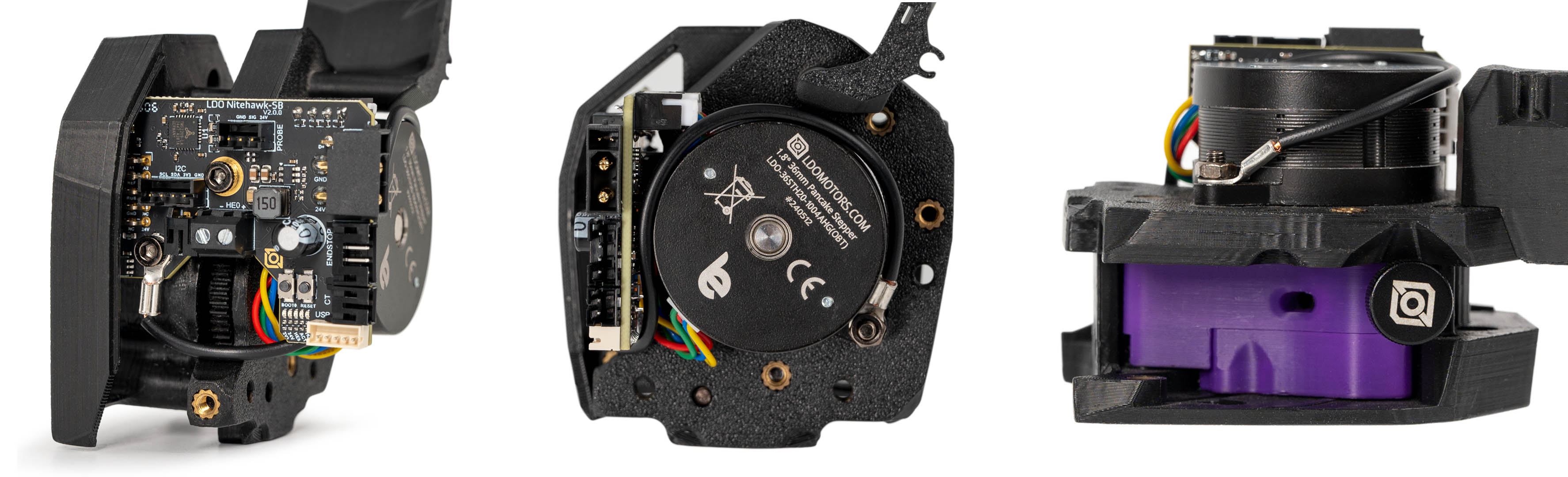
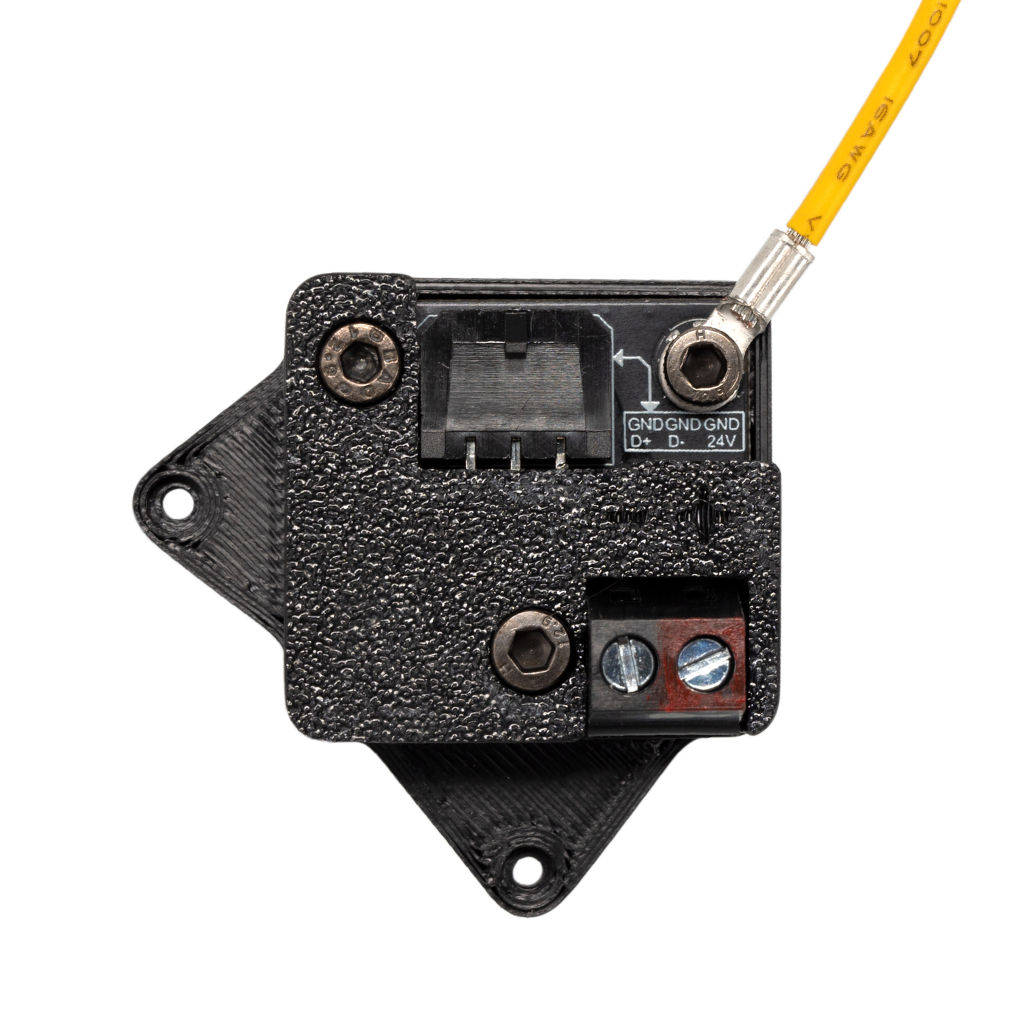
What you're looking at: ESD, electrostatic discharge, is the static filament and moving belts build up, and it kills toolboards. The two supplied cables build one continuous path from the extruder motor body, through the toolboard and umbilical, to the USB adapter and out to the earthed frame.
Parts:
- reused: the long supplied grounding cable, ring already on the USB adapter
- M3×8 SHCS ×1 (verify on bench)
- M3 roll-in T-nut ×1 (verify on bench)
- tool: multimeter
Do:
- Confirm: both short-cable lugs under screws, the long cable's ring on the USB adapter.
- Land its free end on the nearest bottom frame extrusion
(verify on bench): anodising scraped, ring on bare metal, M3×8 SHCS into a roll-in T-nut.
Check
Meter on Ω: extruder motor body → toolboard ground lug < 2–3 Ω; USB-adapter ground lug → C14 earth pin < 2–3 Ω.
Caution
Rev D+ / LDO: use the supplied grounding cable. LDO: "using larger O ring connectors may cause inadvertent shorting of the PCB boards."
Caution
If your kit did not include the grounding cables, or your board doc predates the update: stop, post the three images above in #ldo_motors on the Voron Discord and wait for LDO's answer before improvising. The scheme was undocumented until the board doc was updated 2026-07-10. src — survey §4.1 ⑤
Source: Nitehawk-SB-V2 repo grounding_scheme.jpg · Nitehawk-SB-V2 repo toolboard_ground_routing.jpg · Nitehawk-SB V2 doc § ESD hardening


Good stopping point · ~25 min since the last one
the three Rev D+ toolhead deviations verified (PH2.0 housings, keyed 2×5 fan-adapter header, V2 partial cover), both ESD grounding cables confirmed and the bay cable landed on the frame, each half continuity-checked (the end-to-end reading waits for 10.67). Toolhead is closed and the umbilical is still loose.
Step 10.59 — Fit the X drag chain¶
What you're looking at: A drag chain is an articulated conduit letting a cable follow a moving part without flexing in the same spot twice. The X chain runs along the top of the X extrusion, fixed at one end, clipped to the toolhead anchor at the other.
Parts:
- drag chain 10×10 R18 ×1
- M3 roll-in T-nut ×1
- M3×6 FHCS ×3 (verify on bench)
- reused: the CW2 chain anchor on the toolhead
Do: Cut the chain to length. Slide the T-nut into the top slot of the X extrusion. Fix the chain's fixed end to it with one M3×6 FHCS, and the moving end to the CW2 chain anchor with two.
Check
Push the toolhead through its full X travel by hand. The chain rolls, never drags on the extrusion, and never reaches full extension.
Caution
Rev D+ / LDO: the kit ships 2-hole chain ends — print *_2hole variants, never *_3hole. src
Source: Voron manual p.197 · LDO printed-parts guide Rev D · Video: Part 6 @0:34:57
Step 10.60 — Fit the Y drag chain¶
What you're looking at: The Y chain does the same job one level out: fixed to the right Y extrusion, moving with the right XY joint, so the toolhead umbilical and the endstop cable can travel front to back. Everything it serves lives on the right.
Parts:
- drag chain 10×10 R18 ×1
- M3 roll-in T-nut ×1
- M3×6 FHCS ×3 (verify on bench)
- consumable: small zip tie ×2
Do:
- T-nut into the right Y extrusion, chain fixed end onto it with one M3×6 FHCS, moving end onto the right XY joint's cable bridge with two.
- Secure the bundle to the chain's strain relief with small zip ties.
Check
Run the gantry front to back over full Y travel: the chain articulates freely and the loop stays clear of the bed extrusions.
Caution
Rev D+ / LDO: ignore p.198's separate X and Y endstop wiring — the kit uses one 4-pin XY endstop PCB (LDO notes p.162, p.163, p.169). src
Source: Voron manual p.199 · Voron manual p.198 · LDO Build Notes p.198 · Video: Part 6 @0:39:55
Step 10.61 — Secure the A and B motor cables¶
What you're looking at: The A and B motor leads run from the two rear drive units along the small extrusion between them, then join everything else in the Z chain. The ties keep the cables out of the belts and pulleys.
Parts:
- consumable: zip ties, 4 to 6
Do: Bundle the A and B motor cables along the small extrusion between the two drive units, tying every 60–80 mm. Both bundles feed into the Z chain next.
Check
No cable can reach a moving belt or pulley. Ties are snug, not crushing.
Source: Voron manual p.200 · Video: Part 6 @1:04:55
Step 10.62 — Fit the Z chain guide and the Z chain¶
What you're looking at: The Z chain is the largest of the three, 10 × 15 mm links on a 28 mm bend radius, because it carries the entire gantry harness down to the deck. The printed guide bolts to the frame and holds the chain's lower run.
Parts:
z_chain_guide×1- M5 roll-in T-nut ×1
- M5×10 BHCS ×1
- drag chain 10×15 R28 ×1
- M3×10 FHCS ×2
Do:
- Bolt the guide to the rear-bottom frame extrusion with the M5 T-nut and M5×10 BHCS, at deck level as p.201 shows.
- Attach the chain's lower end to the guide with two M3×10 FHCS, manual p.202.
Check
The guide is square to the extrusion and the chain hangs in a clean vertical loop.
Source: Voron manual p.201 · Voron manual p.202 · Video: Part 4 @1:43:44
Step 10.63 — Fit the Z chain bottom anchor¶
What you're looking at: The bottom anchor is a printed clip with an open channel: the chain runs through it, so it is a mid-run keeper, not a chain end. p.203 shows it bolted to a horizontal extrusion, the chain passing vertically through its channel.
Parts:
z_chain_bottom_anchor×1- M5 roll-in T-nut ×1
- M5×10 BHCS ×1
Do:
- After 10.64, dry-fit the anchor's channel over the chain and keep the extrusion where it runs straight at both Z extremes (verify on bench).
- M5 T-nut into that slot, chain into the channel, M5×10 BHCS through.
Check
Through full Z travel: the chain slides through the anchor without snagging, the loop stays open at the bottom, nothing stretches at the top.
Tip
p.203 gives the fastener, not the extrusion. The candidates are the frame's rear-bottom extrusion and the gantry's rear beam; the dry-fit decides.
Source: Voron manual p.203
Step 10.64 — Fit the Z chain retainer bracket and set the wire path¶
What you're looking at: The blue [a]_z_chain_retainer_bracket bolts to the A drive at the top of the loop and carries the chain's moving end up and down with the gantry. The manual page also fixes the wire path: behind the Z belt and over the drive.
Parts:
[a]_z_chain_retainer_bracket×1- M3×12 SHCS ×2
- M3×10 FHCS ×2
- consumable: zip ties, 2
Do:
- Bolt the bracket to the A drive with two M3×12 SHCS and the chain's upper end into its inserts with two M3×10 FHCS.
- Guide the wire bundle behind the Z belt and over the A drive, zip-tied.
Check
Move the gantry through full Z travel. The bundle never touches the Z belt and the chain's top end never twists.
Source: Voron manual p.204
Good stopping point · ~35 min since the last one
X, Y and Z chains all mounted at both ends, A/B motor cables bundled, retainer bracket on the A drive. Chains are empty and latched. Do not part-fill a chain and walk away — the next segment fills all three in one go.
Step 10.65 — Lay the harness into the chains¶
What you're looking at: Every drag-chain link has a hinged latch down one side, marked with a small screwdriver icon on the side you may pry. With the latches open the chain is an open trough, so cables are laid into it rather than threaded through it.
Parts:
- reused: the umbilical
- reused: the XY endstop cable
- reused: the A and B motor bundles
- tool: 2.5 mm flat screwdriver
Do:
- Pry each latch only on its screwdriver-icon side, lay cables in, press each latch shut.
- Fill in order: umbilical alone in X, umbilical plus XY endstop cable in Y, both plus A and B motor bundles in Z.
Check
Every latch clicked shut. With the gantry mid-travel, you can pinch each cable inside a link and slide it a few millimetres.
Helper: Holds each chain latch open with the flat screwdriver while the adult lays the cables in.
Caution
Pry a latch only in the small indent on its screwdriver-icon side. Prying the other side breaks the latch. LDO cable-chain guide
Caution
Rev D+ / LDO: LDO note p.194–195 — "When running wires in the cable chain, it is important to keep the wires loose. Pulling the wires tight inside the cable chain will result to excessive wire fatigue and possible pre-mature wire breaks." This is the most-repeated warning in the whole LDO documentation set. src
Note: the umbilical's nominal bend radius is 28 mm and the X and Y chains are R18. LDO ships this combination and rates the cable for drag-chain use, but it is the cable most likely to fail first — which is exactly why the next two steps exist.
Source: Voron manual p.195 · Voron manual p.194 · LDO cable-chain guide · LDO Build Notes p.194–195 · Video: More Extras! @2:18:20 (differs: no toolboard — loom to the mainboard; this kit runs a Nitehawk-SB V2 on one USB+24 V umbilical)
Step 10.66 — Zip-tie both ends of every chain¶
What you're looking at: Each end link of a chain has a small tab moulded on for a zip tie. The tie is a strain relief: pull on the umbilical and the load stops at the tie instead of arriving at the XT30 or Micro-Fit connector.
Parts:
- consumable: zip ties, 12
Do:
- Tie to the small tab on each end link, at all six chain ends.
- If a tab is in the way, cut it off and tie around the end link itself.
Check
Six tie points. Pull the umbilical at each end: the strain lands on the zip tie, not the connector.
Source: Nitehawk-SB V2 doc § Working with cable chains · Nitehawk-SB-V2 repo cable_chain_ties.jpg · Video: More Extras! @2:35:55 (differs: no toolboard — loom to the mainboard; this kit runs a Nitehawk-SB V2 on one USB+24 V umbilical)

Step 10.67 — Umbilical → USB adapter PCB¶
What you're looking at: The bay end of the umbilical finally lands on the adapter PCB that has been waiting since steps 10.26 and 10.53. The Micro-Fit's latch is the click you are listening for.
Parts:
- reused: the umbilical's Micro-Fit 3.0 end
Do: With the machine unplugged and confirmed dead, push the Micro-Fit connector into the USB adapter PCB until the latch clicks.
Check
Latch engaged, connector square, no bend tighter than 28 mm. ESD path: extruder motor body → C14 earth pin, < 2–3 Ω.
Caution
Rev D+ / LDO: leave enough slack at the toolhead that the V2's secondary USB port stays reachable without pulling the toolhead off. That port is the whole point of the "+" in Rev D+ (USB passthrough for a future eddy-current probe); designing it out now costs you a re-route later. src — survey §4.1, sixth item
Source: LDO Rev D photo S6 gantry-cable mapping · Nitehawk-SB V2 README § Features
Good stopping point · ~25 min since the last one
every cable laid into its chain, all six chain ends zip-tied, every latch clicked shut, umbilical Micro-Fit seated in the USB adapter. Gantry moves through full X, Y and Z travel by hand.
Section 7 — Cable management¶
Step 10.68 — Dress the below-deck runs into the ducts¶
What you're looking at: The two printed conduits are slotted wire ducts stuck to the deck: a cable presses in between the tines and a lid clips over later. They never meet: the AC conduit carries mains, the DC loop everything else.
Parts: none.
Do:
- Push every mains lead into the AC conduit and every other below-deck run into the DC loop.
- No DC lead enters the AC conduit; no mains lead leaves it except at a terminal.
Check
No cable loose on the deck. Nothing rests on the PSU's AC terminals or the SSR. Conduits 12 mm or more apart (verify on bench).
Tip
mains group = inlet, WAGO bus, PSU AC, SSR load, bed L/N/PE, frame PE. Signal group = everything else.
LDO layout
push every run into LDO's PVC ducts, the mains group in its own duct run, separate from the signal group, crossing at right angles where they must. LDO § Finish line
Source: LDO Rev D photo VS9 finished bay · LDO wiring guide § Finish line · review/2026-09-23-bay-mods/layout-v3/layout-v3.md § AC conduit, Separation
Step 10.69 — Strain-relieve the deck opening¶
(no image — see text)
What you're looking at: Two deck openings carry the above-deck harness: the round hole takes mains only, the Z-chain notch everything DC. A tie below each opening puts the harness weight on the frame, not on a connector.
Parts:
- consumable: zip ties, 3 to 4
Do: Tie each bundle to the deck support or the frame just below its opening: bed L, N and PE at the hole; umbilical, XY endstop, A, B, LED, bed TH, nozzle probe and filter fan at the notch.
Check
Lift each bundle above deck: the strain stops at its tie. No connector below deck moves.
LDO layout
the round hole carries bed L/N/PE/TH, the nozzle probe and the filter fan together; the notch the Z-chain bundle. Tie each just below its opening. LDO § Below-deck wiring
Source: LDO wiring guide § Below-deck wiring
Step 10.70 — Tag every cable at the board end¶
(no image — see text)
What you're looking at: The same cable tags as step 10.40. Every cable should already carry one from the step that landed it; this is the walk that finds the ones you missed. The tags are the only documentation of a Rev D+ bay that will ever exist.
Parts:
- consumable: cable tags, for whatever is missing
Do: Walk every cable that reaches the Leviathan, the PSU, the SSR or the USB adapter and read its tag aloud: what it is, where its far end goes. Tag anything that has none.
Check
You could disconnect the whole board and put it back tomorrow from the tags alone.
Helper: Reads every tag aloud and says where its far end goes.
Source: LDO wiring guide § Finish line
Step 10.71 — Leave the duct covers off¶
(no image — see text)
What you're looking at: Duct covers are the snap-on lids for the conduits from step 10.68. The DC lids are the last thing to fit: the bay has to stay reachable with a meter probe until Ch 13 has driven every motor, heater and fan once.
Parts: none.
Do: Nothing. LDO's "Finish Line" covers the ducts; do not. DC lids stay off until Checkpoint 10 passes and Ch 13 has run everything once. The AC lids close at 10.80, after the strip fin.
Check
Every DC run is open and every terminal is reachable with a meter probe.
LDO layout
every PVC lid stays off, and 10.80 does not apply. LDO § Finish line
Survey §5.2 W8: closing the bay before the checkpoint costs an hour to re-open and tempts you to skip the meter entirely.
Source: LDO wiring guide § Finish line · survey §5.2 W8
Step 10.72 — Walk the bay against LDO's finished photo¶
What you're looking at: LDO's finished Rev D bay again, the photo step 10.1 set as the target, beside the v3 overlay. Yours differs in two ways: the Rev D+ USB adapter with the umbilical, and the printed conduits with the routes they change.
Parts: none.
Do:
- Compare your bay to the photo, one cable at a time, in the table's order.
- Any difference from the photo gets explained by a step in this chapter, or fixed.
| # | walk this |
|---|---|
| 1 | inlet |
| 2 | WAGO bus |
| 3 | PSU |
| 4 | SSR LOAD and INPUT pairs |
| 5 | bed breakout |
| 6 | the three 24 V feeds |
| 7 | six steppers |
| 8 | TH1 |
| 9 | three endstop headers |
| 10 | FAN2 / FAN3 / LED-Strip |
| 11 | the Pi's three links |
| 12 | the umbilical |
Check
Every difference from the photo is one you can name and point to a step for. STEPPER-4, TH0, Z-PROBE, FAN0 and FAN1 stay empty.
Helper: Reads each row of the walk table aloud and ticks it off when the adult points to it.
Source: LDO Rev D photo VS9 finished bay · LDO wiring guide § Finish line · review/2026-09-23-bay-mods/layout-v3/overlay-v3.jpg
Step 10.80 — Fit the strip fin and close the AC lids¶
What you're looking at: The strip fin, a 55 mm plate on a flat 22 by 12 mm foot, stands between the PSU's 3 FG and 4 −V screws: DC leads leave forward, mains rearward. The AC lids cover every mains lead; the terminal screws stay open.
Parts:
V2L_STRIP_FIN×1CMD_V2_6B_WIRE_BOX_COVER×1V3L_90DEG_R15_COVER×2V3L_34mm_DUCT_COVER×1CMD_V2_6B_T_SHORT_COVER×1V3L_10mm_DUCT_COVER×2- consumable: VHB pad
Do:
- Cord out of the room. Find 3 FG, the ⏚ beside 2 N, and 4 −V next to it.
- VHB the foot down
(verify on bench), foot forward, between 3 FG and 4 −V. - Snap every AC lid on.
Check
Screws 1–3 on the fin's mains side, −V and +V on the other. Fin ≥2 mm from both, no lower than the PSU top (verify on bench).
Tip
10.80 comes here, before the 10.73 sweep, on purpose. It was added to the chapter last, so it carries the last number.
Layout v3
a silkscreen in any other order moves the fin; stop and re-check before sticking it. Never loosen or bend a terminal to make room, and no lead may be pinched under a lid. LDO layout: skip this step; LDO's build has no fin and its lids stay off. LDO § Finish line
Source: review/2026-09-23-bay-mods/layout-v2/layout-v2.md § How each requirement is met, bench checks 13–14 · layout-v3/layout-v3.md § AC conduit · layout-v3/overlay-v3.jpg, fin at the FG/−V gap · drawing: layout-v3/work/leads_v3.py · MSS AC covers, Printables 505838 · MSS duct remix, Printables 502306, after RyanDam's Cable Management Duct, GPL-3.0 · Mean Well LRS-200 datasheet — terminal pin assignment
Good stopping point · ~30 min since the last one
below-deck runs dressed, mains in the AC conduit and DC in the loop, both deck openings strain-relieved, every cable tagged, bay walked against LDO's photo and the overlay, strip fin fitted and every AC lid on; DC lids still off. Do not fit a DC lid or any skirt.
Section 8 — Pre-power-on meter sweep¶
Step 10.73 — Confirm dead¶
(no image — see text)
What you're looking at: A PSU holds charge in its bulk capacitors after the cord comes out. Reading 0 V across its DC output, and watching it stay there for ten seconds, is what proves the machine is safe to probe.
Parts:
- tool: multimeter
Do: Cord out of the inlet and out of the room. Meter on DC V across the PSU's +V and −V.
Check
0 V, and it stays 0 V for ten seconds. The bulk caps are discharged.
Unplugged, AC lids on
every step in this section is measured with the cord out; nothing here powers anything on. Every probe point is outside the AC lids, so the sweep re-checks the closed mains side. A row fails: lids off, trace and fix, refit, repeat that step. LDO layout: every lid is still off.
Source: LDO wiring guide § Checkpoint 1
Step 10.74 — 24 V rails¶
(no image — see text)
What you're looking at: The authoritative 24 V table, now that the umbilical and toolboard are on the rail too. A healthy rail reads a resistance that rises; a shorted one behaves like a piece of wire. The last two rows check the rail against earth.
Parts:
- tool: multimeter on Ω
Do: Measure the rail once, then each 24 V input against its own ground to prove it is landed, then each side of the rail against the C14 earth pin.
Check
Every row.
Helper: Records each reading the adult calls out in the table; the adult holds both probes.
| Node | Expected |
|---|---|
| PSU +V → −V | finite, rising as caps charge. Never 0 Ω |
Leviathan Vin 24V + → − |
the same reading — same node |
Leviathan Vin 24-48V + → − |
the same reading — same node |
| USB adapter 24 V in + → − | the same reading — same node, now with the umbilical and toolboard on it |
| PSU +V (or any Vin +) → PE | about your +V → −V reading: the ESD bond below puts −V on PE, so this reads through the same loads (verify on bench). Never 0 Ω |
| PSU −V / any GND → PE | a few Ω — expected. This is the ESD bond from 10.58: USB-adapter GND to the frame, frame to PE. It reads OL only if that cable is missing or its washer sits on anodising |
A continuous beep on a + → − row is a reversed ferrule or a stray strand — find it now. A beep on −V → PE is not a fault; a continuous +V → PE beep is.
Source: LDO wiring guide § Connecting 24V
Step 10.75 — 5 V rail¶
(no image — see text)
What you're looking at: There is no 5 V power supply in this kit: the Leviathan makes 5 V itself and sends it to the Pi through the 5-pin power/UART port and the HAT adapter. This check confirms that rail is not shorted.
Parts:
- tool: multimeter on Ω
Do: Measure at the Pi's 40-pin GPIO header, at the end nearest the microSD slot: pin 2 or 4, 5 V, to pin 6, GND, the outer row's first three pins.
Check
Finite, and not 0 Ω. Exactly two jumpers on the board, Fan2 and Fan3, both on the 24 V pins.
Helper: Records the 5 V reading the adult calls out; the adult holds both probes.
Caution
Rev D+ / LDO: LDO notes p.152, p.172 and p.190 are all SKIP — the manual's 5 V PSU does not exist in this kit and the Pi is never powered over its own USB-C. src
Source: LDO Build Notes p.152, p.172, p.190 · LDO Leviathan V1.3 guide (manual p.5)
Step 10.76 — Thermistors at room temperature¶
(no image — see text)
What you're looking at: A thermistor is a resistor whose value falls as it gets hotter; all three of this machine's are the same ATC Semitec part, nominally 100 kΩ at 25 °C. Measuring them cold catches a crushed or broken lead before any heater runs.
Parts:
- tool: multimeter on Ω
- tool: room thermometer
Do:
- Leave the bed thermistor plugged in; write its 10.44 reading in the table.
- Skip the hotend and chamber thermistors: the toolhead closed at 10.58, and Ch 13 reads both.
Check
Read your room temperature, then compare against Klipper's own curve for that part:
| Room temp | Expected resistance |
|---|---|
| 15 °C | ≈ 162 kΩ |
| 18 °C | ≈ 140 kΩ |
| 20 °C | ≈ 127 kΩ |
| 22 °C | ≈ 115 kΩ |
| 25 °C | ≈ 100 kΩ |
| 28 °C | ≈ 87 kΩ |
| 30 °C | ≈ 79 kΩ |
Helper: Records the room temperature and copies the 10.44 bed reading into the table.
Within ±15 % of the row for your room is fine. 0 Ω means a crushed lead; OL means a broken one or an unseated crimp.
Derived from the [thermistor ATC Semitec 104NT-4-R025H42G] definition in Klipper's temperature_sensors.cfg (100 kΩ at 25 °C), which is the curve the printer will actually use.
Source: Klipper temperature_sensors.cfg · LDO wiring guide § Connecting build plate
Step 10.77 — Protective-earth bonding¶
What you're looking at: The last earth check. Every piece of metal a hand can reach must have a low-resistance path back to the inlet's earth pin, and nothing that carries current may have any path at all.
Parts:
- tool: multimeter on Ω
Do: Short the probes and note that reading. Then, one probe on the C14 earth pin, touch the other to each row below. On frame and plate, probe a screw head, T-nut or bare cut end.
Check
Every metal thing you can touch is bonded; nothing that carries current is, except the 24 V negative, bonded on purpose.
Helper: Records each bonding reading the adult calls out; the adult holds both probes, cord out of the room.
| Point | Expected |
|---|---|
| PE WAGO, any port | < 1 Ω |
| PSU 3 FG (⏚) terminal | < 1 Ω |
| Frame — the screw head of the PE lug fitted at 10.16, on the rear extrusion beside the Z-chain notch | < 1 Ω |
| Frame — a far corner, screw head or T-nut | < 2–3 Ω |
| Build plate — the M4×6 PE screw head | < 1 Ω |
| Extruder motor body (via the ESD ground and the umbilical, 10.67) | a few Ω or less |
| Bed heater L or N | OL |
| +24 V — PSU +V or any Vin + | about your 10.74 +V → −V reading, through the loads and the ESD bond (verify on bench). Never 0 Ω |
| −V / GND — PSU −V or any Vin − | a few Ω — expected, the ESD bond from 10.58 |
Every Ω figure is above your shorted-probe reading. A failed row here is a missing PE lead, anodising under a washer, or a probe on anodising. Fix it before Ch 11 closes the bay.
Source: LDO wiring guide § Connecting the FFC cable, Ethernet cable, USB cable and frame PE
Step 10.78 — SSR polarity and isolation, one last time¶
(no image — see text)
What you're looking at: The same four terminals as step 10.10, now with all four cables attached, plus one measurement the earlier check could not make: mains side to control side must be open, the relay's isolation barrier being all that stands between mains and mainboard.
Parts:
- tool: multimeter
Do: Read the SSR terminals with the harness attached: 1 = bed L, 2 = mains L from the brown WAGO, 3 = red from the Leviathan HEATBED, 4 = black.
Check
All five rows, with the harness attached.
Helper: Records the five SSR readings the adult calls out; the adult holds both probes.
| Measurement | Expected |
|---|---|
| SSR 1 → SSR 2 | 100 kΩ or more, or OL, on the 2 MΩ range, close to your 10.19 L↔N number: the bed pad and the PSU input bridge the open relay. Near 0 Ω is a shorted SSR |
| SSR 3 → SSR 4 | the Leviathan's bed output impedance, a finite reading. Not 0 Ω |
| SSR 1 or 2 → SSR 3 or 4 | OL — mains and DC control are galvanically isolated |
| SSR 1 → SSR 2 wire colours | bed cable on 1, brown WAGO cable on 2 |
| SSR 3 wire colour | red |
If mains-to-control is not open, the SSR's isolation barrier is gone. Replace it; do not power the machine.
Source: LDO wiring guide § Connecting 24V · LDO Rev D photo S4 24 V/SSR mapping
Step 10.79 — Connector audit¶
(no image — see text)
What you're looking at: A final pass over every socket on the Leviathan and the USB adapter, naming each one aloud as you press it home. A half-seated connector and a header plugged one position across are the two faults that survive every electrical test in this chapter.
Parts: none.
Do: Walk the board and press every connector home: seven stepper ports, six used, STEPPER-4 empty, TH1, X-ENDSTOP, Y-ENDSTOP, Z-ENDSTOP, Z-PROBE empty, FAN2, FAN3, LED-Strip, Vin 24V, Vin 24-48V, HEATBED, USB-C. Then the USB adapter: 24 V in, USB in, umbilical, ground.
Check
Nothing rocks, nothing is half-seated, no header pin is bent, no connector is one position off on a header.
Helper: Reads the connector list aloud, one port at a time, and ticks each one pressed home.
Source: LDO wiring guide § Finish line
Good stopping point · ~20 min since the last one
the dead meter sweep is complete and every reading is in band. The machine is unplugged, open and ready for Checkpoint 10. Do not plug the cord in again until Ch 12 Step 12.11 — the next power-on, done with the same hand-on-the-switch ritual as 10.23.
Checkpoint 10¶
Do not start Ch 11 until every line is ticked.
- PSU voltage selector matches your mains — verified twice (10.2, 10.22)
- LDO's Checkpoint #1 passed in full: every node of each colour traced end to end — C14 pin to PSU screw, SSR, bed and frame — L/N/PE mutually isolated at the WAGOs and at the PSU screws, switch switches, SSR open, then one hand-on-the-switch power-on and off again (10.17–10.23)
- Bed heater reads tens of ohms L→N and
OLto the plate (10.13) - SSR: bed on LOAD 1, mains L on LOAD 2, red on INPUT 3, black on INPUT 4; load and control sides isolated (10.14, 10.27, 10.78)
- Protective earth reaches the frame, the build plate and the extruder motor body from the C14 earth pin — the frame lug fitted at 10.16, probed on bare metal, never anodising (10.16, 10.58, 10.67, 10.77)
- No 24 V node and no 5 V node reads 0 Ω; +24 V → PE reads about the same as +V → −V, never 0 Ω, and −V → PE reads a few Ω through the ESD bond; exactly two jumpers on the Leviathan, Fan2 and Fan3, both at 24 V (10.28, 10.74, 10.75)
- Bed thermistor reads within ±15 % of the room-temperature table (10.44, 10.76)
- Six steppers on their mapped ports, tagged;
STEPPER-4andZ-PROBEempty (10.40–10.43, 10.46) - All three Rev D+ toolhead deviations verified: PH2.0 sensor connectors, keyed 2×5 (10-pin) fan header seated with no gap, V2 partial cover with the grounding cable fitted (10.55–10.58)
- Every cable in every chain can be slid by hand; all six chain ends zip-tied; gantry moves through full X, Y and Z travel with no snag (10.65, 10.66)
- Strip fin between PSU 3 FG and 4 −V, AC lids on; DC lids off, skirts off, bottom panel off (10.71, 10.80); touchscreen module built (Ch 11 Steps 11.5–11.6) with its DSI ribbon latched at both ends, once, and taped to the front extrusion for Ch 11 Step 11.7 (10.50)
- Bay walked against LDO's finished photo with every difference explained (10.72); cord out of the room, next plug-in is Ch 12 Step 12.11 — with the bay still open

Common mistakes¶
- Skipping the meter because "it looks right." Every mains fault in this chapter is invisible and silent until the moment it is not. Checkpoint #1 takes twenty-five minutes.
- SSR INPUT 3 and 4 swapped. The bed never heats. (LOAD 1 and 2 swapped changes nothing electrically — keep LDO's convention anyway so the photos stay comparable.) The dangerous SSR fault is a shorted relay, which 10.21 and 10.78 test for; LDO calls this connection critical and it is the only one they do.
- Reading the anodised frame with the meter. The oxide layer is an insulator; a perfectly bonded frame reads
OLon its flat faces. Probe a screw head, a T-nut or a bare cut end (10.16, 10.77). Likewise, −V to PE reading a few ohms is the ESD bond doing its job, not a short (10.74). - Probe plugged into the Leviathan's
Z-PROBEheader. On a Nitehawk build the probe lives on the toolboard'sPROBEport. The stock config's comment says otherwise and the comment is wrong. - Chamber thermistor on a Leviathan
THport. The Rev D+ config reads it asnhk:PB2. Put it on the toolboard'sCTport. - Cables pulled tight in the chains. They will survive assembly and fail in three months, mid-print, usually the umbilical at a connector. Loose, and zip-tied at both ends of every chain.
- Forcing a PH2.0 housing into the wrong V2 header, or pressing the fan-adapter 2×5 (10-pin) header in backwards. Both are physically possible and both destroy something. The key is the check — if it needs force, it is wrong.
- LED routing left until the panels are on. The slot covers and the Z-belt cover choice both have to happen before Ch 11 closes the top (survey §5.2 W5).
Next¶
Ch 12 Part 2, starting at Step 12.11: the power-on gate, flashing both MCUs, printer.cfg, done with the bay you just wired still open; it carries the two remaining Rev D+ deviations — the -sbv2 config file and the stm32g0b1xx USB ID. Then Ch 11 Part A, which closes the bay.