Chapter 11 — Skirts, panels, Clicky-Clack door, filtration¶
One page per step
Read this chapter one step per page — big pictures, prev/next, and the same tick marks. This page is the whole chapter in one scroll.
Closes the machine: the skirt ring and its front touchscreen module, the electronics-bay fans, the bottom panel, the Z belt covers, the Nevermore Micro V5 Duo, the spool holder — then, after Ch 13 has proved the machine moves and heats, the back, side and top panels and the Clicky-Clack door.
What you're building in this chapter. Five sub-assemblies turn an open frame into an enclosure. The skirt ring is the band of twelve printed segments around the base that hides and closes the electronics bay; built into it are the blue belt guards over the Z drive belts at the four corners, the two 60 × 20 mm bay fans — both in the right-hand fan support, beside the PSU — the keystone panel carrying the network socket, the already-wired AC inlet segment from Ch 09, and the BTT TFT4.3 touchscreen module that fills the centre-front position. The bottom panel is a door: VHB-bonded to two rear hinges and four clips, it unclips and swings down so the bay stays reachable through Ch 13. Four Z belt covers clip over the belts at the frame corners. The Nevermore Micro V5 Duo is a recirculating carbon filter built from a printed plenum, two 5015 blowers and a magnetic cartridge, mounted inside the chamber on the bed extrusions. Then the panels — back and top on 1 mm foam and 4 mm clips, both sides on 3 mm foam and 6 mm clips, the thicker foam holding the gantry clear — and the Clicky-Clack door, a framed acrylic panel on lift-off hinges with a magnetic handle and latch. Everything from the back panel onward waits until Ch 13 has run the machine with every face open.

Time: 4.0–6.0 h hands-on, first build (survey §5.1, P11). Split roughly 3.0–4.0 h for Part A (before Ch 13) and 1.0–2.0 h for Part B (after Ch 13).
Sessions: 17 × ~30 min (12 in Part A, 5 in Part B; every minute figure in this chapter is a first-build estimate derived from the Time split and the step count).
Prerequisites
- Ch 10 — Wiring, complete, including LDO Checkpoint #1 (multimeter, unplugged). This is a hard gate: once the skirts and bottom panel go on, the bay is closed and re-opening costs an hour (survey §5.2 W8).
- Ch 10 must also have finished LED routing and the extrusion covers — a skirt over an unrouted LED wire means the skirt comes off again (survey §5.2 W5).
- Ch 12 Part 2 complete — Step 12.11 to Checkpoint 12: the bay powered once, both MCUs flashed,
printer.cfgin. It runs with the bay open, before this part closes it; the touchscreen module (11.5–11.6) was already built from Ch 10 Step 10.50 and its panel proved at 12.11. - Print batch B08 — skirts and front modules (6 plates, 29.2 h).
- Print batch B09 — panels, filtration, spool (5 plates, 21.8 h).
- Print batch B10 — Clicky-Clack door (1 plate, 5.7 h) +
Handle.stlfrom B02. - Print batch B02 — the blue accent parts used here: belt guards, fan grills, fan grill retainers, keystone blank, TFT faceplate, Clicky-Clack handle.
- Print batch B07 —
handlebar_spacer_x4(used at the top panel, step 11.60). - Part B additionally requires Ch 13 — Initial startup, and the Ch 06b gantry-squaring pass that runs inside it. Do not close the machine before those pass.
Tools
- Hex 2 / 2.5 / 3 / 4 mm
- Temperature-controlled soldering iron + M3 brass heat-set tip (skirts, fan grill retainers, Nevermore, Clicky-Clack latch, exhaust cover)
- Soldering iron + solder for the Nevermore bridge PCB; multimeter for the short check
- Small hammer (Clicky-Clack dowel pins and split bushings)
- Side cutters / flush cutters (5015 fan enclosures, rubber retainer strip)
- Sharp scissors or a craft knife (foam tape, VHB, gasket mitres)
- 150 mm steel rule and a machinist square (door frame corners)
- Flat reference surface (the stone counter) to check every skirt segment for rock
Consumables: 1 mm foam tape, 3 mm foam tape, 3M VHB tape, super glue (magnets), IPA and a lint-free cloth, blue tape (holding the door while you hang it), thread locker (optional, hammerhead quick-release trick).
Printed parts (chapter totals; batch ids from docs/voron-print-plan.md)
Parts arrive in the bins named below (see the bin map in print/README.md#bins); check the bin label's list before you start.
| Looks like | STL | Bin | Qty | Colour | Batch |
|---|---|---|---|---|---|
rear_center_skirt_350.stl |
11-skirts | 1 | Black | B08 | |
front_skirt_a_350.stl |
11-skirts | 1 | Black | B08 | |
front_skirt_b_350.stl |
11-skirts | 1 | Black | B08 | |
side_skirt_a_350_x2.stl |
11-skirts | 2 | Black | B08 | |
side_skirt_b_350_x2.stl |
11-skirts | 2 | Black | B08 | |
side_fan_support_x2.STL |
11-skirts | 2 | Black | B08 | |
keystone_panel.stl |
11-skirts | 1 | Black | B08 | |
power_inlet_IECGS_1mm.stl |
09-bay | 1 | Black | B07-P1 (fitted in Ch 09 Steps 09.10–09.12; listed here because it is a ring segment) | |
mount.stl (BTT Pi TFT4.3 Mount) |
10-tft | 1 | Black | B08 | |
[a]_faceplate.stl (BTT Pi TFT4.3 Mount) |
10-tft | 1 | Blue | B02 | |
[a]_belt_guard_a_x2.stl |
11-fans | 2 | Blue | B02 | |
[a]_belt_guard_b_x2.stl |
11-fans | 2 | Blue | B02 | |
[a]_fan_grill_a_x2.stl |
11-fans | 2 | Blue | B02 | |
[a]_fan_grill_b_x2.stl |
11-fans | 2 | Blue | B02 | |
[a]_fan_grill_retainer_x2.stl |
11-fans | 2 | Blue | B02 | |
[a]_keystone_blank_insert.stl |
11-skirts | 2 (1 used, 1 spare) | Blue | B02 | |
ldo_bestagon_insert.stl |
11-skirts | 1 (optional trim) | Blue | B02 | |
corner_panel_clip_4mm_x8.stl |
11-clips-4mm | 8 | Black | B09 | |
midspan_panel_clip_4mm_x7.stl |
11-clips-4mm | 7 | Black | B09 | |
corner_panel_clip_6mm_x8.stl |
11-clips-6mm | 8 | Black | B09 | |
midspan_panel_clip_6mm_x8.stl |
11-clips-6mm | 8 | Black | B09 | |
bottom_panel_clip_x4.stl |
11-panels | 4 | Black | B09 | |
bottom_panel_hinge_x2.stl |
11-panels | 2 | Black | B09 | |
z_belt_cover_a_x2.stl |
11-panels | 2 | Black | B09 | |
z_belt_cover_b_x2.stl |
11-panels | 2 | Black | B09 | |
z_belt_cover_a_led.stl (LDO) |
— | 0 | Black | not printed — Ch 10 Step 10.38 routes the LED lead through the extrusion slot, not the Z-motor opening; see 11.22 for the rejected alternative | |
exhaust_cover.stl (LDO) |
11-finish | 1 | Black | B09 | |
exhaust_filter_grill.stl (Voron) |
11-finish | 1 | Black | B09 | |
V2_Duo_Plenum.stl |
11-nevermore | 1 | Black | B09 | |
V2_Duo_Plenum_LID.stl |
11-nevermore | 1 | Black | B09 | |
Regular_Cartridge(contributed_by_Bucknova).3mf |
11-nevermore | 1 | Black | B09 | |
Regular_Cartridge_Lid(contributed_by_Bucknova).3mf |
11-nevermore | 1 | Black | B09 | |
spool_holder.stl |
11-spool | 1 | Black | B09 | |
bowden_retainer.stl |
11-spool | 1 | Black | B09 | |
handlebar_spacer_x4.stl (LDO) |
11-finish | 4 | Black | B07 | |
DC loop lids, step 11.52: CMD_V2_6B_154mm_DUCT_COVER.stl ×2, CMD_V2_6B_90DEG_COVER.stl ×2, V2L_90DEG_COVER_MIRROR.stl, V2L_58mm_DUCT_COVER.stl ×3, V2L_130mm_DUCT_COVER.stl, V2L_70mm_DUCT_COVER.stl, CMD_Remix-V3_DUCT-2B_45deg_LID.stl ×2, V3L_10mm_DUCT_COVER.stl, V3L_154N_DUCT_COVER.stl ×2, V3L_T_REG_N_COVER.stl ×2 |
11-lids-DC | 17 | Black | B11 | |
Handle-Hinge_Top.stl / Handle-Hinge_Bottom.stl |
11-door | 1 each | Black | B10 | |
Hinge-L-sleeve-2X.stl / Hinge-L-solid-2X.stl |
11-door | 2 each | Black | B10 | |
Latch.stl / Panel_Clip.stl |
11-door | 1 each | Black | B10 | |
Handle.stl (Clicky-Clack) |
11-door | 1 | Blue | B02 |
Not printed, not installed — the Clicky-Clack replaces the stock front doors and the BTT touchscreen replaces the mini12864, so none of these exist on this machine: Panel_Mounting/Front_Doors/door_hinge_x6, handle_a_x2, handle_b_x2, latch_x2; LDO's whole LDO Door/ set; mini12864_case_front, mini12864_case_rear, [a]_mini12864_case_hinge, [a]_mini12864_case_front_insert, [a]_btt_knob_light_shield; exhaust_filter_housing, [a]_exhaust_filter_mount_x2, [a]_filter_access_cover, [a]_exhaust_fan_grill. Manual pages p.211, p.214–216, p.220–221, p.245–249 and p.250–253/256 are therefore dead pages for this build (print plan §7).
Hardware (chapter totals)
| Fastener / part | Qty | Where |
|---|---|---|
| M3×8 SHCS | 20 | skirt ring: belt guards 8, two each (p.217, p.222); front skirts 4 (p.219); rear run 4 (p.223–224); side skirts 4 (p.227, p.230) |
| M3×8 SHCS | 16 | bay-fan grills, four each: 8 into the fans (p.228), 8 into the grill retainers (p.225) |
| M3×8 SHCS | 5 | BTT TFT4.3 mount and faceplate (mount README) |
| M3×8 SHCS | 6 | bottom-panel clips and hinges, into the skirts' heat-set inserts, no T-nuts (p.233, CAD) |
| M3×8 SHCS | 1 | bowden retainer (p.257) |
| M3×8 SHCS | 11 | back-panel clips: two per corner clip, one per midspan (p.239) |
| M3×8 SHCS | 12 | top-panel clips: two per corner clip, one per midspan (p.243) |
| M3×12 SHCS | 24 | side-panel clips, 12 per side: two per corner clip, one per midspan (p.241) |
| M3×12 SHCS | 2 | exhaust grill to exhaust cover, into its two inserts (p.254, exhaust_cover STL) |
| M3×12 SHCS | 2 | Nevermore plenum to the bed extrusions |
| M3×6 BHCS | 4 | Z belt covers (p.234) |
| M3×6 BHCS | 2 | Nevermore plenum lid and cartridge lid (LDO's optional M3×4 BHCS is not a kit row) |
| M3 hammerhead T-nut, 2020 | 47 | panel clips: 11 back, 24 side, 12 top (p.239, p.241, p.243) |
| M3 hammerhead T-nut, 2020 | 4 | Z belt covers (p.234) |
| M3 hammerhead T-nut, 2020 | 1 | bowden retainer (p.257) |
| M3 roll-in T-nut, 2020 | 3 | BTT TFT4.3 mount |
| M3 roll-in T-nut, 2020 | 12 | skirt ring: 4 front (p.218), 4 rear (p.222), 2 per side (p.226, p.229) |
| M3 roll-in T-nut, 2020 | 2 | Nevermore plenum |
| M3 heat-set insert, brass M3×5×4 | 11 | skirt segments: three in each front skirt and the keystone panel, one in each fan support (p.212) |
| M3 heat-set insert, brass M3×5×4 | 16 | bay fans and grill retainers, four each (p.213) |
| M3 heat-set insert, brass M3×5×4 | 2 | BTT TFT4.3 mount |
| M3 heat-set insert, brass M3×5×4 | 6 | Nevermore: 4 fans, 1 plenum, 1 cartridge (LDO guide) |
| M3 heat-set insert, brass M3×5×4 | 2 | exhaust cover, for the grill screws (exhaust_cover STL) |
| M5×10 BHCS | 2 | fan supports to the frame (p.227, p.230) |
| M5×10 BHCS | 2 | exhaust cover tabs to the top rear extrusion (p.255, exhaust_cover STL) |
| M5×16 BHCS | 1 | spool holder arm (p.259) |
| M5×14 BHCS | 4 | aluminium handlebars (LDO extra, not in the manual) |
| M5 roll-in T-nut, 2020 | 1 | spool holder (p.259) |
| M5 roll-in T-nut, 2020 | 2 | fan supports (p.226, p.229) |
| M5 roll-in T-nut, 2020 | 2 | exhaust cover tabs, top rear extrusion back slot (p.254) |
| M5 hammerhead T-nut, 2020 | 4 | aluminium handlebars |
| 4.3" capacitive DSI display | 1 | the BTT Pi TFT4.3, into its mount at 11.6 |
| 5015 fan, Nevermore | 2 | the kit's "Nevermore Micro V5 Parts" bag |
| Nevermore bridge PCB | 1 | the kit's "Nevermore Micro V5 Parts" bag |
| 4mm Bowden Coupler | 1 | exhaust cover centre hole, the PTFE's way through the back panel (11.54) |
| 6×3 mm neodymium magnet | 8 | Nevermore: 4 plenum, 4 cartridge (pockets counted in the STLs); the kit's other 8 were for the stock doors |
| Bottom panel, acrylic, black, 469×469×4 mm | 1 | 11.21 |
| Back panel, acrylic, black, 483×503×3 mm | 1 | 11.55 |
| Side panel, PC, clear, 483×503×3 mm | 2 | 11.57, 11.58 |
| Top panel, PC, clear, 483×483×3 mm | 1 | 11.59 |
| Aluminium handle | 2 | top panel (LDO) |
| Foam tape, 1 mm | back panel + top panel perimeters | supplied, 1 roll |
| Foam tape, 3 mm | both side panels + the Clicky-Clack door opening | supplied, 1 roll |
| 3M VHB tape | 6 pads | bottom-panel clips and hinges (p.232) |
| Extrusion slot cover, 6 mm | 2 × 9 m | optional cosmetic finish (LDO) |
| M2.5×6 screw — from BTT screen packaging | 4 | BTT screen into its mount |
| FFC ribbon — from BTT screen packaging | 1 | screen to the Pi's DSI port |
| M3×16 BHCS — from the Nevermore parts bag | 4 | Nevermore fans to the plenum; the kit's fastener box has no M3×16 BHCS (verify on bench) |
| M5×16 BHCS — from Clicky-Clack door kit | 4 | door frame blind joints |
| M5×45 dowel pin — from Clicky-Clack door kit | 4 | door hinges 2, handle 2 |
| M5×7×8 split bushing — from Clicky-Clack door kit | 6 | door hinges 4, handle hinges 2 |
| M3×20 SHCS — from Clicky-Clack door kit | 4 | handle hinges to the door frame, two each (11.64) |
| M3 roll-in T-nut — from Clicky-Clack door kit | 12 | door hinges 8, four on the printer and four on the door frame (11.62); handle hinges 4 (11.64); the bag holds 14, so 2 are spare |
| M3×8 SHCS — from Clicky-Clack door kit | 12 | door hinges 8 (11.62), handle locating screws 2 (11.50); 2 spare, the latch's pair, since 11.63 keeps the displaced midspan clip's fixing |
| M3×8 BHCS — from Clicky-Clack door kit | 1 | Panel_Clip into the latch |
| M3 heat-set insert — from Clicky-Clack door kit | 1 | the latch |
| 6×3 mm magnet — from Clicky-Clack door kit | 12 | handle 6, latch 4, handle hinges 2 (pockets counted in the STLs) |
| Door frame extrusion, 2020 — from Clicky-Clack door kit | 4 | two 470 mm with tapped ends, two 530 mm with access holes |
| Panel retainer strip — from Clicky-Clack door kit | 1 | 2 m rubber strip, cut to length |
| Door panel, acrylic, 480×500×3 mm — from Clicky-Clack acrylic panel | 1 | the separate Fabreeko line item, not the kit's PC doors |
Every count above is off the page, STL or source named in its row; rows marked (verify on bench) are the ones no source settles. The kit ships 283 M3×8 SHCS, 135 M3 roll-in T-nuts and 75 M3 hammerhead T-nuts, so you are not going to run short. The Clicky-Clack kit supplies everything in its mod BOM plus its own bag of 14 M3 T-nuts; Fabreeko's listing leaves only the panel and the printed parts to source.
The LDO panel stack for a 350 — read this table before you cut a single strip of foam tape. Thicknesses are from the LDO 350 Rev D BOM; the clip assignment is derived in 11.53/11.57/11.59.
| Panel | Material | Size (mm) | Thickness | Foam tape | Clips | Screw |
|---|---|---|---|---|---|---|
| Deck | Acrylic, black | 469 × 469 | 3 mm (verify — see below) | — | deck_support_*mm_x8, fitted in Ch 02 |
— |
| Bottom | Acrylic, black | 469 × 469 | 4 mm | none — VHB pads instead | bottom_panel_clip_x4 ×4 + bottom_panel_hinge_x2 ×2 |
M3×8 SHCS ×6 |
| Back | Acrylic, black | 483 × 503 | 3 mm | 1 mm | 4 × corner_panel_clip_4mm + 3 × midspan_panel_clip_4mm |
M3×8 SHCS ×11 |
| Side (×2) | PC, clear | 483 × 503 | 3 mm | 3 mm | 4 × corner_panel_clip_6mm + 4 × midspan_panel_clip_6mm, each side |
M3×12 SHCS ×12 each |
| Top | PC, clear | 483 × 483 | 3 mm | 1 mm | 4 × corner_panel_clip_4mm + 4 × midspan_panel_clip_4mm |
M3×8 SHCS ×12 |
| Front door (stock, ×2) | PC, clear | 241 × 503 | 3 mm | — | NOT INSTALLED | — |
| Front door (Clicky-Clack) | Acrylic, clear (Fabreeko) | 480 × 500 | 3 mm | 3 mm on the frame face it seals against | extrusion frame + rubber retainer strip | M5×16 BHCS ×4 (frame) |
Clip totals: 4 mm → 8 corner + 7 midspan = exactly corner_panel_clip_4mm_x8 + midspan_panel_clip_4mm_x7. 6 mm → 8 corner + 8 midspan = exactly corner_panel_clip_6mm_x8 + midspan_panel_clip_6mm_x8. Nothing left over, nothing short. A corner clip takes two screws and two hammerhead nuts, a midspan one (p.239, p.241, p.243).
Caution
Deck panel thickness — unresolved conflict. LDO's Build Notes for p.29–30 say "The LDO deck panel has a 4mm nominal thickness, use deck_support_4mm instead of its 3mm counterpart", but LDO's own 350 Rev D BOM lists the deck panel as 469×469×3 mm (and the bottom panel as 4 mm). One of the two documents is wrong. Caliper the deck panel; do not resolve this from documents (print plan §6). This is a Ch 02 decision — if you fitted deck_support_4mm_x8 under a 3 mm panel, the deck rattles and the skirt ring will not sit flat, and you fix it now, before the ring goes on, not later. src · src
Read first
- Do not start until Checkpoint #1 has passed and Ch 12 Part 2 is done. The skirt ring and bottom panel close the electronics bay, and 12.11–12.37 need it open. Reopening it costs an hour plus the safety risk of having skipped the check (survey §5.2 W8).
- Only Part A happens now. The back, side and top panels and the door go on in Part B, after Ch 13 — the startup wizard's motor, endstop and probe checks and the Ch 06b gantry-squaring pass all need the machine open on every face.
- The Clicky-Clack replaces the entire stock front-door assembly, not the front skirt.
front_skirt_a_350+ the TFT module +front_skirt_b_350still go on. Manual p.245–249 are dead pages. - The BTT 4.3" DSI touchscreen replaces the mini12864 module. Manual p.211, p.214–216 and p.220–221 are dead pages; the mount STL lives in the Trident repo, not the Voron-2 repo. src
- Nevermore replaces the stock exhaust filter. Manual p.250–253 and p.256 are skipped; you print LDO's
exhaust_coverand use it with the stockexhaust_filter_grillto seal the back panel's exhaust cut-out: grill inside, cover outside, and the filament PTFE crosses the panel through the coupler in the cover's centre. Decide this now — a back panel sealed the wrong way means the panel comes off and a part gets reprinted (survey §5.2 W11). - Lay every skirt segment on the flat reference and check for rock before you fit anything.
rear_center_skirt_350is 182 mm on its long axis and the worst warp candidate in the whole build. A bowed skirt is the most visible defect on a finished Voron (print plan §5.2, B08 checkpoint).
Sources for this chapter:
- Voron 2.4r2 Assembly Manual, pinned commit
de7e89d— p.210–259 (the whole Skirts/Panels/Doors/Spool section; the dead pages listed below are shown but not followed) - LDO Build Notes (build FAQ) — the dead-page list for p.211, p.214–216, p.220–221, p.245–249, p.250–253 and p.256
- LDO Rev D 350 BOM — panel sizes and thicknesses, bay fans; LDO Rev D printed-parts guide
- LDO wiring guide, Rev D — bay fans, LED strip, touchscreen; BTT 4.3" screen guide
- LDO BTT Pi TFT4.3 mount at commit
5b0496a— the mount lives in the Trident repo, not Voron-2 - LDO Nevermore Micro V5 Duo guide (link-only, no stated licence) and the Nevermore Micro repo
- KB3D Clicky-Clack install guide (link-only) and the mod README at commit
62268ed - STL folders: Voron-2
STLs/and LDOVoron2STLs/ - All step images in this chapter are rendered pages of the official manual, already committed under
assets/manual-pages/— nothing is hot-linked
Video coverage (Steve Builds, pre-release LDO kit — differs from Rev D+): Part 1 @1:45:51 (+10m), Part 5 @4:16:40 (+20m), Part 9 @2:53:49 (+12m), Part 9 @3:15:32 (+3m), Part 9 @3:18:00 (+33m), Part 9 @3:50:40 (+28m), Part 9 @4:18:11 (+26m), Extras! @0:08:09 (+5m), Extras! @0:13:00 (+2m), Extras! @2:04:44 (+42m), Extras! @3:02:15 (+7m), Extras! @3:08:25 (+18m), More Extras! @1:20:31 (+14m)
Part A — before Ch 13, machine unplugged¶
Everything in Part A is done with the machine open, unplugged, and, in the build order, after Ch 12 Part 2, which left it powered with the bay open. So Part A opens with 11.67: shut down, unplug and prove it dead before any hand goes into the bay. Nothing in Part A needs power; the next power-on is Ch 13's 13.3, the first time the machine moves and heats. Work through it, then stop at the marker before 11.52. Three runs are off-machine: the touchscreen module (11.5–11.6) is built from Ch 10 Step 10.50, before its ribbon is latched; the Nevermore (11.26–11.41, after B09) and the Clicky-Clack sub-assembly (11.44–11.50, after B10) can be done any time after their batch has printed — for instance while Ch 12 flashes images.
Step 11.67 — Shut down, unplug and prove it dead¶
(no image — see text)
What you're looking at: Checkpoint 12 left the machine live with the bay open. Part A reaches into the bay, tips the printer on its side and plugs a fan lead into the Leviathan, so it starts dead. The PSU's green LED sits beside its voltage-adjust pot.
Parts:
- tool: multimeter
Do:
- Shut the Pi down from Mainsail; wait for its green ACT LED to stop.
- Rocker off; unplug wall, then inlet; cord out of the room.
- Once the PSU LED is dark, meter DC V, +V to −V.
Check
Rocker unlit, PSU LED dark, no cord at the inlet. The meter reads 0 V and holds it for ten seconds, as at 10.73.
Caution
Who is in the room, 00a.2: one adult at the machine, bay open and live, until this Check passes. She stays out of the room until the meter holds 0 V and the cord is gone.
Caution
Stays dead through Part A. Nothing here needs power. If a step tempts you to check something live, stop: the next plug-in is Ch 13's hand-on-the-switch power-on at 13.3, with the bay closed. At every Pause, the cord stays out of the room. src
Source: LDO wiring guide § Checkpoint 1 · Voron docs — Electrical Wiring · Mean Well LRS-200 datasheet — LED beside +V ADJ. · Ch 00a Step 00a.11
Step 11.1 — Dry-fit the whole skirt ring¶
What you're looking at: The skirt is the band of printed segments around the base of the machine. It closes the electronics bay and carries the belt guards, fan grills, keystone panel, AC inlet and touchscreen. Twelve segments make the ring on a 350.
Parts:
front_skirt_a_350×1front_skirt_b_350×1rear_center_skirt_350×1keystone_panel×1side_skirt_a_350×2side_skirt_b_350×2side_fan_support×2- reused: the BTT
mount, taped to the front extrusion - reused:
power_inlet_IECGS_1mm, already on the frame
Do:
- Lay every segment face-down on the flat reference; no corner should rock.
- Lay the ring out: front skirt, TFT module, front skirt; rear center between inlet and keystone; each side skirt, fan support, skirt. Inlet corner rear-left.
 Check
Check
Twelve segments, none rocking, the ring closing with front and rear runs equal and the two sides equal.
Helper: Holds each skirt segment in place while you check the joints line up.
 Tip
Tip
the built-in supports in the skirt front covers snap out; don't cut them. p.222–224 are drawn from the rear, so they mirror this layout. src
Source: Voron manual p.210 · LDO Rev D printed-parts guide · Video: Part 5 @4:18:21
Step 11.2 — Heat-set the skirt segments¶
What you're looking at: Heat-set inserts are brass M3×5×4 sleeves melted into a printed boss to give it a real metal thread. Both front skirts and the keystone panel take three each; each fan support takes one.
Parts:
- M3×5×4 heat-set insert ×11
Do: Press an insert into every boss the page highlights: three in each front skirt and the keystone panel, one in each fan support's top rail. Part flat, insert square, same tip temperature as before.
Check
Every insert flush or just below, none proud, no bulge on the show face. An M3×8 SHCS turns in freely by hand.
Tip
iron hot, do the rest: fans and retainers ×16 at 11.3, TFT mount ×2 at 11.5, Nevermore ×6 at 11.28, latch ×1 at 11.49, exhaust cover ×2 at 11.54. src
Source: Voron manual p.212 · LDO Rev D printed-parts guide
Step 11.3 — Heat-set the bay fans and the fan grill retainers¶
What you're looking at: The two 60 × 20 mm fans are the electronics-bay coolers. Each takes four inserts in its corner holes, and so does each printed grill retainer, which stands in for a fan behind the grills of the empty support.
Parts:
- reused: the two bay fans
[a]_fan_grill_retainer×2- M3×5×4 heat-set insert ×16
Do: Read each fan's airflow arrow on the frame edge. Press four inserts into the corner holes of the face the arrow points away from, then four into each retainer's corner bosses.
Check
Sixteen inserts flush and square, four per fan on its intake face and four per retainer. No fan frame cracked.
Caution
Rev D+ / LDO: the kit ships exactly two 60×60×20 mm 24 V fans and one 3×2 XH splicer PCB, which joins them into a single "PCB FAN" run. Do not expect four. src · src
Source: Voron manual p.213 · LDO Rev D 350 BOM · LDO wiring guide § Connecting the fans and the LED strip
Step 11.4 — Do not build the mini12864 module¶
What you're looking at: The four manual pages show the mini12864, the small monochrome LCD with a click-wheel that a stock Voron uses as its display. This kit ships a 4.3" colour touchscreen instead, so all four pages, and every part on them, are dead.
Parts: none.
Do: Skip p.211, p.214, p.215 and p.216; they build a display module this kit does not have. Confirm you never printed mini12864_case_front, mini12864_case_rear, [a]_mini12864_case_hinge, [a]_mini12864_case_front_insert or [a]_btt_knob_light_shield.
Check
No mini12864 parts in your bins. The front-centre ring position is filled by the BTT mount from B08.
Helper: Looks through the skirt bins for any mini12864 part and reads out what is there.
Tip
the M3×12 SHCS, M3×40 SHCS and filament length these pages call for stay in their bags.
Caution
Rev D+ / LDO: "For Rev C/D please use The BigTreeTech touchscreen, print the mount from here." The mount STL is in the LDOVoronTrident repo — it is not in the Voron-2 tree. src · mount
Source: Voron manual p.211 · Voron manual p.214–216 · LDO Build Notes p.211, p.214–216 · LDO BTT Pi TFT4.3 mount README
 Good stopping point · ~25 min since the last one
machine unplugged and proved dead at 11.67, every skirt segment dry-fitted and checked for rock, inserts melted into the segments, both bay fans and the two grill retainers, and the mini12864 parts set aside unbuilt. Nothing is bolted to the frame yet.
Step 11.5 — Heat-set and face the BTT TFT4.3 mount¶
(no image — see mount README)
What you're looking at: mount.stl is the black printed carrier that holds the BTT Pi TFT4.3 touchscreen and fills the centre-front ring position. [a]_faceplate.stl is the blue bezel that trims the screen aperture. You build it at Ch 10 Step 10.50, before the ribbon is latched.
Parts:
mount×1[a]_faceplate×1- M3×5×4 heat-set insert ×2
- M3×8 SHCS ×2
Do:
- Press one heat-set insert into each of the two faceplate bosses in the mount.
- Offer the blue faceplate up to the mount and drive an M3×8 SHCS into each side, snug only.
Check
Faceplate sits flush all round with no gap at the top edge; the screen aperture is square to the mount's top rail.
Caution
Rev D+ / LDO: you printed mount.stl (30 g, 44.8 mm tall), not mount_thick.stl (74 g, 67.8 mm). mount_thick exists only to give a pointy tool access to the screen's brightness buttons. If you find you want that access, reprint — LDO links the folder, not a file. src · print plan §6
Source: LDO BTT Pi TFT4.3 mount README
Step 11.6 — Fit the BTT Pi TFT4.3 screen into the mount¶
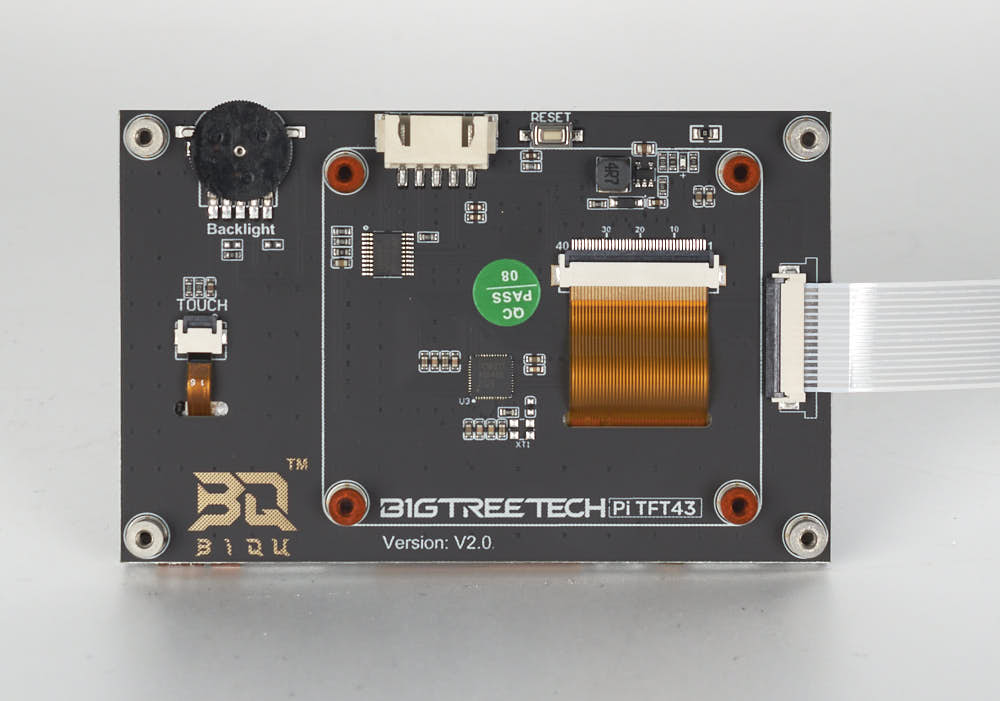
What you're looking at: The BTT Pi TFT43 is a 4.3" capacitive display that reaches the Raspberry Pi over one flat ribbon carrying power and video. On the back, the white edge socket takes the ribbon and the four corner holes the M2.5×6 screws.
Parts:
- 4.3" capacitive DSI display ×1
- FFC ribbon ×1 — from BTT screen packaging
- M2.5×6 screw ×4 — from BTT screen packaging
- reused: the faceplated
mount
Do:
- Peel the back film. Slide the ribbon in, metal contacts up and blue tab rearward, then close the latch once.
- Fit the screen, FFC connector at the bottom edge, and drive the four M2.5×6 screws finger-tight.
Check
Screen-end latch closed evenly, ribbon square in the socket, screen square in the faceplate aperture, FFC leaving the slot with no kink.
Helper: Holds the mount steady, face down, while you seat the screen and drive its four screws.
Tip
leave the front film on until the build is finished; tape over the free end's bare contacts until Ch 10 Step 10.50 latches the Pi end.
Caution
Rev D+ / LDO: "Incorrect orientation of the FFC cables can result in damage to your Raspberry Pi and/or touchscreen." An FFC has no polarity key — the metal contacts are the only clue, and each end is latched exactly once in this build. src
Source: LDO BTT 4.3" screen guide · LDO wiring photo PITFT43_FFC.jpg
Step 11.7 — Fit the touchscreen module into the front skirt run¶
What you're looking at: The finished touchscreen module now becomes a skirt segment in its own right, filling the centre-front gap between the two front skirts. Its top rail has to line up flush with theirs or the front of the machine reads as three separate parts.
Parts:
- reused: the touchscreen module, ribbon latched at both ends
- M3 roll-in T-nut ×3
- M3×8 SHCS ×3
Do:
- Free the module from its tape without pulling the ribbon.
- Roll three M3 T-nuts into the front extrusion.
- Slide the module between the two front skirts, top rails flush, and drive three M3×8 SHCS snug.
Check
The module's top rail is flush and continuous with both front skirt rails; the screen is level; the gaps to front_skirt_a and front_skirt_b are equal.
Helper: Holds the module level between the two front skirts while you drive its three screws.
Caution
Rev D+ / LDO: the manual's p.220 fastener is M3×12 SHCS into the mini12864 case. The BTT mount uses M3×8 SHCS into M3 roll-in nuts — 5 M3×8 and 3 roll-in nuts across steps 11.5 and 11.7. src
Source: Voron manual p.220 · LDO BTT Pi TFT4.3 mount README
Step 11.8 — Route and connect the FFC ribbon to the Pi¶
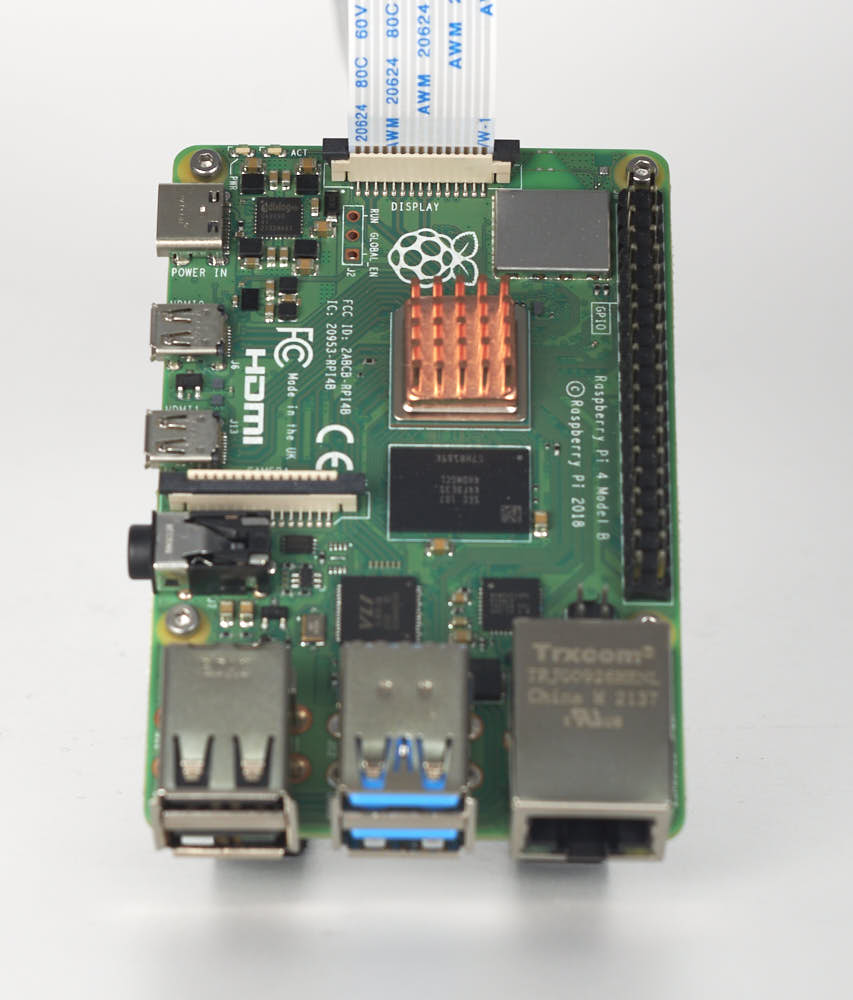
What you're looking at: The FFC is the one cable between screen and Pi, and it is not keyed: the bare contacts are the only orientation clue, and getting it wrong destroys either end. p.221 wires two ribbons to an EXP1/EXP2 header this machine lacks.
Parts:
- reused: the FFC ribbon, Pi end contacts forward and blue tab rearward
Do:
- Ignore p.221; it wires EXP1/EXP2 ribbons.
- Follow the ribbon from the module to the Pi: latches closed, a service loop at each end, no tight radius, clear of the front skirts.
- Never open a latch.
Check
Both latches closed, ribbon square and fully seated, no contacts exposed outside either connector, nothing pinched by the skirt or an extrusion edge.
Caution
Rev D+ / LDO: this is the wiring guide's "Connecting the FFC Cable, Ethernet Cable, USB Cable and Frame PE" step, done at 10.50. Screen rotation is a Ch 12 software step, not a wiring one: 12.10 writes it into /boot/firmware/cmdline.txt as video=DSI-1:…rotate= and 12.11 proves it. Do not use display_lcd_rotate, the legacy fake-KMS path, dead on MainsailOS 3.x. src · src
Tip
if Ch 10 Step 10.50 had to leave the Pi end taped because the mount was not printed, connect it now exactly as 10.50 describes.
Source: Voron manual p.221 · LDO wiring guide § Setting up the touch screen · LDO BTT 4.3" screen guide · LDO wiring photo RPI_DSI_FFC.jpg
Good stopping point · ~10 min since the last one
the touchscreen module (built at 10.50) is bolted into the front of the ring, snug, and its FFC run checked end to end, latched at both ends. Do not leave an FFC half-latched — the latch is what holds the contacts.
Step 11.9 — Fit the belt guards to the skirt segments¶
What you're looking at: A belt guard is the blue ring that closes the circular cut-out in a skirt segment over a Z-drive pulley, so nothing can reach a moving belt from outside. Guards a and b are mirror images, and the pair render shows both.
Parts:
[a]_belt_guard_a×2[a]_belt_guard_b×2- M3×8 SHCS ×6
Do:
- Fit guards to
front_skirt_a,front_skirt_bandkeystone_panel. The plug-panel corner gets its guard in situ at 11.14. - Dry-fit each corner: the boss drops in only one way round. Drive two M3×8 SHCS into the inserts from 11.2.
Check
Three guards fitted flush, each aperture concentric with its cut-out, and the fourth set aside for 11.14 with its corner known.
Helper: Sorts the guards into an a pile and a b pile and hands over the one each corner needs.
Source: Voron manual p.217
Step 11.10 — Populate the keystone panel¶
What you're looking at: The keystone panel is the rear skirt segment with two rectangular cut-outs for snap-in network modules. The CAT6 keystone is the RJ45 socket that Ch 10's Ethernet run plugs into from the inside; the blue blank fills the second slot.
Parts:
keystone_panel×1- reused: the CAT6 keystone insert
[a]_keystone_blank_insert×1
Do: Snap the CAT6 keystone into whichever of the two slots suits your cable run to the Pi's Ethernet port, and the blue blank into the other. Both clip in from the inside face, no fasteners.
Check
Both slots filled, both inserts flush with the outside face, neither rattling. The RJ45 opening faces out.
Tip
if you want more of the LDO logo on the machine, ldo_bestagon_insert snaps into any of the skirt hexagons — print extras. src
Source: Voron manual p.217 · LDOVoron2 STLs/
Step 11.11 — Build the electronics-bay fan modules¶
What you're looking at: Each side_fan_support has two fan openings. Both fans go in the right-hand support, the PSU side seen from the front. On the left, the two grill retainers stand in for fans. Grills a and b are mirrored.
Parts:
- reused: the two bay fans, inserts fitted
- reused: the two grill retainers, inserts fitted
side_fan_support×2[a]_fan_grill_a×2[a]_fan_grill_b×2- M3×8 SHCS ×16
Do:
- Right support: grill outside each opening, fan behind, four M3×8 SHCS through the grill into the fan's inserts.
- Both arrows into the bay; leads uncut.
- Left support: the same, a retainer for each fan.
Check
Two fans in the right-hand support, spinning freely, arrows into the bay. Left support: grills on retainers. Screws snug, fan frames not crushed.
Helper: Reads each fan's airflow arrow aloud and checks both point into the bay.
Caution
Rev D+ / LDO: the kit contains two 60×20 fans, two retainers, four grills and one 3×2 splicer PCB. p.228 is the fan support, p.225 the retainer support. LDO's Rev D bay photos S1, S4, S6 put the fans beside the PSU. No airflow direction is given; both extracting also works if matched. src · src
Tip
[a]_fan_grill_open_optional_x2 is an alternate grill with more open area and less filtering, if the bay runs warm. src
Source: Voron manual p.225 · Voron manual p.228 · LDO Rev D 350 BOM · Voron-2 STLs/Skirts/
Step 11.12 — Pre-load the skirt T-nuts¶
What you're looking at: A roll-in T-nut drops into an extrusion slot and rotates a quarter turn to lock, so it can be added after a frame is built. Once a skirt segment covers the slot, no nut can get in.
Parts:
- M3 roll-in T-nut ×12
- M5 roll-in T-nut ×2
Do:
- Roll every T-nut into the frame extrusions before any segment goes up, each loose at roughly its position.
- M3: four front, four rear, two per side. M5: one per side, between that side's two M3.
Check
Every T-nut sits flat in its slot and slides with light finger pressure. None jammed, none dropped inside a closed extrusion end.
Helper: Counts twelve M3 and two M5 T-nuts into a tray and hands them over one at a time.
Caution
Rev D+ / LDO: "Due to the tight tolerances of the extrusions and roll-in t-nuts it is advisable to either test fit before assembly to identify the sides of the extrusions that fits the best or to pre-load the t-nuts into the extrusions." src
Source: Voron manual p.218 · Voron manual p.226 · Voron manual p.229 · LDO Build Notes p.218 · Video: Part 5 @4:24:04
Good stopping point · ~15 min since the last one
three belt guards on their segments (the fourth waits for the plug panel at 11.14), keystone panel populated, the right-hand fan support built with both fans and the left one with its two retainers, and every skirt T-nut pre-loaded in the right slot. The ring is still off the machine.
Step 11.13 — Mount the front skirt segments¶
What you're looking at: The front run is the most-looked-at part of a finished Voron: skirt, touchscreen module, skirt, reading as one continuous band. Snugging first and only then closing the joints is what makes the two seams disappear.
Parts:
front_skirt_a_350×1front_skirt_b_350×1- M3×8 SHCS ×4
- reused: the four front T-nuts
Do:
- Hang each front skirt on its T-nuts, belt-guard aperture over the front Z-drive pulley, and drive two M3×8 SHCS up from underneath.
- Snug them, back off a quarter turn, push both hard against the TFT module, then tighten.
Check
Front run reads as one continuous band: skirt–module–skirt with equal, tight joints and a flush top rail. No daylight at the front Z-drive apertures.
Helper: Holds each front skirt against the touchscreen module while you drive its screws.
Source: Voron manual p.219
Step 11.14 — Mount the rear skirt run¶
What you're looking at: The rear run has three segments. One of them, the power_inlet_IECGS_1mm panel carrying the AC inlet, has been on the machine since Ch 09 and never moves. p.222 is not a segment: it shows the last belt guard going onto that panel.
Parts:
- reused: the fourth belt guard
- reused: the populated
keystone_panel rear_center_skirt_350×1- reused:
power_inlet_IECGS_1mm, already on the frame - reused: the four rear T-nuts
- M3×8 SHCS ×6
Do:
- Belt guard onto the plug panel, two M3×8 SHCS into its inserts.
keystone_panelinto the far rear corner, thenrear_center_skirt_350into the gap.- Feed the Ethernet through the keystone. Two M3×8 per segment: snug, close the joints, tighten.
Check
Rear run continuous and flush, all four guards on, the AC switch moving freely, RJ45 keystone square, nothing pinching the Ethernet or AC leads.
Helper: Holds the rear center skirt in its gap while you drive the screws.
Caution
Rev D+ / LDO: the inlet segment is power_inlet_IECGS_1mm — the 1.0 mm AC inlet with the integrated switch. The 1.2 mm variants and power_inlet_filtered are wrong for this kit. p.222–224 are drawn from the rear, plug panel on the image-left, which is the printer's right; follow the panel on your frame, not the picture's side. src
Source: Voron manual p.222–224 · LDO Build Notes p.222–224 · Video: Part 6 @1:39:57
Step 11.15 — Mount the first side skirt run¶
What you're looking at: Each side run is three segments: side_skirt_a at the front, the fan support in the middle, side_skirt_b at the rear. The two skirts go on first and stay loose, because the fan support drops into the gap they leave.
Parts:
side_skirt_a_350×1side_skirt_b_350×1- M3×8 SHCS ×2
- reused: this side's two M3 T-nuts
Do:
- On the right-hand side seen from the front, fit
side_skirt_aat the front andside_skirt_bat the rear, leaving the fan-support gap. - Drive the M3×8 SHCS into the pre-loaded T-nuts, snug not tight. M5 T-nut stays empty for 11.16.
Check
Both segments parallel to the extrusion, top rails level with the front and rear runs, the gap matching the fan module's width.
Helper: Holds each side skirt level against the extrusion while you start its screw.
Source: Voron manual p.226 · Voron manual p.227
Step 11.16 — Drop in the fan module and close the side run¶
What you're looking at: The right-hand fan support from 11.11, both fans in it, is the middle segment of the side run. It is trapped rather than screwed at its ends, so pushing the two skirts against it closes both joints.
Parts:
- reused: the right-hand fan support with both fans
- M5×10 BHCS ×1
- reused: this side's M5 T-nut
Do:
- Slide the support into the gap from outside, grills out, leads into the bay.
- Push the skirts against it to close both joints.
- Drive the M5×10 BHCS up into the M5 T-nut, then tighten this run.
Check
The whole side one band with flush joints, both fans spinning freely, no lead trapped between the support and the extrusion.
Helper: Holds the fan support in the gap, grills out, while you drive the M5 screw.
Source: Voron manual p.227 · Voron manual p.230
Step 11.17 — Mount the second side skirt run¶
What you're looking at: The same three-segment run on the left-hand side. Its middle segment is the second side_fan_support, no fans in it, just grills on the two retainers from 11.11. When it closes, the skirt ring is continuous all the way round.
Parts:
side_skirt_a_350×1side_skirt_b_350×1- reused: the left-hand fan support with its retainers
- M3×8 SHCS ×2
- M5×10 BHCS ×1
- reused: this side's three T-nuts
Do: Repeat 11.15 and 11.16 on the left-hand side with the retainer support. p.229 shows the T-nuts, p.230 the fasteners.
Check
The ring closed all the way round, every joint tight, every top rail flush. Two fans right, two retainers left.
Helper: Holds the left fan support in its gap while you close the run.
Source: Voron manual p.229 · Voron manual p.230
Good stopping point · ~20 min since the last one
front, rear and both side skirt runs mounted, both bay fans in the right-hand run, grills on retainers in the left. The ring is complete all the way round; no run is half-fastened.
Step 11.18 — Verify the bay-fan wiring¶
What you're looking at: The two manual pages describe a BTT Octopus controller this kit does not have. You are confirming Ch 10's wiring instead: both fans on one 3×2 splicer PCB, that PCB on its printed spacer, and the run landing on the Leviathan's FAN2 port.
Parts:
- reused: the 3×2 XH splicer PCB on its printed spacer
Do:
- Ignore p.228 and p.231.
- Confirm Ch 10's wiring: both fans on the 3×2 splicer, the splicer on its printed spacer, the run on FAN2 / PF7.
- Dress the leads into the duct, clear of the blades.
Check
Both fans on one splicer; splicer on its spacer, not touching aluminium; PCB FAN plugged into FAN2/PF7; no lead within reach of a blade.
Caution
Rev D+ / LDO: fan map for this build — PCB fan → FAN2/PF7; LED strip → LED-Strip/PE6; filter fan → FAN3/PF9. "Please remember to mount 3x2 splicing PCBs using the printed part to prevent a short with the extrusion." src
Source: Voron manual p.228 · Voron manual p.231 · LDO wiring guide § Connecting the fans and the LED strip
Step 11.19 — Fit the bestagon insert (optional)¶
(no image — see LDO STLs README)
What you're looking at: The bestagon insert is a purely cosmetic blue plug that snaps into one of the hexagonal openings in a skirt segment. Nothing depends on it.
Parts:
ldo_bestagon_insert×1
Do: Push the insert into one of the skirt hexagons from the outside until it snaps. Pick a hexagon on the front-left or front-right skirt where it reads without competing with the touchscreen.
Check
Insert flush and retained; the hexagon is not stressed white at the corners.
Helper: Picks the hexagon and pushes the insert in until it clicks.
Source: LDOVoron2 STLs/
Step 11.20 — VHB the bottom-panel clips and hinges¶
What you're looking at: 3M VHB is a double-sided acrylic foam tape that reaches most of its strength within an hour and does not come off again. These six printed parts, four clips and two hinges, are what the bottom panel bonds to.
Parts:
bottom_panel_clip×4bottom_panel_hinge×2- consumable: 3M VHB tape, six pads
- consumable: IPA and a lint-free cloth
Do:
- Still unplugged, put the printer on its side, as at 10.1.
- Wipe all six pad faces with IPA and let it flash off.
- Cut six VHB pads to match, press one onto each, liners left on.
Check
Six parts, six pads, each centred with no overhang onto a curved face, liners still on.
Helper: Wipes all six pad faces with IPA and the cloth before the pads go on.
Source: Voron manual p.232
Step 11.21 — Fit the bottom panel¶
What you're looking at: The bottom panel is the 4 mm acrylic floor of the electronics bay, and it is a door: VHB-bonded to two rear hinges and held by four snap clips, it unclips at the front and swings down for access through Ch 13.
Parts:
- bottom panel, acrylic, black, 469×469×4 mm ×1
- reused: the six taped clips and hinges
- M3×8 SHCS ×6
Do:
- Screw each part into its skirt insert with one M3×8 SHCS: hinges rear, clips front and sides.
- Peel the film off both panel faces, pull the liners, and press the panel home, hinge edge at the rear.
Check
Panel square, equal margins, no rock, every pad bonded. After an hour, release the front clips and swing it down, clearing the skirt ring.
Helper: Holds the panel square to the frame while you press it onto the pads.
Caution
Rev D+ / LDO: the bottom panel is the 4 mm acrylic, not the 3 mm deck panel. If you are holding a 469×469 panel and cannot tell which is which, caliper it — 3 mm is the deck (fitted back in Ch 02), 4 mm is this one. src
Tip
swing the door with the machine still on its side or up on blocks; confirm every duct is reachable, then close it.
Source: Voron manual p.232 · Voron manual p.233 · LDO Rev D 350 BOM · CAD: Voron 2.4r2 STEP @ de7e89d
Good stopping point · ~20 min since the last one
bay-fan wiring verified against Ch 10, bestagon insert decided, VHB pads pressed and the bottom panel hung on its rear hinges and front clips. Leave the VHB to cure undisturbed — do not swing the door open until it has; do not press a pad and walk away before the panel is on it.
Step 11.22 — Choose the Z belt cover variant¶
What you're looking at: A Z belt cover is a printed shroud that clips over each of the four Z belts at a frame corner, so nothing can be drawn into the belt. LDO's alternate _a_led version adds a cable slot for LED wiring routed through a Z-motor opening.
Parts:
z_belt_cover_a×2z_belt_cover_b×2
Do: Check how Ch 10 routed the chamber LED wiring. Ch 10 used the extrusion slot, so the stock covers apply. If any LED wire passes through a Z-motor opening, print LDO's z_belt_cover_a_led for that corner, a 7 g, 25-minute part.
Check
You can state, per corner, which cover goes on and why. No cable crosses a stock cover's sealing face.
Caution
Rev D+ / LDO: "PAGE 234 Use the alternate Z-belt cover if you routed the LED wires through the Z-motor opening." src · part
Source: Voron manual p.234 · LDO Build Notes p.234 · LDOVoron2 z_belt_cover_a_led.stl
Step 11.23 — Load each cover with a hammerhead nut¶
What you're looking at: A hammerhead T-nut drops straight into an extrusion slot from the face rather than rolling in from an end, then rotates a quarter turn under load to lock. Starting the screw keeps the nut captive in the cover's recess.
Parts:
- reused: the four Z belt covers
- M3 hammerhead T-nut ×4
- M3×6 BHCS ×4
Do: Drop an M3 hammerhead nut into the recess on the back of each cover and start an M3×6 BHCS into it from the front, two or three turns only, so the nut stays captive but free to rotate.
Check
Nut captive, screw started, nut still able to turn, the head still reachable with a 2 mm hex once the cover is on.
Helper: Counts four covers, four nuts and four screws onto the tray.
Source: Voron manual p.234
Step 11.24 — Fit the first Z belt cover¶
What you're looking at: The cover goes on with the belt already threaded through its slot, which is why the belt is pinched flat first. The click you feel is the hammerhead nut rotating and biting inside the extrusion channel.
Parts:
- reused: one loaded Z belt cover
Do:
- Pinch the Z belt flat and slide the cover in, belt through its slot, hammerhead nut into the channel.
- Hold the cover square, tighten the M3×6 BHCS. If the nut spins, back off and re-seat it squarely.
Check
Cover flat against the extrusion, the Z belt running through freely with no rub, the cover not moving when pushed.
Helper: Pinches the Z belt flat while you slide the cover in.
Source: Voron manual p.235
Step 11.25 — Fit the remaining three Z belt covers¶
What you're looking at: The remaining three corners are identical. The full-travel run afterwards is the real test: a cover that touches a belt makes noise now and cuts the belt edge over months.
Parts:
- reused: the three remaining loaded covers
Do: Repeat 11.24 at the other three Z belt corners. Then run the gantry up and down its full travel by hand and watch each cover.
Check
Four covers on, all four belts running clear, no rubbing anywhere in the full Z travel.
Helper: Watches each cover and calls out any rub while you move the gantry.
Tip
p.237 is a page of Voron history, nothing to build.
Source: Voron manual p.236 · Voron manual p.237
Good stopping point · ~15 min since the last one
all four Z belt covers on, each with its hammerhead nut, and the gantry runs its full Z travel without touching one.
Step 11.26 — Break out the Nevermore printed supports¶
(no image — see LDO Nevermore V5 Duo guide)
What you're looking at: The Nevermore is a recirculating activated-carbon filter that sits inside the chamber and scrubs the fumes ASA gives off. Four printed parts make it: a plenum holding two blower fans, its lid, and a magnetic cartridge with its own lid for the carbon.
Parts:
V2_Duo_Plenum×1V2_Duo_Plenum_LID×1Regular_Cartridge×1Regular_Cartridge_Lid×1
Do: The cartridge and the plenum each carry a built-in printed support. Push them out; they break at the interface. Do not cut them out with a knife.
Check
Both supports removed cleanly, no torn layers on the sealing faces, the cartridge lid slides freely in the cartridge grooves.
Caution
Rev D+ / LDO: you are building the Regular cartridge, not the XL — the XL wants a larger carbon charge and a faster, louder fan. src
Source: LDO Nevermore V5 Duo guide § Preparation · Nevermore Micro repo
Step 11.27 — Modify both 5015 fan enclosures¶
(no image — see LDO Nevermore guide § Preparation)
What you're looking at: A 5015 blower is a 50 × 15 mm squirrel-cage fan: it makes pressure rather than free-air flow, which is what pushes chamber air through packed carbon. Both housings have to be opened and a section of plastic removed so they fit the plenum.
Parts:
- staged: Nevermore 5015 fan ×2
- tool: wire snips
Do:
- Pry the tabs holding each fan's enclosure together and separate it.
- With wire snips, remove the section of plastic the guide highlights from each housing.
- Use snips, not a blade.
Check
Both fans modified identically, impellers still spin freely, no cracked housing, no swarf left inside the scroll.
Source: LDO Nevermore V5 Duo guide § Preparation · Video: Extras! @2:30:00
Step 11.28 — Heat-set the Nevermore parts¶
(no image — see LDO Nevermore guide § Preparation)
What you're looking at: Six inserts, three destinations: four in the fan mounting holes, one in the plenum for its lid screw, one in the cartridge for its lid screw. Nothing else on the Nevermore takes a threaded fastener.
Parts:
- M3×5×4 heat-set insert ×6
- reused: the plenum and the cartridge
Do: Four inserts go into the fan mounting holes, one into the plenum, one into the cartridge. Six total.
Check
All six flush and square; an M3 screw starts freely in each.
Source: LDO Nevermore V5 Duo guide § Preparation · Video: Extras! @2:24:31
Step 11.29 — Cut the connector off the long-wire fan¶
(no image — see LDO Nevermore guide § Preparation)
What you're looking at: The fan with the longer lead has its plug cut off so both fans can be soldered to the bridge PCB, a small board that parallels them onto one lead. The cut-off pigtail is the only connector that mates with the FILTER FAN extension.
Parts:
- staged: the long-lead Nevermore 5015 fan
- tool: side cutters
Do: Cut the JST connector off the longer-leaded fan. Keep the connector pigtail; it gets soldered back onto the bridge PCB at 11.33.
Check
Connector cut free and set aside somewhere you will not lose it; both fan leads still long enough to route through the plenum.
Source: LDO Nevermore V5 Duo guide § Preparation
Good stopping point · ~15 min since the last one
Nevermore supports broken off, both 5015 enclosures trimmed, inserts melted, and the long-wire fan's connector cut off. Nothing is glued and nothing is soldered to the bridge PCB yet.
Step 11.30 — Fit the first fan into the plenum¶
(no image — see LDO Nevermore guide § Install Fans)
What you're looking at: The plenum's wire channel is a moulded groove that carries both fans' leads to one corner. Routing the wire before seating the fan is the only order that works: once the fan is in, the channel is behind it.
Parts:
- Nevermore 5015 fan, cut lead ×1
- reused: the plenum
- tool: tweezers
Do: Route the fan's wires from the right side of the plenum, right to left along the wire channel, with tweezers. Then seat the fan in the right side and pull the wire flat in the channel.
Check
Fan seated fully with the impeller clear of the plenum wall; wire flat in the channel, not crossing the fan aperture.
Source: LDO Nevermore V5 Duo guide § Install Fans
Step 11.31 — Fit the second fan and trim the leads¶
(no image — see LDO Nevermore guide § Install Fans)
What you're looking at: The second fan mirrors the first. Cutting all four wire ends to the same 30–40 mm now is what makes the bridge-PCB soldering at 11.33 tidy, and it also fixes the plenum's mounting position later.
Parts:
- Nevermore 5015 fan ×1
- tool: side cutters
Do: Route its wires from the left side of the plenum, right to left, and seat the fan in the left side. Now cut both fans' wires to equal length, roughly 30–40 mm proud of the enclosure.
Check
Both fans seated, all four wire ends the same length at 30–40 mm, both impellers spin freely.
Source: LDO Nevermore V5 Duo guide § Install Fans
Step 11.32 — Bolt the fans to the plenum¶
(no image — see LDO Nevermore guide § Install Fans)
What you're looking at: The M3×16 BHCS pass through the fan bodies into the heat-sets from 11.28. A 5015 housing is thin plastic and will distort if these are cranked, which shows up as the impeller rubbing.
Parts:
- M3×16 BHCS ×4 — from the Nevermore parts bag
- reused: the two Nevermore fans
Do: Drive the four M3×16 BHCS into the fan heat-sets from 11.28. Snug only; a 5015 housing distorts and the impeller rubs if you crank them.
Check
Both fans held with no rock; spin each impeller by hand and listen for rub.
Source: LDO Nevermore V5 Duo guide § Install Fans
Step 11.33 — Solder the fans to the bridge PCB¶
(no image — see LDO Nevermore guide § Install Fans)
What you're looking at: The bridge PCB is a small board that joins both fans and the saved pigtail into one 24 V pair, red to the top pads, black to the bottom. A solder bridge here puts a dead short across the mainboard's 24 V fan output.
Parts:
- Nevermore bridge PCB ×1
- reused: the saved connector pigtail
- tool: soldering iron and solder
- tool: multimeter
Do:
- Solder both fans' wires and the pigtail to the bridge PCB, red to the top pads, black to the bottom.
- Arrange the wires as the guide's photo shows.
- Meter for a short between positive and negative.
Check
Continuity reads open between + and −; all six joints shiny and mechanically sound; PCB sits in its compartment without pressing on a wire.
Caution
A bad solder here shorts a 24 V rail. LDO: "A bad solder will result in permanently damaging the controller board." Do the meter check before anything gets plugged in. src
Source: LDO Nevermore V5 Duo guide § Install Fans · Video: Extras! @2:36:20
Good stopping point · ~20 min since the last one
both fans seated in the plenum, leads trimmed to length and soldered to the bridge PCB, and the pair metered for a short. The plenum is open and unglued.
Step 11.34 — Glue the plenum magnets¶
(no image — see LDO Nevermore guide § Nevermore Assembly)
What you're looking at: The plenum and cartridge hold together on magnets rather than screws, so the cartridge can be pulled off to recharge the carbon. Every magnet in the plenum must go in with the same pole facing out, otherwise half of them will repel the cartridge.
Parts:
- 6×3 mm neodymium magnet ×4
- consumable: super glue
Do: Drop a spot of super glue into each of the plenum's four magnet pockets and press a magnet in, one at a time, all with the same pole facing out. Press each fully home.
Check
All four plenum magnets flush and the same polarity: a spare magnet is attracted to every one the same way.
Helper: Tests each magnet against a spare and hands them over all the same side up.
Source: LDO Nevermore V5 Duo guide § Nevermore Assembly · Video: Extras! @2:59:56
Step 11.35 — Close the plenum lid¶
(no image — see LDO Nevermore guide § Nevermore Assembly)
What you're looking at: The lid slides into grooves in the plenum body and one screw holds it. It closes the fan compartment so the blowers push air through the cartridge rather than straight back out.
Parts:
V2_Duo_Plenum_LID×1- M3×6 BHCS ×1
Do: Slide the lid into the plenum body's grooves and secure with the M3×6 BHCS into the plenum heat-set. Add the optional M3×4 on the other side if you want it to look symmetric.
Check
Lid fully home in both grooves, screw snug, no wire pinched at the lid edge.
Source: LDO Nevermore V5 Duo guide § Nevermore Assembly
Step 11.36 — Glue the cartridge magnets to match¶
(no image — see LDO Nevermore guide § Cartridge Assembly)
What you're looking at: This is the matching half of 11.34, and the reason for the marker: a magnet's polarity is invisible once it is glued in. Stick each one to the finished plenum first, mark the exposed face, and glue it that way round.
Parts:
- 6×3 mm neodymium magnet ×4
- consumable: super glue
- tool: a marker
Do: Stick each magnet to the assembled plenum, mark the exposed face, and keep that orientation. Then glue them into the cartridge pockets one at a time, marked face out.
Check
Cartridge offers up to the plenum and snaps home; it holds against a firm shake; all four magnets flush.
Helper: Marks the exposed face of each magnet while it sits on the plenum.
Source: LDO Nevermore V5 Duo guide § Cartridge Assembly
Step 11.37 — Fill and close the cartridge¶
(no image — see LDO Nevermore guide § Cartridge Assembly)
What you're looking at: The cartridge is the removable box for the activated carbon: 4 mm acid-free pellets, which are not in the kit. Filled or empty, it has to be closed and fitted, or the plenum just stirs the chamber.
Parts:
Regular_Cartridge_Lid×1- M3×6 BHCS ×1
- tool: a marker
- consumable: 4 mm acid-free activated carbon pellets, not supplied
Do:
- Pellets on hand? Fill the cartridge with them. Otherwise leave it empty.
- Slide the lid into its grooves and fix it with the M3×6 BHCS.
- Write the fill state and date on the lid.
Check
Lid home in both grooves, screw snug, no pellets in the grooves. Fill state written on the lid.
Helper: Writes the fill state and the date on the cartridge lid.
Caution
Media not in the kit. LDO: "NOT INCLUDED WITH THE KIT", acid-free pellets recommended. The Nevermore project warns that acid-residue carbon corrodes rails and switches: buy only vetted acid-free carbon. An empty, closed cartridge is fine until then; the filter still installs and wires. src
Source: LDO Nevermore V5 Duo guide § Cartridge Assembly · Nevermore Micro README § Sourcing the proper acid-free carbon
Good stopping point · ~20 min since the last one
plenum and cartridge magnets glued in matching polarity, both lids closed, the cartridge's fill state written on its lid. Never stop between gluing the plenum magnets and the cartridge magnets: the second set has to be matched to the first while you still know which way round they went.
Step 11.38 — Mount the plenum in the chamber¶
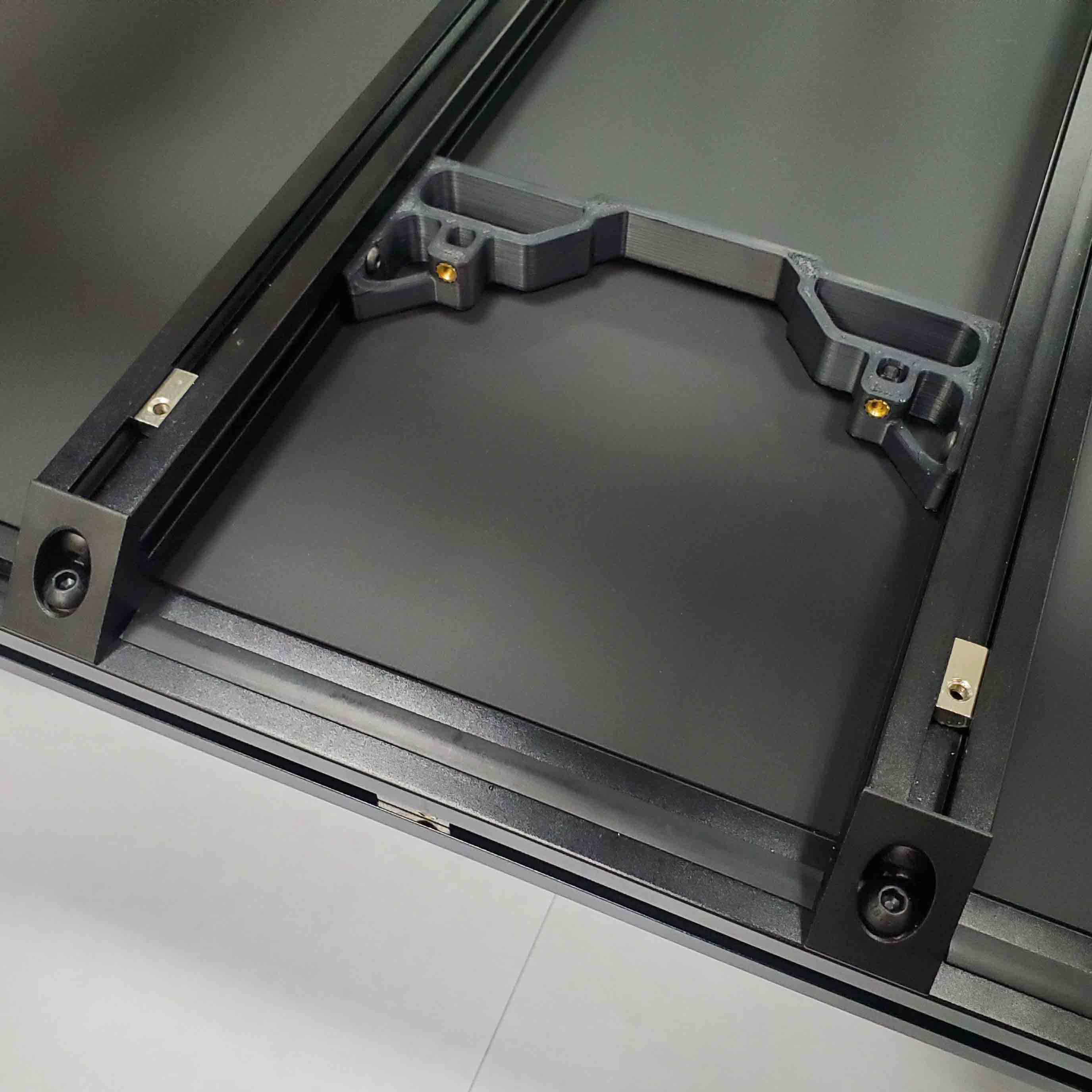
What you're looking at: The plenum bolts to the inside faces of the two bed extrusions, low and inboard, where it is below the bed surface and out of the gantry's way. The photo is LDO's placement reference, with the two T-nuts already rolled in.
Parts:
- reused: the plenum assembly
- M3 roll-in T-nut ×2
- M3×12 SHCS ×2
Do: Roll one M3 T-nut into the inside face of each bed extrusion, not the top slot, and bolt the plenum on with two M3×12 SHCS. The fan leads were cut to length for this position at 11.31.
Check
Plenum solid on the extrusions, sitting inboard and below the bed surface; nothing it can foul as the gantry descends; both screws snug.
Source: LDO Nevermore V5 Duo guide § Installation for Voron V2.4 · LDO wiring photo nevermore_base_placement.jpg
Step 11.39 — Attach the cartridge¶
(no image — see LDO Nevermore guide § Installation for Voron V2.4)
What you're looking at: Nothing but magnets holds the cartridge on. That is the point: carbon is consumable, and this joint is the one you will open every few hundred hours.
Parts:
- reused: the cartridge
Do: Slide the cartridge along until the magnets take, and let it pull itself home.
Check
Cartridge seated square on the plenum with no gap at the joint; it comes off with a deliberate pull and not with an accidental knock.
Source: LDO Nevermore V5 Duo guide § Installation for Voron V2.4
Step 11.40 — Connect the filter fan¶
(no image — see LDO wiring guide § Connecting the Fans and the LED Strip)
What you're looking at: The FILTER FAN extension is the kit lead already run to FAN3 in Ch 10 Step 10.48 and left coiled at the rear of the chamber. This step mates the Nevermore's pigtail to it. The Nevermore guide names an Octopus pin; this machine's port is FAN3 / PF9.
Parts:
- reused: the kit's FILTER FAN extension lead
Do: Mate the Nevermore's pigtail with the FILTER FAN extension and follow it back to the Leviathan. It lands on FAN3 / PF9. With the machine still unplugged, confirm that header's voltage-selection jumper is set for 24 V.
Check
Filter fan on FAN3/PF9; 24 V jumper confirmed; the lead is routed in the duct and cannot be caught by the bed or the gantry.
Helper: Finds the FILTER FAN tag on the coiled lead and reads it aloud.
Caution
Rev D+ / LDO: the Nevermore guide was written for a BTT Octopus and tells you to use "Octopus Fan3 - Pinout PD13". This machine has a Leviathan. Use FAN3 / PF9 from the Rev D wiring guide's fan table. src
Source: LDO wiring guide § Connecting the fans and the LED strip · Video: Extras! @2:48:31
Step 11.41 — Note the filter fan config for Ch 12¶
(no image — see LDO Nevermore guide § Configuration printer.cfg)
What you're looking at: Nothing to build: you are writing down a pin number so Ch 12 does not have to re-derive it. LDO's published config section is right in shape but names the wrong board's pin.
Parts: none.
Do: Write the pin on a tag and tape it to the plenum. LDO's [heater_fan exhaust_fan] section is right in shape but its pin: PD13 is the Octopus pin and must become the Leviathan's PF9. Step 12.32 replaces it with [fan_generic nevermore] on the same pin.
Check
Tag on the plenum reading "FILTER FAN → FAN3 / PF9". Ch 12's config checklist has the Nevermore section on it.
Helper: Writes the tag and tapes it to the plenum.
Source: LDO Nevermore V5 Duo guide § Configuration printer.cfg · leviathan-printer-rev-d-sbv2.cfg
Step 11.42 — Fit the bowden retainer¶
What you're looking at: The bowden retainer sits on the top rear extrusion and overhangs the back. It holds the spool end of the reverse-bowden PTFE that carries filament to the Clockwork 2. With the back panel on, the tube crosses it through the exhaust cover's coupler.
Parts:
bowden_retainer×1- M3 hammerhead T-nut ×1
- M3×8 SHCS ×1
- consumable: PTFE tube, 4 mm OD, 3 mm ID, 1.2 m
Do:
- Nut in its recess, M3×8 started; slide onto the top rear extrusion beside the notch.
- Cut two 86 mm spool-holder lengths off the PTFE.
- Run the rest from the round hole to the Clockwork 2 inlet; tighten.
Check
Retainer solid on the extrusion; the PTFE passes through with light drag only; no sharp bend where the tube leaves the retainer.
Caution
The back panel is still off, so the tube drops straight in for Ch 13. At 11.55 it is re-routed in through the exhaust cover's coupler, the way p.258 loops it into the housing. Do not shorten it until then (verify on bench).
Source: Voron manual p.257 · Voron manual p.258 · Video: Part 9 @3:13:57
Step 11.43 — Fit the spool holder arm¶
What you're looking at: The spool holder is the printed arm that carries a 1 kg filament spool on the rear of the machine. The two short PTFE offcuts pressed into its grooves are the bearing surface the spool turns on.
Parts:
spool_holder×1- consumable: PTFE tube, the two 86 mm lengths
- M5 roll-in T-nut ×1
- M5×16 BHCS ×1
Do:
- Press the two 86 mm PTFE lengths into the grooves along the arm.
- Roll the M5 T-nut into the rear vertical extrusion at spool height, offer the arm up, and drive the M5×16 BHCS home.
Check
Arm level and solid enough for a full 1 kg spool, both PTFE inserts seated, a spool spinning with light finger pressure without binding.
Source: Voron manual p.259 · Video: Part 9 @3:11:11
Good stopping point · ~15 min since the last one
Nevermore mounted in the chamber, cartridge attached, filter fan connected to the Ch 10 lead, bowden retainer and spool holder arm fitted. Its config is [fan_generic nevermore] on PF9 (11.41) — Ch 12 Step 12.32 already wrote it; confirm it against your Ch 12 notes or Checkpoint 12, not a live Mainsail: the machine stays unplugged until 13.3.
Step 11.44 — Assemble the Clicky-Clack door frame¶
(no image — see KB3D install guide · mod README)
What you're looking at: Clicky-Clack is the magnetic-latch front door: a 2020 aluminium frame around one clear acrylic panel. The two shorter extrusions have tapped ends; the longer two have access holes for the blind-joint screws.
Parts:
- door frame extrusion, 470 mm ×2 — from Clicky-Clack door kit
- door frame extrusion, 530 mm ×2 — from Clicky-Clack door kit
- M5×16 BHCS ×4 — from Clicky-Clack door kit
- door panel, acrylic, 480×500×3 mm ×1 — from Clicky-Clack acrylic panel
- tool: machinist square
Do:
- Start an M5×16 BHCS halfway into each tapped end.
- Fit both 530 mm pieces to one tapped piece through their access holes; square each corner.
- Three sides only, slide the acrylic in, then close the fourth.
Check
All four corners square, the acrylic fully home with no bow, no twist on a flat surface, and the hinge side written down.
Helper: Holds the machinist square in each corner while you tighten it.
Caution
You are using the plain acrylic panel from Fabreeko, not the NanoNest stack the KB3D guide illustrates. Skip the KB3D guide's NanoNest taping section entirely; the panel goes straight into the frame slot. src
Tip
hinges go on the left seen from the front, latch on the right. Mirror every left and right in 11.57 and 11.62–11.64 to reverse the swing.
Source: KB3D Clicky-Clack install guide § Frame Assembly · Clicky-Clack mod README · Fabreeko acrylic panel
Step 11.45 — Fit the rubber panel retainer strip¶
(no image — see mod README)
What you're looking at: The rubber retainer strip is an extruded profile that presses into the frame groove alongside the acrylic and takes up the clearance. Without it the panel rattles in its slot every time the door closes.
Parts:
- panel retainer strip, 2 m ×1 — from Clicky-Clack door kit
- tool: side cutters
Do: Cut the strip to length for each side with 45° mitres at the corners, then press it into the extrusion groove alongside the acrylic. It takes up the clearance and stops the panel rattling.
Check
Strip seated all the way round with the mitres closed; the acrylic no longer moves in the frame when you tap it.
Source: Clicky-Clack mod README
Step 11.46 — Build the door hinges: dowel into the solid halves¶
(no image — see mod README § Assembly)
What you're looking at: Each door hinge is two printed halves: a solid half carrying a steel dowel pin, and a sleeve half that drops onto it. Leaving 20 mm of pin proud is what lets the whole door lift straight off its hinges.
Parts:
Hinge-L-solid×2- M5×45 dowel pin ×2 — from Clicky-Clack door kit
- tool: small hammer
Do: Tap an M5×45 dowel into each solid hinge half; it is meant to be a very tight fit. Stop when about 20 mm protrudes. Do not drive it flush.
Check
Both pins about 20 mm proud, both perpendicular to the hinge face, neither part split.
Tip
an M3×20 screw's shoulder is a quick 20 mm gauge.
Source: Clicky-Clack mod README § Assembly
Step 11.47 — Bush the sleeve halves¶
(no image — see mod README § Assembly)
What you're looking at: A split bushing is a rolled metal sleeve that becomes the actual bearing surface between pin and printed part, so the hinge does not wear its way loose. Two go into each sleeve half, fully below the surface.
Parts:
Hinge-L-sleeve×2- M5×7×8 split bushing ×4 — from Clicky-Clack door kit
- tool: small hammer
Do: Slide two bushings over one of the dowels, offer the empty sleeve part over them, and tap the sleeve down until the bushings sit fully inside with nothing protruding. Repeat for the second sleeve.
Check
Both sleeves bushed with nothing standing proud; a sleeve half drops onto a solid half's dowel and rotates freely with no slop and no bind.
Tip
a soldering iron works instead of a hammer, melting the bushings in like a heat-set.
Source: Clicky-Clack mod README § Assembly
Good stopping point · ~20 min since the last one
the door frame is squared and blind-jointed, the rubber retainer strip is in, and both hinges are dowelled and bushed. The acrylic is not yet trapped and nothing is glued.
Step 11.48 — Glue the handle, latch and handle-hinge magnets¶
(no image — see KB3D guide § Hinge & Handle Assembly)
What you're looking at: Twelve 6 × 3 mm magnets: six in the handle, four in the latch, one in each handle hinge. The handle pulls to the latch, the hinges pull to the handle ends, so test each pair before gluing.
Parts:
Handle×1Latch×1Handle-Hinge_Top×1Handle-Hinge_Bottom×1- 6×3 mm magnet ×12 — from Clicky-Clack door kit
- consumable: super glue
Do:
- Test each pair with a loose magnet first.
- Glue each magnet into its hexagon pocket, fully home: four in the handle attracting four in the latch, one in each handle end attracting one in each handle hinge.
Check
Handle and latch pull together firmly and click; both handle hinges pull to the handle; nothing standing proud of a pocket.
Helper: Sorts the magnets into two polarity piles before you glue any of them in.
Tip
put a magnet on the end of a steel tool and use that to press each one into its pocket. src
Source: KB3D Clicky-Clack install guide § Hinge & Handle Assembly
Step 11.49 — Fit the latch's heat-set and panel clip¶
(no image — see KB3D guide § Hinge & Handle Assembly)
What you're looking at: The Panel_Clip is both the door's catch and the middle side-panel clip for that side, so one of the eight clips fitted at 11.57 is displaced by it at 11.63. The heat-set gives the latch a metal thread.
Parts:
- reused: the latch
- M3×5×4 heat-set insert ×1 — from Clicky-Clack door kit
Panel_Clip×1- M3×8 BHCS ×1 — from Clicky-Clack door kit
Do: Press one heat-set insert into the hole in the middle of the latch and let it cool. Then screw the Panel_Clip onto the latch with the M3×8 BHCS.
Check
Insert square and flush; the panel clip is solid on the latch and its panel groove is unobstructed.
Source: KB3D Clicky-Clack install guide § Hinge & Handle Assembly
Step 11.50 — Finish the handle¶
(no image — see mod README § Assembly)
What you're looking at: The handle hangs on two more M5×45 pins, deliberately looser than the door hinges so it can swing. The two M3×8 screws at its ends are travel stops, not fasteners: they limit how far the handle rotates.
Parts:
- reused: the handle and both handle hinges
- M5×45 dowel pin ×2 — from Clicky-Clack door kit
- M5×7×8 split bushing ×2 — from Clicky-Clack door kit
- M3×8 SHCS ×2 — from Clicky-Clack door kit
Do:
- Push the two M5×45 pins into the handle, looser than the door hinges.
- Tap one bushing into each handle hinge.
- Drive the two M3×8 locating screws into the handle ends, then slide the hinges on.
Check
Handle hinges slide on and stay put by magnet alone; the handle rotates through its full arc and stops against the locating screws; nothing binds.
Source: Clicky-Clack mod README § Assembly
Step 11.51 — Foam-tape the front opening¶
(no image — see KB3D guide § Frame Assembly)
What you're looking at: The 3 mm foam runs on the front face of the front opening's extrusions, the face the closed door frame presses against, not the chamber-side face. Butting the corners rather than overlapping keeps the seal one thickness everywhere.
Parts:
- consumable: 3 mm foam tape
Do: Run 3 mm foam tape around the front face of the four front-opening extrusions, along their inboard edge. Hold the door frame dry against it and tape the surface it lands on. Butt the corners; do not overlap.
Check
Continuous, unbroken seal on all four sides of the opening, no overlaps standing proud, no gaps at the corners.
Helper: Peels the foam tape backing a hand's length ahead as you press it down.
Source: KB3D Clicky-Clack install guide § Frame Assembly
Good stopping point · ~20 min since the last one
end of Part A. Handle, latch and handle-hinge magnets glued and curing, the latch heat-set and panel clip fitted, and the front opening foam-taped. Do not fit the back, side or top panels: Ch 13 needs every face open. Go to Ch 13.
⛔ Stop here until Ch 13 is complete¶
Everything above is done with the machine open. Do not fit the back, side or top panels or hang the door yet.
Ch 12 Part 2 (12.11–12.37) is already done — the boards were flashed and configured with the bay open, before this part closed it. Go now to Ch 13 (initial startup) — which includes the Ch 06b gantry-squaring pass and a QGL re-run. All of it needs the machine reachable from every face: STEPPER_BUZZ per motor, the XY endstop and homing checks, bed locating and the 0,0 point, PROBE_ACCURACY, dropping the Z joints and releasing the A/B tensioners for squaring.
Come back here at 11.52 once Ch 13's Finish page is done. The rest of this chapter is about 1.0–2.0 h.
Sub-sections that wait for Ch 13: 11.52–11.55 (back panel and exhaust), 11.56–11.58 (side panels), 11.59–11.60 (top panel and handlebars), 11.61–11.65 (Clicky-Clack door hung on the machine), 11.66 (final seal check).
Part B — after Ch 13¶
Step 11.52 — Foam-tape the back panel¶
What you're looking at: The back panel is 3 mm black acrylic. The 1 mm foam tape on its inner perimeter is a noise damper between acrylic and aluminium, not a gasket, so it is thinner than the 3 mm used on the sides.
Parts:
CMD_V2_6B_154mm_DUCT_COVER×2CMD_V2_6B_90DEG_COVER×2V2L_90DEG_COVER_MIRROR×1V2L_58mm_DUCT_COVER×3V2L_130mm_DUCT_COVER×1V2L_70mm_DUCT_COVER×1CMD_Remix-V3_DUCT-2B_45deg_LID×2V3L_10mm_DUCT_COVER×1V3L_154N_DUCT_COVER×2V3L_T_REG_N_COVER×2- staged: back panel, acrylic, black, 483×503×3 mm ×1
- consumable: 1 mm foam tape
Do:
- Open the bottom panel and snap every DC loop lid on. Close it.
- Peel the protective film from both faces of the back panel.
- Run 1 mm foam tape on the frame-side contact areas, corners butted.
Check
Every DC lid seated, no wire pinched under one. Continuous 1 mm tape on all four edges, none where a clip sits, film off.
Helper: Holds the back panel steady and peels the tape backing ahead of you.
DC lids
left off at Step 10.71 for the meter. Ch 13 has now run every motor, heater and fan, so they close now, before any panel. Fallback middle run: its lids instead of the 154N and T_REG_N ones. LDO layout: snap the PVC duct covers on.
Caution
Back and top panels get 1 mm foam. Side panels get 3 mm. Mixing them up either lets the gantry rub a side panel or leaves the back panel proud of its clips.
Source: Voron manual p.238 · Voron manual p.239
Step 11.53 — Fit the back-panel clips¶
What you're looking at: A panel clip is a small printed part that screws to the frame and grips the panel edge in a groove. The 4mm in the name is the stack the groove is cut for: a 3 mm panel plus 1 mm of foam.
Parts:
corner_panel_clip_4mm×4midspan_panel_clip_4mm×3- M3×8 SHCS ×11
- M3 hammerhead T-nut ×11
Do:
- Load each clip loosely: two M3×8 SHCS and nuts per corner clip, one per midspan.
- Corners first, then three midspans as p.239 shows.
- Offer the panel up, slide every clip onto its edge, tighten.
Check
Seven clips engaged on the panel edge, the panel flat against the frame with the 1 mm foam just compressed, no bowed acrylic.
Helper: Counts out eleven screws and eleven hammerhead nuts, two per corner clip and one per midspan.
Caution
Clip-thickness assignment. The manual never says which clip goes on which panel; the print plan infers it: 3 mm panel plus 1 mm foam = 4 mm, 7 back and 8 top clips matching _4mm_x7 and _4mm_x8, M3×8 here versus M3×12 on the sides. Test-fit a 4 mm and a 6 mm clip before committing the 31. src
Tip
a drop of thread locker turns each hammerhead nut into a quarter-turn quick release, but only once the whole assembly is finished. [Voron manual p.239]
Source: Voron manual p.239 · Voron manual p.240 · Voron-2 STLs/Panel_Mounting/ · Video: Part 9 @3:54:44
Step 11.54 — Fit the exhaust cover and grill¶
What you're looking at: The grill goes inside: its thin flange sits behind the panel and its honeycomb fills the notch, flush with the outer face. LDO's exhaust_cover closes it from outside, its centre boss nesting in the grill's middle cell, its threaded hole taking the PTFE coupler.
Parts:
exhaust_cover×1exhaust_filter_grill×1- M3×12 SHCS ×2
- M3 heat-set insert ×2
- 4mm Bowden Coupler ×1
- tool: soldering iron with the LDO insert tip
Do:
- Press an insert into each small cover hole from the boss side.
- Thread the coupler into the centre hole from the flat side.
- Grill flange inside, cover outside; drive both M3×12 from inside into the inserts.
Check
Notch closed from both faces with no light through it, the boss in the grill's centre cell, both side ribs in the notch, coupler snug.
Caution
Rev D+ / LDO: "PAGE 250-253 & 256 SKIP — Please follow our guide for Nevermore mod." The cover replaces p.256's housing and p.255's mounts: two inserts for the grill screws, two tabs bolted to the extrusion at 11.55. LDO publishes no step for it; this fit comes from the STL (verify on bench). src · src
Source: Voron manual p.250–256 · LDO Build Notes p.250–253, p.256 · LDOVoron2 STLs/ · Video: Extras! @0:06:32
Step 11.55 — Hang the back panel¶
What you're looking at: Everything from 11.52 to 11.54 goes on as one assembly; the cover's two tabs bolt into the top rear extrusion's back slot, where p.255 puts the mounts. Opposite corners first keeps the acrylic flat. The PTFE then loops into the cover's coupler, as on p.258.
Parts:
- back panel, acrylic, black, 483×503×3 mm ×1
- M5 roll-in T-nut ×2
- M5×10 BHCS ×2
- reused: the back-panel clips, exhaust cover and grill
- reused: the reverse-bowden PTFE
Do:
- Roll two M5 T-nuts into the top rear extrusion's back slot, one per cover tab.
- Hang the panel; clips tight, opposite corners first; one M5×10 BHCS per tab.
- Re-route the PTFE in through the cover's coupler.
Check
Panel square and flat, foam compressed but not squashed, both tabs tight on the extrusion, and the PTFE sliding through the coupler without a kink.
Helper: Holds the panel square in the clips while you tighten opposite corners.
Source: Voron manual p.240 · Voron manual p.255 · Voron manual p.258 · LDOVoron2 exhaust_cover.stl
Good stopping point · ~25 min since the last one
back panel foam-taped, its seven clips on, exhaust cover and grill sealed into the cut-out, panel hung and screwed down, cover tabs bolted, the PTFE through the cover's coupler. A panel is either fully clipped or off the machine — never leave one hanging on half its clips.
Step 11.56 — Foam-tape the side panels¶
What you're looking at: The side panels are clear polycarbonate, tougher than acrylic and the material the gantry gets closest to. Their 3 mm foam is a functional standoff that holds the panel far enough out for the gantry to clear it.
Parts:
- staged: side panel, PC, clear, 483×503×3 mm ×2
- consumable: 3 mm foam tape
- consumable: a lint-free cloth
Do: Peel the film from both faces of both panels. Run 3 mm foam tape around the perimeter of each inner face, corners butted.
Check
3 mm tape on both panels, all four edges, corners butted. Never substitute the 1 mm tape here.
Helper: Cleans both side panels with the cloth, then peels the tape backing ahead.
Tip
the manual's reason: "The 3mm foam tape is used on the side panels to prevent the gantry from rubbing on the panels."
Source: Voron manual p.241 · Video: Part 9 @3:17:55
Step 11.57 — Fit the first side panel¶
What you're looking at: The 6mm clips are the deeper-grooved version, sized for a 3 mm panel plus 3 mm of foam, and take the longer M3×12, two per corner clip. One midspan position on the right-hand panel's front vertical edge stays accessible for the latch at 11.63.
Parts:
- side panel, PC, clear, 483×503×3 mm ×1
corner_panel_clip_6mm×4midspan_panel_clip_6mm×4- M3×12 SHCS ×12
- M3 hammerhead T-nut ×12
Do:
- Right-hand side, seen from the front. Load eight clips: two M3×12 SHCS per corner clip, one per midspan.
- Corners then midspans as p.241 shows; offer the panel up, tighten every clip. Front-edge midspan only snug for 11.63.
Check
Panel flat with equal margins, and the gantry run through its full XY travel by hand touches nothing.
Helper: Holds the side panel against the clips while you tighten them.
Caution
Side panels take M3×12 SHCS, not M3×8. The 6 mm clip is thicker and an M3×8 will not reach the hammerhead nut with any thread to spare.
Source: Voron manual p.241 · Voron manual p.242
Step 11.58 — Fit the second side panel¶
What you're looking at: The same eight clips and twelve screws on the opposite side. When it is done both stocks of 6 mm clips are exactly used up, which is the arithmetic check that the assignment was right.
Parts:
- side panel, PC, clear, 483×503×3 mm ×1
corner_panel_clip_6mm×4midspan_panel_clip_6mm×4- M3×12 SHCS ×12
- M3 hammerhead T-nut ×12
Do: Repeat 11.57 on the left-hand side, the hinge side. All eight clips are fully tight here; nothing on this panel gets replaced.
Check
Both panels on, the gantry clearing both through full travel, all 6 mm clips fitted: 8 corner, 8 midspan. One comes off at 11.63.
Helper: Holds the side panel against the clips while you tighten them.
Source: Voron manual p.242
Good stopping point · ~25 min since the last one
both side panels foam-taped, clipped and screwed, all twenty-four M3×12 in. Both sides are fully on.
Step 11.59 — Fit the top panel¶
What you're looking at: The top panel is clear polycarbonate again, but back on 1 mm foam and 4 mm clips like the back panel, because the gantry never comes near it. Fitting it closes the machine on five faces and is what lets the chamber hold heat.
Parts:
- top panel, PC, clear, 483×483×3 mm ×1
- consumable: 1 mm foam tape
corner_panel_clip_4mm×4midspan_panel_clip_4mm×4- M3×8 SHCS ×12
- M3 hammerhead T-nut ×12
Do:
- Film off both faces, 1 mm foam around the perimeter of the underside.
- Load eight clips, two screws per corner clip, fit four corners and four midspans as p.243 shows, drop the panel on and tighten.
Check
Panel flat with even margins, foam compressed evenly, the machine closed on five faces. All 4 mm clips used: 8 corner, 7 midspan.
Helper: Wipes the top panel clean and holds one edge while you seat it.
Source: Voron manual p.243 · Voron manual p.244
Step 11.60 — Fit the aluminium handlebars¶
What you're looking at: The two aluminium handlebars are an LDO kit extra with no page in the Voron manual. The printed handlebar_spacer under each foot takes up the top panel's thickness, so the load goes into the frame extrusion rather than into the polycarbonate.
Parts:
- aluminium handle ×2 (LDO)
handlebar_spacer_x4×4 (batch B07)- M5×14 BHCS ×4
- M5 hammerhead T-nut ×4
Do: Put a printed spacer under each handle foot, then bolt each handle down with M5×14 BHCS into M5 hammerhead nuts in the top frame extrusions. One handle per side, positioned so a two-person lift is balanced.
Check
Both handles solid, the spacers carrying the load rather than the polycarbonate, and nothing flexing at the panel on a one-inch lift.
Helper: Holds each handle square on its spacers while you drive the screws.
Caution
Rev D+ / LDO: "This optional part offsets the top panel thickness and helps mount the included aluminium handle bar." The 350 Rev D BOM ships two aluminium handles and four M5×14 BHCS. src · src
Source: LDOVoron2 STLs/ · LDO Rev D 350 BOM
Step 11.61 — Do not fit the stock doors¶
What you're looking at: The five pages show the stock Voron front: two narrow hinged doors, magnets glued into the front extrusions, printed handles and latches. The Clicky-Clack replaces all of it with one framed door, so nothing here is fitted and the two supplied door panels become spares.
Parts: none.
Do:
- Skip all five DOORS pages, p.245 to p.249; the Clicky-Clack replaces them.
- Confirm you never printed
door_hinge_x6,handle_a_x2,handle_b_x2,latch_x2or LDO'sLDO Door/set. - Bag the two stock door panels and the spare magnets.
Check
No stock door hardware installed; the front opening is bare extrusion with the 3 mm foam gasket from 11.51 on it.
Helper: Bags the two stock door panels and the spare magnets and labels the bag.
Caution
Fitting Clicky-Clack means you also lose LDO's kit-number nameplate, which lives on LDO Door/handle_b_nameplate.stl. Print it and glue it elsewhere if you want it (print plan §3, B10).
Source: Voron manual p.245–249 · LDO Build Notes p.245–249
Good stopping point · ~15 min since the last one
top panel on its eight clips, handlebars bolted through their spacers, and the stock front doors confirmed not-installed. The machine is closed on five faces; the front is still open.
Step 11.62 — Hang the door hinges¶
What you're looking at: The hinges are the lift-off kind: the pins point up, so the door drops on and lifts straight off. The top and bottom corner panel clips on that vertical are the alignment datum, because they are already square to the frame.
Parts:
- reused: the two door hinges
- M3×8 SHCS ×8 — from Clicky-Clack door kit
- M3 roll-in T-nut ×8 — from Clicky-Clack door kit
- consumable: blue tape
Do:
- Roll four M3 T-nuts into the left front upright, aligned to the top and bottom corner clips, and four into the door frame's hinge edge.
- Screw each hinge on loosely, pins up, small gap at the top.
Check
Both printer-side halves on with pins up, the door lifting off and dropping back on, hanging parallel with an even gap top to bottom.
Helper: Holds the taped door in the opening while you mark and hang the hinges.
Tip
tape the door in the opening first to see where it wants to sit.
Source: KB3D Clicky-Clack install guide § Frame Assembly · Clicky-Clack STLs/: each Hinge-L half has two Ø3.4 bores through a 3 mm flange, so M3×8
Step 11.63 — Fit the latch¶
(no image — see KB3D guide § Frame Assembly)
What you're looking at: The latch is the frame-side half of the magnetic catch, and it arrives already married to the panel clip it displaces. Leaving it loose is deliberate: this is the part you slide to align the closed door in the next step.
Parts:
- reused: the latch with its panel clip
- reused: the hammerhead nut of the midspan clip it displaces
Do:
- Remove the midspan clip from the right-hand side panel's front vertical edge and reuse its hammerhead nut.
- Centre the latch vertically on that edge, not fully tightened yet; you move it to align the door at 11.64.
Check
Latch on the frame and still adjustable; its Panel_Clip half is holding the side panel edge exactly as the clip it replaced did.
Source: KB3D Clicky-Clack install guide § Frame Assembly
Step 11.64 — Fit the handle and align the door¶
What you're looking at: Alignment happens by moving the latch and the handle hinges. The paper shim keeps the handle and handle-hinge magnets from snapping together while you position them. A correctly aligned door is drawn onto its foam by the magnets, not merely resting against it.
Parts:
- reused: the handle assembly
- M3×20 SHCS ×4 — from Clicky-Clack door kit
- M3 roll-in T-nut ×4 — from Clicky-Clack door kit
- consumable: a paper shim
Do:
- Attach both handle hinges loosely to the door's right-hand edge.
- Shim the magnets apart with paper, then float the handle over the latch until they align.
- Lock the latch, tighten the handle screws, pull the shim.
Check
The door closes with a click, the latch drawing it in against the 3 mm foam, the handle swinging freely, all four sides sealed.
Helper: Holds the paper shim between the magnets while you slide the handle into line.
Tip
if the latch will not catch cleanly, the problem is usually hinge alignment, not latch position. Re-align at 11.62 rather than moving the latch. src
Source: KB3D Clicky-Clack install guide § Frame Assembly · Clicky-Clack STLs/: each handle hinge has two Ø3.6 bores about 14 mm long, so M3×20 · Video: Part 9 @4:36:44 (differs: stock hinged doors; this kit gets the Clicky-Clack door (batch B10))
Good stopping point · ~25 min since the last one
door hinges hung, latch fitted, handle on, and the door swings and closes on its magnets. Do not stop with the door hanging on one hinge; it will twist the frame and the acrylic.
Step 11.65 — Thread-lock the hammerhead nuts¶
What you're looking at: Thread locker on the hammerhead nuts stops them turning when the screw is slackened. That converts every panel clip into a quarter-turn quick release: the panel comes off in seconds and the nut does not vanish inside the extrusion.
Parts:
- consumable: thread locker, optional
Do: Now that every panel is on and aligned, put a drop of thread locker on each panel clip's hammerhead nut.
Check
Every clip still holds its panel; a quarter turn of any clip screw releases the panel edge without the nut falling into the extrusion.
Source: Voron manual p.239
Step 11.66 — Final seal and clearance check¶
What you're looking at: Nothing to fit. This is the whole enclosure as one object: five panels, a door, a skirt ring and a screen, all of which have to seal without touching anything that moves. The chamber temperature Ch 14's ASA work depends on is decided here.
Parts:
- consumable: 6 mm extrusion slot cover, optional
Do:
- Peel any film. Close the door and check every seam for daylight.
- Push the gantry through full XY and Z by hand; nothing should touch.
- Confirm the touchscreen, AC switch, keystone and spool arm are clear.
Check
No daylight at any panel seam or around the door, no contact in full XY or Z travel, the door latching with one push.
Helper: Runs a finger round every panel seam and calls out any gap found.
Tip
trim and press the optional 6 mm slot cover into any empty extrusion slots you want to hide.
Source: Voron manual p.241 · Voron manual p.243 · KB3D Clicky-Clack install guide § Frame Assembly · survey §5.2 W11
Good stopping point · ~15 min since the last one
hammerhead nuts thread-locked, every seal and clearance checked, machine closed. Ready for Checkpoint 11.
Checkpoint 11¶
Part A — before Ch 13
- Checkpoint #1 passed and Ch 12 Part 2 (12.11–12.37, Checkpoint 12) done before any of this started; deck panel calipered and the Ch 02 deck supports match it.
- All twelve skirt segments checked for rock on the flat reference; the ring is closed with flush, tight joints all round, and no mini12864 parts exist anywhere on the machine.
- BTT TFT4.3 module in the front-centre position; FFC seated at both ends in the correct orientation (contacts up at the screen, forward at the Pi) with a service loop.
- Two 60×20 bay fans, both in the right-hand fan support, both blowing the same way, joined by the 3×2 splicer PCB on its printed spacer, landing on FAN2/PF7; the left support's grills on the two retainers.
- Bottom panel bonded on six VHB pads to two rear hinges and four clips, opened and closed once after the VHB cured; four Z belt covers on, correct variant per corner, belts clear through full Z travel.
- Nevermore built and installed: 6 heat-sets, both 5015 fans modified and bolted, bridge PCB meter-checked for shorts, magnets polarity-matched, plenum on the bed extrusions, filter fan on FAN3/PF9 with the 24 V jumper confirmed, cartridge closed with its fill state written on the lid.
- Spool holder and bowden retainer fitted; a full spool spins freely with no kink in the PTFE.
- Clicky-Clack door frame square, acrylic retained, hinges and handle assembled, all magnet pairs attracting, hinge side decided (left unless you chose otherwise at 11.44); 3 mm foam on the front face of the front opening.
Part B — after Ch 13
- Ch 12 and Ch 13 complete, including the Ch 06b gantry-squaring pass, before any panel went on.
- Clips test-fitted for thickness before all 31 were committed: 4 mm on back + top with M3×8, 6 mm on both sides with M3×12, two screws in every corner clip; none left over, none short. Foam tape correct per panel: 1 mm back and top, 3 mm both sides.
- Gantry run through full XY travel with the side panels on — no contact. Exhaust cover and grill sealing the back panel, cover tabs bolted to the top rear extrusion, the PTFE through the cover's coupler; no Voron filter housing fitted. Both handlebars on their printed spacers.
- No stock door parts fitted; the Clicky-Clack latches with a click and draws the door onto the 3 mm foam; no daylight at any seam; thread locker on the panel-clip hammerhead nuts.

Common mistakes¶
- Closing the machine too early. Starting before Checkpoint #1 seals an unverified electronics bay; fitting the back, side and top panels before Ch 13 means taking them off again for gantry squaring and the startup wizard's motor, endstop and probe checks — an hour, plus the foam tape you tear getting them off (survey §5.2 W8).
- Mixing up the foam tape. 1 mm on back and top, 3 mm on the sides. The 3 mm is not cosmetic — it is the standoff that keeps the gantry off the panel. A side panel taped with 1 mm gets scored.
- Assuming the 4 mm and 6 mm clips are interchangeable. They are not, and the screw length gives it away: M3×8 for the 4 mm clips, M3×12 for the 6 mm. Test-fit one of each before committing 31 clips.
- Resolving the deck panel thickness from the documents. LDO's build note says 4 mm and LDO's own BOM says 3 mm. Caliper it. If Ch 02 got the wrong deck supports, fix it before the skirt ring goes on.
- Trusting the Nevermore guide's board. It was written for a BTT Octopus:
PD13. This machine is a Leviathan — FAN3 / PF9, 24 V jumper confirmed. And do not skip the multimeter check on the bridge PCB; a short across the 24 V fan rail takes the controller with it. Same class of mistake: the 3×2 bay-fan splicer must sit on its printed spacer, not bare on the extrusion. - Forcing a Clicky-Clack latch that will not catch, or gluing the cartridge magnets without marking polarity first. The latch is almost never the problem — re-hang the door at the hinges. And backwards magnets mean digging cyanoacrylate-bonded neodymium out of a printed part.
Next¶
Ch 13 — Initial startup, on the machine Ch 12 already configured (leviathan-printer-rev-d-sbv2.cfg, with LDO's Nevermore [heater_fan exhaust_fan] replaced by [fan_generic nevermore] on the Leviathan's PF9); then back here for Part B.