Chapter 13 — Initial startup¶
One page per step
Read this chapter one step per page — big pictures, prev/next, and the same tick marks. This page is the whole chapter in one scroll.
Turns the wired machine on for the first time and proves every subsystem in the order the Voron startup wizard prescribes — temperatures, heaters, fans, motors, endstops, homing, probe, PID, QGL, Z=0, bed mesh — then hands off to gantry squaring and comes back for the first print.
What you're building in this chapter. Nothing is assembled here. This chapter proves, one subsystem at a time and in the wizard's own order, that what the earlier chapters built actually works — and it goes outward from the safest test to the most dangerous. First the three temperature sensors are read cold; then each heater is driven briefly and watched to stop; then every fan and light is commanded on and off; then each of the seven motors is buzzed a millimetre to prove the right cable is in the right socket; then each endstop and the probe are pressed by hand. Only then does the machine move on its own, in the homing sequence, after which comes the calibration chain: bed locating and the 0,0 origin, the Z-endstop coordinate, PID tuning, a heat soak, quad gantry levelling, a hand-off to Ch 06b for cold squaring, and finally Z=0 by the paper test and a bed mesh. It ends with the first print — a 30 mm cube that Ch 14 will put a caliper on. Part L is an optional add-on: a silicone nozzle scrubber behind the plate, wired into PRINT_START. Its parts are printed only after Part L has measured this machine and decided which parts fit. Final belt tension, the closed-chamber soak and the hot Z-joint lock are Ch 14's, once Ch 11 Part B has put the panels on.
Time: 2.5–4.0 h hands-on, first build (survey §5.1 P13 / §7.2). Add ~30 min of unattended PID runs and 10–20 min of heat-soak wall clock, ~15 min at the laptop for the PrusaSlicer printer profile (Step 13.41), plus ~1 h for the cube print at the end. The optional scrubber add-on (Part L) adds ~2 h hands-on, plus a ~2.5 h Core One+ print in the middle of it.
Sessions: 11 × ~30 min hands-on, 15 with Part L (Pause segments below; every minute figure is a first-build estimate derived from the Time range and the step count, and excludes the unattended PID runs, the heat soak and the cube print).
Prerequisites:
- Ch 10 — Wiring. Checkpoint #1 passed with a multimeter, machine unplugged. This is a hard gate: if you have not done it, stop and do it. src
- Ch 12 — Software. Klipper, Moonraker and Mainsail installed;
leviathan-printer-rev-d-sbv2.cfgfetched asprinter.cfg(grep -c gpio printer.cfg→ 0); both MCU serial IDs filled in; the 350 mm options uncommented. The boards were energised for the first time at Ch 12 Step 12.11, with the hand-on-switch drill; Step 13.3 repeats it. - Ch 06 Part A — Z axis (gantry installed, Z belts on) and Ch 07 — A/B belts at provisional tension. The gantry is not squared yet — that is Ch 06 Part B (06b), which runs out of the middle of this chapter at Step 13.34: cold squaring and a provisional A/B re-tension only. Final tension, the closed-chamber soak and the hot Z-joint lock are Ch 14 Steps 14.4–14.6.
- Ch 11 — Skirts and panels: bottom panel and skirts on (Ch 11 Part A). Back, side and top panels off and left off (Ch 11 Part B comes after this chapter, before Ch 14) — you need access to the gantry for Ch 06b, and you want to see and smell everything on power-up. The heat soaks in this chapter therefore run with the front open; their gate is probe repeatability, not a chamber temperature.
- Print batches: none. You will print
Voron_Design_Cube_v7at the end of this chapter, on the new machine. Part L only: one Bambu A1 nozzle wiper in hand. The scrubber parts are not printed ahead: Step 13.47 decides them from this machine's numbers, Step 13.48 prints them on the Core One+.
Tools
- Laptop or tablet on the same network, with the Mainsail console open, and a second window with
M112already typed and unsent — that is your software emergency stop. Mainsail's red Emergency Stop button in the top bar and the touchscreen's E-stop send the same thing.RESTARTis not a stop: a console command normally queues behind the move that is running. TypeM112and nothing else on the line — Mainsail turns exactly that into the same emergency-stop call as its red button (and KlipperScreen's E-stop), which bypasses the command queue;RESTART, orM112with a comment or a second command on the line, waits its turn behind the move. After anM112,FIRMWARE_RESTARTbrings Klipper back. - A sheet of ordinary printer paper (~0.1 mm) for the Z=0 paper test
- Digital caliper, steel rule and masking tape (rotation distance, Step 13.40)
- 2 mm and 2.5 mm hex keys (Z endstop position, probe height)
- Phone with a belt-tension spectrum app, for the Ch 06b return leg
- A dried spool of Prusament ASA, the PTFE reverse-bowden fitted (Ch 11 Steps 11.42–11.43), and the laptop with PrusaSlicer for Step 13.41
Consumables: a spool of ASA, dried and warm from the dryer (survey §7.3). Nothing else is consumed.
Printed parts
| STL | Qty | Colour |
|---|---|---|
| Scrubber add-on, Part L only: brush bracket, stop bracket, purge bucket, generated and printed inside Part L after the decision step | 1 each | Black |
Hardware (chapter totals)
| Fastener / part | Qty | Note |
|---|---|---|
| M3×8 SHCS | 6 | Part L only: scrubber brackets and their two sheet stops. Otherwise nothing is fastened in this chapter except re-positioning the Z endstop and the probe, both already installed in Ch 09/Ch 10 |
| M3 roll-in T-nut | 4 | Part L only |
| 6×3 mm neodymium magnet | 4 | Part L only: kit spares |
Read first
- PID tuning comes before QGL, and QGL is run hot. A thermally unstable machine will not QGL repeatably. Do not reorder this. (survey §3.3, §4.4 #16)
- Do not trust a QGL until
PROBE_ACCURACYshows σ < 0.003 mm with no trend across the 10 samples. From cold, that takes 10–20 minutes of soak at temperature. (survey §4.4 #16) - Never unplug or re-plug a stepper with the power on. Every "swap the A and B connectors" instruction in this chapter means: power down, swap, power up. (survey §4.4 #10)
- The stock LDO config ships every build-size option commented out and
[safe_z_home] home_xy_positionset to the placeholder-10,-10. A fullG28will refuse to run until you replace it with a real coordinate — that is Step 13.26, not a fault. (survey §4.4 #15) - If Ch 12 loaded
leviathan-printer-rev-d.cfginstead ofleviathan-printer-rev-d-sbv2.cfg, stop now. Everynhk:pin differs. Klipper refuses the V1 file on this toolboard (Pin 'gpio23' is not a valid pin name on mcu 'nhk'), so you will not mis-drive anything — but you will not get past Step 13.4 either. The check is not the serial ID (you pasted that yourself, and it is right in both files); it isgrep -c gpio ~/printer_data/config/printer.cfgover SSH: 0 is the V2 file, 20 is the V1 file. (survey §4.1 ①, §5.2 W13) M112is the stop.RESTARTis not. HaveM112typed — alone on the line — and unsent in a second console window before every first move — the homing steps say so each time. Test it once, at Step 13.22, before the machine ever moves under its own power.
Sources for this chapter:
- Voron initial-startup wizard — the spine of this chapter; every step links its exact wizard section
- Voron docs — V2 gantry squaring (step 13.34, handed off to Ch 06b) and first print
- Klipper G-Codes and Config Reference for every command this chapter sends, plus Bed Mesh, Manual Level and Rotation distance
- Klipper source at commit
f0892d8where a number is quoted:thermistor.py(the 4700 Ωpullup_resistordefault),probe.py,manual_probe.py leviathan-printer-rev-d-sbv2.cfgat commit667521d— line ranges for every section a step reads or edits- LDO wiring guide, Rev D — Checkpoint #1, the nozzle probe, steppers, fans and the LED strip
- Ellis' Print Tuning Guide — first layer squish — linked only; no licence, nothing from it is copied or mirrored
- Step images mirrored into
assets/remote/13-initial-startup/from Voron-Documentation (GPL-3.0) and LDOVoron2 (8270e8c, LDO Motors' work, mirrored with attribution) — see that folder'sSOURCES.txt
Video coverage (Steve Builds, pre-release LDO kit — differs from Rev D+): Part 9 @1:36:00 (+4m), Part 9 @1:39:33 (+16m), Part 9 @1:50:46 (+3m), Part 9 @2:49:00 (+5m), Part 9 @5:16:40 (+9m), More Extras! @3:20:30 (+5m), More Extras! @3:44:05 (+15m)
Part A — Power-on and connect¶
Step 13.1 — Clear the machine and stage the bench¶
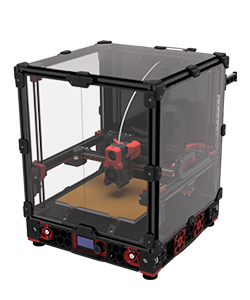
What you're looking at: The render is a stock Voron 2.4: the gantry across the top, four Z drives in the corners, the bed on its own frame, the electronics bay under the deck. Anything left in the chamber can be crushed or set alight.
Parts: none.
Do: Clear the chamber: tools, offcuts, zip-tie tails, spare fasteners, filament spool. Pull off any rubber rail stoppers. Put a fire extinguisher within reach, clear the bench of paper and IPA, and confirm the side and top panels are off.
 Check
Check
You can see the toolhead, all four Z drives, the electronics bay and the PSU without moving anything.
Source: Voron docs image v2render.png · Voron startup wizard § Preparation
Step 13.2 — Re-confirm the Checkpoint #1 result and the PSU voltage selector¶
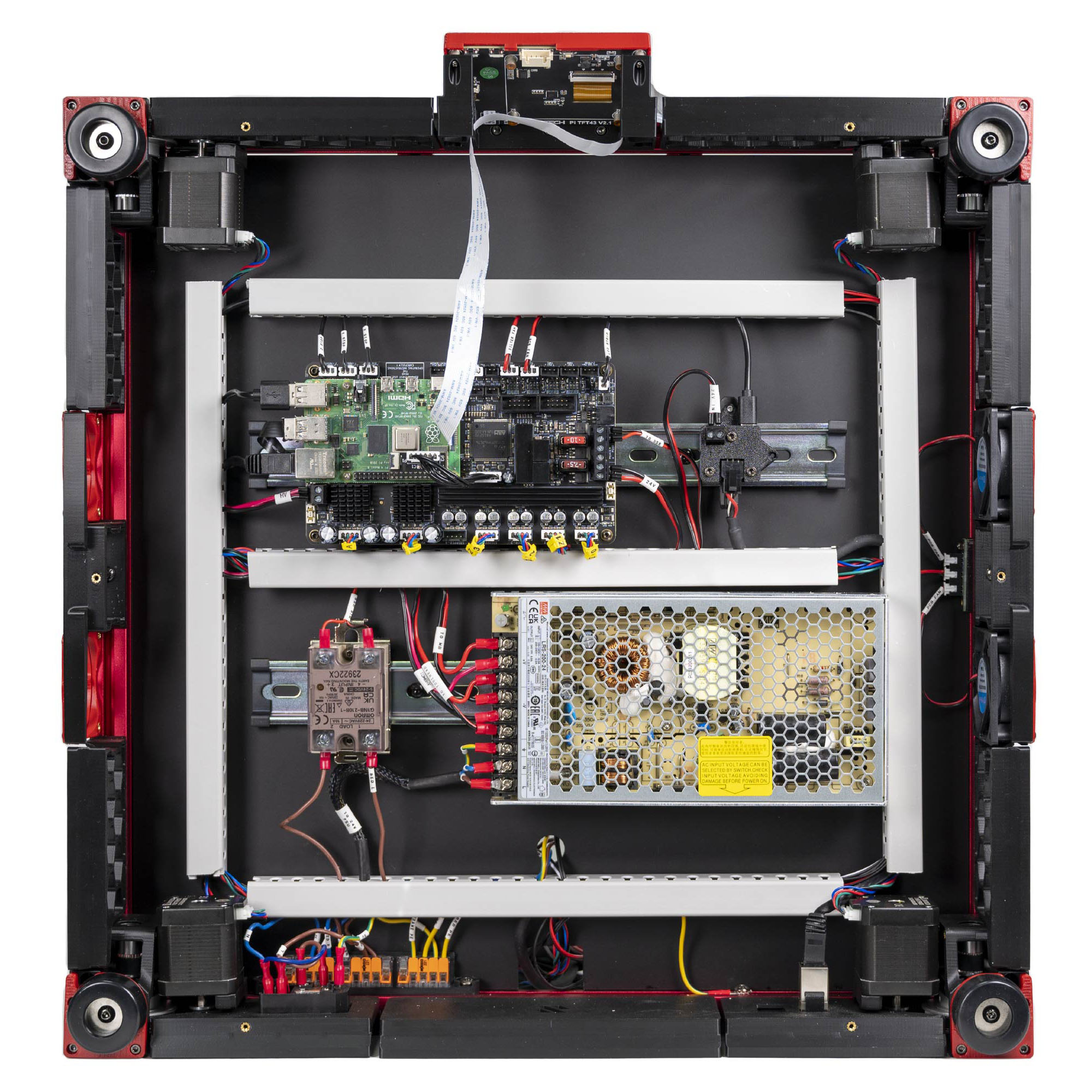
What you're looking at: LDO's finished Rev D bay, photographed from below: the view you have with the machine on its side. Three things are re-read in it: the PSU's red voltage slider, the SSR's four numbered terminals, and the Leviathan's five-position voltage-selection jumper block.
Parts: none.
Do:
- Switch off at the inlet rocker and pull the cord out of the inlet.
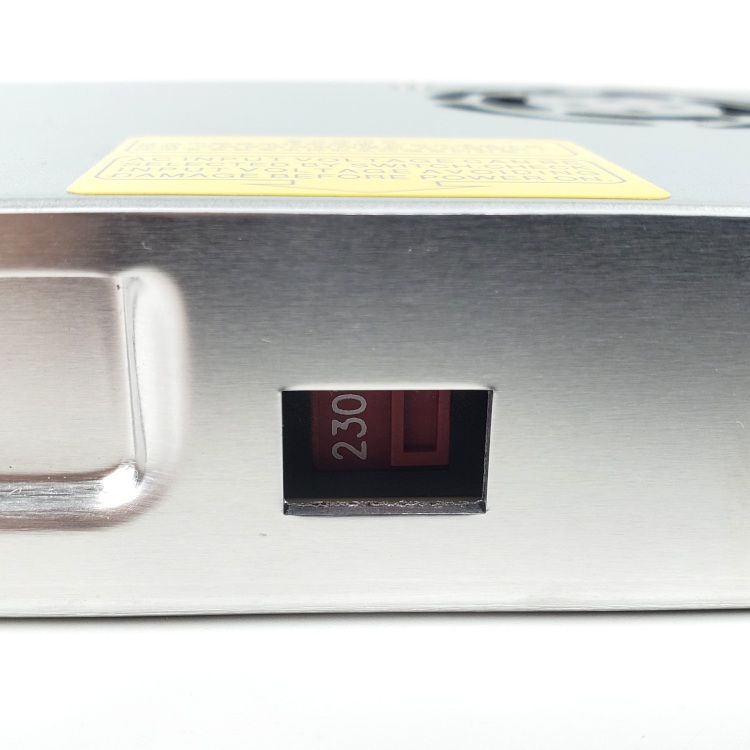
- Confirm the PSU's 115/230 V selector matches your mains.
- Confirm the SSR terminals and the Leviathan jumpers against the table.
| Item | Must be |
|---|---|
| SSR INPUT 3 / INPUT 4 | control red + / control black − |
| SSR LOAD 1 / LOAD 2 | bed live / mains brown |
| Leviathan jumpers | exactly two: Fan2 and Fan3, both on the 24 V pins |
| Probe, Fan0, Fan1 | bare, no jumper |
Check
Selector correct. No bare copper anywhere. Every DC duct still open so you can watch the bay; the AC lids stay on. src
LDO
"Mixing voltage will permanantly damage the controller and attached components."
Caution
Rev D+ / LDO: there is no 5 V PSU in this kit — the Leviathan supplies the Pi's 5 V through the Pi HAT adapter. If you are looking for a second supply, you have the wrong manual pages (manual p.152, p.172, p.190 are all SKIP). (survey §4.2)
Source: LDO wiring photo VS9 finished bay · LDO wiring guide § Checkpoint 1 · LDO wiring guide § Preparing the power supply unit
Good stopping point · ~15 min since the last one
bench cleared, tools and meter staged, Checkpoint #1 re-read and the PSU voltage selector confirmed for the third time. The cord is out of the inlet. The next segment is the power-on and runs straight through to the fan and light checks — do not start it with less than 45 minutes free.
Step 13.3 — Power on again, hand on the switch¶
What you're looking at: The photo is the PSU's 115/230 V slide switch again. The rocker your hand is on is built into the C14 inlet module: the machine's only mains isolator. This is the first power-on with a live printer.cfg that can drive heaters and motors.
Parts: none.
Do:
- Two people: one on the switch, one watching with hands out.
- Plug the mains lead in, stand to the side, switch on at the IEC inlet rocker.
- Keep your hand on it ten seconds. Listen and smell.
Check
PSU green LED, Pi power and activity LEDs, the toolboard's 3V3 and 24V LEDs all lit, with no clicking, buzzing, hot smell or humming stepper.
Caution
If any of that is wrong, switch off at the inlet immediately and go back to Ch 10.
Tip
a stepper that is warm to the touch after a minute of idling is normal (they hold at run_current); a stepper that is hot in a minute is not.
Source: LDO wiring photo psu_switch.jpg · LDO wiring guide § Checkpoint 1 · Voron startup wizard § Preparation · Ch 12 Step 12.11
Step 13.4 — Connect Klipper and confirm both MCUs¶
(no image of your own printer yet — simulated printer: your numbers differ)
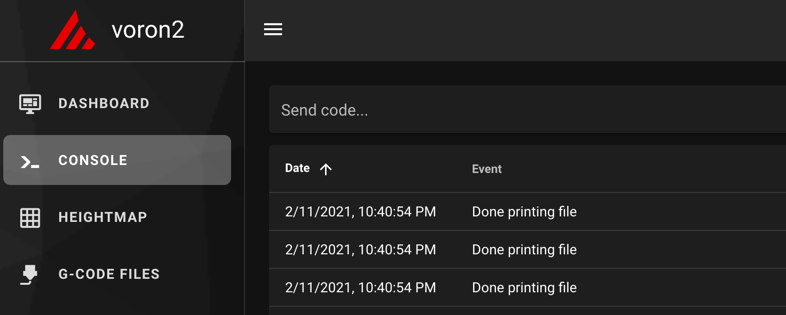
What you're looking at: The screenshots are the Console tab, where every command in this chapter is typed and every reply read. FIRMWARE_RESTART restarts the host and both microcontrollers, so a clean Ready after it means the whole stack is talking to the whole machine.
Parts: none.
Do: Open the web interface at the Pi's address. Go to the Console tab: every command in this chapter is typed there. Send FIRMWARE_RESTART, then STATUS.
Send: FIRMWARE_RESTART
Recv: // Klipper state: Shutdown
Recv: // Klipper state: Ready
Send: STATUS
Recv: // Klipper state: Ready
Check
Ready, with no mcu 'nhk': Unable to open serial port and no Option 'serial' in section 'mcu' must be specified. Any error here is a Ch 12 problem, not a Ch 13 problem.
Caution
Rev D+ / LDO: ls /dev/serial/by-id/* over SSH must show exactly two Klipper devices — one usb-Klipper_**stm32f446xx**_… (Leviathan; stm32h743xx on a V1.3 board — the LDO guide's stmf446xx is a typo, Ch 12 Step 12.13) and one usb-Klipper_**stm32g0b1xx**_… (Nitehawk-SB V2). The Rev D wiring guide tells you to look for rp2040; that is the V1 board and it is not what you have. (survey §4.1 ②)
Source: Voron docs image mainsail_terminal.png · Voron startup wizard § Mainsail and Fluidd · Klipper docs § FIRMWARE_RESTART
Step 13.5 — Prove the 350 mm config edits are live¶
(no image — see text)
What you're looking at: Nothing to see on the machine. You are asking the running Klipper instance what it believes the machine's dimensions are, rather than trusting the file on disk. Moonraker answers that in a browser; Mainsail has no panel for the limits, and GET_POSITION prints positions, not limits.
Parts: none.
Do: Do not trust the file on disk; ask the running instance. In a browser open:
http://voron.local/printer/objects/query?toolhead=axis_maximum
Then confirm in Mainsail's config editor that these are uncommented: [stepper_x] position_endstop: 350 and position_max: 350; [stepper_y] the same; [stepper_z] position_max: 330; [quad_gantry_level] gantry_corners: -60,-10 / 410,420 and points: 50,25 / 50,275 / 300,275 / 300,25; [gcode_macro G32] park line G0 X175 Y175 Z30 F3600; [resonance_tester] probe_points: 175, 175, 20.
Check
The browser shows "axis_maximum": [350.0, 350.0, 330.0, 0.0] from the running config; 250 or 300 in the first two slots means the wrong size pair is live.
Helper: Reads the four axis_maximum numbers off the browser and checks them against 350, 350, 330, 0.
 Tip
Tip
with every size commented out Klipper refuses to start, so if it is running one pair is live. Step 13.23 proves it: M114 must read X:350.000 Y:350.000. (survey §5.2 W14)
Source: leviathan-printer-rev-d-sbv2.cfg · leviathan-printer-rev-d-sbv2.cfg · Voron startup wizard § Preparation · Moonraker API § Query printer object status
Part B — Temperatures, heaters, fans, lights¶
Step 13.6 — Verify the three temperature readings at room temperature¶
(no image of your own printer yet — simulated printer: your numbers differ)
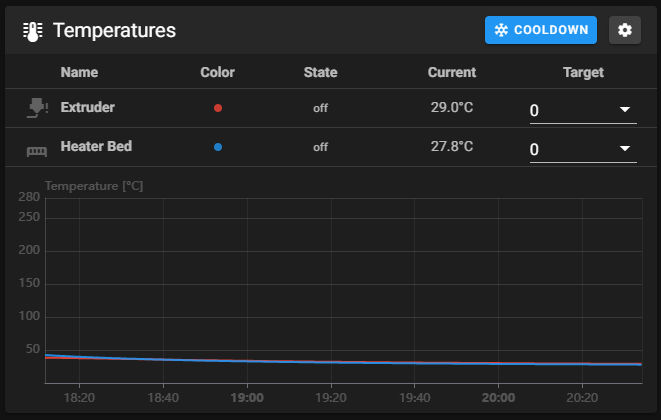
What you're looking at: The screenshot is the temperature panel, one trace per sensor. Three are expected: the hotend, the bed, and the chamber sensor on the toolboard. A sensor reading room temperature and staying there is a sensor that is wired and configured correctly.
Parts: none.
Do: Look at the temperature panel. You should have exactly three sensors: extruder, heater_bed and chamber_temp. Read them and do nothing else for thirty seconds.
Check
Extruder, bed and chamber all read within a couple of degrees of room temperature, and none of them is climbing.
Helper: Reads the three temperatures off the Mainsail screen and calls them out.
Caution
A temperature rising with nothing commanded means a heater is energised through a wiring fault: cut power at the switch.
Caution
Rev D+ / LDO: the hotend and chamber thermistors land on the Nitehawk V2 through JST-PH2.0 connectors, not the XH2.5 the Rev D wiring guide names. A spare pigtail crimped to XH2.5 will not fit, and a PH2.0 housing can be forced into the wrong header. (survey §4.1 ③)
Tip
extruder and bed are ATC Semitec 104NT-4-R025H42G with pullup_resistor: 2200; the chamber sensor is on the toolboard CT port, whose 4.7 kΩ pull-up is Klipper's default, so it carries no pullup_resistor line.
Source: Voron docs image mainsail_temp_graph.png · Voron startup wizard § Verify temperature · Klipper docs § Common thermistors · Klipper thermistor.py (the 4700 Ω default)
Step 13.7 — Short heat test: hotend to 50 °C¶
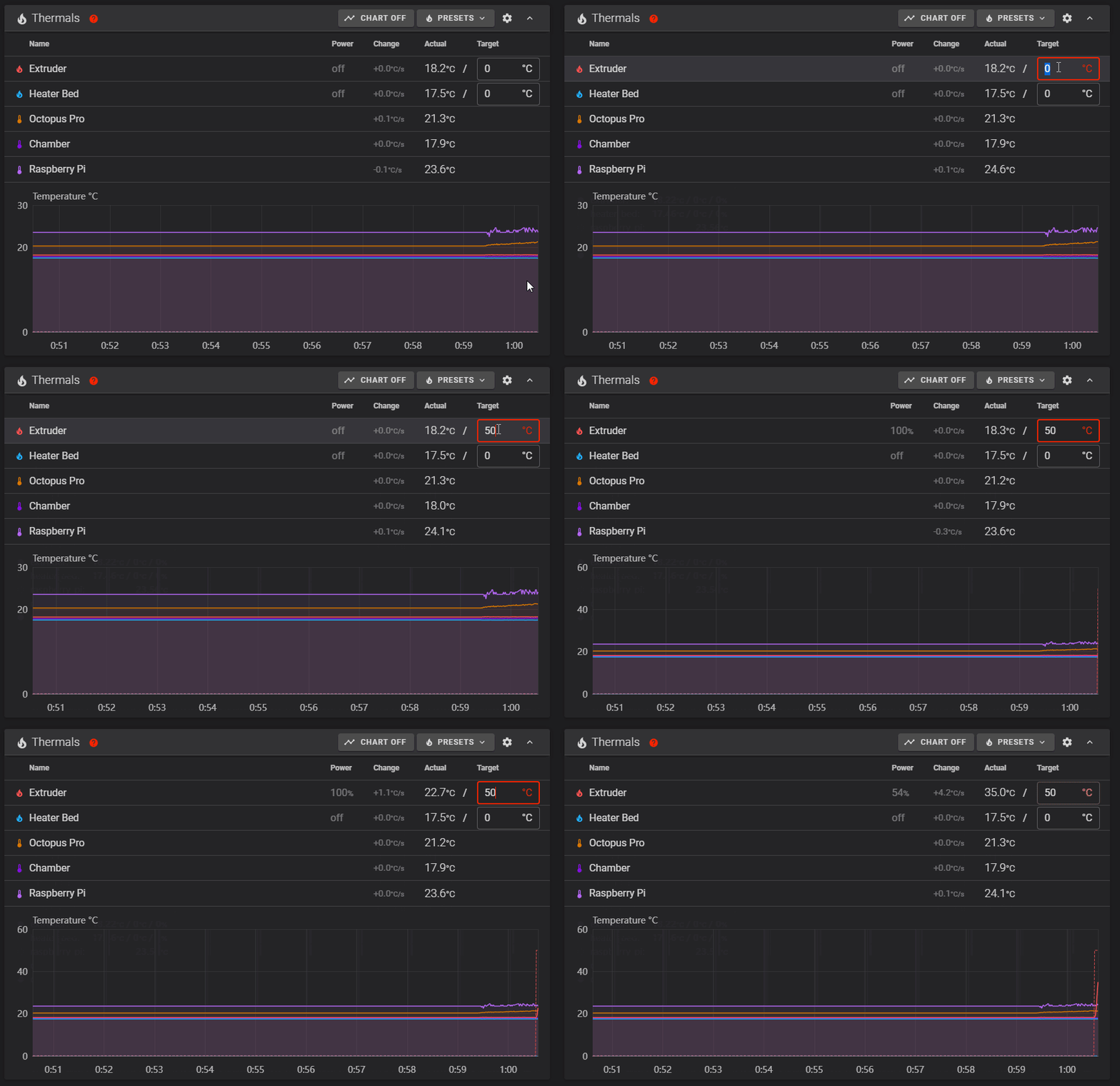
What you're looking at: The animation shows a heater climbing on the graph once a target is set. 50 °C is chosen deliberately: hot enough to prove the heater and its thermistor are the same pair, cool enough to be harmless if they are not.
Parts: none.
Do: Hand back on the power switch. Set the Extruder target to 50 and press enter. Watch the graph and the toolboard's HE0 LED.
Check
The extruder temperature climbs within about 10 s and the HE0 LED is lit; set the target to Off and it decays toward room temperature.
Caution
If a different sensor heats, the thermistor or heater pairs are swapped. HE0 lit with no climb is the heater side: cartridge lead, ferrules, the HE0 screw terminal. HE0 dark is the pin or config side: [extruder] heater_pin: nhk:PA7.
Source: Voron docs image heaters.gif · Voron startup wizard § Verify heaters
Step 13.8 — Short heat test: bed to 50 °C, and watch the SSR¶
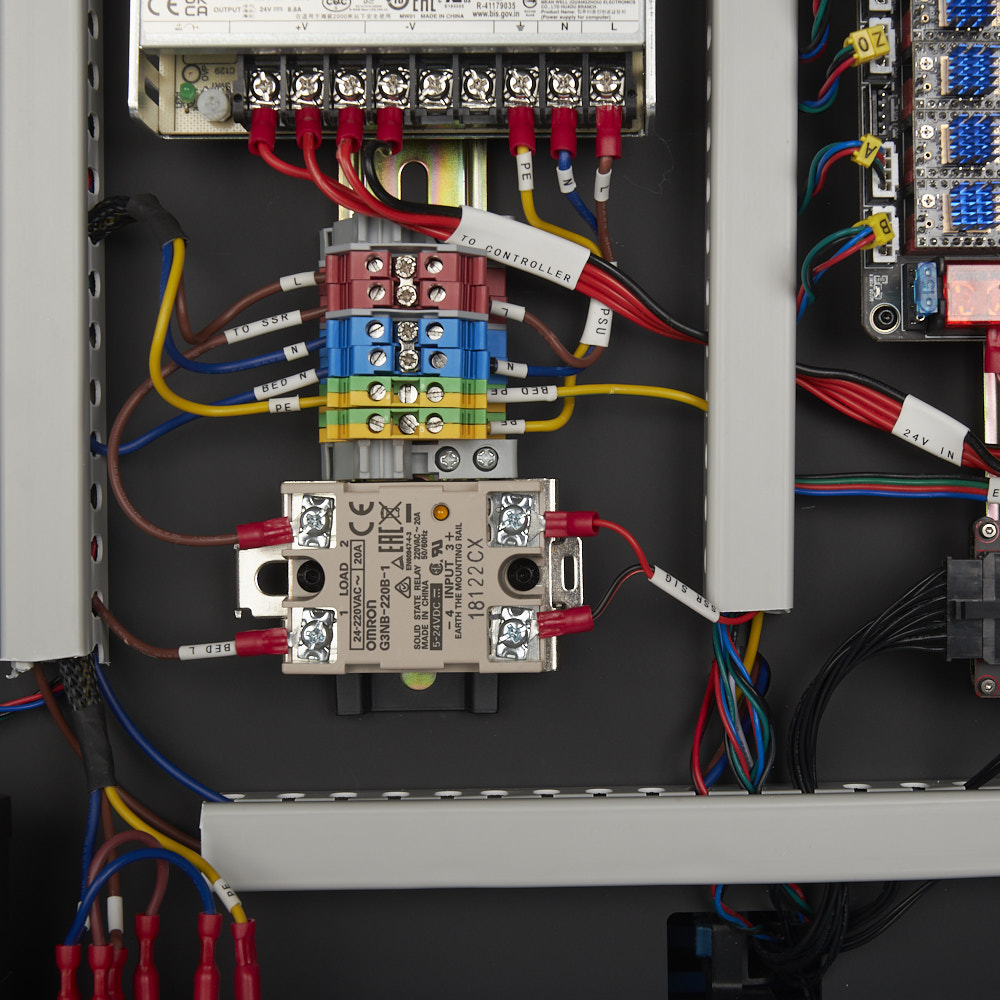
What you're looking at: The same test on the other heater, with a second thing to watch: the SSR's own indicator LED down in the bay. That LED shows the relay's control side receiving its signal, splitting any bed fault into mains side or control side.
Parts: none.
Do: Lift the machine onto blocks or lay it on its side so the bay is visible. Hand back on the switch. Set the Bed target to 50 and watch the SSR's indicator LED as well as the graph.
Check
The SSR LED comes on and the bed temperature climbs; set the target to Off.
Tip
[heater_bed] max_power: 0.6 in the LDO config is deliberate — it limits warp on a 350 plate. Do not raise it because 100 °C feels slow.
Source: LDO wiring photo SSR_Close_Up.jpg · Voron startup wizard § Verify heaters · LDO wiring guide § Connecting 24V · leviathan-printer-rev-d-sbv2.cfg · Video: Part 9 @1:36:02
Step 13.9 — Hotend fan (Stealthburner bottom fan)¶
(no image — see text)
What you're looking at: The Stealthburner's bottom fan is the hotend fan. It cools the heatsink above the nozzle and runs automatically whenever the hotend is hot, with nobody commanding it. A hotend heated with this fan dead will jam within one print.
Parts: none.
Do: Set the Extruder target to 50 again and leave it there for this step and the next.
Check
The bottom fan spins up as soon as the hotend is active and stays on above 50 °C.
Caution
If the top 5015 fan answers the hotend instead, and the bottom fan answers M106 at Step 13.10, exchange pin: nhk:PD0 and pin: nhk:PA15 between [heater_fan hotend_fan] and [fan], move the commented tachometer_pin lines PD1/PD2 with them, RESTART, and re-run 13.9–13.10. Do not re-plug P2/P4 or re-crimp anything.
Tip
this fan is [heater_fan hotend_fan] on nhk:PD0 with heater_temp: 50.0. A hotend fan that does not run will clog the hotend on your first print.
Source: Voron startup wizard § Hotend fan · leviathan-printer-rev-d-sbv2.cfg
Step 13.10 — Part cooling fan (Stealthburner top fan)¶
(no image — see text)
What you're looking at: The top fan is the part-cooling fan. It blows down through the printed ducts onto the plastic just laid, and only the slicer or a manual M106 turns it on. Nothing about the hotend's temperature affects it.
Parts: none.
Do: Send M106 S255, then M107.
Check
The top fan spins to full and you feel air under the nozzle; M107 stops it.
Tip
this is [fan] on nhk:PA15; off_below: 0.10 commands zero below 10 %, which is expected. If the bottom fan answers M106, apply Step 13.9's fix, then set the Extruder target to Off.
Caution
Rev D+ / LDO: the 2×5 (10-pin) board-to-board header between the Stealthburner fan adapter and the toolboard has reversed gender and is keyed on Rev D+. If a toolhead fan does nothing at all, do not press the connector harder — check that it seated with the key, not against it. (survey §4.1 ④)
Source: Voron startup wizard § Part cooling fan · leviathan-printer-rev-d-sbv2.cfg
Step 13.11 — Bay fan and filter fan¶
(no image — see text)
What you're looking at: Two fans that are not on the toolhead: the 6020 pair in the electronics bay, tied to the bed heater being commanded and to any enabled stepper, and the Nevermore blower, which Ch 12 made a macro-commandable fan rather than a heater-slaved one.
Parts: none.
Do:
- Set the Bed target to 60; the bay fan pair starts within a second.
- Set the bed back to Off; the pair keeps running about 30 s, then stops.
- Send
SET_FAN_SPEED FAN=nevermore SPEED=1, confirm it runs, thenSET_FAN_SPEED FAN=nevermore SPEED=0.
Check
The bay fan pair starts the instant a bed target is set and runs on 30 s after Off; the Nevermore runs only when commanded.
Caution
Rev D+ / LDO: the LDO config names FAN3/PF9 [heater_fan exhaust_fan], but that port drives the Nevermore filter fan; the kit has no exhaust fan. Ch 12 Step 12.32 replaced it with [fan_generic nevermore], so there is no heater_temp: 60 trigger and nothing happens at bed 60 °C. (survey §3.2, §4.2 p.250–253)
Tip
[controller_fan controller_fan] on FAN2/PF7 keys on the heater's non-zero target or on any enabled stepper, not on temperature, and runs on for idle_timeout, 30 s by default. The Nevermore is FAN3/PF9.
Source: Voron startup wizard § Controller fan · leviathan-printer-rev-d-sbv2.cfg · Klipper controller_fan.py · LDO wiring guide § Connecting the fans and the LED strip
Step 13.12 — Lights¶
(no image — see text)
What you're looking at: Two independent lighting systems. The COB strips on the chamber ceiling are plain LEDs on a dimmable output, switched with SET_PIN. The three Stealthburner LEDs are addressable, each with its own tiny controller, so they take a colour command rather than a brightness.
Parts: none.
Do: Send SET_PIN PIN=caselight VALUE=1, then SET_LED LED=rgb_light RED=1 GREEN=1 BLUE=1 WHITE=1.
Check
The chamber COB strips come on and all three Stealthburner LEDs light.
Helper: Presses the light buttons in Mainsail and says which lamps came on.
Tip
the strips are [output_pin caselight] on PE6. Colours that come out wrong rather than absent mean color_order only; the LDO config's chain_count: 3, color_order: GRBW is correct for the supplied LEDs. (survey §4.4 #12)
Source: leviathan-printer-rev-d-sbv2.cfg · LDO wiring guide § Connecting the fans and the LED strip · Klipper docs § neopixel
 Good stopping point · ~40 min since the last one
the machine has been powered, Klipper reports Ready with both MCUs, all three temperatures read room ambient, both heaters proved they climb and stop, and every fan and light has been commanded on and off. Nothing has moved yet. Heaters off, machine idle.
Part C — Motors¶
Step 13.13 — STEPPER_BUZZ the four Z motors¶
What you're looking at: Voron's own map of which motor sits at which corner and which config name it answers to. The diagram below names all four Z corners with the command that moves each, its port, and what rises: the gantry corner, not the bed.
Parts: none.
Do: Run the four Z commands one at a time, watching the machine, not the console. STEPPER_BUZZ prints nothing; it moves the named stepper 1 mm positive, pauses, returns, and repeats ten times.
Send: STEPPER_BUZZ STEPPER=stepper_z
Send: STEPPER_BUZZ STEPPER=stepper_z1
Send: STEPPER_BUZZ STEPPER=stepper_z2
Send: STEPPER_BUZZ STEPPER=stepper_z3
Check
Exactly one motor responds per command, it moves cleanly forward, pause, back, pause, and it lifts the corner named below first.
Helper: Watches each Z corner and calls out which one just moved.
| Command | Motor | Corner that must rise first |
|---|---|---|
STEPPER_BUZZ STEPPER=stepper_z |
Z0, STEPPER-0 |
front left |
STEPPER_BUZZ STEPPER=stepper_z1 |
Z1, STEPPER-1 |
rear left |
STEPPER_BUZZ STEPPER=stepper_z2 |
Z2, STEPPER-2 |
rear right |
STEPPER_BUZZ STEPPER=stepper_z3 |
Z3, STEPPER-3 |
front right |
Note: on a 2.4 the bed is bolted to the frame and does not move — what rises 1 mm is the corresponding corner of the gantry. The wizard's V2 table said "bed" until Voron corrected it to "gantry" on 2026-09-16. Sight along the top of the X extrusion against the frame to see it.
Source: Voron docs image V2-motor-configuration-guide.png · Voron startup wizard § Stepper motor check · Klipper docs § STEPPER_BUZZ · Video: Part 9 @1:42:04
Step 13.14 — STEPPER_BUZZ the A and B motors¶
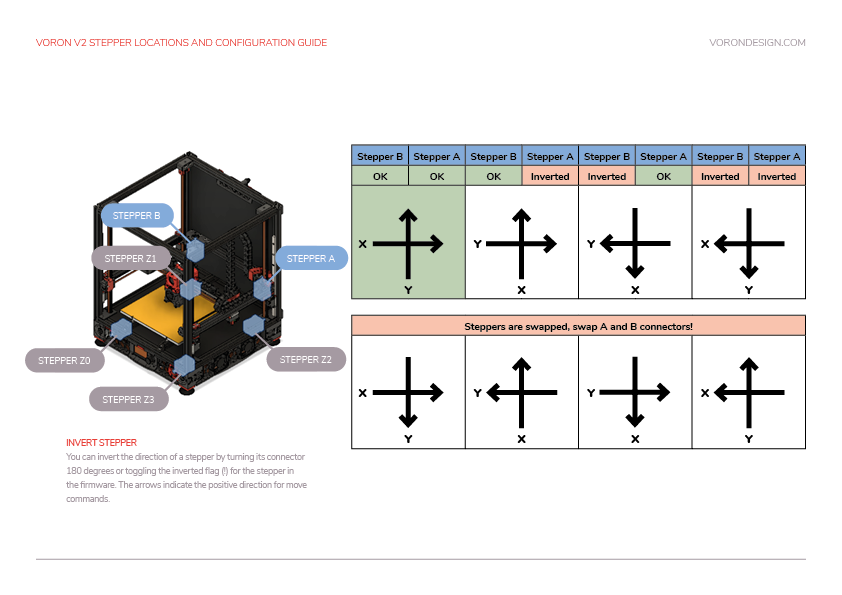
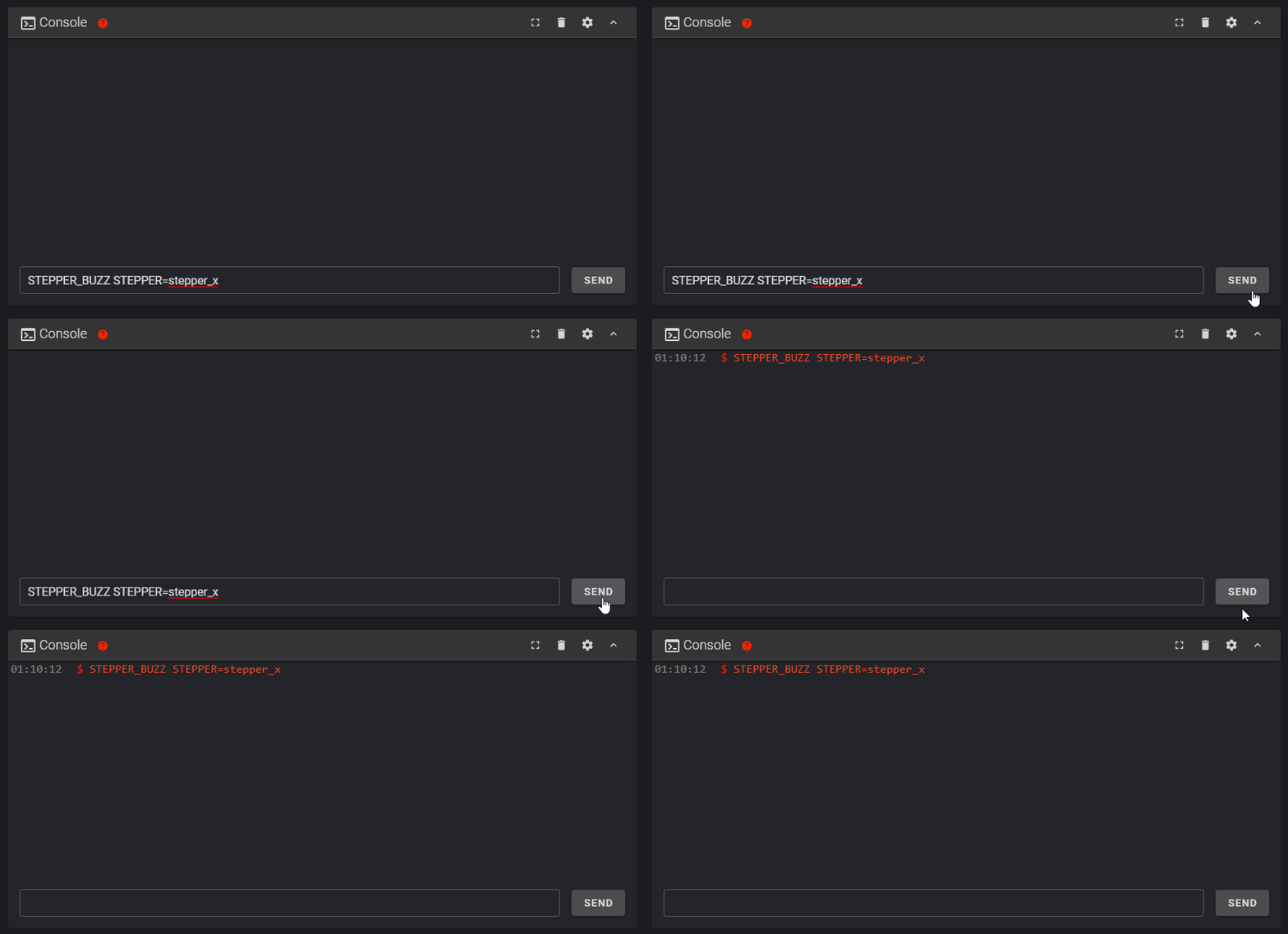
What you're looking at: The animation shows a healthy buzz. A and B are the two rear-corner motors that drive the gantry through the crossed CoreXY belts, so neither moves a single axis by itself. The diagram's A/B panel names both: [stepper_x] is motor B, [stepper_y] is motor A.
Parts: none.
Do: Run the two gantry commands.
Send: STEPPER_BUZZ STEPPER=stepper_x
Send: STEPPER_BUZZ STEPPER=stepper_y
Check
stepper_x moves the rear-left motor B on HV-STEPPER-0 and stepper_y the rear-right motor A on HV-STEPPER-1, both cleanly, with no grinding.
Helper: Watches the two rear motors and calls out which one moved for each command.
Tip
ignore the wizard's clockwise-then-counterclockwise expectation. On CoreXY one motor's rotation direction proves nothing by eye; A/B direction is settled at Step 13.22.
Source: Voron docs image verifysteppers.gif · Voron startup wizard § Motor configuration guide for the Voron V2 · Klipper docs § STEPPER_BUZZ · Video: Part 9 @1:53:47
Step 13.15 — STEPPER_BUZZ the extruder¶
(no image — see text)
What you're looking at: The extruder motor lives on the toolhead and drives the Clockwork 2's pair of geared wheels that grip the filament. With no filament loaded, all you are looking for is those gears turning back and forth.
Parts: none.
Do: Send STEPPER_BUZZ STEPPER=extruder with no filament loaded.
Check
The Clockwork 2 gears turn back and forth. Direction is not tested here; it is tested when you first extrude, at Step 13.40.
Helper: Watches the Clockwork 2 gears and says whether they turned both ways.
Tip
if nothing moves, check [extruder] step_pin: nhk:PB8 / dir_pin: nhk:PB9 / enable_pin: !nhk:PC14. Those are the V2 pins; the V1 config's gpio23/24/25 silently does nothing on this board.
Source: Voron startup wizard § Stepper motor check · Klipper docs § STEPPER_BUZZ · leviathan-printer-rev-d-sbv2.cfg
Step 13.16 — Correct any wrong motor or wrong direction¶
(no image — see text)
What you're looking at: Four faults look almost identical from the console, each with its own fix: nothing at all is power or pins, a buzz without travel is coil wiring, a wrong motor is a wrong port, a wrong direction is one character in the config.
Parts: none.
Do: Fix what Steps 13.13–13.15 found, one cause at a time, from the table.
| Symptom | Fix |
|---|---|
| Nothing moved | Check enable_pin and step_pin, and that the driver has power |
| Buzzed but did not travel 1 mm cleanly | Coil pairs transposed in the connector. Power down, then re-pin it so each coil is a pair |
| The wrong motor answered | Motors in the wrong ports. Power the machine down before moving any stepper connector |
| It moved the wrong way | Invert that stepper's dir_pin: add a ! so dir_pin: PD3 becomes dir_pin: !PD3, or remove an existing !. RESTART and re-run the buzz |
Check
All seven motors answer the right command and move cleanly; the four Z motors turn the right way. Do not proceed with a known-bad axis.
Source: Voron startup wizard § Motor configuration guide for the Voron V2 · LDO wiring guide § Connecting steppers · Video: Part 9 @2:23:56
Good stopping point · ~20 min since the last one
every motor buzzed, identified and turning the right way, and any swap has been fixed at the connector, not in the config. The machine still has not homed.
Part D — Endstops and probe¶
Step 13.17 — QUERY_ENDSTOPS with everything released¶
(no image of your own printer yet — simulated printer: your numbers differ)
What you're looking at: QUERY_ENDSTOPS reports each limit switch's present state without moving anything at all. open means the switch is not pressed. Stock Voron endstops are wired normally-closed to ground, so a TRIGGERED reading on an untouched switch means a broken circuit, not a reversed one.
Parts: none.
Do:
- Put a hand under the gantry, send
M84, and lower it to a third of its travel, nozzle about 100 mm above the plate. - Push the toolhead to the middle of the bed by hand, then send
QUERY_ENDSTOPS.
Send: QUERY_ENDSTOPS
Recv: // stepper_x:open stepper_y:open stepper_z:open
Check
All three read open. A TRIGGERED reading with nothing pressing it is a wiring fault, not a missing !.
Helper: Reads the endstop states off the screen and calls each one back.
Caution
M84 releases all seven motors, and the Z motors are the only thing holding the gantry: keep a hand under it. This, Step 13.24 and the QGL max_adjust What-if row are the only places M84 is right; elsewhere disable just stepper_x/stepper_y with SET_STEPPER_ENABLE and leave Z holding.
Caution
Rev D+ / LDO: if your XY endstop cables are labelled "X Stop / Y Stop" instead of "XES / YES", you have the mis-pinned batch and both X and Y will misbehave here. Re-pin per LDO's guide before going further. src (survey §4.4 #14)
Source: Voron startup wizard § Endstop check · Klipper docs § QUERY_ENDSTOPS · Klipper safe_z_home.py · LDO XY endstop reconnecting guide
Step 13.18 — X endstop by hand¶
(no image — see text)
What you're looking at: The X endstop is one of the two microswitches on the gantry pod, pressed by the toolhead at the right-hand end of its travel. Pushing it by hand tests the switch, its cable and its board port as one chain, with no motor involved.
Parts: none.
Do: Push the toolhead all the way to the right until you hear the endstop pod click, hold it there, and send QUERY_ENDSTOPS.
Send: QUERY_ENDSTOPS
Recv: // stepper_x:TRIGGERED stepper_y:open stepper_z:open
Check
Only stepper_x changes, and it returns to open when you push the toolhead back to the middle.
Helper: Sends QUERY_ENDSTOPS while the adult holds the toolhead on the switch, then reads the reply aloud.
Tip
if the toolhead cannot reach the switch, look for a rubber rail stopper still on the rail, then for a racked gantry.
Source: Voron startup wizard § Endstop check · Klipper docs § QUERY_ENDSTOPS
Step 13.19 — Y endstop by hand¶
(no image — see text)
What you're looking at: The Y endstop is the other switch on that same pod, pressed when the whole gantry reaches the back of the machine. Same three-part chain, same test.
Parts: none.
Do: Push the gantry all the way to the back until the endstop clicks, hold, and send QUERY_ENDSTOPS.
Send: QUERY_ENDSTOPS
Recv: // stepper_x:open stepper_y:TRIGGERED stepper_z:open
Check
Only stepper_y changes, and it releases when you move the gantry forward again.
Helper: Sends QUERY_ENDSTOPS while the adult holds the gantry at the back, then reads the reply aloud.
Source: Voron startup wizard § Endstop check · Klipper docs § QUERY_ENDSTOPS
Step 13.20 — Z endstop (the LDO nozzle probe) by hand¶
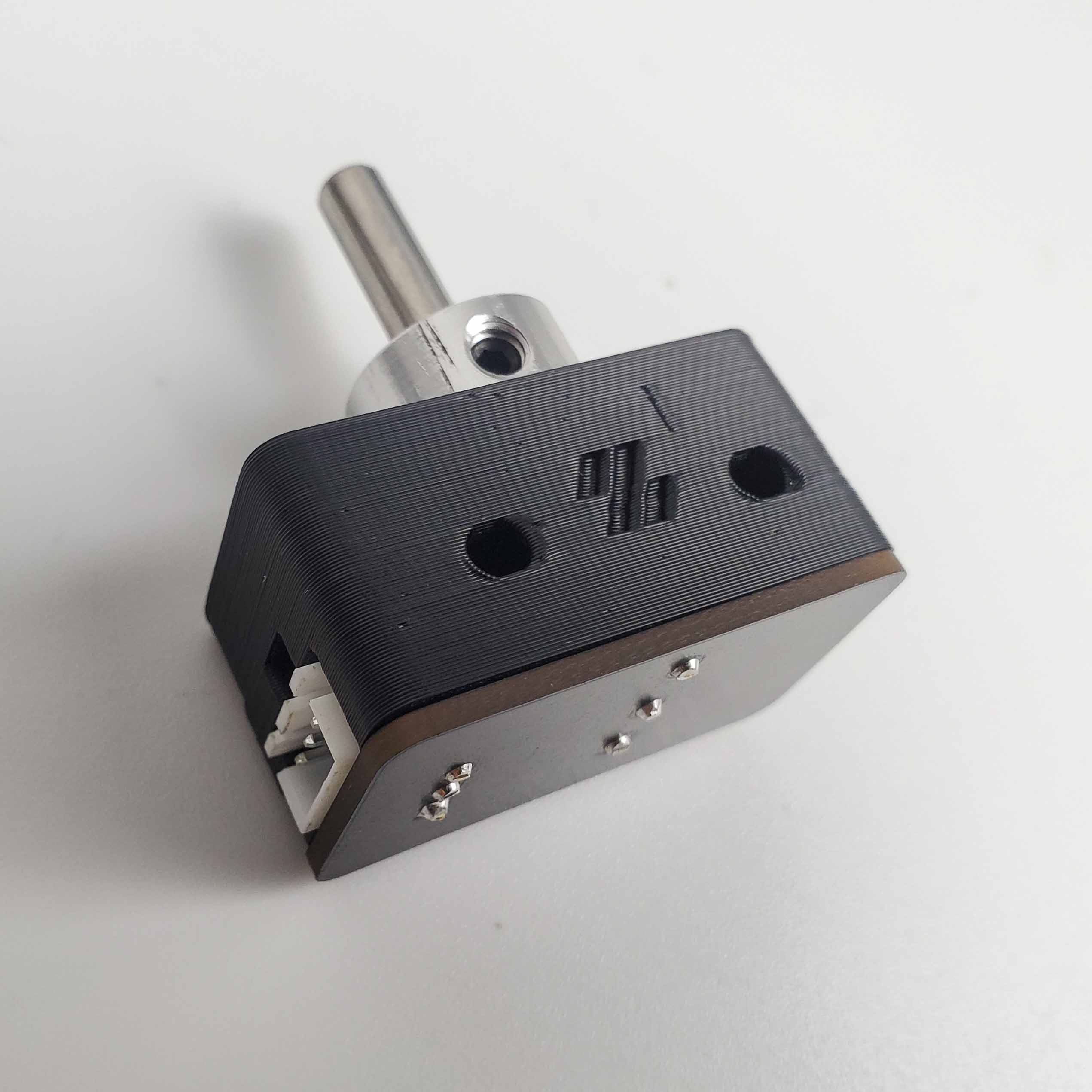
What you're looking at: The photo is the LDO nozzle probe installed: a sprung 5 mm shaft beside the bed with a D2F microswitch under it. The nozzle presses that shaft at the end of every Z homing move, so this part, not the inductive probe, defines Z=0.
Parts: none.
Do: Press the nozzle probe's sliding shaft down with a finger until the D2F switch clicks, hold, and send QUERY_ENDSTOPS.
Send: QUERY_ENDSTOPS
Recv: // stepper_x:open stepper_y:open stepper_z:TRIGGERED
Check
Only stepper_z changes, and the shaft springs back up freely to read open again.
Helper: Sends QUERY_ENDSTOPS while the adult holds the probe shaft down, then reads the reply aloud.
Tip
if the shaft is sticky, back off the probe body's set screw a quarter turn. That screw only stops the shaft falling out; it must not grip it.
Source: LDO wiring photo z_stop_final.jpg · LDO wiring guide § Assembling the nozzle probe · Voron startup wizard § Endstop check
Step 13.21 — QUERY_PROBE on the inductive probe¶
(no image of your own printer yet — simulated printer: your numbers differ)
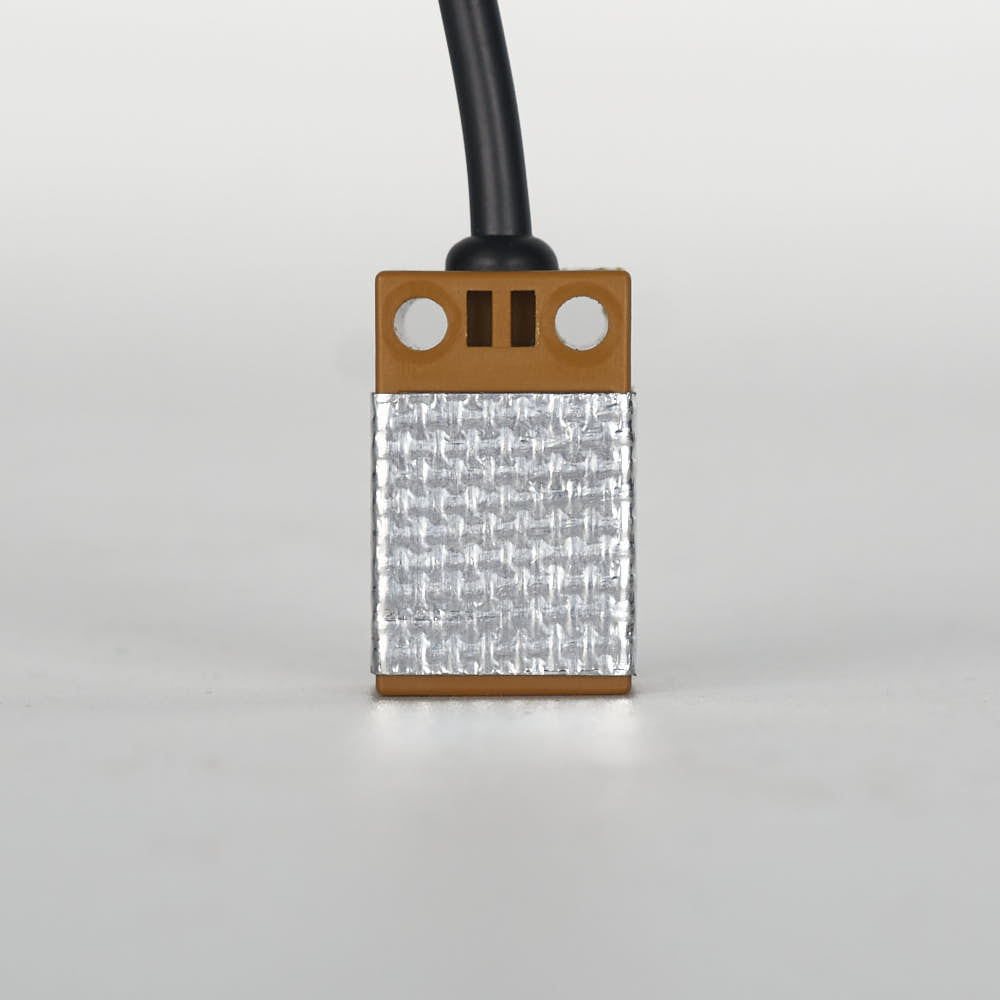
What you're looking at: The Omron inductive probe senses metal without touching it, and on this build it is used only to level the gantry and shape the mesh. The photo shows the fibreglass heat shield it must wear: front and sides only, sensing face bare.
Parts: none.
Do: With the gantry still high and well clear of the bed, send QUERY_PROBE. Then hold a steel offcut or the flex plate up under the probe face and send it again.
Send: QUERY_PROBE
Recv: // probe: open

  (metal close to the probe)

Send: QUERY_PROBE
Recv: // probe: TRIGGERED
Check
open when far, TRIGGERED when metal is close.
Helper: Reads the probe state off the screen after each QUERY_PROBE and calls it back.
Tip
if it is stuck one way, check ground, signal and 24 V at the probe, and that [probe] pin: nhk:PC15 matches where it is plugged. If the sense is inverted, use pin: !nhk:PC15.
Caution
Rev D+ / LDO: the PROBE port is JST-PH2.0 on Rev D+ and is 24 V only. Also confirm the probe body still carries the supplied fibreglass tape on the front and sides only — not the back and not the bottom; tape on the sensing face changes the trigger height. (survey §4.1 ③, §4.2 p.143)
Source: LDO wiring photo Probe_Insulation.jpg · Voron startup wizard § Probe check · Klipper docs § QUERY_PROBE · leviathan-printer-rev-d-sbv2.cfg
Good stopping point · ~20 min since the last one
all three endstops and the inductive probe respond correctly to QUERY_ENDSTOPS / QUERY_PROBE, tested by hand with nothing homed. Do not stop halfway through the endstop set: the value of this pass is seeing all four in one sitting.
Part E — Homing and machine coordinates¶
Step 13.22 — Home X, with an abort ready¶
What you're looking at: The screenshot is the interface's jog and homing panel. The stop you test first is M112, typed alone on the line: Mainsail sends that as its emergency-stop call, so it goes round the command queue while a move is running. RESTART waits behind the move instead.
Parts: none.
Do:
- Two people: one owns the stop, one watches, hands out.
- Test each stop,
FIRMWARE_RESTARTafter each:M112alone on the line, Mainsail's red Emergency Stop, the touchscreen E-stop. - Put
M112typed and unsent in a second window, then sendG28 X.
Check
Each stop put Klipper in Shutdown. The toolhead lifts 10 mm, travels right to the X endstop, backs off 5 mm and re-touches.
Caution
Before G28 X, confirm the gantry is still a third of the way up, where Step 13.17 left it: every homing move before Z is homed lifts it another 10 mm.
Tip
the 10 mm lift is [safe_z_home] z_hop: 10. Any other direction: M112, FIRMWARE_RESTART, note what happened, and still test Y before changing anything; you need both results to read the chart.
Source: Voron docs image mainsail_controls.png · Voron startup wizard § XY homing check · Klipper docs § M112 · Mainsail src/store/printer/actions.ts (sendGcode: a line that is exactly M112, trimmed and case-insensitive, is sent as printer.emergency_stop; anything else goes to printer.gcode.script and queues) · Klipper webhooks.py (the emergency_stop endpoint calls invoke_shutdown directly, without the G-code mutex)
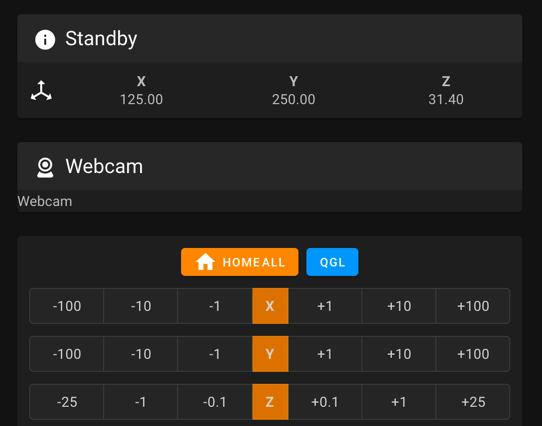
Step 13.23 — Home Y, then read the chart¶
What you're looking at: The chart maps each combination of observed X and Y homing directions onto a cause. The upper block is a direction problem, fixed with one character in the config; the lower orange block means the two motors are swapped, fixed with the power off.
Parts: none.
Do: M112 ready. Send G28 Y, which lifts another 10 mm first because Z is still unhomed. Compare what X and Y actually did against the chart, then send M114.
Check
The toolhead travels to the back until it hits the Y endstop, and M114 reads X:350.000 Y:350.000.
| Observation | Fix |
|---|---|
| Matches a column in the upper block of the chart | Invert dir_pin on the stepper that column marks Inverted. [stepper_x] is motor B, [stepper_y] is motor A |
| Matches the lower (orange) block | The motors themselves are swapped: power down, exchange the A and B connectors at the board, power up, re-test |
| Gantry moves downward first instead of sideways | Z stepper directions are reversed. Go back to Step 13.16 |
Source: Voron docs image V2-motor-configuration-guide.png · Voron startup wizard § XY homing check
Step 13.24 — Bed locating: line up the Z endstop and set the bed gap¶
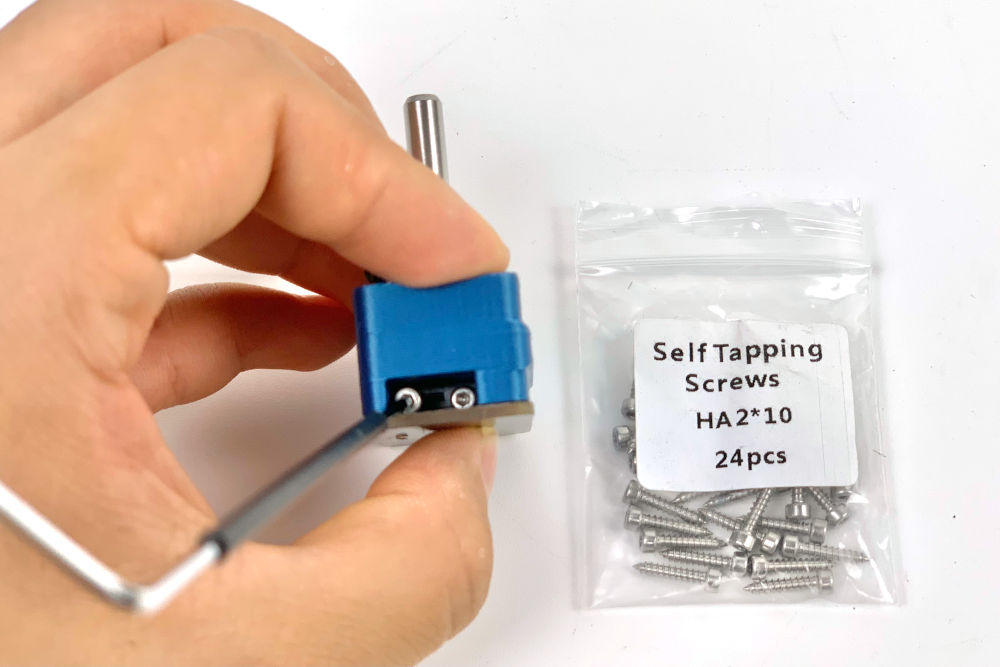
What you're looking at: The photo is LDO's bench shot of the probe body, not how it sits on the extrusion. Two things have to line up: the shaft directly under the nozzle, and 2–3 mm of clearance between that shaft and the back edge of the build plate.
Parts: none.
Do:
M112ready,G28 X Y, then jog the toolhead left along the rear until the nozzle lines up with the probe.- Loosen the probe's two M3×25 SHCS, slide it until the shaft is directly under the nozzle, re-tighten.
Check
The nozzle tip is over the middle of the probe shaft, with a 2–3 mm gap to the plate's back edge across its travel.
Caution
Each G28 X Y lifts the gantry another 10 mm until Z is homed at Step 13.27. If it is getting near the top, M84 with a hand under the gantry (it sinks when the Z motors release), lower it by hand, and re-home.
Tip
if the bed fouls the shaft, loosen the bed and shift it forward. This is the last chance to do it easily.
Source: LDO wiring photo z_stop_install_3.jpg · Voron startup wizard § Bed locating · LDO wiring guide § Assembling the nozzle probe
Step 13.25 — Define the 0,0 point¶
(no image — see text)
What you're looking at: 0,0 is the machine's origin: the nozzle position Klipper calls X0 Y0. It is set indirectly, by telling each axis how far its endstop sits from that origin, which is why position_endstop and position_max always move together.
Parts: none.
Do:
- Send
SET_STEPPER_ENABLE STEPPER=stepper_x ENABLE=0andSET_STEPPER_ENABLE STEPPER=stepper_y ENABLE=0, neverM84. - Push the toolhead by hand to the front-left corner. If it binds before the nozzle reaches the corner, stop.
M112ready,G28 X Y, then jog to X0 Y0, watching for skipping near the corner.
Check
The nozzle sits over the plate, within about 5 mm of the front-left corner, with no skipping on the way.
| Symptom | Fix |
|---|---|
| Nozzle too far into the bed | Increase position_endstop and position_max together, on that axis only. +2 mm on [stepper_x] moves 0,0 2 mm left |
| Nozzle beyond the bed edge | Decrease both together |
Tip
binding before the corner is racking or a mechanical fault, not a config problem. FIRMWARE_RESTART after any config edit, then re-check.
Source: Voron startup wizard § Define 0,0 point
Step 13.26 — Record the Z endstop coordinate into [safe_z_home]¶
(no image — see text)
What you're looking at: M114 reports where Klipper currently believes the nozzle is. Parking it over the probe shaft and reading those two numbers is how the deliberate placeholder in [safe_z_home] becomes a real, measured position: the one the toolhead will move to before every Z home from now on.
Parts: none.
Do: M112 ready. G28 X Y, jog the nozzle back to directly over the probe shaft from Step 13.24, and send M114.
Send: M114
Recv: X:163.500 Y:350.000 Z:10.000 E:0.000
Copy the X and Y values into [safe_z_home] home_xy_position: replacing the placeholder -10,-10. FIRMWARE_RESTART.
Check
The values are yours, not the example above (verify on bench).
Helper: Reads the M114 X and Y values aloud while the adult types them into safe_z_home.
Tip
until you do this, a full G28 fails with Move out of range: -10.000 -10.000 … because the placeholder is outside position_min: 0. Re-set these if you ever re-calibrate the X or Y endstop.
Source: Voron startup wizard § Z endstop pin location · leviathan-printer-rev-d-sbv2.cfg
Step 13.27 — Full G28¶
(no image — see text)
What you're looking at: The full sequence: X to its switch, Y to its switch, then a move to the coordinate you just recorded and a slow two-touch descent onto the nozzle probe. The stock position_endstop: -0.5 deliberately leaves the nozzle high.
Parts: none.
Do:
M112typed and unsent, someone watching the nozzle.- Send
G28: X right, Y back, then a slow descent onto the nozzle probe at the[safe_z_home]coordinate. - Stop the descent with
M112if the nozzle will miss the shaft.
Check
Z homes on the probe: first touch at homing_speed: 8, 3 mm retract, second touch at 3 mm/s, nozzle pressing the shaft, not the printed body.
Caution
The Z homing move only ends when the switch trips. Beside the pin there is nothing to trip it: the move runs on to position_min: -5 and drives the nozzle into whatever is under it.
Tip
the stock [stepper_z] position_endstop: -0.5 leaves the nozzle deliberately high, a safe placeholder that Step 13.36 replaces. Do not send the nozzle to Z0 yet.
Source: Voron startup wizard § Z endstop location · leviathan-printer-rev-d-sbv2.cfg · Klipper docs § SET_KINEMATIC_POSITION
Good stopping point · ~30 min since the last one
homing works. X, Y and Z home, the bed is located, 0,0 is defined and the [safe_z_home] coordinate is written into printer.cfg, and a full G28 completes without a crash. Klipper came back clean after the edits (commit them: cd ~/printer_data/config && git add -A && git commit -m "13.26 safe_z_home"). This is the biggest milestone in the chapter — a good place to stop.
Part F — Probe accuracy, cold¶
Step 13.28 — PROBE_ACCURACY at the bed centre, cold¶
(no image — see text)
What you're looking at: PROBE_ACCURACY probes the same spot ten times and reports how far the readings scattered. It measures the machine's repeatability rather than the bed: a tight standard deviation means the gantry returns to the same height every time.
Parts: none.
Do: G28, then G0 X175 Y175 Z10 F6000, then PROBE_ACCURACY.
Send: PROBE_ACCURACY
Recv: // PROBE_ACCURACY at X:175.000 Y:175.000 Z:10.000 (samples=10 retract=3.000 speed=10.0 lift_speed=10.0)
Recv: // probe: at 175.000,200.000 bed will contact at z=2.077500
      ... (8 more)
Recv: // probe: at 175.000,200.000 bed will contact at z=2.075000
Recv: // probe accuracy results: maximum 2.080000, minimum 2.075000, range 0.005000,
      average 2.077250, median 2.077500, standard deviation 0.001803
Check
Standard deviation < 0.003 mm, and the ten values are not marching steadily one way.
Helper: Reads the range and the standard deviation off the screen and writes them down.
Tip
values that trend are mechanical: Z pulley grub screws, Z belt tensions. Random scatter is usually probe mounting or cable. The hot test at Step 13.32 is the QGL gate.
Note: [probe] y_offset: 25.0, so the probe sits 25 mm behind the nozzle — that is why the reported probe Y is 200 when the nozzle is at 175. Older Klipper prints these lines as probe at 175.000,200.000 is z=2.077500; same thing.
Source: Voron startup wizard § Probe accuracy check · Klipper docs § PROBE_ACCURACY · Klipper probe.py
Part G — PID, before QGL¶
Step 13.29 — PID tune the bed at 100 °C¶
(no image — see text)
What you're looking at: PID is the control loop that holds a heater at a setpoint without overshooting or hunting. PID_CALIBRATE deliberately drives the heater into oscillation, measures how it responds, and computes the three constants that damp it. Nothing else can happen while it runs.
Parts: none.
Do: Move the nozzle to the bed centre, 5–10 mm above the surface, then run the calibration. It takes about 10 minutes; leave it alone.
Send: G0 X175 Y175 Z10 F6000
Send: PID_CALIBRATE HEATER=heater_bed TARGET=100
      ... ~10 min ...
Recv: // PID parameters: pid_Kp=58.437 pid_Ki=2.347 pid_Kd=363.769
Recv: // The SAVE_CONFIG command will update the printer config file
Recv: // with these parameters and restart the printer.
Send: SAVE_CONFIG
Check
SAVE_CONFIG restarts Klipper and the new pid_Kp/Ki/Kd appear in the auto-generated block at the bottom of printer.cfg. Your numbers will differ from the example. src
Source: Voron startup wizard § PID tune heated bed · Klipper docs § PID_CALIBRATE · Klipper docs § SAVE_CONFIG
Step 13.30 — PID tune the hotend at 245 °C with the part fan at 25 %¶
(no image — see text)
What you're looking at: The same procedure on the hotend, with the part fan at 25 % on purpose: that fan is a disturbance the loop will face in every real print, so tuning against it produces constants that hold under printing conditions.
Parts: none.
Do: G28 first, because SAVE_CONFIG restarted the printer. Then set the part fan to 25 % and run the hotend calibration; about 5 minutes.
Send: G28
Send: M106 S64
Send: PID_CALIBRATE HEATER=extruder TARGET=245
      ... ~5 min ...
Recv: // PID parameters: pid_Kp=26.213 pid_Ki=1.304 pid_Kd=131.721
Send: SAVE_CONFIG
Send: M107
Check
Saved and restarted, with the new pid_Kp/Ki/Kd written into the auto-generated block.
Tip
running the hotend PID with the part fan at 25 % is deliberate; it tunes for the disturbance the fan actually causes in a print.
Source: Voron startup wizard § PID tune hotend · Klipper docs § PID_CALIBRATE
Part H — Quad gantry level¶
Step 13.31 — Heat soak: bed 100 °C, hotend 150 °C¶
(no image — see text)
What you're looking at: A heat soak is waiting for the frame to come up to temperature, not the bed. Aluminium extrusions grow as they warm, which moves the gantry relative to the bed, so anything measured cold was measured on a different machine.
Parts: none.
Do:
- Send
SET_IDLE_TIMEOUT TIMEOUT=7200, thenG28. - Set the bed to 100 °C and the hotend to 150 °C.
- Wait 10–20 minutes from cold.
Check
The bed holds 100 °C without hunting and the hotend 150 °C; chamber_temp rises only a few degrees with the machine open.
Caution
The LDO config ships [idle_timeout] timeout: 1800, and Klipper's idle timeout runs TURN_OFF_HEATERS then M84 after 30 minutes without a move, which is exactly what a static soak looks like. RESTART, FIRMWARE_RESTART and every SAVE_CONFIG put it back to 1800.
Tip
150 °C is below min_extrude_temp: 170 on purpose: hot enough to expand the toolhead, cold enough that nothing oozes. The soak gate at Step 13.32 is probe repeatability, not a chamber number.
Source: Voron startup wizard § QGL with heated bed and chamber · Klipper docs § SET_IDLE_TIMEOUT · leviathan-printer-rev-d-sbv2.cfg
Good stopping point · ~20 min since the last one
cold PROBE_ACCURACY is in range, both PID tunes are saved, and the machine is holding its heat soak at bed 100 °C / hotend 150 °C. The soak is a genuine wait state: leave it soaking, but do not leave the room with the heaters on.
Step 13.32 — PROBE_ACCURACY hot — the gate on everything downstream¶
(no image — see text)
What you're looking at: The same ten-probe repeatability test as Step 13.28, now hot. This is the gate: a probe still drifting will make gantry levelling report success while leaving the gantry tilted, and every measurement downstream inherits that error.
Parts: none.
Do: With the printer at temperature, G0 X175 Y175 Z10 F6000 and run PROBE_ACCURACY again.
Check
σ < 0.003 mm and no trend across the ten samples.
Caution
Do not run QGL until this passes. A drifting probe produces a QGL that looks like it converged and is not level. If the values are still drifting, wait another 5 minutes and repeat. Write down how long it took to stabilise: that is your print-start soak time from now on. (survey §4.4 #16)
Source: Voron startup wizard § Probe accuracy check · Klipper docs § PROBE_ACCURACY
Step 13.33 — QUAD_GANTRY_LEVEL¶
(no image — see text)
What you're looking at: QGL probes four points near the bed's corners, computes how far each of the four Z motors must move to bring the gantry parallel to the bed, moves them independently, and repeats. The number to watch is Probed points range; it should shrink on every pass.
Parts: none.
Do: Send QUAD_GANTRY_LEVEL. It probes the four points 50,25 / 50,275 / 300,275 / 300,25, computes each Z actuator's height against the gantry corners, adjusts, and repeats until the probed range is inside retry_tolerance: 0.0075 or it runs out of retries: 5.
Send: QUAD_GANTRY_LEVEL
Recv: // Gantry-relative probe points:
Recv: // 0: 0.052500 1: 0.031250 2: -0.018750 3: 0.005000
Recv: // Actuator Positions:
Recv: // z: 0.061250 z1: 0.030000 z2: -0.022500 z3: 0.008750
Recv: // Average: 0.019375
Recv: // Making the following Z adjustments:
Recv: // stepper_z = -0.041875
Recv: // stepper_z1 = -0.010625
Recv: // stepper_z2 = 0.041875
Recv: // stepper_z3 = 0.010625
Recv: // Retries: 0/5 Probed points range: 0.071250 tolerance: 0.007500
      ... repeats ...
Recv: // Retries: 2/5 Probed points range: 0.005250 tolerance: 0.007500
Check
Probed points range shrinks on every pass and ends below 0.007500. Watch that number, not the individual adjustments.
Tip
if it grows, or stalls well above tolerance, the gantry is racked. Go to Step 13.34 now rather than retrying.
Source: Voron startup wizard § Quad gantry level · Voron startup wizard § Common QGL problems · Klipper docs § QUAD_GANTRY_LEVEL · Video: Part 9 @2:49:11
Good stopping point · ~15 min since the last one
hot PROBE_ACCURACY passed and QGL converges. Heaters can go off; SET_IDLE_TIMEOUT TIMEOUT=1800 puts the timeout back (Ch 06b raises it again at Step 06b.1). Do not stop mid-QGL with the gantry at an unknown tilt; let the macro finish or SET_STEPPER_ENABLE STEPPER=stepper_x ENABLE=0 / …stepper_y… (never M84) and re-home first.
Step 13.34 — Hand off to Ch 06b: square the gantry, then re-tension A/B¶
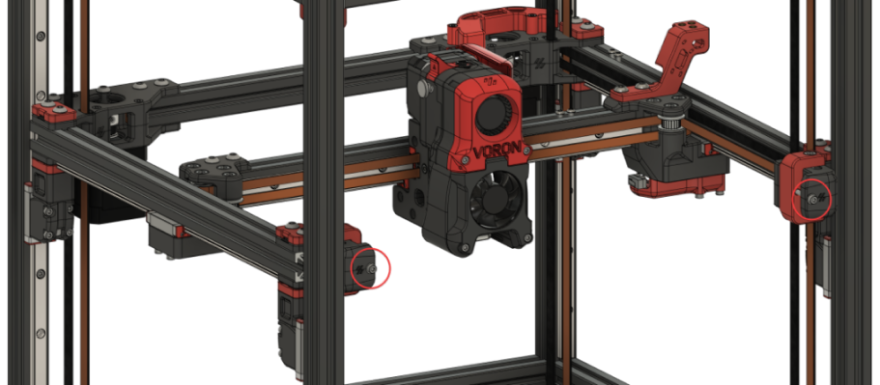
What you're looking at: The diagram shows the A/B tensioners fully released, which is where gantry squaring begins. Squaring undoes belt tension, so Ch 07's tensioning was only provisional, Ch 06b puts back only a working tension, and final tension belongs to Ch 14.
Parts: none.
Do: Leave this chapter here and run Ch 06b gantry squaring, which needs exactly what you now have: a printer that homes and QGLs.
Check
Ch 06b's checkpoint is ticked and the A/B belts are back at its provisional tension.
Do not skip this even if QGL converged
a QGL that converges on a racked gantry is a levelled parallelogram. Ch 06b fully releases A/B belt tension and drops the lower Z joints, then leaves the gantry square, cold, with the A/B belts at a provisional tension. (survey §5.2 W1)
Tip
Final belt tensions are Ch 14 Steps 14.4–14.6: A/B 110 Hz, Z 140 Hz, both over 150 mm, cold with the door open.
Source: Voron docs image Gantry-ABTension.png · Voron docs — V2 gantry squaring
Good stopping point · ~10 min since the last one
you are handed off to Ch 06b: A/B tension fully released, Z joints dropped, gantry squared cold to the manual's procedure and the A/B belts back at a provisional tension. Come back to 13.35 with Checkpoint 06b ticked. Do not re-run QGL until A/B tension is restored.
Next: Ch 06b Step 06b.1
Step 13.35 — Re-heat and re-QGL after squaring¶
(no image — see text)
What you're looking at: Everything measured before squaring is now stale, so the soak, the probe check and the level are all repeated on the squared machine. A QGL that converges in fewer passes and from a smaller starting range is the evidence that squaring actually took.
Parts: none.
Do:
- Machine still open, no panels. Send
SET_IDLE_TIMEOUT TIMEOUT=7200again. - Bed to 100 °C, hotend to 150 °C, soak for the time you recorded at Step 13.32.
G28,PROBE_ACCURACYat σ under 0.003 mm, thenQUAD_GANTRY_LEVEL.
Check
QGL converges in fewer passes and from a smaller range than before. If not, the squaring did not take: go back to Ch 06b.
Tip
Ch 06b's RESTART put [idle_timeout] back to 1800 s. Stay hot: the remaining steps run in this same session.
Source: Voron startup wizard § QGL with heated bed and chamber · Klipper docs § QUAD_GANTRY_LEVEL
Part I — Z offset (Z=0)¶
Step 13.36 — Z_ENDSTOP_CALIBRATE and the paper test¶
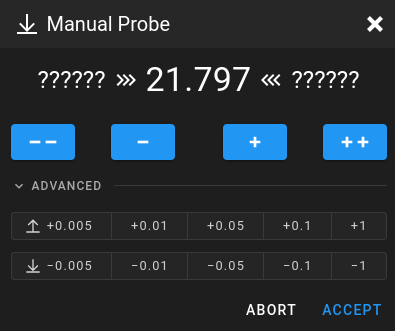
What you're looking at: The screenshot is Klipper's manual-probe dialog. Z_ENDSTOP_CALIBRATE steps the nozzle down in known increments until a sheet of paper just drags under it, then records that height as Z=0. The paper is ~0.1 mm thick, so this Z=0 sits one paper-thickness above the plate.
Parts:
- tool: printer paper, one sheet
Do:
- Hot and levelled:
G28, nozzle to the bed centre, wipe off any ooze, put the paper under it. - Run
Z_ENDSTOP_CALIBRATE. Step down withTESTZ Z=-1until close, thenTESTZ Z=-0.1;TESTZ Z=0.1backs off. ACCEPTat the first position where the paper drags.
Send: Z_ENDSTOP_CALIBRATE
Recv: // Starting manual Z probe. Use TESTZ to adjust position.
Recv: // Finish with ACCEPT or ABORT command.
Recv: // Z position: ?????? --> 9.800 <-- ??????
Send: TESTZ Z=-1
Recv: // Z position: ?????? --> 8.800 <-- 9.800
      ... down to ...
Send: TESTZ Z=-0.1
Recv: // Z position: 0.150 --> 0.250 <-- 0.350
Send: ACCEPT
Recv: // stepper_z: position_endstop: -0.750
Recv: // The SAVE_CONFIG command will update the printer config file
Recv: // with the above and restart the printer.
Send: SAVE_CONFIG
Check
You accepted at light drag: the paper still slides, but with resistance, and Klipper printed a new position_endstop.
Caution
Do not add an extra step down "for the heat". The number Klipper prints is old position_endstop − the Z you accepted at: with the stock −0.5 and an accept at 0.250, that is −0.5 − 0.250 = −0.750. Yours will differ; the arithmetic will not.
Tip
the small back-and-forth Klipper does on tiny moves is deliberate backlash compensation; the final position is the one you asked for.
Note: this sets Z=0 from the nozzle probe, not the inductive probe. [probe] z_offset: 0 stays uncalibrated on purpose — that probe is used only for QGL and mesh shape.
Source: Voron docs image mainsail_manual_probe.png · Voron startup wizard § Z endstop calibrate · Klipper docs § MANUAL_PROBE / TESTZ · Klipper manual_probe.py · Video: More Extras! @3:53:57 (differs: Euclid probe (Klicky fitted later, Part 11); this kit uses the Omron inductive probe + LDO nozzle probe, Klicky bagged)
Step 13.37 — Sanity-check Z=0¶
(no image — see text)
What you're looking at: The same sheet of paper, now a check rather than a measurement: the nozzle is commanded to the Z=0 you just saved and the paper should behave the same way. A larger position_endstop puts the nozzle closer to the bed.
Parts:
- tool: the same sheet of paper
Do: G28, then G0 X175 Y175 Z0 F1200. Slide the paper under the nozzle.
Check
The paper drags but is not pinned or torn, and the nozzle has not touched the PEI; at Z0 it sits one paper-thickness above it.
Tip
if it is wrong, re-run Step 13.36; do not hand-edit position_endstop yet. Increasing [stepper_z] position_endstop brings the nozzle closer to the bed, so −0.700 is closer than −0.750.
Source: Voron startup wizard § Z offset adjustment · Klipper docs § Manual Level
Good stopping point · ~20 min since the last one
re-heated, re-QGL'd after squaring, Z_ENDSTOP_CALIBRATE done at the paper-drag height, and Z=0 sanity-checked at the bed centre. SAVE_CONFIG run and committed. The machine now knows where the bed is.
Part J — Bed mesh¶
Step 13.38 — Confirm the [bed_mesh] section from Ch 12¶
(no image — see text)
What you're looking at: Nothing to build here. [bed_mesh] is one config section, owned by Ch 12, and this step only confirms it survived. PRINT_END calls BED_MESH_CLEAR, which is why a missing section shows up as a console warning at the end of every print rather than as a failure.
Parts: none.
Do: Open printer.cfg, confirm the [bed_mesh] section from Ch 12 Step 12.34 is present and unchanged, then FIRMWARE_RESTART. Do not retype it here.
Check
grep -A4 '^\[bed_mesh\]' ~/printer_data/config/printer.cfg returns the block, Klipper comes back Ready, and BED_MESH_CLEAR is accepted at the console.
Tip
the LDO config ships no [bed_mesh] section at all, so PRINT_END prints Unknown command:"BED_MESH_CLEAR" until one exists. A rejected section is a range error: fix it in Ch 12, not here. (survey §4.4 #15)
Source: Klipper docs § bed_mesh · Klipper docs § Bed Mesh · leviathan-printer-rev-d-sbv2.cfg
Step 13.39 — BED_MESH_CALIBRATE¶
(no image — see text)
What you're looking at: BED_MESH_CALIBRATE probes a grid across the plate and stores the height at each point, so Klipper can correct Z continuously as the nozzle travels. It has to be taken hot and after levelling, because both the plate and the gantry change shape with temperature.
Parts: none.
Do: Still hot and still levelled: G28, QUAD_GANTRY_LEVEL, G28, then BED_MESH_CALIBRATE. 49 probe points takes a few minutes.
Send: BED_MESH_CALIBRATE
      ... 49 probes ...
Recv: // Mesh Bed Leveling Complete
Recv: // Bed Mesh state has been saved to profile [default]
Recv: // for the current session.  The SAVE_CONFIG command will
Recv: // update the printer config file and restart the printer.
Send: SAVE_CONFIG
Check
BED_MESH_OUTPUT shows the whole plate inside roughly ±0.10 mm at 100 °C.
Caution
A corner 0.3 mm out of family points at a bed screw torqued cold in Ch 03, not at a bad plate. Mesh after QGL, always, and re-mesh whenever you change the bed or the plate.
Tip
this mesh is a hot mesh at 100 °C. It is not valid for a 60 °C PLA bed — take a second profile later if you print cold materials.
Source: Voron startup wizard § Bed leveling · Klipper docs § BED_MESH_CALIBRATE · Klipper docs § Bed Mesh
Good stopping point · ~15 min since the last one
[bed_mesh] confirmed against Ch 12 and a full mesh probed and saved with no probe point out of range. Machine idle, heaters off, SET_IDLE_TIMEOUT TIMEOUT=1800 sent to put the timeout back.
Part K — First print¶
The first print is the last check in this chapter, not the start of tuning. The cube is printed once, here. Step 13.40 loads the first filament and measures rotation_distance — this step owns that measurement; Ch 14 Step 14.7 only re-checks and refines it after the first print. The cube's measurement is Ch 14's and stays there. Keep the cube.
Step 13.40 — Set the extruder rotation distance (Ch 14 procedure)¶
(no image — see text)
What you're looking at: rotation_distance is how far the filament advances for one turn of the extruder motor. Until it is right, every flow number downstream is wrong by the same percentage. The measurement is indirect: the rule reads the remainder, not the amount extruded.
Parts:
- consumable: Prusament ASA, dried
- tool: steel rule or caliper
- consumable: masking tape
Do: Load filament. Spool on the holder arm, filament through the PTFE reverse-bowden, tip cut square, fed down the tube to the Clockwork 2 gears. Send G28, then LOAD_FILAMENT TEMP=260; it heats and waits. Wipe the extruded blob off the nozzle.
Measure. Add max_extrude_only_distance: 150 to [extruder] and RESTART — Klipper's default is 50 mm, so a single G1 E100 errors out with "Extrude only move too long". G28, park with G0 X175 Y10 Z50 F6000, heat to 260 °C. Put a piece of tape on the filament at the 120 mm mark, measured from where the filament enters the extruder. Then extrude 100 mm slowly, in relative mode, at 1 mm/s:
M83
G1 E100 F60
Measure from the extruder entrance to the tape again — that reading is the remaining distance R.
Check
R reads ≈20 mm, so the extruded amount is within 0.5 % of target: 99.5 to 100.5 mm for a 100 mm request.
Caution
Watch the gears. If the filament is pushed back up the tube, invert [extruder] dir_pin by adding or removing the ! on nhk:PB9, RESTART, and send the macro again. That is the extruder direction test. If the gears do not grab, open the CW2 latch, push the filament past them by hand, close it and repeat.
Tip
write the value you end on into [extruder] rotation_distance, RESTART, and commit. This has to be right before the first print; extrusion error looks exactly like a flow or first-layer problem.
The arithmetic, how to iterate, and the two classic mistakes
actual_extruded       = 120 − R
new_rotation_distance = old_rotation_distance × (actual_extruded / 100)
R is what the rule reads, not the amount extruded — forgetting the subtraction is
the classic way to land a rotation distance five times too small. The other one:
always use your current rotation_distance in the formula, never the original.
And remember a higher value means less filament comes out.
Iterate without restarting using
SET_EXTRUDER_ROTATION_DISTANCE EXTRUDER=extruder DISTANCE=<value>, then write the
final number into [extruder] rotation_distance and RESTART. M83 before every
G1 E100 — in absolute mode the move only extrudes 100 mm if E happens to be 0.
Extruding slowly is deliberate: it removes the pressure-related error a fast extrude
introduces. If you would rather not raise max_extrude_only_distance, the Voron
guide's way is to extrude 50 mm twice instead.
Starting value for Clockwork 2 is rotation_distance: 22.6789511 with
gear_ratio: 50:10; expect to land within about ±2 % of that. If you are 5 %+ off,
you have the wrong gear_ratio (50:17 is Clockwork 1), not a calibration
problem.
Source: Voron startup wizard § Extruder calibration (e-steps) · Klipper docs § Rotation distance · Klipper docs § SET_EXTRUDER_ROTATION_DISTANCE · Ellis' Print Tuning Guide — extruder calibration · leviathan-printer-rev-d-sbv2.cfg LOAD_FILAMENT
Step 13.41 — Make the Voron printer profile and slice the cube¶
(no image — see text)
What you're looking at: Voron_Design_Cube_v7 is a 30 mm test cube that batch B00 already printed on the Prusa. Everything sliced so far used the Core One+ profile. The Voron profile is four things: the 350 mm bed, the Klipper flavour, a start G-code calling PRINT_START, and a physical printer.
Parts:
- tool: the laptop with PrusaSlicer 2.9.6
- tool: the
Voron_Design_Cube_v7.stlfile
Do:
- Save the CORE One HF0.4 profile as
Voron 2.4 350: bed 350 × 350, height 330, Klipper. Untick binary G-code, auto temperatures. - Start G-code below, End
PRINT_END. Physical printervoron.local; Test. - Slice the cube: 260/110, compensations off, seam rear.
PRINT_START BED=[first_layer_bed_temperature] EXTRUDER=[first_layer_temperature] CHAMBER=0 FILAMENT={filament_type[initial_tool]}
Where things are: Printer Settings → Save as… from Prusa CORE One HF0.4 nozzle, bed origin 0, 0; G-code flavor: Klipper under General → Firmware, then OK its dialog; Supports binary G-code under General → Firmware in Expert mode; Emit temperature commands automatically under Custom G-code. The Start and End G-code each replace everything in their box. The physical printer is the icon next to the printer preset → Add physical printer, no API key.
The flavor dialog switches Machine limits → How to apply limits to Use for time estimate, because Klipper takes no machine limits from G-code. The Core One preset ships binary G-code ticked, and Klipper reads only plain .gcode. Unticking the automatic temperature commands stops PrusaSlicer prepending M104/M190 before PRINT_START, which would heat the hotend before homing and home Z on the nozzle-probe pin through hot ooze. FILAMENT= passes the filament type, so PRINT_START runs the Nevermore only for materials that need it. Saving as a copy keeps the Prusament ASA and STRUCTURAL presets from print/00-slicer-setup.md compatible with it. Extruder 1: nozzle 0.4 stays; leave retraction at the copied value and tune it in Ch 14 (verify on bench).
The cube is Voron_Design_Cube_v7.stl, the same file batch B00 printed on the Prusa, exactly 30.000 × 30.000 × 30.000 mm. Slice it at hotend 260 °C, bed 110 °C, XY size compensation 0, shrinkage compensation 0 %, no supports, seam to the rear: the same overrides the Prusa profile uses, so the two cubes are comparable. Chamber temperature is not a slicer setting on this machine yet: the Prusa filament profile's chamber values emit M141/M191, which this config does not define (Klipper answers Unknown command, harmless); the chamber is CHAMBER= on PRINT_START, kept at 0, a timed soak, until Ch 14 has measured what the closed chamber reaches.
Check
The export is a .gcode file starting PRINT_START BED=110 EXTRUDER=260 CHAMBER=0 FILAMENT=ASA, no M190/M109 before it. No supports, seam at the rear, physical-printer Test passed.
Caution
Export refused with "Machine limits cannot be emitted to G-Code when Klipper firmware flavor is used": set How to apply limits back to Use for time estimate. A .bgcode file instead of .gcode: Supports binary G-code is still ticked.
Caution
The Voron slicer guide's own starting point is 240 °C / 100 °C / 92 % flow for ABS. Use 260/110 here anyway: it is the Prusament ASA figure, and it is what makes this cube comparable with the B00 reference you caliper it against at Ch 14 Step 14.11.
Tip
Host type Moonraker if your PrusaSlicer lists it, else OctoPrint: Moonraker answers OctoPrint's upload API through [octoprint_compat].
Source: Voron-2 STLs/Test_Prints/ · Voron docs — first print · Voron docs — slicer setup · Moonraker configuration § octoprint_compat · Ch 12 Step 12.36
Step 13.42 — Print it, and set the first-layer squish¶
What you're looking at: The photo is Voron's own example of correct first-layer squish: beads that touch with no gaps but are still individually visible. Babystepping moves Z live while the layer prints; Z_OFFSET_APPLY_ENDSTOP turns that live adjustment into a saved value.
Parts:
- reused: the flex plate, cleaned
- consumable: Prusament ASA, already loaded
- consumable: IPA
Do: Upload from the slicer using the physical printer from Step 13.41, start it, and watch the whole first layer. Live-adjust Z in 0.01 mm steps while it lays down; Mainsail's "Z Offset" babystep control does the same thing:
SET_GCODE_OFFSET Z_ADJUST=-0.01 MOVE=1     ; closer to the bed
SET_GCODE_OFFSET Z_ADJUST=0.01 MOVE=1      ; further away
Note the total you end on (Mainsail shows it next to the Z-offset buttons) and let the cube finish. Only then make it permanent: Z_OFFSET_APPLY_ENDSTOP, then SAVE_CONFIG. SAVE_CONFIG restarts Klipper and would abort a running print — never send it mid-print. Keep the cube.
Check
On smooth PEI the bottom has no gaps between the beads and no ridging, and you can still see the individual lines.
Caution
Do not use Z_OFFSET_APPLY_PROBE: this machine's Z reference is the LDO nozzle probe, not the inductive probe. After the save, stepper_z: position_endstop in the saved block has moved by the amount you babystepped; babystepping alone is discarded on restart. (survey §3.3)
Tip
completely featureless and glassy is too much squish. Do not touch input shaper or pressure advance until this print has finished successfully.
Source: Voron docs image voron_cereal.png · Voron docs — first print · Ellis' Print Tuning Guide — first layer squish

Step 13.43 — Shut down properly¶
(no image — see text)
What you're looking at: The Pi is a computer with a filesystem that can be corrupted by losing power mid-write. Shutting the host down first and only then cutting mains is the ordinary rule for any Linux machine, and the file at risk holds every calibration in this chapter.
Parts: none.
Do:
- Commit the config:
cd ~/printer_data/config && git add -A && git commit -m "Ch 13 done: PID, Z endstop, mesh, rotation_distance", thenscpthe directory to the laptop. - Use the web interface's Shutdown, wait for the Pi's activity LED to go dark, then switch the machine off at the inlet.
Check
git log on the Pi lists the Ch 12 baseline and every SAVE_CONFIG since, and a copy of the directory is off the Pi's SD card.
Helper: Watches the Pi's green activity LED and says when it has stayed dark.
Caution
Pulling power on a running Pi corrupts the SD card and costs you Ch 12 all over again.
Source: Voron startup wizard § Finish · Voron startup wizard § Next: slicer setup
Good stopping point · ~30 min since the last one
extruder rotation distance set, the Voron cube sliced, printed and its first-layer squish dialled, and the machine shut down properly. Ready for Checkpoint 13, then Ch 11 Part B.
Part L — Add-on: nozzle scrubber with sheet stops¶
This part is optional. It fits jinetix's silicone nozzle scrubber on the rear of the bed extrusions: a brush bracket and its magnetic purge bucket on the left, a narrow stop bracket on the right. Nothing is printed until this part has measured the machine and decided which parts fit, or that none do. PRINT_START then wipes the nozzle before the Z home that counts.
Step 13.44 — Inspect the plate edge and the room behind it¶
(no image — see text)
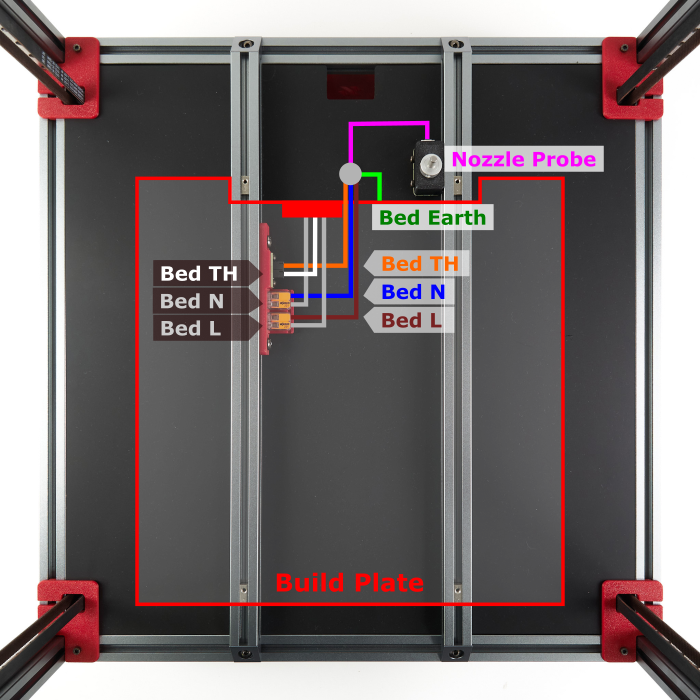
What you're looking at: Behind the plate, each bed extrusion needs a bare top for a 38 mm bracket that butts the plate's rear edge. The brush sits on that edge outboard of the left extrusion, so the edge must be straight there.
Parts:
- tool: steel rule
- tool: digital caliper
Do:
- Machine off: is the plate's rear edge straight outboard of the left bed extrusion?
- Rule each extrusion top from the plate edge back to the first obstacle.
- Note what stands above either top there, probe collar included.
Check
Edge straight, at least 39 mm of bare top on the left, and the right side's length and collar noted. All written down.
Helper: Holds the rule on each extrusion top and reads the clear length aloud.
Caution
A notched edge at the brush, or under 39 mm of bare top on the left, ends the add-on here. The right side only decides whether the narrow stop bracket is fitted.
Tip
Nothing is printed before the decision step, so these looks cost nothing. Bed leads, the WAGO mount and the Nevermore all belong inboard and below the tops.
Source: Printables 796563 — jinetix, nozzle scrubber w/ sheet stops · Voron manual p.161 · LDO wiki build-plate mapping
Step 13.45 — Measure the sheet height and the wiper¶
(no image — see text)
What you're looking at: The printed parts are drawn from the bed-extrusion top up. The author's LDO stack puts the flex plate's top 20.05 mm above it; yours sets how far the brush stands proud of the sheet. The wiper's own height adds to that.
Parts:
- staged: Bambu A1 heatbed nozzle wiper ×1 — from bin 13-scrubber, bought at Ch 00
- tool: digital caliper
Do:
- Caliper body flat on the flex plate at its rear edge, depth rod down to the left extrusion top: that is H.
- Caliper the wiper from its base underside to the bristle tips: that is w.
Check
Both numbers written down. Expect H near 20 mm, and w near 3.85 mm, or 4.0 mm for a clone.
Helper: Reads both caliper values aloud and writes them on the record card.
Tip
The wiper must be in hand for this step. Ch 00's tool list carries its buy row.
Source: Printables 796563 — height notes and BOM · Bambu Lab — Heatbed Nozzle Wiper A1/A2L
Step 13.46 — Measure the Omron height and the reach past the plate¶
(no image — see text)
What you're looking at: The Omron rides 25 mm behind the nozzle, so it sweeps the strip behind the plate whenever the rear rows print. d and G are its height; O is how far the nozzle travels past the plate's rear edge.
Parts:
- tool: digital caliper
Do:
- Power on,
M112ready:G28thenG0 X175 Y175 Z10. Omron face to plate, minus 10, is d. - Full Y, over the left extrusion: Omron to its top, minus 10, is G.
- At
Z1jog to the plate edge;position_maxminusM114Y is O.
Check
G is within 0.3 mm of H plus d. d, G, O and that edge Y are written down.
Helper: Reads each caliper value and the M114 Y aloud and writes them down.
Source: Klipper docs § probe · Klipper docs § M114 · Printables 796563 — Y overtravel note
Step 13.47 — Decide what to print, or stop¶
(no image — see text)
What you're looking at: The calculator checks the layout numbers. The generator works the heights out from yours: how far to lower the wiper seat, how much to trim the bucket, and whether the sheet-stop screws fit. It can also say no-go.
Parts:
- tool: the laptop with this repo and its
venv-cqPython
Do:
- Fill in the calculator below. A failing row stops here or drops the stop bracket.
- Run the generator with your five numbers and keep its printout.
- Shut the Voron down as before.
venv-cq/bin/python slicer/addons/scrubber-796563/remix.py --H 20.05 --w 3.85 --d 0.6 --G 20.65 --O 4.5
Scrubber add-on — does it fit, and which parts — the calculator needs JavaScript; the limits are in the table on this page.
Check
The generator printed L, T and a sheet-stop line and wrote three files to measured/, or printed NO-GO and wrote nothing.
Helper: Reads each number off the record card while the adult types it in.
Caution
NO-GO means the add-on stays off and every step below is skipped. The files committed beside the generator are only its default for the expected numbers: print the set it writes for yours.
Source: slicer/addons/scrubber-796563/README.md and remix.py · Printables 796563 — STEP files and height notes
Good stopping point · ~35 min since the last one
H, w, d, G and O measured and written down, the decision made, the chosen files in measured/ or NO-GO recorded, and the Voron shut down as at Step 13.43. Nothing printed yet.
Step 13.48 — Print the chosen parts on the Core One+¶
(no image — see text)
What you're looking at: The parts print as one job on the Core One+, outside the plate run. The bracket and bucket file names carry the L and T the generator chose, so what lands on the bed matches your machine.
Parts:
- consumable: Galaxy Black ASA, about 40 g
- tool: the Core One+ with the smooth sheet
Do:
- In PrusaSlicer 2.9.6, load the files from
measured/withvoron-coreone-asa.ini, as oriented, no supports. - Leave the stop bracket out if the calculator said so.
- Print on the smooth sheet. Once cool, bag the parts in bin
13-scrubber.
Check
The bed holds exactly the files the printout named, and the slice comes to about 2.5 h and 40 g.
Helper: Checks each file name on the bed against the printout and ticks it.
ASA
set Chamber Filtration to Adv. Filtration before starting, as for every ASA plate.
Source: print/README.md § Add-on prints · Printables 796563 — print settings
Good stopping point · ~15 min since the last one
the add-on print is running on the Core One+, about 2.5 h. Leave the parts on the sheet until it has cooled.
Step 13.49 — Inspect the prints, then fit the magnets and the wiper¶
(no image — see text)
What you're looking at: Two caliper readings prove the parts match the decision before anything goes on the machine. The bucket hangs under the bracket on four magnets, so it lifts off for emptying.
Parts:
- 6×3 mm neodymium magnet ×4
- brush bracket, mirrored ×1 — from bin 13-scrubber
- purge bucket, mirrored ×1 — from bin 13-scrubber
- Bambu A1 heatbed nozzle wiper ×1 — from bin 13-scrubber, bought at Ch 00
- consumable: super glue
- tool: digital caliper
Do:
- Press two magnets into the bracket's underside, then the bucket's two, each attracting the one above it.
- Press the wiper into its seat, bristles up.
- Caliper bracket base to bristle tips, then the bucket's height.
Check
Both readings within 0.2 mm of the printout's inspect line. The bucket hangs square and the magnets sit flush.
Helper: Tests each magnet pair and hands them over the right way up.
Caution
A reading more than 0.2 mm off means the wrong file or a bad print. Reprint before anything goes on the machine.
Tip
The pockets are drawn for ASA shrinkage, so the magnets press in. Any that falls out gets a drop of super glue.
Source: Printables 796563 — BOM · slicer/addons/scrubber-796563/remix.py
Step 13.50 — Bolt both brackets to the bed extrusions¶
(no image — see text)
What you're looking at: Both brackets sit on the bed extrusions just behind the plate, their front faces against its rear edge. The brush bracket goes on the left, away from the nozzle-probe pin. One upright M3×8 in each bracket is a sheet stop.
Parts:
- reused: the brush bracket with its bucket
- stop bracket ×1 — from bin 13-scrubber
- M3 roll-in T-nut ×4
- M3×8 SHCS ×6
- tool: 2.5 mm hex key
Do:
- Power on,
G28,G0 X175 Y60 Z150. Roll two T-nuts into each extrusion's top slot behind the plate. - Bolt each bracket with two M3×8, face on the plate edge, snug.
- Fit the upright M3×8s unless the printout said no.
Check
Both brackets sit flat, front faces on the plate edge. With the stop screws fitted, the flex plate stops on both heads.
Helper: Holds each bracket against the plate edge while the adult tightens it.
Caution
If the right bracket touches the probe collar or body after all, take it off. A pin that cannot move freely drifts Z zero.
Source: Printables 796563 — BOM · LDO wiring guide § Assembling the nozzle probe
Good stopping point · ~25 min since the last one
the add-on is bolted on, the bucket hangs on its magnets, and Klipper does not know about it yet. Do not run any scrub command before Step 13.52.
Step 13.51 — Read the brush coordinates off the machine¶
(no image — see text)
What you're looking at: The macros work from numbers read off this machine, never presets: the X of both bristle edges, the plate-edge Y from the reach measurement, and the height of the bristle tops.
Parts:
- reused: the fitted scrubber
- tool: a sheet of printer paper
Do:
M112ready,G28, nozzle cold. Jog over the brush atZ5and readM114X at its left and right bristle edges.- Lower over the bristles until paper drags. That Z minus 0.5 is
z_scrub.
Check
The two X values are about 35 mm apart, and z_scrub is within 0.3 mm of the printout's expected value.
Helper: Reads each M114 value aloud and writes it on the record card.
Caution
Below Z1, keep the nozzle over the brush. Over the plate's rear edge it digs into the flex plate.
Source: Printables 796563 — macro reference point · Klipper docs § M114
Step 13.52 — Add the scrubber macros¶
(no image — see text)
What you're looking at: [gcode_arcs] lets Klipper run the small G2/G3 circles of the scrub. _SCRUB holds your numbers; NOZZLE_PARK_BUCKET and NOZZLE_CLEAN read them and refuse to run while any is still a placeholder.
Parts: none.
Do: Paste the block below under [gcode_macro PRINT_END]. Replace the four placeholder values with the numbers you wrote down, then SAVE & RESTART.
#####################################################################
#   Nozzle scrubber  — ADDED at Ch 13 (add-on). Geometry and macro logic
#   adapted from jinetix, "Voron 2.4 Silicone Nozzle Scrubber w/ Sheet
#   Stops", Printables 796563, macro revision 2025-12-22, CC BY-NC-SA 4.0.
#   Changes: one variable block instead of two copies; bucket on the LEFT
#   (mirrored fit); the circle radius and centre are clamped to this
#   machine's Y overtravel; XY moves happen at park height and Z drops only
#   over the bucket (the author's Z-then-XY order drags the nozzle at scrub
#   height); refuses to run until the values are measured.
#####################################################################

[gcode_arcs]
resolution: 0.1

[gcode_macro _SCRUB]
description: Scrubber geometry. Values only; read by NOZZLE_PARK_BUCKET and NOZZLE_CLEAN.
##  Every value marked (verify on bench) is measured on YOUR machine.
##  The placeholders below make both macros refuse to run.
variable_brush_x_min: -1.0     # (verify on bench) X, nozzle over the OUTBOARD (left) bristle edge
variable_brush_x_max: -1.0     # (verify on bench) X, nozzle over the INBOARD (right) bristle edge
variable_edge_y: -1.0          # (verify on bench) Y, nozzle tip exactly over the plate's rear edge
variable_z_scrub: 99.0         # (verify on bench) Z of the bristle tops minus 0.5
variable_bucket_offset: 10.0   # park this far outboard of brush_x_min, over the bucket
variable_park_z: 5.0
variable_circle_r: 2.0         # largest scrub circle; shrunk to fit the Y overtravel
variable_passes: 5
variable_circles: 2
variable_flicks: 5
variable_flick_depth: 3.0
variable_travel_speed: 9000
variable_flick_speed: 9000
variable_scrub_speed: 3000
variable_z_speed: 1500
gcode:
    {action_respond_info("_SCRUB only holds the scrubber's measured values")}

[gcode_macro NOZZLE_PARK_BUCKET]
description: Lift, then park the nozzle over the purge bucket.
gcode:
    {% set s = printer["gcode_macro _SCRUB"] %}
    {% if s.brush_x_min < 0 or s.brush_x_max <= s.brush_x_min or s.edge_y < 0 or s.z_scrub > 10 %}
      {action_raise_error("Scrubber not measured yet: fill in [gcode_macro _SCRUB]")}
    {% endif %}
    {% if printer.toolhead.homed_axes != "xyz" %}
      {action_raise_error("Scrubber: home all three axes first")}
    {% endif %}
    {% set ymax = printer.toolhead.axis_maximum.y - 0.5 %}
    {% set ylo = s.edge_y + 1.5 %}
    {% set r = [s.circle_r, (ymax - ylo) / 2.0]|min %}
    {% set cy = ylo + r %}
    G90
    G1 Z{[printer.toolhead.position.z, s.park_z]|max} F{s.z_speed}
    G1 X{s.brush_x_min - s.bucket_offset} Y{cy} F{s.travel_speed}
    G1 Z{s.park_z} F{s.z_speed}

[gcode_macro NOZZLE_CLEAN]
description: Flick ooze into the bucket, then scrub the nozzle on the silicone brush.
gcode:
    {% set s = printer["gcode_macro _SCRUB"] %}
    {% set ymax = printer.toolhead.axis_maximum.y - 0.5 %}
    {% set ylo = s.edge_y + 1.5 %}
    {% set r = [s.circle_r, (ymax - ylo) / 2.0]|min %}
    {% if r < 0.75 %}
      {action_raise_error("Scrubber: Y overtravel past the plate is too short for the brush")}
    {% endif %}
    {% set cy = ylo + r %}
    {% set bucket_x = s.brush_x_min - s.bucket_offset %}
    {% set flick_x = s.brush_x_min + s.flick_depth %}
    {% set x0 = s.brush_x_min + 0.5 %}
    {% set x1 = s.brush_x_max - 2 * r - 0.5 %}
    {% set dx = (x1 - x0) / (s.passes - 1) if s.passes > 1 else 0 %}
    NOZZLE_PARK_BUCKET
    G90
    G1 Z{s.z_scrub} F{s.z_speed}                ; down over the bucket, never over the brush
    {% for i in range(s.flicks) %}
      G1 X{flick_x} F{s.flick_speed}            ; into the outboard bristles
      G4 P20
      G1 X{bucket_x} F{s.flick_speed * 1.5}     ; snap back: the string drops in the bucket
    {% endfor %}
    {% for i in range(s.passes) %}
      {% set x = x0 + i * dx %}
      G1 X{x} Y{cy} F{s.travel_speed}
      {% for j in range(s.circles) %}
        {% if (i + j) % 2 == 1 %}
          G3 X{x} Y{cy} I{r} J0 F{s.scrub_speed}
        {% else %}
          G2 X{x} Y{cy} I{r} J0 F{s.scrub_speed}
        {% endif %}
      {% endfor %}
    {% endfor %}
    G1 Z{s.park_z} F{s.z_speed}                 ; lift straight up off the brush
Check
Klipper restarts without an error, and NOZZLE_PARK_BUCKET parks the nozzle over the bucket at Z5.
Tip
The macro sizes its scrub circles to fit your reach past the plate, from 2 mm radius down to 0.75 mm.
Source: Printables 796563 — macros, revision 2025-12-22 · Klipper docs § gcode_arcs · Klipper docs § Command templates
Step 13.53 — Dry-run the scrub cold¶
(no image — see text)
What you're looking at: A cold run shows the whole path before anything is hot: five flicks from the bucket into the brush edge, five rows of small circles on the bristles, then a straight lift. The Omron trails behind, over the bucket.
Parts: none.
Do:
M112ready,G28, then sendNOZZLE_CLEAN.- Watch the nozzle stay on the bristles and the Omron pass over the bucket without touching.
Check
Nothing touches except nozzle on silicone, the bucket stays hung, and the run ends at Z5.
Helper: Watches the Omron from the side and calls out if it touches anything.
Caution
If the Omron touches the bucket, send M112, measure d and G again and re-run the generator from the decision step. Fit nothing it did not choose.
Source: Printables 796563 — macro behaviour
Step 13.54 — Scrub inside PRINT_START, then shut down¶
(no image — see text)
What you're looking at: The scrub runs after QGL at the QGL temperature, between a provisional Z home and the one that counts. The nozzle probe measures the real tip, so a clean tip is a true Z zero.
Parts: none.
Do: In PRINT_START, insert the three lines below after QUAD_GANTRY_LEVEL, above the existing G28 Z. SAVE & RESTART, print one small part and watch the scrub, then commit and shut down as before.
    G28 Z    ; provisional, tip not clean yet
    NOZZLE_PARK_BUCKET
    NOZZLE_CLEAN
Check
The tip leaves the brush clean, the string lands in the bucket, and the first layer matches the cube's.
Caution
The nozzle is at 150 °C during the scrub. Keep hands off the toolhead, and empty the bucket only cold, lifting it off its magnets.
Source: Printables 796563 — macro placement · Ch 12 Step 12.36
Good stopping point · ~30 min since the last one
the scrubber runs inside PRINT_START, the config is committed and copied off the Pi, and the machine is shut down. Ready for Checkpoint 13, then Ch 11 Part B.
What if — first-start failures and what they actually mean¶
| Symptom | Most likely cause | Fix |
|---|---|---|
| A temperature climbs with nothing commanded | Heater energised through a wiring fault | Cut power at the switch. Back to Ch 10 — do not "just watch it" |
| Thermistor reads a wild or jumping value | Crimp, or a PH2.0 housing half-seated / in the wrong header | Re-seat, check continuity. Rev D+: uses PH2.0, not the guide's XH2.5 |
| Hotend heats when you command the bed (or vice versa) | Thermistor pair or heater pair swapped | Swap at the board, power off first |
| Bed does not heat, SSR LED on | Fault on the mains side of the SSR | Check LOAD 1 / LOAD 2 and the bed L/N |
| Bed does not heat, SSR LED off | Control polarity reversed | Leviathan + → SSR INPUT 3, − → INPUT 4 |
| A fan never starts | Wrong port, wrong voltage jumper, or the keyed 2×5 (10-pin) toolhead header seated backwards | Check the port against the config; Rev D+: header is keyed — if it will not drop in, it is backwards. BLDC fans do not spin backwards on reversed polarity, they do nothing or burn out |
The wrong toolhead fan answers — the top (5015) fan follows the hotend, the bottom (4010) fan follows M106 |
Fan adapter HEF/PCF assignment is the reverse of the config (the Ch 08 Step 08.46 source conflict) | Swap pin: nhk:PD0 and pin: nhk:PA15 between [heater_fan hotend_fan] and [fan], RESTART, re-run 13.9–13.10. Do not re-plug or re-crimp |
STEPPER_BUZZ moves nothing |
enable_pin/step_pin, or no driver power |
Check the pins; check the HV/24 V rail |
STEPPER_BUZZ buzzes without travelling 1 mm |
Stepper coil pairs transposed in the connector | Re-pin the connector so each coil is a pair. Power off first |
| A motor moves the wrong way | dir_pin polarity |
Add or remove ! on that stepper's dir_pin, RESTART, re-buzz |
| The wrong motor answers | Motors in the wrong ports | Power off, move the connector, power on. Never hot-swap a stepper |
G28 X sends the gantry down first |
Z stepper directions reversed | Fix Z dir_pins before touching A/B |
| X and Y both move, but the toolhead goes diagonally / the wrong axis | A and B swapped, or one inverted | Read the V2 configuration chart; upper block → invert a dir_pin; lower (orange) block → physically swap A and B |
An endstop reads TRIGGERED untouched |
Wiring, not polarity | Stock Voron endstops are N.C. to ground — a needed ! usually means a wiring fault. Fix the wiring |
| Endstop unreachable by the toolhead | Rubber rail stopper still on the rail, or racked gantry | Remove stoppers; then Ch 06b |
G28 → Move out of range: -10.000 -10.000 … |
[safe_z_home] home_xy_position still the -10,-10 placeholder |
Step 13.26 |
| Homing overshoots into the frame, or stops short | The wrong build-size pair is uncommented (there is no default — with all three commented Klipper does not start) | Step 13.5: the Moonraker query must show 350.0, 350.0, 330.0 |
A G28 X or G28 Y stalls the Z motors against the frame, or drops the nozzle onto the bed |
Gantry parked at its top stop (or a reversed Z dir_pin) — every homing move before Z is homed lifts 10 mm from wherever the gantry is |
Step 13.17's first Do line: hand under the gantry, release the motors as it says, lower the gantry to a third of its travel; Step 13.16 for the dir_pin |
QUERY_PROBE stuck open or stuck TRIGGERED |
Ground/signal/24 V, wrong [probe] pin, or a voltage-select jumper |
Check wiring first, then pin: !nhk:PC15 |
| Probe triggers too early (nozzle still several mm up at trigger, or the probe grazes the plate) | Probe mounted too low in the retainer bracket | Raise it in the bracket. It must clear the plate and any clips at every mesh point |
| Probe triggers too late (nozzle nearly touching at trigger) | Probe mounted too high in the retainer bracket, or fibreglass tape on the sensing face | Lower the probe in the bracket so it triggers with the nozzle ~2 mm above the plate; strip tape from the back and bottom — front and sides only |
PROBE_ACCURACY σ high but stable |
Probe mount, cable strain, or [probe] speed too fast |
Check the bracket is tight; try a lower speed |
PROBE_ACCURACY values trending one way |
Thermal, or mechanical: Z pulley grub screws, uneven Z belts | Soak longer; then check all four Z belts and the pulley set screws |
Probe samples exceed samples_tolerance |
Same causes; samples_tolerance: 0.006 is tight by design |
Fix the cause, do not widen the tolerance |
| Bed and hotend switched themselves off mid-soak, motors released (gantry may have dropped) | [idle_timeout] timeout: 1800 in the LDO config — 30 min without a move runs TURN_OFF_HEATERS + M84; not a fault |
SET_IDLE_TIMEOUT TIMEOUT=7200 before every soak (Steps 13.31, 13.35, Ch 14 Steps 14.3, 14.8); re-heat, G28, repeat the soak |
QGL does not converge — Probed points range stalls or grows |
Gantry racking | Step 13.34 → Ch 06b (cold squaring, provisional A/B tension), then Step 13.35 re-QGL |
A move will not stop when you send RESTART |
RESTART queues behind the running move; only a line that is exactly M112 goes round it — Mainsail sends that as its emergency-stop call |
Send M112 alone on the line (or Mainsail's red Emergency Stop), then FIRMWARE_RESTART |
QGL: Retries aborting: Probed points range is increasing. Possibly Z motor numbering is wrong |
Z motors on the wrong drivers | Recheck the Z map: Z0 front-left → STEPPER-0, Z1 rear-left → -1, Z2 rear-right → -2, Z3 front-right → -3 |
QGL: Aborting quad_gantry_level required adjustment … is greater than max_adjust |
Gantry too far out of level to correct in software | M84 with a hand under the gantry (it sinks when the Z motors release), level the gantry by hand against the frame, G28, retry |
| QGL "out of bounds" / cannot reach the probe point | Gantry far from level, or wrong gantry_corners |
FIRMWARE_RESTART with a hand under the gantry (it sinks when the Z motors release), level the gantry by hand against the frame, G28, retry; confirm the 350 corners -60,-10 / 410,420 |
Unknown command:"BED_MESH_CLEAR" at the end of a print |
No [bed_mesh] section |
Step 13.38. It is a warning, not a failure — but you have no mesh |
| First layer is right at the front and wrong at the back (or similar) | Meshed before QGL, or mesh taken cold | Re-run: G28 → QUAD_GANTRY_LEVEL → G28 → BED_MESH_CALIBRATE, hot |
Checkpoint 13¶
Tick every line before you start Ch 14.
- Checkpoint #1 (Ch 10) was passed before this chapter began, with a multimeter, unplugged.
-
STATUSreturnsKlipper state: Ready, and both MCUs are present —stm32f446xx(orstm32h743xxon a V1.3 board) andstm32g0b1xx. -
grep -c gpio ~/printer_data/config/printer.cfgreturns 0 — the-sbv2config. -
M112tested once (Step 13.22) and typed-and-unsent, alone on the line, before every first move; everyone in the room knows it is the stop andRESTARTis not. - Extruder, bed and chamber (three sensors) all report room temperature at rest and none of them drifts upward untouched.
- Both heaters heat and cool on command; the SSR LED tracks the bed, the toolboard HE0 LED tracks the hotend.
- All four fan outputs verified and on the right fan: hotend (SB bottom), part cooling (SB top), bay PCB fan pair, Nevermore filter fan; plus the chamber LEDs and all three Stealthburner LEDs.
- All seven motors pass
STEPPER_BUZZ— correct motor, clean motion; correct direction for the four Z motors (A/B at 13.22–13.23, extruder at 13.40). -
QUERY_ENDSTOPSreadsstepper_x:open stepper_y:open stepper_z:openat rest and each endstop triggers alone; the nozzle probe shaft springs back freely. -
QUERY_PROBEtogglesopen/TRIGGEREDwith metal, and the probe's fibreglass tape is front-and-sides only. -
G28completes on all three axes; 0,0 lands within 5 mm of the front-left corner of the plate with no skipping. -
[safe_z_home] home_xy_positionholds your measured Z-endstop coordinate, not-10,-10. - Bed and hotend PID tuned and
SAVE_CONFIG-ed;PROBE_ACCURACYhot shows σ < 0.003 mm with no trend, and you wrote down the soak time. - Ch 06b cold gantry squaring done (Checkpoint 06b ticked), A/B belts back at its provisional tension, and QGL re-run and converged afterwards. Final tension is Ch 14 Steps 14.4–14.6, not here.
-
Z_ENDSTOP_CALIBRATEdone hot at the paper-drag height (no extra step down) and saved; bed mesh taken hot after QGL and saved. - Filament loaded, extruder direction confirmed,
rotation_distancemeasured here (Step 13.40) and written into[extruder]. - PrusaSlicer has a
Voron 2.4 350printer preset (350×350, Klipper flavour, limits for time estimate only, plain.gcode,PRINT_START … FILAMENT=/PRINT_END, physical printer test OK) and the Voron cube printed from it, first-layer squish committed withZ_OFFSET_APPLY_ENDSTOP+SAVE_CONFIGafter the print ended, cube kept for Ch 14's measurement. -
~/printer_data/configcommitted after everySAVE_CONFIGand copied off the Pi. - Part L, if fitted: H, w, d, G and O written down and the Step 13.47 decision kept (L, T, sheet stops, or NO-GO); only the files it wrote were printed, both inspection readings within 0.2 mm; the cold dry-run touched nothing but silicone;
NOZZLE_CLEANruns inPRINT_STARTbefore the finalG28 Z.
Next: Ch 11 Part B, Step 11.52 — back, side and top panels and the door; then Ch 14.
Common mistakes¶
- Running QGL before PID, or cold. A drifting probe gives a QGL that reports success and leaves the gantry unlevel; you then chase it through first-layer tuning for a week. PID first, soak to temperature, and gate on
PROBE_ACCURACYσ < 0.003 mm. (survey §3.3, §4.4 #16) - Setting the Z offset and the bed mesh before squaring the gantry. Ch 06b fully releases A/B tension and drops the Z joints — everything measured before it is scrap. Square first, re-tension, re-QGL, then Z=0 and mesh.
- Adding a
!to an endstop pin to make aTRIGGEREDreading go away. Every stock Voron endstop is normally-closed to ground. If it needs inverting, you almost certainly have a wiring fault that will fail intermittently later. - Moving a stepper connector with the power on. Back-EMF from a spinning or hot-swapped motor kills drivers, and you will not find out until the next homing move. Power down for every connector change. (survey §4.4 #10)
- Using
RESTARTas an emergency stop. It waits its turn behind the move you are trying to stop.M112typed alone on the line (or the red button) is sent as Mainsail's emergency-stop call and goes round the queue;M112 ; stop, orM112after another command on the line, is just a queued command.FIRMWARE_RESTARTafterwards. - "Correcting" the paper test for temperature. The paper test leaves the nozzle one paper-thickness (~0.1 mm) high by design, hot or cold; Step 13.42's babystepping closes that gap on the real first layer. An extra
TESTZ Z=-0.1puts Z=0 on the PEI and makes 13.37's check fail by construction. SAVE_CONFIGduring the first print. It restarts Klipper and kills the print at layer one. Babystep, note the total, let the cube finish, thenZ_OFFSET_APPLY_ENDSTOP+SAVE_CONFIG.- Trusting babystepping. The Z Offset slider is discarded on restart unless you commit it with
Z_OFFSET_APPLY_ENDSTOPfollowed bySAVE_CONFIG.
Next¶
Ch 11 Part B — back, side and top panels and the Clicky-Clack door — then Ch 14 — Calibration and tuning: final belt tension, the closed-chamber soak and the hot Z-joint lock, then caliper the cube against the Prusa-printed reference, then input shaper → pressure advance → extrusion multiplier → first-layer squish, in that order, and only now that a cube has printed.