Chapter 14 — Calibration and tuning¶
One page per step
Read this chapter one step per page — big pictures, prev/next, and the same tick marks. This page is the whole chapter in one scroll.
Takes a machine that homes, probes, levels, is squared cold and has printed its first cube (Ch 13), now closed in by Ch 11 Part B, and turns it into a machine that prints Voron-quality ASA: belts at final tension, the gantry's Z joints locked at working temperature, extruder refined, input shaper set, pressure advance and flow dialled in, and that cube calipered against the Prusa-printed reference.
What you're building in this chapter. Nothing mechanical is added; six calibration items are measured and written down. Belt tension is set for the last time, now that gantry squaring has released it — a tensioned belt is a string, and its pitch over a measured span is the reading. Then the closed chamber gets its first real heat soak, QGL is run until it settles, and the four Z joint bolts are given their only full tighten while the frame is at working temperature — the last three steps of Voron's squaring procedure, which Ch 06b left for a panelled machine. The extruder value measured in Ch 13 is re-checked. Input shaping uses the accelerometer built into the toolboard to find the frequency at which this machine rings, fits a filter that cancels it, and brings the acceleration ceiling down from its placeholder. Pressure advance compensates for the lag between the extruder and the nozzle at corners, and extrusion multiplier scales the total amount of plastic — both belong to the filament, not the machine. Between them sits the chamber: how hot the closed enclosure actually gets, which decides both the print profile and the soak time. The tuning log at the end is the deliverable. Part H is an optional add-on: the stock Voron exhaust housing on the back panel, its fan driven by the chamber thermistor, so PLA and PETG print under a 35–40 °C ceiling while ASA keeps its closed chamber.
Time: 2.5–4.0 h hands-on (survey §7.2), spread over ~8–10 h wall-clock. Most of the wall-clock is the 1½–2 h closed-chamber soak at Step 14.6, the shorter soaks (~30 min each) and four test prints. The optional exhaust add-on (Part H) adds ~3.5 h hands-on, plus ~7 h of Core One+ printing made after its first step passes, a ~1 h chamber soak and a ~1 h PLA print.
Sessions: 14 × ~30 min hands-on, 20 with Part H (one Pause per calibration item; every minute figure is a first-build estimate derived from the Time range and the step count, and excludes soaks and test prints).
Prerequisites:
- Ch 13 — First power-up and initial startup. All wizard steps passed (temperatures → heaters → fans →
STEPPER_BUZZ→ XY endstop → homing → bed locating → 0,0 → Z endstop → probe → PID → QGL → Z-offset), filament loaded androtation_distancemeasured at Step 13.40, the Voron printer profile made at Step 13.41. - The Voron-printed
Voron_Design_Cube_v7from Ch 13 Steps 13.41–13.42, kept. Ch 13 prints the cube and commits the first-layer squish; this chapter measures it, at step 14.11. - Ch 06b — Squaring the gantry, cold, run out of the middle of Ch 13 at Step 13.34 and finished before Ch 13's Z=0 and mesh: gantry square, the four Z joint M5×40 bolts reinstalled lightly (06b.13) and not yet torqued, A/B belts at a provisional tension. This chapter's belt-tension steps must come after 06b — the squaring procedure starts by fully releasing A/B tension, so anything you set before it is gone (survey §4.4 #2, §5.2 W1). Voron's squaring steps 14–17 (closed-chamber soak, QGL 3–5×, tighten the Z joints hot, restart) are Step 14.6 here, because they need the panels.
- Ch 11 Part B — Panels and the Clicky-Clack door, on. The chamber has to close: Step 14.6's soak, Step 14.8 and Checkpoint 14 all gate on a closed chamber.
- Ch 12 — Software.
[bed_mesh]added at Step 12.34,PRINT_STARTreplaced at Step 12.36 (survey §4.4 #15). - Batch B00. The Prusa-printed
Voron_Design_Cube_v7in Prusament ASA Galaxy Black, kept as the reference coupon (B00 step B00.6). You need it in hand at step 14.11. - Printed parts: none for Parts A–G; everything they print, they print on the Voron. Part H prints its own five parts on the Core One+ at Step 14.26, after Step 14.25 has checked the machine.
- Part H only: the Step 00.8 exhaust row (a 24 V 6020 fan, a 1 m JST-XH extension, carbon filter mat), bought after Step 14.25 passes.
- A spool of Prusament ASA in the dryer, warm and loaded (survey §7.3).
Tools
- Digital caliper, 150 mm
- Steel rule, 150 mm minimum (belt spans and the e-step mark)
- Masking tape and a fine marker (e-step mark; Ellis prefers tape to a marker line)
- Phone with a spectrum analyser: Sound Spectrum Analysis (iOS), Spectroid (Android), or Gates Carbon Drive (both — use the "motorcycle" option) src
- Hex 2.5 mm (A/B front tensioners, M3×40; Z idler tensioners, M3×16) and a ball-end hex 4 mm (the four Z joint M5×40 bolts, Step 14.6 — the rear pair are reached at an angle from the door)
- 150 mm machinist square (the hot re-square check at Step 14.6 — the same one as Ch 06b)
- Laptop or tablet on the Mainsail console, with
M112typed and unsent in a second window for the shaper run at Step 14.13 (Ch 13 Tools) - Part H only: string, scissors, 3 mm hex key, the soldering iron with the LDO insert tip, and the multimeter
Printed parts
| STL | Qty | Colour |
|---|---|---|
| Exhaust housing, Part H only, printed at Step 14.26 | 1 | Black |
| Exhaust fan grill, access cover and two filter mounts, Part H only, printed at Step 14.26 | 1, 1, 2 | Blue |
Hardware (chapter totals)
| Fastener / part | Qty | Note |
|---|---|---|
| M3×8 SHCS | 4: 2 nameplate + 2 exhaust | the nameplate, Step 14.24; Part H's access cover, Step 14.28 |
| M3 roll-in T-nut | 2 | the nameplate, Step 14.24 |
| M3 heat-set insert, brass M3×5×4 | 8 | Part H only: the exhaust housing, Step 14.27 |
| M3×30 SHCS | 4 | Part H only: the exhaust fan and its grill, Step 14.28 |
| — turned, not added — | 0 | Outside Part H, nothing else is added or removed in this chapter. The only things you turn are the two A/B front tensioner screws, the four Z idler tensioner bolts at the top of each upright (never the Z belt clamps at the gantry corners, on the front idlers, A/B drives and Z joints), and the four Z joint M5×40 bolts, which get their first and only full tighten hot at Step 14.6. |
Consumables: Prusament ASA Galaxy Black (~150 g across all test prints), IPA for the flex plate. Part H: VHB tape and zip ties from the kit, ~50 g PLA, and ~100 g ASA on the Core One+.
Read first
- Order is not intuitive and is enforced. PID before QGL (a thermally unstable machine will not QGL repeatably); e-steps before the first print; input shaper and pressure advance only after a successful first print (survey §3.3). Pressure advance changes when input shaping is enabled, so shaper comes first of the two. src
SAVE_CONFIGrestarts Klipper. EverySAVE_CONFIGin this chapter loses your homing. Re-G32after each one. Saved values land in the auto-generated block at the bottom ofprinter.cfgand override anything you typed above.- Change one thing at a time and write it down. The tuning log at the end of this chapter is the deliverable. If two things change between prints you cannot attribute the result.
- Do not chase dimensional error with
rotation_distance, XY compensation or the extrusion multiplier. Ellis: deviations are material shrinkage and bulging, not axis errors; his multiplier method is aesthetics-first, judged on a top surface, and Voron parts, drawn with ABS shrinkage in mind, need no compensation beyond a good multiplier tune. src - Shaper auto-calibration is destructive if abused. Klipper: "It is not advisable to run the shaper auto-calibration very frequently… There is also an increased risk of some parts unscrewing or becoming loose. Always check that all parts of the printer are securely fixed in place after each auto-tuning." src
Sources for this chapter:
- Voron docs — Secondary printer tuning — belt frequencies and the mesh-variance check; materials for the chamber band; initial-startup wizard for PID, QGL and e-steps
- Klipper — Measuring Resonances, Resonance Compensation, Pressure Advance, Rotation Distance, Bed Mesh, plus Config Reference and G-Codes
leviathan-printer-rev-d-sbv2.cfgat commit667521d— the line ranges each tuning step reads or edits- Voron 2.4r2 Assembly Manual p.125 — the belt step that gives no frequency, which is why step 14.4 exists
- Ellis' Print Tuning Guide and the Pressure/Linear Advance tool — linked only. The guide publishes no licence, so nothing from it is copied, quoted at length or mirrored here; every reference is a link out
- Part H: Voron-2
STLs/Exhaust_Filter/and manual p.250–256 for the housing; Voron docs — Chamber Temperature & Exhaust Fan for the pattern; Klippertemperature_fanandtemperature_combined; the design recordreview/2026-10-03-exhaust/DESIGN.md - E3D Revo 60 W heatercore / 104NT thermistor — the 270 °C
max_tempquestion in step 14.2 - Step images mirrored into
assets/remote/14-calibration/from Voron-Documentation and Klipper, both GPL-3.0 — see that folder'sSOURCES.txt
Video coverage (Steve Builds, pre-release LDO kit — differs from Rev D+): Extras! @1:15:59 (+10m), More Extras! @4:09:07 (+8m)
Part A — Heaters¶
Step 14.1 — Pre-flight the config before you tune anything¶
(no image — see text)
What you're looking at: Nothing to look at. You are reading four config sections before letting any of them generate numbers. The thermistor type, the pull-up resistor and the temperature ceiling all live in [extruder], and a wrong value in any makes every PID constant wrong with it.
Parts: none.
Do: Open printer.cfg and confirm these four sections before any of them generates a number.
| Section | Must hold |
|---|---|
[extruder] |
sensor_type: ATC Semitec 104NT-4-R025H42G, pullup_resistor: 2200, max_temp: 270, gear_ratio: 50:10, and your measured rotation_distance from Ch 13 Step 13.40. 22.6789511 is only the Clockwork 2 starting point; do not put it back |
[heater_bed] |
max_power: 0.6 and control: pid |
[resonance_tester] |
accel_chip: adxl345 and the live probe_points: 175, 175, 20 |
[input_shaper] |
present, both shaper_freq lines still commented. Do not delete it |
 Check
Check
STATUS is clean, both MCUs connected, and chamber, hotend and bed all read within a couple of degrees of the room.
Helper: Reads each Must hold value aloud while the adult finds it in printer.cfg.
Caution
A hotend reading 20 °C off the bed at rest means a wrong sensor_type, and every PID number you generate will be wrong with it.
 Tip
Tip
E3D's 60 W HeaterCore uses the Semitec 104NT-4-R025H42G and is rated to 300 °C, so max_temp: 270 is a deliberate ceiling below the hardware limit.
Caution
Rev D+ / LDO: These values come from leviathan-printer-rev-d-**sbv2**.cfg, not leviathan-printer-rev-d.cfg. If [extruder] sensor_pin reads nhk:gpio29 instead of nhk:PB12 you are on the V1 config and must go back to Ch 12 before doing anything thermal. src
Source: leviathan-printer-rev-d-sbv2.cfg · Voron docs — Secondary printer tuning
Step 14.2 — Confirm the heaters are already PID-tuned¶
(no image — see text)
What you're looking at: PID constants are the three numbers that hold a heater steady at a target. They were measured in Ch 13, and they belong to the temperature they were measured at, so changing your bed target means re-running the tune.
Parts: none.
Do: Both heaters were tuned and saved in Ch 13 at Step 13.29; do not repeat that here. Open printer.cfg and confirm both PID stanzas are in the auto-generated block at the bottom.
Check
Both stanzas hold your numbers, not the LDO config's generic starting values.
Ch 13 owns the tuning procedure
bed at 100 °C, hotend at 245 °C with the part fan at 25 %. Re-run it only if you have moved a target since, for example re-tuning the bed at TARGET=110 for ASA; PID is most accurate near the temperature it was tuned at.
Caution
Do not re-run the hotend tune at the 260 °C print temperature. PID_CALIBRATE switches the heater off only at the target, and [extruder] max_temp is 270, so a 60 W Revo HF can overshoot and shut Klipper down mid-tune (verify on bench). To tune at the print temperature, raise max_temp to 290 first, under the core's rated 300 °C, then set it back.
Tip
the generic values are 58.437 / 2.347 / 363.769 for the bed and 26.213 / 1.304 / 131.721 for the hotend. Do not add pwm_cycle_time; Klipper's 0.100 s default is correct here.
Source: Voron startup wizard § PID tune bed & hotend · leviathan-printer-rev-d-sbv2.cfg · E3D Revo 60 W heatercore / 104NT thermistor
Step 14.3 — Verify thermal stability, then re-QGL¶
(no image — see text)
What you're looking at: Thermal stability here means the frame, not just the heaters. PROBE_ACCURACY is the instrument: ten probes at one spot, and a series that drifts steadily downward is aluminium still expanding, not a fault in the probe.
Parts: none.
Do:
SET_IDLE_TIMEOUT TIMEOUT=7200, then bed to 100 °C and hotend to 150 °C, door open.- Sit 10–20 minutes from cold, watching the temperature graph.
G32, thenPROBE_ACCURACYat bed centre. Heaters off,SET_IDLE_TIMEOUT TIMEOUT=1800.
Check
Both heaters hold within ±0.5 °C of setpoint with no slow oscillation, and PROBE_ACCURACY reports σ < 0.003 mm with no trend.
Caution
The LDO config's 1800 s idle timeout switches the heaters and the Z motors off 30 minutes after the last move, which is exactly what a static soak looks like.
Caution
A drifting probe series, each probe lower than the last, means the frame is still expanding: wait longer. If σ stays high after the soak, suspect uneven Z belts.
Tip
the door stays open so this does not become the long soak; the closed-chamber soak that locks the geometry in is Step 14.6.
Source: Voron startup wizard § Probe accuracy check · Voron startup wizard § QGL with heated bed and chamber · Klipper docs § SET_IDLE_TIMEOUT
Good stopping point · ~25 min since the last one
config pre-flighted against the -sbv2 file, both heaters confirmed PID-tuned and holding, and the machine re-QGL'd hot with σ in range. Heaters can go off. Nothing mechanical has been touched.
Part B — Belts, final tension¶
These three steps are the end of Voron's gantry-squaring procedure, split off from Ch 06b because they need a closed chamber. Prerequisites: Ch 06b cold squaring done (Checkpoint 06b ticked, Z joint M5×40 bolts still at their light 06b.13 torque, A/B belts at the provisional tension 06b set) and Ch 11 Part B panels and door on. Ch 14 owns final belt tension: 14.4 sets A/B, 14.5 sets Z, 14.6 soaks the closed machine, settles QGL and locks the Z joints hot. Voron's order — tension first (its step 13), then soak, QGL and the hot tighten (14–17) — is kept, because tightening the joints hot freezes the gantry's geometry and re-tensioning afterwards would move what was just frozen.
Step 14.4 — Set A/B belt tension to 110 Hz over a 150 mm span¶
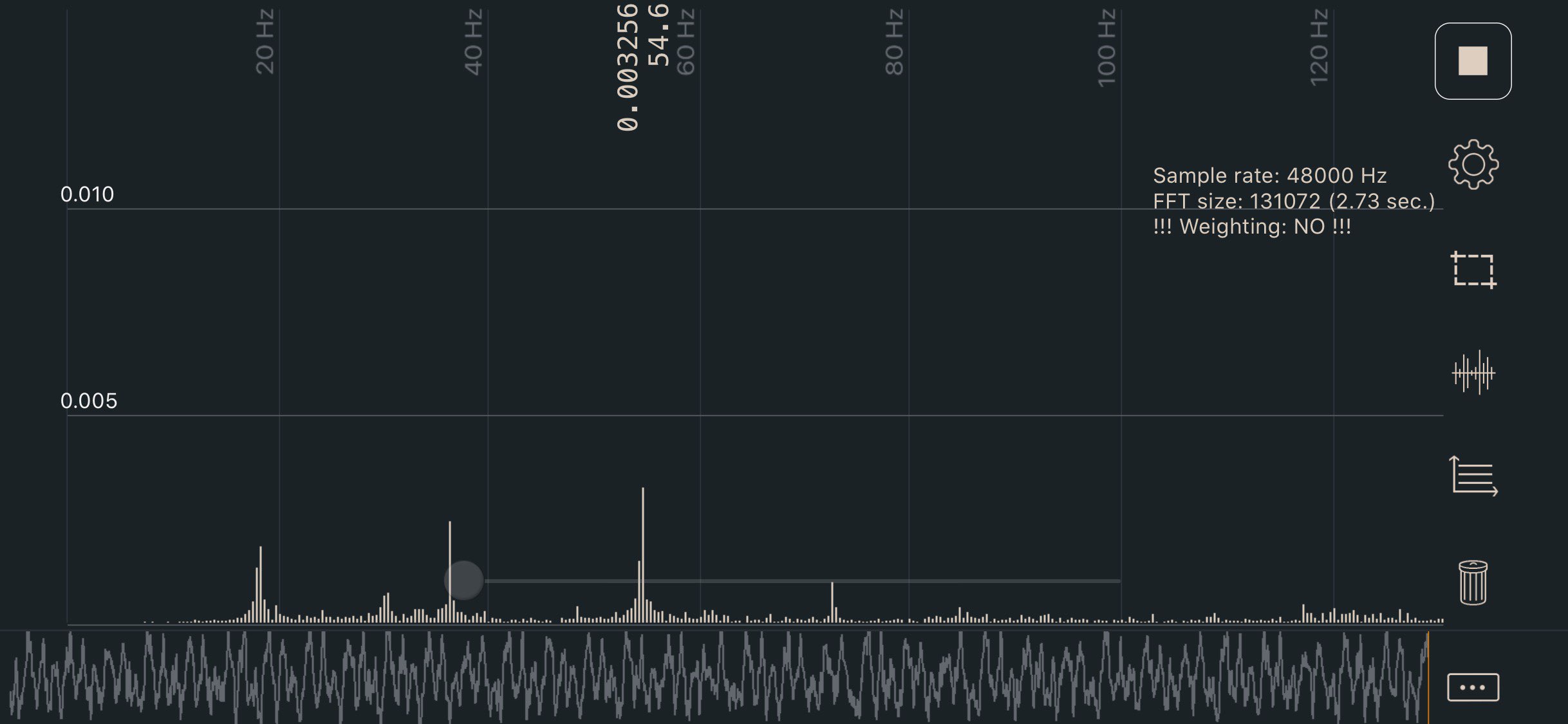
What you're looking at: The photo shows a phone spectrum analyser on a plucked belt. A tensioned belt is a string: its lowest frequency peak is its pitch. A frequency means nothing without its span. Ch 06b put a working tension on these belts; this is the final one.
Parts:
- reused: the two M3×40 A/B front-idler tensioner screws
- tool: 2.5 mm hex key
- tool: steel rule
- tool: phone with a spectrum analyser app
Do:
- Cold or cooling, panels on, door open:
SET_IDLE_TIMEOUT TIMEOUT=99999,G28, gantry mid-height,SET_STEPPER_ENABLE STEPPER=stepper_x ENABLE=0andSTEPPER=stepper_y. - Set a measured 150 mm span between the idler centres, pluck A, read the lowest peak, tension to 110 Hz, repeat on B until equal.
Check
A and B agree within a few Hz at ~110 Hz after moving the gantry and returning. Write both in the tuning log.
Helper: Holds the phone by the span and reads the lowest peak aloud after each pluck.
Caution
If one reads 110 and the other 95, the gantry is not square — go back to Ch 06b, do not compensate with tension.
Caution
Never M84 on this machine with the gantry in the air: it releases the Z motors too and the gantry drops onto the bed. Disable only stepper_x and stepper_y, so the X carriage moves by hand while the four Z motors hold the gantry.
Tip
the two tensions affect each other, so go back and forth until both are equal. Move the X extrusion back a few centimetres and forward again, then re-check both.
Why 110 Hz over a 150 mm span — the three sources disagree
| Source | A/B target | Z target |
|---|---|---|
| Official assembly manual p.125 | no number — "cut both belts to the same length" | no number |
| docs.vorondesign.com — Secondary Printer Tuning | 110 Hz over a 150 mm span (≈ 2 lb, "on the lower end of the range") | 140 Hz over 150 mm |
| voronldo.com belt tension guide | 80–100 Hz for a 350 | "same as X/Y, 110–130 Hz" |
Use 110 Hz / 150 mm. It is the only sourced official figure, and it is the only one that names the span, which is what makes a frequency mean anything — the same belt at a 200 mm span reads far lower. The Voron docs also explain why 110: it corresponds to roughly 2 lb of tension and is deliberately at the low end, so you get a good starting point without stretching the belts. The survey rejects voronldo.com as unaffiliated, uncited and internally inconsistent (survey §4.3, §9 Rejected sources) — ignore the 80–100 Hz figure entirely.
Source: Voron docs image sound-spectrum-belt.jpg · Voron docs — Secondary printer tuning § Belt tension · Voron manual p.125 · Klipper docs § SET_IDLE_TIMEOUT · Ch 06b Steps 06b.1, 06b.5
 Good stopping point · ~20 min since the last one
A and B are both at final tension and equal. Belts are a single calibration item: never stop with one of the pair adjusted and the other not. Leave the gantry parked mid-travel with the Z motors holding and the idle timeout still raised; Step 14.6 puts it back to 1800 at the end, once the last hot check has passed.
Step 14.5 — Set the four Z belts to 140 Hz over 150 mm¶
(no image — see text)
What you're looking at: The four Z belts lift the gantry and are set like A and B. One odd belt shows up as scatter in PROBE_ACCURACY rather than as anything you can see. The adjuster is the Z idler tensioner bolt at the top of each upright, an M3×16.
Parts:
- reused: the four M3×16 Z idler tensioner bolts
- tool: 2.5 mm hex key
- tool: steel rule
- tool: phone with a spectrum analyser app
Do:
- Set a 150 mm span: Z bearing block top belt clip to that corner's Z idler pulley centre.
- Pluck it, read the lowest peak, adjust to ≈140 Hz. All four, then re-check after jogging down and back up.
Check
All four Z belts within a few Hz of each other at ~140 Hz, and four numbers in the tuning log.
Helper: Holds the phone by each Z belt and reads the lowest peak aloud after each pluck.
Belt tension — six belts, each over a measured 150 mm span — the calculator needs JavaScript; the limits are in the table on this page.
Caution
Adjust at the Z idler tensioner bolt only, never the Z belt clamps on the gantry corners, on top of each front idler or A/B drive and under each Z joint: those hold both belt ends and let a belt go if loosened.
Caution
Evenness across the four matters more than hitting 140 exactly: the Voron QGL troubleshooting text points at uneven Z belts when PROBE_ACCURACY σ is high. This is the final setting; Ch 06b Step 06b.3 was the working value. (survey §4.3)
Tip
the tensioner head is under the blue slider: 2.5 mm key from below, clockwise as you look up at the head is tighter (verify on bench). The note rises.
Source: Voron docs — Secondary printer tuning § Belt tension · Ch 06b Step 06b.3
Step 14.6 — Closed-chamber soak, settle QGL, lock the Z joints hot, re-verify¶
(no image — see text)
What you're looking at: Aluminium grows as it warms, so a gantry squared cold in Ch 06b is not square at chamber temperature. A long soak brings the frame to its working size, and the four Z joint M5×40 bolts get their first and only full tighten hot.
Parts:
- reused: the four M5×40 Z joint SHCS
- tool: 4 mm ball-end hex key
- tool: 150 mm machinist square
Do:
SET_IDLE_TIMEOUT TIMEOUT=99999,G28, note the Z height where a ball-end 4 mm reaches all four Z-joint heads.- Shut the panels and door, bed to 110 °C, hotend 150 °C, and soak 1½–2 hours. Then work the table hot.
| Order | Hot, with the chamber closed | Accept |
|---|---|---|
| 1 | PROBE_ACCURACY at bed centre, then QUAD_GANTRY_LEVEL three to five times in a row |
Each run converges and its correction shrinks run over run rather than bouncing around |
| 2 | Jog Z back to the height you noted, open the door, and repeat Ch 06b's machinist-square check at both front corners, gantry forward and back | No light under the square at either front corner, hot |
| 3 | Fully tighten the four M5×40 Z joint bolts while the machine is still hot, rear pair first, door open as briefly as you can | First and only full torque on these four bolts |
| 4 | Refit any side panel you took off, its M3×12 clip screws back in, door shut. Still hot: G28, one more QUAD_GANTRY_LEVEL, then PROBE_ACCURACY. Only then heaters off and SET_IDLE_TIMEOUT TIMEOUT=1800 |
QGL converging in ≤3 retries within retry_tolerance: 0.0075, PROBE_ACCURACY σ < 0.003 mm with no trend, idle timeout back at the config's 1800 |
Check
chamber_temp was plateaued for at least 20 minutes before the QGL runs, and each run's correction got smaller rather than bouncing around.
Caution
Light showing under the square hot when it did not cold means the squaring did not survive thermal expansion or the belt change: leave the Z joints light, go back to Ch 06b Step 06b.14, and return here. Do not tighten the Z joints cold; cold-tightening throws away the point of the soak and shows up as first-layer inconsistency.
Caution
If the QGL runs need all 5 retries where Ch 13 converged in 2, one of the six belts is off. Fix it at 14.4/14.5 before tightening anything: the tighten freezes whatever geometry the belts are holding.
Tip
bed to your print temperature, 110 °C for ASA. If a rear Z joint is out of reach, take that side panel off and refit it before the last QGL.
Source: Voron docs § V2 Gantry Squaring, steps 14–17 · Voron startup wizard § Quad gantry level · Klipper docs § QUAD_GANTRY_LEVEL · Klipper docs § SET_IDLE_TIMEOUT · leviathan-printer-rev-d-sbv2.cfg · Ch 06b Part B · Video: Part 9 @2:49:16
Good stopping point · ~15 min since the last one
since the last pause (plus the 1½–2 h soak) — all six belts at final tension and even, the machine soaked closed, QGL settled over 3–5 runs, the four Z joint bolts locked hot, PROBE_ACCURACY re-verified hot afterwards and the idle timeout set back to 1800. The whole belt-and-geometry item is closed; heaters can go off. The next item is the extruder.
Part C — Extruder¶
Step 14.7 — Rotation-distance check (100 mm extrusion)¶
(no image — see text)
What you're looking at: rotation_distance is millimetres of filament per motor revolution. The measurement is indirect: the rule reads the remainder, not the amount extruded. Ch 13 Step 13.40 owns it; this is the refinement pass, now that the extruder has run a print.
Parts:
- consumable: masking tape
- tool: steel rule
- tool: digital caliper
- consumable: Prusament ASA, loaded
Do: Heat the hotend to the ASA print temperature of 260 °C with filament loaded and the extruder engaged. Repeat 13.40's measurement once, caliper rather than rule on the remainder: tape at the 120 mm mark from the extruder entrance, then
M83
G1 E100 F60
and measure from the extruder entrance to the tape — that reading is the remaining distance R. [extruder] still carries the max_extrude_only_distance: 150 from 13.40. If the result is outside 0.5 %, apply 13.40's formula (new = old × (120 − R) / 100, using the value currently in the config), test it live with SET_EXTRUDER_ROTATION_DISTANCE EXTRUDER=extruder DISTANCE=<value>, and when it lands write the final number into [extruder] rotation_distance and RESTART. Never put 22.6789511 back — it is the Clockwork 2 starting point, not a calibration.
Check
R reads ≈20 mm, so the extruded amount is within 0.5 % of target: 99.5 to 100.5 mm. Record it in the tuning log.
Source: Voron startup wizard § Extruder calibration (e-steps) · Ellis' Print Tuning Guide — extruder calibration · Klipper docs § Rotation distance · Klipper docs § SET_EXTRUDER_ROTATION_DISTANCE · Video: Part 9 @5:24:09
Good stopping point · ~20 min since the last one
rotation distance measured, iterated and written into [extruder], and Klipper restarted on the new value. Unload or park the filament; do not leave the hotend hot.
Part D — Chamber and the first real print¶
Step 14.8 — Set the chamber target and understand the soak¶
(no image — see text)
What you're looking at: There is no chamber heater on this machine; the chamber is warmed by the bed and held there by the panels and the door. The toolboard sensor tells you how hot the enclosure gets; expect it settled by 45 minutes from cold.
Parts: none.
Do:
SET_IDLE_TIMEOUT TIMEOUT=7200before you set a temperature.- Bed 100–110 °C, panels on, Clicky-Clack door shut. Read
[temperature_sensor chamber_temp]in the web UI and wait up to 45 minutes from cold. - Put the settled value in the tuning log, then
SET_IDLE_TIMEOUT TIMEOUT=1800.
Check
With bed at 110 °C, panels on and door closed, chamber_temp has settled in the 50–60 °C accept band by 45 minutes.
Caution
The LDO config's 1800 s idle timeout turns the heaters and the Z motors off 30 minutes after the last move, and a static soak is exactly that. RESTART, FIRMWARE_RESTART and every SAVE_CONFIG put it back to 1800.
Caution
The chamber sensor is already wired to the Nitehawk on nhk:PB2, the toolboard's CT port; the config's T1 comment is a Leviathan-era label. Mainsail names it chamber_temp; its gcode_id in M105 output is chamber_th.
Caution
If the chamber stalls below 45 °C, first check the bed is still heating: targets that went to 0 by themselves mean the idle timeout fired. Then look for a missing panel, an open keystone blank, or the exhaust left open.
Tip
55–60 °C is the ideal end of that band, what the printed parts were designed for. A 350 with a 100–110 °C bed and closed panels gets there passively.
Source: Voron docs — materials · leviathan-printer-rev-d-sbv2.cfg · leviathan-printer-rev-d-sbv2.cfg · Klipper docs § SET_IDLE_TIMEOUT
Step 14.9 — Close Ch 12's PRINT_START TODO with the purge line¶
(no image — see text)
What you're looking at: A purge line is a short stripe of filament laid at the plate edge before the real print, to build nozzle pressure and wipe off ooze. It goes into Ch 12's PRINT_START macro rather than the slicer, so every print gets it.
Parts: none.
Do: PRINT_START is owned by Ch 12 Step 12.36; do not write a second one here. It ends with a ## TODO Ch 14: purge / prime line goes here marker. Now that the extruder is calibrated, replace that marker with:
    G90
    G1 X5 Y5 Z0.3 F6000                    ; <-- 350 only
    M83                                    ; relative extrusion for the purge
    G92 E0
    G1 X120 E20 F1200                      ; purge line
    G1 Z2 F600
M83 and G92 E0 are not optional. Klipper starts in absolute extrusion mode, and Ch 12's macro does not set M83/G92 E0 until after this point — a bare G1 E20 here would extrude to an arbitrary absolute position instead of 20 mm.
The slicer side already exists: the Voron 2.4 350 printer preset from Ch 13 calls PRINT_START BED=[first_layer_bed_temperature] EXTRUDER=[first_layer_temperature] CHAMBER=0 FILAMENT={filament_type[initial_tool]} and PRINT_END; nothing in the slicer changes for the purge line, because it lives in the macro.
Check
A hand-run PRINT_START CHAMBER=0 lays a continuous purge line at X5 to X120 that sticks, and grep -c '^\[gcode_macro PRINT_START\]' printer.cfg returns 1.
Caution
Run it from the console with the machine cold and watch Ch 12's order: homes first, heats the bed, timed soak, QGL hot, re-homes Z, meshes, parks at X5 Y5, heats the nozzle, then purges. Send PRINT_END afterwards; the hand run leaves the heaters on otherwise.
Caution
Keep CHAMBER=0 until the previous step has told you what your chamber actually reaches. TEMPERATURE_WAIT has no timeout: a CHAMBER=50 the machine never reaches blocks the print forever, and the only way out is cancelling. Once 14.8 gives you a repeatable settled value, set CHAMBER a few degrees below it — never at or above it. src
Source: leviathan-printer-rev-d-sbv2.cfg · Klipper docs § TEMPERATURE_WAIT
Good stopping point · ~15 min since the last one
chamber behaviour measured and written down, and PRINT_START's Ch 12 TODO closed with the real purge line. CHAMBER is still set from a measured number, not a guess. Config restarts clean.
Step 14.10 — Fetch the cube you already printed in Ch 13¶
(no image — see text)
What you're looking at: Two cubes of the same file in the same filament: one printed on the Prusa in batch B00, one on the Voron in Ch 13. Nothing is printed here; the pair goes on the bench so the next step can measure them.
Parts:
- reused: the Voron-printed cube
- reused: the Prusa-printed B00 reference cube
Do: Put both cubes on the bench. The cube is printed once, in Ch 13, and Step 13.41 is authoritative for it. Re-print only if you have changed a slicer setting since, and then re-run 13.41–13.42 as written.
Check
Two cubes in front of you, both Voron_Design_Cube_v7, both in Prusament ASA Galaxy Black.
Helper: Fetches the Prusa B00 cube from its bin and sets both cubes side by side.
Caution
The purge line you just added to PRINT_START governs the next print; it does not invalidate this cube.
Tip
13.41 sliced it at 260 °C / 110 °C with XY size and shrinkage compensation both zero, the same overrides the Prusa profile used.
Source: Voron-2 STLs/Test_Prints/ · Voron docs — first print
Step 14.11 — Caliper the cube against the Prusa-printed one¶
(no image — see text)
What you're looking at: A caliper on a 30 mm cube is the cheapest whole-machine test there is. Mid-height is the honest place to measure: the first layer is squashed and the top can bulge. The difference between the X and Y readings is a squareness proxy.
Parts:
- reused: both cubes
- tool: digital caliper
Do: Measure both cubes at mid-height, not across the first layer: X, Y and Z, recorded in the table below. Same STL, same filament, same nominal settings; the only variables are the two machines.
| Measurement | Nominal | Prusa Core One+ (B00 reference) | Voron 2.4 350 (this print) | Accept | If out |
|---|---|---|---|---|---|
| X, mid-height | 30.00 mm | ______ | ______ | ±0.15 mm | see below |
| Y, mid-height | 30.00 mm | ______ | ______ | ±0.15 mm | see below |
| Z (total height) | 30.00 mm | ______ | ______ | ±0.10 mm | over → first layer under-squished; under → over-squished |
| X at first layer | — | ______ | ______ | within 0.15 mm of mid-height X | elephant-foot compensation wrong; adjust in 0.05 mm steps |
| X − Y (squareness proxy) | 0.00 mm | ______ | ______ | ≤0.10 mm | a persistent X−Y difference on the Voron is a gantry-square problem → Ch 06b |
| Corner snap test | — | pass/fail | pass/fail | must not delaminate along a layer line | chamber too cold or fan too high |
Two honest expectations before you start chasing numbers:
- A size error is not an axis error, and not a flow number. Ellis: "don't mess with your
steps_per_mm/rotation_distance. Deviations are almost always from material shrinkage, bulging, layer inconsistencies, etc, NOT issues with your axes." The extrusion multiplier is set by eye on a top surface at 14.19–14.20, never from these readings, and Voron parts need no compensation beyond that tune. X or Y out of ±0.15: confirm the slice had shrinkage and XY size compensation at 0, finish 14.19–14.20, then measure again. Never negative XY compensation: it wrecks every bearing fit in the machine. src - A Voron-vs-Prusa difference of ~0.1 mm is chamber, not calibration. The Voron runs a hotter, more uniform chamber than the Core One+, so its parts shrink slightly differently. Both being in tolerance matters more than them matching each other.
Check
Both cubes inside tolerance: X and Y within ±0.15 mm and Z within ±0.10 mm of 30.00 mm, and within 0.15 mm of each other.
Helper: Writes each caliper reading into the comparison table as the adult calls it out.
Source: Ellis' Print Tuning Guide — extrusion multiplier · Voron-2 STLs/Test_Prints/
Good stopping point · ~15 min since the last one
the Ch 13 cube is calipered against the Prusa-printed reference and the numbers are in the tuning log. No config has changed; the multiplier is set later by eye, at 14.19–14.20, not from these numbers.
Part E — Input shaper¶
Now, and not before — the machine has printed successfully, the belts are at final tension, and the frame has been hot.
Step 14.12 — Bring up the on-board accelerometer¶
(no image — see text)
What you're looking at: The ADXL345 is an accelerometer: a chip that measures how hard it is being shaken, in three axes. On this build it is soldered onto the toolboard itself, so there is nothing to mount and nothing to wire.
Parts: none.
Do: Check both Python environments. SHAPER_CALIBRATE runs inside Klipper's own klippy-env, and the graph script at 14.14 runs on the Pi's system Python:
~/klippy-env/bin/python -c 'import numpy'
python3 -c 'import numpy, matplotlib'
On a MainsailOS image both print nothing and return: it installs numpy into klippy-env, and numpy and matplotlib system-wide. klippy-env has no matplotlib, so never test for it there. If the first errors, ~/klippy-env/bin/pip install numpy; if the second errors, sudo apt install python3-numpy python3-matplotlib libopenblas-dev. That is what MainsailOS itself runs. Do not copy Klipper's numpy<1.26 pin or its libatlas-base-dev on a Trixie image: the pinned numpy does not support Trixie's Python 3.13, and libatlas-base-dev was merged into libopenblas-dev and no longer exists. src · MainsailOS
Then confirm — do not edit — that the 350 mm probe point in [resonance_tester] is live; Ch 12 Step 12.27 uncommented it and Checkpoint 12 required it (the stock config ships all three build sizes commented out):
[adxl345]
cs_pin: nhk:PB10
spi_software_sclk_pin: nhk:PA5
spi_software_mosi_pin: nhk:PA2
spi_software_miso_pin: nhk:PA6

[resonance_tester]
accel_chip: adxl345
accel_per_hz: 100
sweeping_accel: 400
sweeping_period: 0
probe_points:
    175, 175, 20
Then ACCELEROMETER_QUERY and MEASURE_AXES_NOISE (no restart needed — nothing was edited).
Check
ACCELEROMETER_QUERY returns three axis values with roughly 9800, free-fall in mm/s², on one of them, and MEASURE_AXES_NOISE returns figures in the ~1–100 range.
Helper: Reads the MEASURE_AXES_NOISE figures aloud and checks each one is under 100.
Tip
1000 or more from MEASURE_AXES_NOISE means a sensor, power or wiring problem, or a badly imbalanced fan. On Invalid adxl345 id, run it again; SPI init is flaky on the first attempt.
Caution
Rev D+ / LDO: The accelerometer is on the Nitehawk-SB V2 board itself. There is no separate ADXL345 breakout and no printed ADXL mount to fit — the V1 documentation's ADXL mount does not apply to this kit (survey §4.1). The [adxl345] pins above are already correct in leviathan-printer-rev-d-sbv2.cfg; if yours read nhk:gpio21/18/20/19 you are on the V1 config.
Source: Klipper docs § Installation instructions · MainsailOS modules/generic/50-klipper · Klipper docs § Checking the setup · leviathan-printer-rev-d-sbv2.cfg · Klipper docs § ACCELEROMETER_QUERY · Video: Extras! @0:42:02
Good stopping point · ~15 min since the last one
accelerometer answers, noise is in the 1–100 band, and the 350 mm [resonance_tester] probe point is confirmed live. Nothing has been shaped yet.
Step 14.13 — Run SHAPER_CALIBRATE¶
(no image — see text)
What you're looking at: SHAPER_CALIBRATE drives the toolhead through a frequency sweep while the accelerometer records, then fits a filter to what it measured. Both axes run in one pass because the sensor is on the toolhead rather than clipped to a moving bed.
Parts: none.
Do: G28 first. Make sure nothing is resting on the gantry and the panels are on, and have M112 typed and unsent in a second console window; this is the fastest the machine has moved so far. Then:
SHAPER_CALIBRATE
Both axes run in one pass (the accelerometer is on the toolhead, so this is not a bed-slinger — no re-mounting between axes). It takes a few minutes and is loud. Do not SAVE_CONFIG yet.
Check
One output block per axis, each ending in a Recommended shaper_type_x = …, shaper_freq_x = … Hz line.
What the output block looks like
Klipper's own worked example, one block per axis. Each block gives the fitted
frequency, the residual vibration %, the smoothing figure and a suggested
max_accel, for each of the five shaper types:
Fitted shaper 'mzv' frequency = 36.8 Hz (vibrations = 1.7%, smoothing ~= 0.150)
To avoid too much smoothing with 'mzv', suggested max_accel <= 4000 mm/sec^2
...
Recommended shaper_type_y = mzv, shaper_freq_y = 36.8 Hz
Source: Klipper docs § Input shaper auto-calibration · Klipper docs § SHAPER_CALIBRATE · Video: Extras! @1:46:46
Step 14.14 — Read the graphs¶
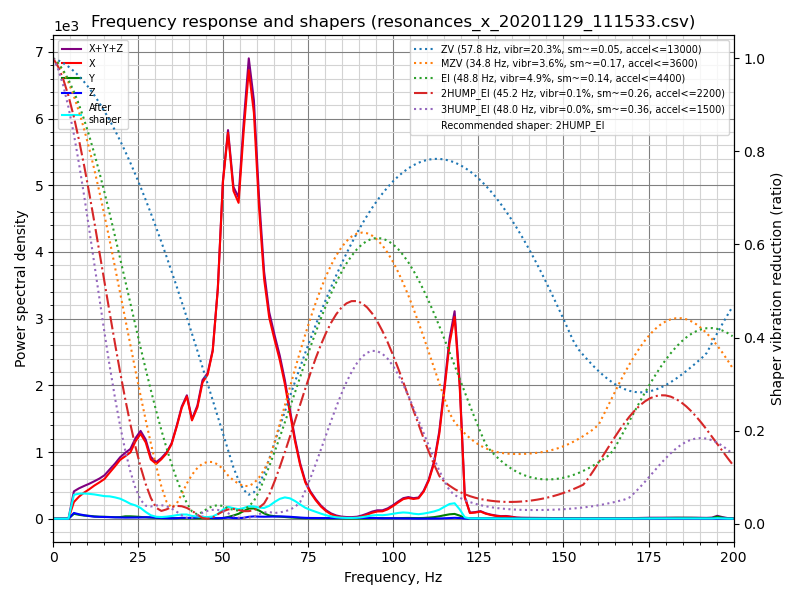
What you're looking at: The chart plots vibration against frequency: the tall peak is the machine's dominant resonance, and the curves show how far each shaper type would suppress it. A plot with no peak at all means the run measured noise rather than the machine.
Parts: none.
Do: Generate the PNGs from the CSVs the run left in /tmp. Ran it more than once? Delete the older CSVs first; the script averages every file it matches.
~/klipper/scripts/calibrate_shaper.py /tmp/calibration_data_x_*.csv -o /tmp/shaper_x.png
~/klipper/scripts/calibrate_shaper.py /tmp/calibration_data_y_*.csv -o /tmp/shaper_y.png
Read them in this order:
1. Where is the tallest peak? That is the dominant resonance and it is what sets shaper_freq.
2. How many big peaks are there, and how far apart? One clean peak → mzv or zv and a high max_accel. Two or more widely separated peaks → the script will push you to 2hump_ei/3hump_ei, which cost acceleration. Widely separated peaks are usually a mechanical message: a loose backer, an under-tensioned belt, a rail bolt in the end hole.
3. vibrations = X % — residual ringing after shaping. Lower is better; single digits is good.
4. smoothing ~= Y — how much the shaper blurs fine detail. Higher smoothing forces a lower max_accel. The two trade against each other; the script's max_accel line is that trade expressed as a number.
5. Is the plot noise with no peak? Then you measured nothing — go back to MEASURE_AXES_NOISE.
Check
Both plots show a clear dominant peak, and neither axis peaks below 25 Hz.
Helper: Finds the tallest peak on each graph and reads its frequency aloud.
Caution
Below 25 Hz on either axis is a build fault, not a tuning result. Stop, and go re-check belt tension, the titanium backers, the XY joints and the frame bolts before you shape over it.
What to expect on a 350, and where the 25 Hz floor comes from
No official per-model figure exists; what is sourced is the floor. Klipper: "If the measured ringing frequency is very low (below approx 20-25 Hz), it might be a good idea to invest into stiffening the printer or decreasing the moving mass… before proceeding with further input shaping tuning."
In practice a well-built 350 with backers fitted lands both axes in roughly the 35–60 Hz band, X usually the higher of the two — the toolhead alone is lighter than the whole gantry that Y has to move. Treat that band as community-observed, not a spec.
Source: Klipper docs/img/calibrate-x.png · Klipper docs § Resonance compensation · Klipper docs § Max smoothing
Step 14.15 — Save the shaper and set the real max_accel¶
(no image — see text)
What you're looking at: SAVE_CONFIG writes the shaper's four values into the auto-generated block at the bottom of the config. It deliberately does not touch max_accel, which the stock file leaves at a 10000 placeholder, so setting that by hand is the half of this step everyone forgets.
Parts: none.
Do: If the recommendations look sane, SAVE_CONFIG. That writes [input_shaper] with shaper_type_x/y and shaper_freq_x/y. It does not touch max_accel; Klipper says so explicitly, and this is the step everyone skips. The LDO config ships:
[printer]
max_velocity: 300
max_accel: 10000          # placeholder — must come down
max_z_velocity: 15
max_z_accel: 350
square_corner_velocity: 5.0
Set max_accel to at or below the lower of the two per-axis suggested values, with margin — if the run suggested ≤4000 for X and ≤3500 for Y, use 3000–3500. Leave square_corner_velocity at 5.0.
Check
printer.cfg's bottom block has [input_shaper] with four values and [printer] max_accel is no longer 10000.
Why the suggested number is a ceiling, not a setting — and the post-run walk
Klipper is blunt that the suggested figure "is by no means a recommendation to set
this acceleration for printing"; it is only the ceiling at which that shaper stops
smoothing badly, and your real ceiling is also limited by motor torque. Leave
square_corner_velocity at 5.0 because the calibration script assumed it — changing
it invalidates the max_accel numbers.
Re-print the Voron cube and compare the corners to the first one; that is your before/after. Then walk the machine and check nothing has unscrewed itself — Klipper warns that resonance testing loosens fasteners.
Source: Klipper docs § Input shaper auto-calibration · Klipper docs § input_shaper · leviathan-printer-rev-d-sbv2.cfg · Video: Extras! @2:00:00
Good stopping point · ~25 min since the last one
SHAPER_CALIBRATE run, graphs read, [input_shaper] saved and max_accel brought down from the 10000 placeholder. Never stop between running the calibration and saving it; the CSVs live in /tmp and a reboot loses them.
Step 14.16 — Z-axis shaping and Z limits (optional)¶
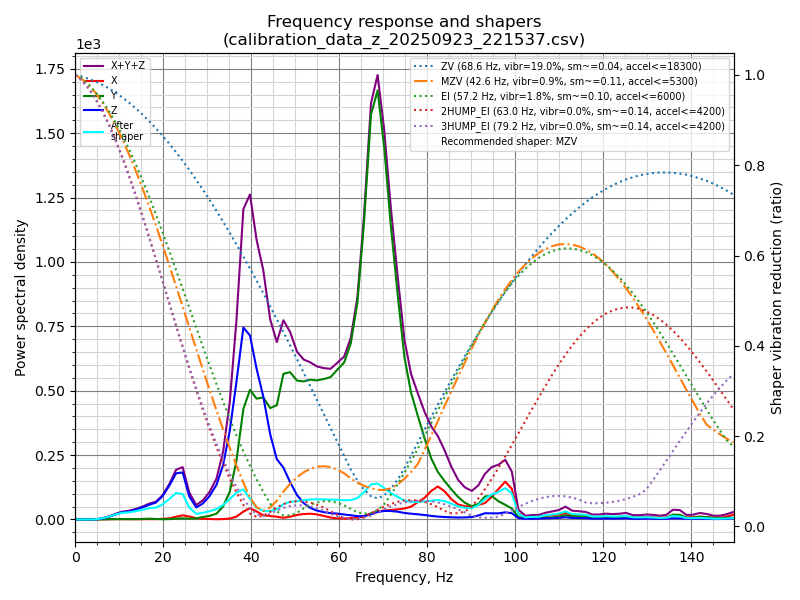
What you're looking at: On a 2.4 the gantry itself moves in Z, so the toolhead's accelerometer can measure Z too; the chart is Klipper's example of the result. The Z speed and acceleration limits are raised for the test only; they exist because Z is belt-driven.
Parts: none.
Do: Worth doing if you see Z-direction artefacts. It needs two temporary changes, because the stock Z limits are far below what the test needs:
[resonance_tester]
accel_chip_z: adxl345

[printer]
max_z_velocity: 20        # temporarily, up from 15
max_z_accel: 1550         # temporarily, up from 350
RESTART, run SHAPER_CALIBRATE AXIS=Z, SAVE_CONFIG if you like the result (it writes shaper_type_z / shaper_freq_z), then put max_z_velocity and max_z_accel back to 15 and 350.
Check
The two Z limits read 15 and 350 again after you are done.
Tip
those are belt-and-driver limits for a four-motor belted Z, not resonance limits; leaving them at 20/1550 is a way to skip Z steps. Skipping this step breaks nothing downstream.
Source: Klipper docs § Measuring the resonances of Z axis · Klipper docs/img/calibrate-z.png · leviathan-printer-rev-d-sbv2.cfg
Good stopping point · ~10 min since the last one
optional Z shaping either done or skipped, and max_z_velocity / max_z_accel are back at 15 and 350. Confirm those two numbers before you walk away; leaving them raised is how you skip Z steps on the next print.
Part F — Pressure advance and flow¶
Step 14.17 — Generate and print the Ellis PA pattern¶
(no image — the pattern and an annotated example are on Ellis' Pattern Method page)
What you're looking at: Pressure advance compensates for molten plastic behaving like a spring in the nozzle: pressure lags the extruder, so corners under-extrude going in and over-extrude coming out. Ellis' pattern prints many corners across a sweep of values so the right one can be picked by eye.
Parts:
- consumable: Prusament ASA, about 15 g
Do:
- Open ellis3dp.com/Pressure_Linear_Advance_Tool/ with nozzle 0.4, layer 0.2, ASA temps 260/110.
- Enable the acceleration-control option and set it to your external-perimeter acceleration, not your new
max_accel. - Sweep PA 0 to 0.10 in 0.005 steps and print it.
Check
Pattern prints cleanly with visible, distinct corner tests across the full sweep.
Caution
If you leave the acceleration at the machine maximum the pattern will ring and the result is worthless.
Tip
if the extremes of your sweep both look equally bad, widen the range and re-run rather than guessing.
Source: Ellis' Print Tuning Guide — pressure advance, pattern method · Ellis' Pressure/Linear Advance tool
Step 14.18 — Read the pattern and save the value¶
(no image — see text)
What you're looking at: You are hunting for the one corner in the sweep that is sharp with no gap and no bulge. The value belongs to the filament, not the machine, so it is saved in the filament profile rather than in printer.cfg.
Parts:
- tool: good light
- tool: loupe, optional
Do:
- Find the sharpest corner with the fewest artefacts: no gaps, no bulges, no divots.
- Re-run at 0.001–0.002 intervals around it to refine.
- Put the value in the PrusaSlicer filament custom G-code for ASA:
SET_PRESSURE_ADVANCE ADVANCE=<your value>
Or set [extruder] pressure_advance: if you only ever print ASA on this machine.
Check
One corner is visibly the sharpest, and the value you saved is in the 0.01–0.08 band, most often 0.02–0.05.
Helper: Once the pattern has cooled off the plate, counts lines from its start to the sharpest corner with the loupe.
Pressure advance — the value the pattern picked — the calculator needs JavaScript; the limits are in the table on this page.
Tip
there is rarely a perfect value. Ellis leans higher: if the sharpest corner has a tiny bit of gapping, still take it. Direct drive is that sensitive.
Caution
If you cannot get a clean corner at any value, or you see gapping and bulging simultaneously, stop tuning — Ellis: "you likely have extruder issues." Check the CW2 for backlash: with the toolhead cold, reverse the extruder gear direction by hand and feel for a dead zone.
Where the 0.01–0.08 band comes from
The LDO config's own commented starting point is #pressure_advance: 0.05, and
Klipper documents typical values as "between 0.050 and 1.000 (the high end usually
only with bowden extruders)". For a direct-drive Clockwork 2 with a Revo HF and a
0.4 nozzle in ASA, expect the bottom of that band. No vendor publishes a
Revo-HF-specific number; treat 0.04 as the place to start looking and let the
pattern decide. Most land between 0.02 and 0.05; the wider 0.01–0.08 gate only
flags a reading worth a second look.
Source: Ellis' Print Tuning Guide — saving the pressure-advance value · Klipper docs § Pressure advance · Klipper docs § SET_PRESSURE_ADVANCE
Good stopping point · ~20 min since the last one
the PA pattern is printed, read and the chosen value saved into the ASA filament profile. One calibration item closed; extrusion multiplier is the next.
Step 14.19 — Extrusion multiplier / flow: the 2 % pass¶
(no image — see text)
What you're looking at: Extrusion multiplier is a straight percentage scaling of how much plastic comes out. It is judged on the centre of a top surface: too little leaves visible valleys between the lines, too much leaves ridges. The edges always look over-extruded and prove nothing.
Parts:
- consumable: Prusament ASA, about 25 g
Do:
- Print Ellis' 30 × 30 × 3 mm test cubes in a row at 92, 94, 96, 98 % flow.
- Slice at top-layer line width 100 %, infill 30 %+, top solid infill speed ~60 mm/s, normal fan.
Check
Judged on the centre of each top surface, one cube has no gaps between the top lines and no ridging.
Extrusion multiplier — the 2 % pass — the calculator needs JavaScript; the limits are in the table on this page.
Caution
Too low leaves visible gaps and valleys between the top lines when held toward a light; too high leaves pellets, ridging and a rough raised surface. Most filaments land in the 92–98 % window, and Prusament ASA should.
Tip
the cubes are in Ellis' test_prints folder. In PrusaSlicer, right-click each object → add settings → Extrusion multiplier to vary them on one plate.
Source: Ellis' Print Tuning Guide — extrusion multiplier · Ellis' test_prints/
Step 14.20 — The 0.5 % refinement pass¶
(no image — see text)
What you're looking at: A second, finer pass around the winner, judged the same way by eye on the centre of each top surface. The multiplier is not a size setting: Ellis tunes it for the surface, and Voron parts need no other compensation.
Parts:
- consumable: Prusament ASA, about 25 g
Do: Take the winner from 14.19 and print four more cubes at ±0.5 % and ±1.0 % around it. Pick the smoothest centre and write that number into the filament profile's extrusion multiplier, not the print profile.
Check
The chosen cube has a uniformly smooth top with no gaps and no ridging.
Source: Ellis' Print Tuning Guide — extrusion multiplier
Good stopping point · ~25 min since the last one
both extrusion-multiplier passes done and the final number written into the filament profile. It was chosen by the top surface, not by a caliper.
Step 14.21 — Re-check first-layer squish, because the multiplier moved¶
(no image — see text)
What you're looking at: Changing extrusion multiplier changes how much plastic the first layer puts down, so the squish set in Ch 13 is now slightly off. Same live-Z procedure, same commit command; this loop back is expected, not a sign that something was done wrong.
Parts: none.
Do: Print one more cube, or any wide flat part, and repeat the live-Z procedure from Ch 13 Step 13.42. Save with Z_OFFSET_APPLY_ENDSTOP then SAVE_CONFIG.
Check
Bottom surface is smooth, lines still individually visible, no gaps.
First layer, re-checked after the multiplier moved — the calculator needs JavaScript; the limits are in the table on this page.
Tip
this closes the essentials loop. Ellis' order is extruder, surface prep, first layer, pressure advance, extrusion multiplier; the multiplier feeding back into first layer is expected.
Source: Ellis' Print Tuning Guide — first layer squish · Klipper docs § Z_OFFSET_APPLY_ENDSTOP
Good stopping point · ~10 min since the last one
first-layer squish re-set after the extrusion-multiplier change and saved with Z_OFFSET_APPLY_ENDSTOP + SAVE_CONFIG. The essentials loop is closed.
Part G — Ongoing¶
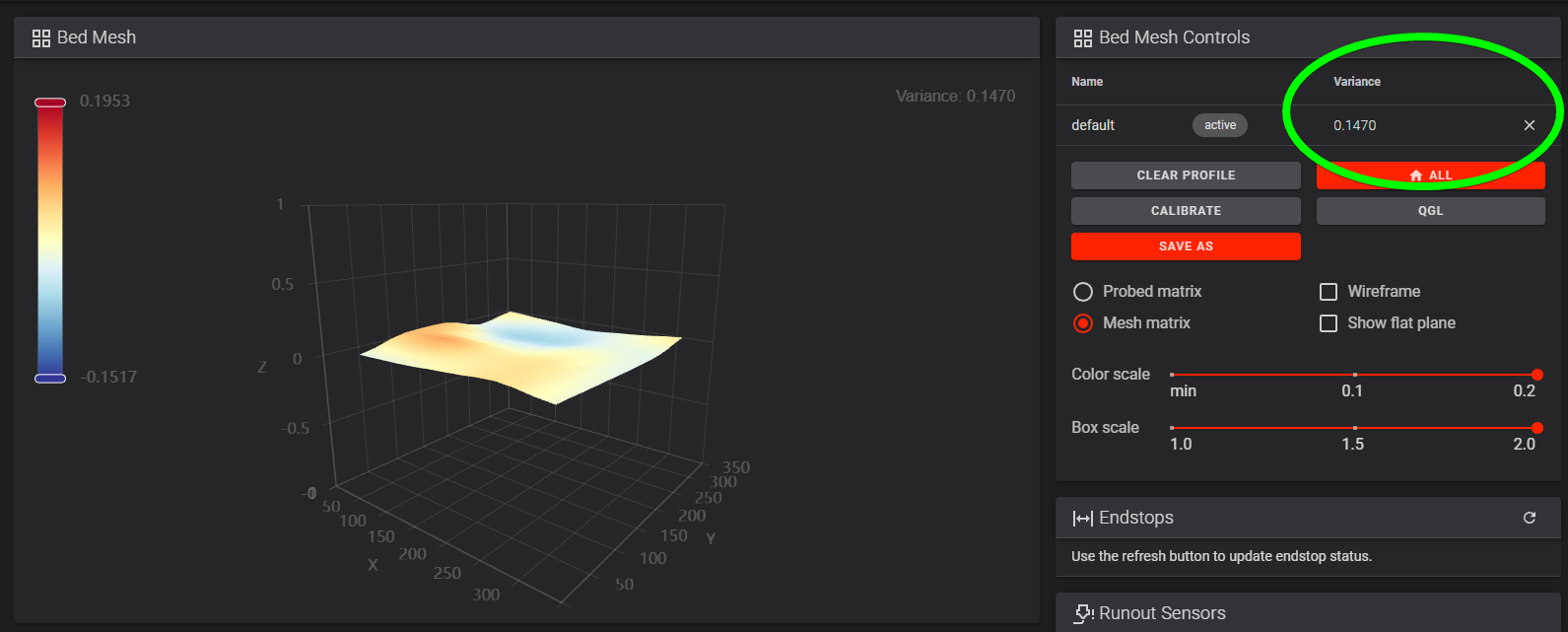
Step 14.22 — Bed mesh variance, and a backup¶
What you're looking at: The heightmap is the bed mesh drawn as a surface. The Variance figure is the real reading; the colours are stretched to fill the scale and make a 0.03 mm bed look alarming. zero_reference_position is what centres the mesh on Z0.
Parts: none.
Do:
- Fully heat-soaked and QGL'd, run
BED_MESH_CALIBRATEand open Mainsail's Heightmap page. - Read the Variance number, not the colours, and confirm
zero_reference_position: 175,175is set. - Back up:
cd ~/printer_data/config && git add -A && git commit -m "Ch 14 done: belts, shaper, max_accel, Z offset", and copy the directory off the Pi.
Check
The heightmap sits centred around Z0, the variance is in the tuning log, and the config directory is copied off the Pi.
Bed mesh variance, and the backup — the calculator needs JavaScript; the limits are in the table on this page.
Caution
A V2 on the stock Z endstop must have zero_reference_position: 175,175, or the mesh floats away from Z0. Under ~0.05 mm total variance a mesh is optional, but keep generating one per print: the variance changes with chamber temperature as the gantry extrusions bend.
Tip
copy printer.cfg with its auto-save block, moonraker.conf, config.leviathan and config.nitehawk. git log should show one commit per SAVE_CONFIG since the Ch 12 baseline.
Source: Voron docs image heightmap_variance.png · Voron docs — Secondary printer tuning § Bed mesh · Klipper docs § Bed Mesh
Step 14.23 — Hand off to Ellis for everything after this¶
(no image — see text)
What you're looking at: Nothing to do on the machine. What is left after this chapter is print tuning rather than machine tuning, and it has an accepted order: each of Ellis' sections assumes the ones above it are already done.
Parts: none.
Do: Ellis' Print Tuning Guide is the ongoing reference from here. Work his Tuning section in his order; the numbering is his, and each step assumes the ones above it:
| # | Section | Status after this chapter |
|---|---|---|
| 1 | Extruder Calibration | done — Ch 13 step 13.40, refined at step 14.7 |
| 2 | Build Surface Preparation & Handling | read it — smooth PEI + ASA needs no glue, but it needs to be clean |
| 3 | First Layer Squish | done — Ch 13 step 13.42, then step 14.21 |
| 4 | Pressure Advance / Linear Advance | done — steps 14.17, 14.18 |
| 5 | Extrusion Multiplier | done — steps 14.19, 14.20 |
| 6 | PA / EM Oddities | read when a result won't converge |
| 7 | Cooling and Layer Times | next — the ASA-specific one; minimum layer times matter more than fan % in a hot chamber |
| 8 | Retraction | next — CW2 is direct drive, expect a small value |
| 9 | Infill/Perimeter Overlap | later |
| 10 | Stepover | later |
Beyond that, his Advanced Tuning section covers Maximum Volumetric Flow Rate (worth doing — the Revo HF's whole point is flow) and Maximum Speeds and Accelerations, and his Troubleshooting index is the fastest way to name a defect you are looking at.
Check
Cooling/layer times and retraction are on the list for the next session, with the tuning log ready to record them.
Source: Ellis' Print Tuning Guide — link only, nothing from it is copied or mirrored
Good stopping point · ~15 min since the last one
mesh variance recorded, printer.cfg backed up off the Pi, and the tuning log filled in. Ready for Checkpoint 14; everything after this is Ellis, at your own pace.
Step 14.24 — Claim the serial number and print the nameplate¶
What you're looking at: Voron serials are issued by the community, not a vendor: mods on the r/voroncorexy subreddit review a video of a finished machine and reply with yours. The nameplate carrying it is the first print made for the machine itself.
Parts:
- M3×8 SHCS ×2
- M3 roll-in T-nut ×2
- consumable: accent Prusament ASA, blue
- consumable: a sheet of paper
- tool: a pen
- tool: phone or camera
Do:
- Film the printer printing, bay closed, with a handwritten sheet showing your Reddit username and date.
- Post it to r/voroncorexy as a serial request.
- Print it in accent ASA and bolt it to the front top rail:
venv-cq/bin/python scripts/nameplate.py --serial V2.xxxx --names "Alex & Helper" --date 2026-12-20
Check
A serial like V2.1234 arrives, and the plate is on the front top rail, clear of the closed door (verify on bench).
Helper: Reads the serial back from the post and checks every character on the printed plate.
Caution
The request goes on the subreddit, and the machine has to be finished: cables managed above the deck plate, electronics separated from the chamber, bay covered. Your Reddit username and the date must be handwritten and in shot. Discord username is optional now, and its old 4-digit tag is no longer required.
Tip
the subreddit's nameplate bot posts a generic serial plate when your serial lands. This one is ours: front top rail, two M3 T-nuts, blue accent. src
Good stopping point · ~20 min since the last one
the serial request is posted and the nameplate generated. The plate mounts on the front top rail because the skirt ring covers the front bottom rail and the front uprights are 20 mm wide; do not bolt anything to the left upright, which carries the door hinges.
Source: Voron docs — About § Serial Numbers · TeamFDM FAQ — serial requirements · Ch 11 Steps 11.12–11.13, 11.62 for what the skirt ring and the door hinges already occupy · scripts/nameplate.py
Part H — Add-on: chamber exhaust fan¶
This part is optional. It fits the stock Voron exhaust housing over the back panel's exhaust notch, in place of the cover Ch 11 sealed it with, and lets the chamber thermistor drive its 60 mm fan through Klipper. PLA and PETG then print under a 35–40 °C ceiling; ASA keeps a closed, unvented chamber and the Nevermore. Nothing is cut, and nothing is bought or printed until the first step has checked this machine. The fan takes the Leviathan's FAN0 and a third 24 V jumper: Ch 10's "exactly two jumpers" and "FAN0 empty" describe the machine before this add-on, and stay true for a build without it. Expect a ceiling, not air conditioning: Voron's own tuning notes say PLA may still want the door open.
Step 14.25 — Inspect the back of the machine before anything is bought¶
What you're looking at: The stock housing hangs outside the back panel over the exhaust notch, its grill in the notch and two mounts on the top rear extrusion. It stands about 62 mm proud, and its fan lead must reach the electronics bay.
Parts:
- tool: steel rule
- tool: a length of string
Do:
- Machine off: do the exhaust cover and grill fill a notch in the back panel's top edge?
- Rule the free depth behind it; string a lead route to FAN0.
- Note where the PTFE enters.
Check
Every row of the calculator below answered and passing, and the string length written down.
Exhaust add-on — does the stock housing fit this machine — the calculator needs JavaScript; the limits are in the table on this page.
Helper: Holds the string along the route and reads its length off the rule.
Caution
A failing row ends the add-on here. Cutting the back panel or printing a community remix is a different job, decided separately, and nothing below covers it.
Source: Voron manual p.250–256 · Voron-2 350_Back_Panel.DXF · LDO Build Notes p.250–253, p.256 · review/2026-10-03-exhaust/DESIGN.md
Step 14.26 — Print the exhaust parts on the Core One+¶
What you're looking at: Four stock Voron parts, printed as two jobs outside the plate run: the housing in black, then the fan grill, the access cover and two mounts in the blue accent, as their [a]_ prefix asks.
Parts:
- consumable: Galaxy Black ASA, about 70 g
- consumable: blue accent ASA, about 35 g
- tool: the Core One+ with the smooth sheet
Do:
- Run
python3 slicer/fetch_stls.pyso the add-on's files are on disk. - In PrusaSlicer 2.9.6, print the housing with
voron-coreone-asa.ini, as oriented, no supports. - Then print the other three, mounts twice, with
voron-accent-blue.ini. Once cool, bag all five in bin14-exhaust.
Check
The black job slices to about 5 h and 66 g, the blue one to about 2 h and 35 g, both without supports.
Helper: Ticks each file on the bed against the list in the add-on folder.
ASA
set Chamber Filtration to Adv. Filtration before each job, as for every ASA plate.
Source: print/README.md § Add-on prints · slicer/addons/exhaust-voron2/README.md · Voron-2 STLs/Exhaust_Filter/
Good stopping point · ~35 min since the last one
the back of the machine inspected and the calculator passed, the Step 00.8 row ordered, and the housing printing on the Core One+, about 5 h, with the blue job, about 2 h, after it. Nothing on the Voron has changed.
Step 14.27 — Set the eight heat-set inserts in the housing¶
What you're looking at: The housing takes eight M3 inserts: two on the panel face for the grill screws, two on the outer face for the access cover, and four round the fan opening for the fan and its grill.
Parts:
- M3×5×4 heat-set insert ×8
- tool: soldering iron with the LDO insert tip
Do: Press an insert into each of the eight bosses p.250 highlights. Part flat, insert square, same tip temperature as every insert before.
Check
Eight inserts flush and square, with no plastic pushed up round any of them.
Source: Voron manual p.250
Step 14.28 — Build the fan and the filter into the housing¶
What you're looking at: The fan sits on the housing's angled bottom face. It pulls chamber air through the grill and the carbon mat and blows it out of the bottom. The access cover closes the filter bay, so the mat can be changed later.
Parts:
- exhaust housing ×1 — from bin 14-exhaust
- fan grill ×1 — from bin 14-exhaust
- access cover ×1 — from bin 14-exhaust
- 24 V exhaust fan ×1 — from bin 14-exhaust, bought at Ch 00
- carbon filter mat layer ×2 — from bin 14-exhaust, bought at Ch 00
- M3×30 SHCS ×4
- M3×8 SHCS ×2
- tool: scissors
- tool: 2.5 mm hex key
Do:
- Bolt fan and grill on with four M3×30, arrow out, lead fed inside the housing.
- Cut two mat layers to fill the filter bay; slide them in.
- Close the access cover with two M3×8.
Check
The fan spins freely by hand, its arrow points out of the housing, and its plug reaches the panel face past the mat.
Caution
Two mat layers, not the full stack the Voron CAD draws: PLA and PETG need the airflow more than the filtering. The PLA test at the end of this part decides whether even those two stay.
Source: Voron manual p.252 · Voron manual p.253
Good stopping point · ~40 min since the last one
eight inserts set, and the fan, its grill, the mat and the access cover on the housing. The Voron is untouched and still has its exhaust cover.
Step 14.29 — Swap the exhaust cover for the housing¶
What you're looking at: The grill sits in the notch, held up by two mounts bolted to the top rear extrusion. The housing is taped to the outside of the panel over it, and the two grill screws pull it tight from inside the chamber.
Parts:
- reused: the exhaust grill and its two M3×12 SHCS
- reused: the cover tabs' two M5 T-nuts and M5×10 BHCS
- reused: the PTFE coupler and the reverse-bowden PTFE
- filter mount ×2 — from bin 14-exhaust
- consumable: VHB tape
- tool: 2.5 mm hex key
- tool: 3 mm hex key
Do:
- Machine off. PTFE and coupler out of the cover; unbolt cover and grill, keep all four screws.
- Hang the grill on both mounts on the same T-nuts, snug.
- Tape the housing on; drive both M3×12 from inside.
Check
The housing sits square over the notch with no light round the tape, grill and mounts are tight, and full XY travel touches nothing.
Helper: Holds the housing square on the panel while the adult drives the two screws from inside.
Caution
Before taping, pass the fan lead in through one grill opening. Then thread the coupler into the housing's top boss and run the PTFE in through it, looped as p.258 shows (verify on bench).
Tip
keep the exhaust cover. Refitting it returns the machine to its Ch 11 state if the add-on comes off.
Source: Voron manual p.254 · Voron manual p.255 · Voron manual p.256
Good stopping point · ~30 min since the last one
the housing on the back panel, the exhaust cover kept as a spare, the fan lead inside the chamber and unplugged. Leave the tape an hour before anything leans on the housing.
Step 14.30 — Shut down, unplug and prove it dead¶
(no image — see text)
What you're looking at: The fan lead lands on the Leviathan, under the deck and beside the PSU's mains terminals. The bay opens only on a dead machine, exactly as at 11.67.
Parts:
- tool: multimeter
Do:
- Shut the Pi down from Mainsail; wait for the ACT LED to stop.
- Rocker off; unplug wall, then inlet; cord out of the room.
- On its side, open the bottom panel; meter DC V, +V to −V.
Check
Rocker unlit, PSU LED dark, no cord at the inlet. The meter reads 0 V and holds it for ten seconds.
Caution
Who is in the room, 00a.2: one adult at the machine until this Check passes. The helper stays out of the room until the meter holds 0 V and the cord is gone.
Source: LDO wiring guide § Checkpoint 1 · Voron docs — Electrical Wiring · Ch 11 Step 11.67
Step 14.31 — Plug the lead into FAN0 and jumper it for 24 V¶
What you're looking at: FAN0 is the first of the Leviathan's four fan headers, a 3-pin XH socket on pin PB7. The jumper block beside them picks each port's voltage; this fan is a 24 V part.
Parts:
- JST-XH 2-pin extension lead, 1 m ×1 — from bin 14-exhaust, bought at Ch 00
- voltage-selection jumper ×1 — from the Ch 09 jumper bag
- consumable: zip ties
- consumable: VHB tape
Do:
- Extend the fan lead; run it down the back panel's inside on VHB tie points, through the Z-chain notch.
- Plug it into FAN0, red where FAN2's red is.
- Jumper Fan0 on the 24 V pins.
Check
Exactly three jumpers, Fan0, Fan2 and Fan3, all on the 24 V pins; Fan1 and Probe bare. The lead clears the bed and gantry.
Caution
From here on this machine has three jumpers and a live FAN0, not the two jumpers Ch 10 checks for. A jumper on 5 V, or a 5 V fan on 24 V, destroys the fan or the board.
Source: LDO Leviathan V1.3 guide (manual p.7) · Leviathan voron2_leviathan.cfg — FAN0 = PB7 · Leviathan V1.3 schematic — FAN_0 is a JST XH 3-pin
Step 14.32 — Close the bay and power on, hand on the switch¶
(no image — see text)
What you're looking at: The first power-on after the bay was open repeats Ch 13's ritual: a hand on the rocker and eyes on the board. A new lead and a third jumper are the only changes since the last good boot.
Parts: none.
Do:
- Close the bottom panel, stand the machine upright, cord back in.
- Power on with a hand on the rocker, as at 13.3.
Check
Klipper Ready with both MCUs, no smell or smoke, and the exhaust fan still: nothing drives FAN0 yet.
Source: Ch 00a Step 00a.11 · Ch 13 Step 13.3
Good stopping point · ~45 min since the last one
FAN0 wired and jumpered for 24 V, the bay closed, the machine on and Ready with the exhaust fan still. Klipper does not know the fan yet.
Step 14.33 — Add the exhaust fan to printer.cfg¶
What you're looking at: A [temperature_fan] is a fan Klipper switches against a temperature target, used here as a ceiling. It reads the existing chamber sensor through a combined sensor, so nothing Ch 12 wrote changes. Two small macros set and clear the ceiling for each print.
Parts: none.
Do: Paste the block below under [fan_generic nevermore]. Add the first line under SET_GCODE_OFFSET Z=0 in PRINT_START, the second under TURN_OFF_HEATERS in PRINT_END. SAVE & RESTART.
#####################################################################
#   Chamber exhaust fan  — ADDED at Ch 14 Part H (add-on)
#   Stock Voron 2.4r2 exhaust housing with a 6020 24 V fan on the
#   Leviathan's FAN0. The chamber thermistor drives it through a
#   combined sensor, so [temperature_sensor chamber_temp], its gcode_id
#   and every macro that reads it stay exactly as Ch 12 wrote them.
#####################################################################

[temperature_fan exhaust_fan]
pin: PB7                       # Leviathan FAN0, not the toolboard's FAN0
max_power: 1.0
shutdown_speed: 0.0            # a fault leaves it off, as LDO's stock exhaust did
kick_start_time: 0.5
sensor_type: temperature_combined
sensor_list: temperature_sensor chamber_temp
combination_method: max
maximum_deviation: 999.9       # one sensor: nothing to compare
min_temp: 0                    # the same limits as chamber_temp
max_temp: 100
control: watermark
max_delta: 2.0                 # on at ceiling + 2, off at ceiling - 2
target_temp: 0                 # 0 = off until a print sets a ceiling
min_speed: 0.0
max_speed: 1.0

[gcode_macro _EXHAUST]
description: Set the exhaust ceiling for this print. PRINT_START calls it. FILTER=1 (a Nevermore material) is never vented.
variable_hot_above: 45         # a ceiling above this is a hot-chamber material: stay off
variable_purge_min: 10         # PRINT_END: minutes flat out after a vented print
gcode:
    {% set chamber = params.CHAMBER|default(0)|float %}
    {% set target = params.TARGET|default(0)|float %}
    {% set filter = params.FILTER|default(0)|int %}
    {% if chamber > 0 or target > hot_above or filter %}
      {% set target = 0 %}
    {% endif %}
    UPDATE_DELAYED_GCODE ID=_EXHAUST_OFF DURATION=0
    SET_TEMPERATURE_FAN_TARGET TEMPERATURE_FAN=exhaust_fan TARGET={target}
    {action_respond_info("Exhaust: off" if target == 0 else "Exhaust: ceiling %.0f C" % target)}

[gcode_macro _EXHAUST_PURGE]
description: PRINT_END calls it. After a vented print, flat out for purge_min, then off.
gcode:
    {% set e = printer["gcode_macro _EXHAUST"] %}
    {% if printer["temperature_fan exhaust_fan"].target > 0 and e.purge_min > 0 %}
      SET_TEMPERATURE_FAN_TARGET TEMPERATURE_FAN=exhaust_fan TARGET=1   ; below any chamber: flat out
      UPDATE_DELAYED_GCODE ID=_EXHAUST_OFF DURATION={e.purge_min * 60}
    {% else %}
      SET_TEMPERATURE_FAN_TARGET TEMPERATURE_FAN=exhaust_fan TARGET=0
    {% endif %}

[delayed_gcode _EXHAUST_OFF]
gcode:
    SET_TEMPERATURE_FAN_TARGET TEMPERATURE_FAN=exhaust_fan TARGET=0
_EXHAUST CHAMBER={chamber} TARGET={params.EXHAUST|default(0)|float} FILTER={1 if filter else 0}
_EXHAUST_PURGE
Check
Klipper restarts clean, and Mainsail lists exhaust_fan at target 0 beside chamber_temp, both reading the same temperature.
Helper: Reads the pin line back off the screen: PB7, not PF7.
Caution
Leave [temperature_sensor chamber_temp] exactly as it is. The combined sensor reads it, so its pin is declared once, and PRINT_START's chamber wait and M105's chamber_th keep working.
Tip
SET_TEMPERATURE_FAN_TARGET TEMPERATURE_FAN=exhaust_fan MAX_SPEED=0.6 quietens the fan until the next restart.
Source: Klipper docs § temperature_fan · Klipper docs § Combined temperature sensor · Klipper temperature_fan.py · Voron docs — Chamber Temperature & Exhaust Fan · review/2026-10-03-exhaust/test_macros.py
Step 14.34 — Test the fan by target, then on a hot chamber¶
What you're looking at: With a ceiling set, the fan starts 2 °C above it and stops 2 °C below, reading the toolhead's chamber sensor. The bed is the heat source, and the soak also proves the closed housing does not cost ASA its chamber band.
Parts: none.
Do:
- Send the first three lines: air blows out of the housing, then stops.
- Door shut,
M140 S110; logchamber_temponce settled, up to 45 min. - Send the next two; the fan runs, then stops. Send the last two.
SET_IDLE_TIMEOUT TIMEOUT=7200
SET_TEMPERATURE_FAN_TARGET TEMPERATURE_FAN=exhaust_fan TARGET=15
SET_TEMPERATURE_FAN_TARGET TEMPERATURE_FAN=exhaust_fan TARGET=0
TURN_OFF_HEATERS
SET_TEMPERATURE_FAN_TARGET TEMPERATURE_FAN=exhaust_fan TARGET=45
SET_TEMPERATURE_FAN_TARGET TEMPERATURE_FAN=exhaust_fan TARGET=0
SET_IDLE_TIMEOUT TIMEOUT=1800
Check
The settled chamber is still in the 50–60 °C band, and at ceiling 45, bed off, the fan runs and stops near 43 °C.
Exhaust fan — switches at its ceiling, and ASA still soaks — the calculator needs JavaScript; the limits are in the table on this page.
Caution
The bed reaches 110 °C. Hands off the plate until it reads under 40 °C again.
Source: Klipper docs § SET_TEMPERATURE_FAN_TARGET · Klipper temperature_fan.py § watermark · Ch 14 Step 14.8
Good stopping point · ~35 min since the last one
the exhaust in printer.cfg, the fan proved by target and on a hot chamber, heaters off, ceiling 0, idle timeout back at 1800.
Step 14.35 — Give PrusaSlicer the exhaust ceiling¶
(no image — see text)
What you're looking at: Each filament preset already has two chamber fields, Nominal and Minimal, which Prusa's Core One uses the same way: a ceiling its fans hold, and a warmth it waits for. The new start line passes both, so each filament sets its own.
Parts:
- tool: the laptop with PrusaSlicer 2.9.6
Do:
- Expert mode: make the line below the
Voron 2.4 350start G-code. - Voron filament presets, Chamber temperature Nominal / Minimal: PLA 35 / 0, PETG 40 / 0.
- ASA: Minimal a few degrees under your settled soak.
PRINT_START BED=[first_layer_bed_temperature] EXTRUDER=[first_layer_temperature] CHAMBER={chamber_minimal_temperature[initial_tool]} EXHAUST={chamber_temperature[initial_tool]} FILAMENT={filament_type[initial_tool]}
Check
A PLA slice's start line ends CHAMBER=0 EXHAUST=35 FILAMENT=PLA, an ASA slice carries your Minimal as CHAMBER and FILAMENT=ASA, and neither has M141 or M191.
Helper: Reads each Nominal and Minimal value back from the preset while the adult types.
Caution
CHAMBER used to be one number in the printer preset, shared by every filament. Raised for ASA, it would make a PLA print wait forever for heat it never makes. Minimal 0 now means no wait.
Tip
Prusa's own presets ship PLA 20, PETG 35 and ASA 55 / 40. Kept as they are, PLA just runs the fan more, and ASA stays unvented either way.
Source: PrusaSlicer 2.9.6 GCode.cpp — chamber commands only with automatic temperature commands on · Ch 13 Step 13.41 · review/2026-10-03-exhaust/DESIGN.md
Step 14.36 — Print PLA under a 35 °C ceiling, log it, shut down¶
(no image — see text)
What you're looking at: The proof is a real PLA print with the door shut: the chamber should sit near the ceiling while the fan cycles. Voron's own notes warn that PLA may still need the door open; this print finds out.
Parts:
- consumable: PLA, about 50 g
Do:
- Print an hour-long PLA part from the Voron PLA preset, door shut.
- Every 15 min, log
chamber_tempand whether the fan runs. - Commit the config, copy it off the Pi, and shut down as at 13.43.
Check
From 20 min in, chamber_temp stays at or under 37 °C. After the print the fan runs about 10 min, then stops.
Caution
If the chamber passes 37 °C with the fan flat out, take one mat layer out and print again. Past that, print PLA with the door ajar.
Tip
the sensor rides on the toolhead and reads warm, so the chamber itself runs a little under the ceiling. A thermometer hung mid-chamber shows by how much.
Source: Voron docs — filament tuning, PLA in an enclosure · Voron docs — Chamber Temperature & Exhaust Fan
Good stopping point · ~30 min since the last one
PLA printed under the ceiling with the chamber logged, the purge run and stopped, the config committed and copied off the Pi, and the machine shut down properly.
Tuning log¶
Fill this in as you go — one row per change, both of you initialling. This is the record that makes the next tuning session cheap, and the thing you check first when a print goes wrong three months from now.
| Date | What | Value set | How measured | Result / notes | By |
|---|---|---|---|---|---|
| Bed PID @ 100 °C | Kp ___ Ki ___ Kd ___ | PID_CALIBRATE + SAVE_CONFIG |
holds ±___ °C | ||
| Hotend PID @ 245 °C | Kp ___ Ki ___ Kd ___ | PID_CALIBRATE, fans 25 % |
holds ±___ °C | ||
| A belt tension | ___ Hz | 150 mm span, ___ app | |||
| B belt tension | ___ Hz | 150 mm span, ___ app | |||
| Z belts (4) | ___ / ___ / ___ / ___ Hz | 150 mm, top belt clip to Z idler centre | |||
| Z joints locked hot (14.6) | soak ___ min, chamber ___ °C | QGL ×___ runs, square OK | QGL after: ___ retries | ||
PROBE_ACCURACY σ |
___ mm | hot, soaked ___ min | target < 0.003 | ||
rotation_distance |
13.40: ______ → 14.7: ______ | 100 mm extrude, actual ___ mm | within 0.5 %? | ||
| Chamber soak | ___ °C in ___ min | chamber_temp, panels + door on |
|||
| Cube X / Y / Z (Voron) | ___ / ___ / ___ mm | caliper, mid-height | vs Prusa: ___ / ___ / ___ | ||
shaper_type_x / freq |
______ / ___ Hz | SHAPER_CALIBRATE |
vibrations ___ %, smoothing ___ | ||
shaper_type_y / freq |
______ / ___ Hz | SHAPER_CALIBRATE |
vibrations ___ %, smoothing ___ | ||
max_accel |
______ mm/s² | lower of the two suggestions, minus margin | |||
| Pressure advance (ASA) | ______ | Ellis pattern, ___ to ___ step ___ | |||
| Extrusion multiplier (ASA) | ___ % | Ellis 30×30×3 cubes, centre of the top surface by eye | top smooth, no gaps, no ridging? | ||
| Z offset (final) | position_endstop ______ |
Z_OFFSET_APPLY_ENDSTOP |
|||
| Bed mesh variance | ___ mm | BED_MESH_CALIBRATE, hot |
|||
| Part H: ASA soak with the housing (14.34) | ___ °C in ___ min | chamber_temp, bed 110, ceiling 0 |
still 50–60 °C? | ||
| Part H: fan stop at ceiling 45 (14.34) | ___ °C | bed off, chamber_temp |
43 ±1.5? | ||
| Part H: PLA under a 35 ceiling (14.36) | ___ to ___ °C | every 15 min, door shut | fan on at ___ of ___ readings | ||
Checkpoint 14¶
- Bed and hotend PID tuned in Ch 13 and
SAVE_CONFIG'd; both hold within ±0.5 °C at setpoint - A and B belts both at ~110 Hz over a measured 150 mm span, equal to each other after moving the gantry and returning
- All four Z belts at ~140 Hz over a measured 150 mm span, even with each other — set at the Z idler tensioner bolts, belt clamps untouched
- Closed-chamber soak of 1½–2 h done with panels and door on; QGL run 3–5× hot with shrinking corrections; machinist square clean at both front corners hot; the four Z joint M5×40 bolts tightened hot, idle timeout set back with
SET_IDLE_TIMEOUT TIMEOUT=1800after the last hot check -
QUAD_GANTRY_LEVELconverges in ≤3 retries hot after the lock;PROBE_ACCURACYσ < 0.003 mm with no trend -
rotation_distanceverified on the Ch 13 value: 100 mm requested measures 99.5–100.5 mm;22.6789511nowhere inprinter.cfg -
PRINT_START(Ch 12 Step 12.36, with Step 14.9's purge line) homes, heats the bed, soaks, QGLs, re-homes Z, meshes, heats the nozzle and purges — tested standalone from the console withCHAMBER=0 - Chamber reaches the 50–60 °C band with panels and door closed
- Voron cube (printed in Ch 13) calipered; X, Y within ±0.15 mm and Z within ±0.10 mm of 30.00 mm
- Both cubes (Prusa and Voron) measured into the comparison table
-
MEASURE_AXES_NOISEin the 1–100 range;[resonance_tester] probe_points: 175, 175, 20confirmed live (Ch 12 Step 12.27) -
[input_shaper]saved for X and Y; neither axis below 25 Hz -
[printer] max_accelreduced from the stock 10000 to at or below the calibration's suggestion, with margin -
max_z_velocity: 15/max_z_accel: 350restored if Z shaping was attempted - Pressure advance set per-filament for ASA and recorded
- Extrusion multiplier set in the ASA filament profile and recorded
- First-layer squish re-checked after the extrusion-multiplier change and saved with
Z_OFFSET_APPLY_ENDSTOP - Every fastener the shaper run could have loosened re-checked
-
~/printer_data/configcommitted (one commit perSAVE_CONFIG) and copied off the Pi - Tuning log filled in, with initials
- Part H, if fitted: Step 14.25's calculator passed; exactly three jumpers, Fan0, Fan2 and Fan3, all at 24 V; the ASA soak still settles at 50–60 °C with the housing closed; a PLA print held
chamber_tempat or under 37 °C, then purged and stopped; config committed
Common mistakes¶
- Tensioning belts before Ch 06b squaring. The squaring procedure begins by fully releasing A/B tension; anything set before it is thrown away, and you will have done the work twice (survey §5.2 W1).
- Reading a belt frequency without measuring the span. 110 Hz is only meaningful at 150 mm. Eyeballing the span is the single most common way people end up with belts 30 % out and blame the printer.
- Loosening a Z belt clamp to "adjust" Z tension. The clamps on each gantry corner, on top of the front idler or A/B drive and under the Z joint, hold both belt ends; the adjuster is the idler tensioner bolt at the top of each upright. A released clamp means re-threading the belt.
- Tightening the Z joints cold, or skipping the closed-chamber soak. The value of Step 14.6 is locking the gantry in at full thermal expansion; a cold tighten looks the same on the bench and shows up as first-layer inconsistency.
- Running
SHAPER_CALIBRATEbefore the first successful print, or before final belt tension. Both change the resonances you just measured, so the result is stale before you use it. Same for pressure advance, which also shifts when input shaping is switched on. SAVE_CONFIGafter the shaper run and stopping there. It writes[input_shaper]but explicitly does not touchmax_accel. Leaving the stockmax_accel: 10000means you shaped the ringing and then printed at an acceleration that reintroduces it.- Fixing an oversize cube with negative XY size compensation or the extrusion multiplier. Negative XY compensation makes every bearing bore and screw hole in the machine oversize, and a multiplier moved to hit a caliper number leaves the top-surface optimum of 14.19–14.20. Voron parts need no compensation beyond a good multiplier tune (Ellis).
- PID-tuning the hotend at 260 °C with
max_temp: 270. The relay test overshoots the target and can reach the limit mid-run (verify on bench). Tune at 245, or raisemax_tempto 290 first. - Raising
[heater_bed] max_powerabove 0.6 to speed up warm-up. LDO set it to protect a 355 mm cast plate from warping. Wait the extra five minutes. - Skipping the heat soak because the bed says 110 °C. The bed reaches temperature in minutes; the frame is there only when
PROBE_ACCURACYstops trending. Probing a cold frame gives a mesh and a Z offset that are wrong for every print you then run. - Soaking on the stock idle timeout.
[idle_timeout] timeout: 1800(LDO config) runsTURN_OFF_HEATERS+M8430 minutes after the last move; a static soak has no moves, so the heaters go off, the Z motors release and the chamber "stalls".SET_IDLE_TIMEOUT TIMEOUT=7200before 14.3 and 14.8 (99999 for 14.6, which runs longer), and put it back to 1800 afterwards.
Next¶
The machine is tuned. Print something for the machine itself — a nozzle brush, a spool holder, the Clicky-Clack spares — and then work Ellis' sections 7 and 8 (cooling/layer times, retraction) as your first real tuning session on ASA.